01 Introduction to the Elasticsearch Search Engine
This chapter covers the basic Elasticsearch operations.
Elasticsearch, often abbreviated as ES, is an open-source distributed full-text search engine that can store and retrieve data in near real time.
Installing Elasticsearch
Using Docker is the recommended way to install Elasticsearch.
Pull the image:
docker pull elasticsearch:7.12.0
Create the directories that will be mounted into the Docker container:
# linux的命令
mkdir -p /opt/es/config & mkdir -p /opt/es/data & mkdir -p /opt/es/plugins

chmod 777 /opt/es/data
Create the configuration file:
echo "http.host: 0.0.0.0" > /opt/es/config/elasticsearch.yml
Create the container:
# linux
docker run --name es -p 9200:9200  -p 9300:9300 -e "discovery.type=single-node" -e ES_JAVA_OPTS="-Xms84m -Xmx512m" -v /opt/es/config/elasticsearch.yml:/usr/share/elasticsearch/config/elasticsearch.yml -v /opt/es/data:/usr/share/elasticsearch/data -v /opt/es/plugins:/usr/share/elasticsearch/plugins -d elasticsearch:7.12.0

# windows
docker run --name es -p 9200:9200  -p 9300:9300 -e "discovery.type=single-node" -e ES_JAVA_OPTS="-Xms84m -Xmx512m" -v H:\\docker\\es\\config\\elasticsearch.yml:/usr/share/elasticsearch/config/elasticsearch.yml -v H:\\docker\\es\\data:/usr/share/elasticsearch/data -v H:\\docker\\es\\plugins:/usr/share/elasticsearch/plugins -d elasticsearch:7.12.0
# windows添加目录映射,需要在dockerDesktop里面设置映射目录
Open IP:9200 in a browser.
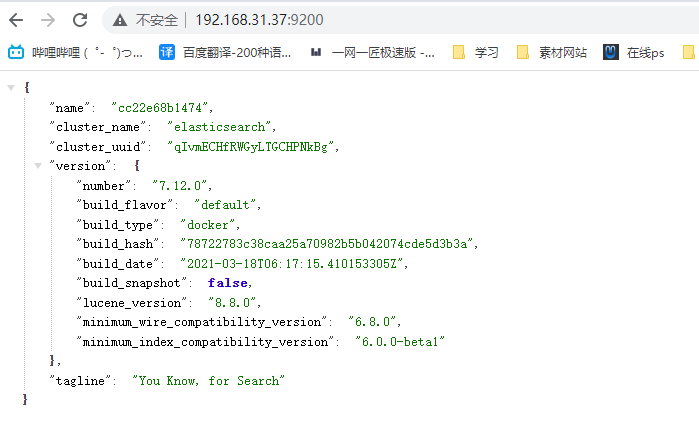
If a response appears, the installation was successful.
You can install the Multi Elasticsearch Head browser extension,
or use the following application:
ElasticHD
Connecting to Elasticsearch
package core

import (
  "es_study/global"
  "fmt"
  "github.com/olivere/elastic/v7"
)

func EsConnect() {

  client, err := elastic.NewClient(
    elastic.SetURL("http://127.0.0.1:9200"),
    elastic.SetSniff(false),
    elastic.SetBasicAuth("", ""),
  )
  if err != nil {
    fmt.Println(err)
    return
  }
  global.ESClient = client
}
Elasticsearch Authentication
Authentication may be unnecessary when:
- Elasticsearch is used only by the server and ports 9200 and 9300 are not exposed publicly.
- Elasticsearch listens only on
127.0.0.1.
Authentication is required when:
- Elasticsearch must provide a publicly accessible service.
https://blog.csdn.net/qq_38669698/article/details/130529829
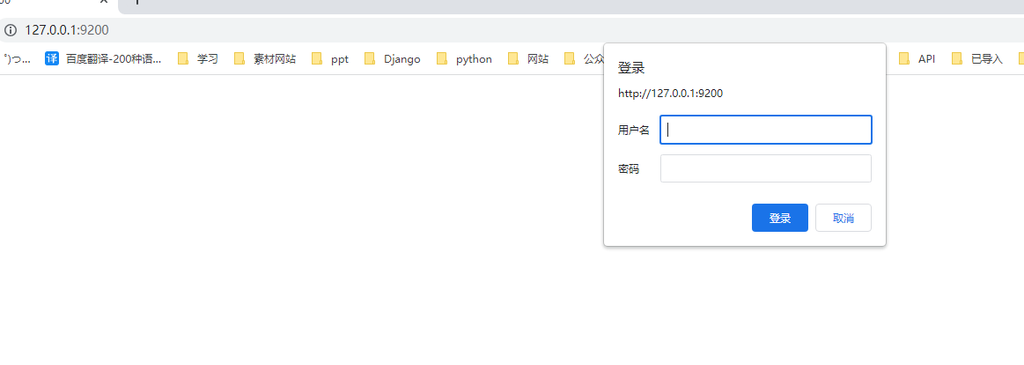
This indicates that authentication has been enabled successfully.
Enter the username and password to view the same page as before.
You can also test it with curl:
curl  http://127.0.0.1:9200/
curl -u elastic:xxxxxx http://127.0.0.1:9200/
Index Operations
mapping
// 查看某个索引的map
/index/_mapping
Common field types:
{
  "mappings": {
    "properties": {
      "title": {
        "type": "text" // 查询的时候是分词匹配
      },
      "key": {
        "type": "keyword" // 完整匹配
      },
      "user_id": {
        "type": "integer"
      },
      "created_at":{
        "type": "date",
        "null_value": "null",
        "format": "[yyyy-MM-dd HH:mm:ss]"
      }
    }
  }
}
Creating an Index
func CreateIndex() {
  createIndex, err := global.ESClient.
    CreateIndex("user_index").
    BodyString(models.UserModel{}.Mapping()).Do(context.Background())
  if err != nil {
    fmt.Println(err)
    return
  }
  fmt.Println(createIndex)
  fmt.Println("索引创建成功")
}
Note: creating an index that already exists produces an error.
Checking Whether an Index Exists
// ExistsIndex 判断索引是否存在
func ExistsIndex(index string) bool {
  exists, _ := global.ESClient.IndexExists(index).Do(context.Background())
  return exists
}
Deleting an Index
func DeleteIndex(index string) {
  _, err := global.ESClient.
    DeleteIndex(index).Do(context.Background())
  if err != nil {
    fmt.Println(err)
    return
  }
  fmt.Println(index, "索引删除成功")
}
Document Operations
Adding Documents
Adding One Document
func DocCreate() {
  user := models.UserModel{
    ID:        12,
    UserName:  "lisi",
    Age:       23,
    NickName:  "夜空中最亮的lisi",
    CreatedAt: time.Now().Format("2006-01-02 15:04:05"),
    Title:     "今天天气很不错",
  }
  indexResponse, err := global.ESClient.Index().Index(user.Index()).BodyJson(user).Do(context.Background())
  if err != nil {
    fmt.Println(err)
    return
  }
  fmt.Printf("%#v\n", indexResponse)
}
Add the document.
If a field is not present in the mapping, Elasticsearch automatically creates a mapping for it.
Adding Documents in Bulk
func DocCreateBatch() {

  list := []models.UserModel{
    {
      ID:        12,
      UserName:  "fengfeng",
      NickName:  "夜空中最亮的枫枫",
      CreatedAt: time.Now().Format("2006-01-02 15:04:05"),
    },
    {
      ID:        13,
      UserName:  "lisa",
      NickName:  "夜空中最亮的丽萨",
      CreatedAt: time.Now().Format("2006-01-02 15:04:05"),
    },
  }

  bulk := global.ESClient.Bulk().Index(models.UserModel{}.Index()).Refresh("true")
  for _, model := range list {
    req := elastic.NewBulkCreateRequest().Doc(model)
    bulk.Add(req)
  }
  res, err := bulk.Do(context.Background())
  if err != nil {
    fmt.Println(err)
    return
  }
  fmt.Println(res.Succeeded())
}
Deleting Documents
Deleting by ID
func DocDelete() {

  deleteResponse, err := global.ESClient.Delete().
    Index(models.UserModel{}.Index()).Id("tmcqfYkBWS69Op6Q4Z0t").Refresh("true").Do(context.Background())
  if err != nil {
    fmt.Println(err)
    return
  }
  fmt.Println(deleteResponse)
}
If the document does not exist, Elasticsearch returns a 404 error.
Deleting Multiple Documents by ID
func DocDeleteBatch() {
  idList := []string{
    "tGcofYkBWS69Op6QHJ2g",
    "tWcpfYkBWS69Op6Q050w",
  }
  bulk := global.ESClient.Bulk().Index(models.UserModel{}.Index()).Refresh("true")
  for _, s := range idList {
    req := elastic.NewBulkDeleteRequest().Id(s)
    bulk.Add(req)
  }
  res, err := bulk.Do(context.Background())
  if err != nil {
    fmt.Println(err)
    return
  }
  fmt.Println(res.Succeeded())  // 实际删除的文档切片
}
If a document does not exist, no error is returned and res.Succeeded() is empty.
Querying Documents
Listing Documents
func DocFind() {

  limit := 2
  page := 4
  from := (page - 1) * limit

  query := elastic.NewBoolQuery()
  res, err := global.ESClient.Search(models.UserModel{}.Index()).Query(query).From(from).Size(limit).Do(context.Background())
  if err != nil {
    fmt.Println(err)
    return
  }
  count := res.Hits.TotalHits.Value  // 总数
  fmt.Println(count)
  for _, hit := range res.Hits.Hits {
    fmt.Println(string(hit.Source))
  }
}
Exact Matching
Use this query for a keyword field:
query := elastic.NewTermQuery("user_name", "fengfeng")
Full-Text Matching
This is mainly used with text fields, but it can also query keyword fields.
For a keyword field, the complete value must match.
For a text field, the full value is unnecessary because the analyzed terms can produce multiple matches.
query := elastic.NewMatchQuery("nick_name", "夜空中最亮的枫枫")