01 Why Version Control Matters
The Importance of Version Control
Suppose your manager asks you to write a proposal.
You write the document and may give it a filename like this:

You send it to your manager, who says the proposal is mostly fine but asks you to revise a few parts and send it again.
Without much experience, you might edit the original file directly. Your manager asks for another revision, so you edit it again.
Later, your manager decides that the first version may have been better and asks you to use it instead.
How would you recover that first version now?
With some experience, you would probably make a copy before every revision, like this:
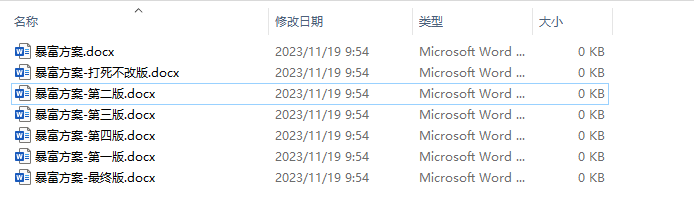
If you have done this before, you already understand why version control matters.
However, this approach has many problems:
- Too many files quickly become disorganized.
- Copying files and directories is an awkward way to manage versions.
- The history is difficult to understand.
- It does not support collaboration.
Instead, consider this question:
Could we keep a history that records every change made to a file?
For example:
版本一:创建文件xxx   三天前
版本二:修改了第xx行   两天前
版本三:修改错别字xxx   两天前
版本四:领导说要改xxx   一天前
版本五:最终版   三小时前
The system should do more than keep a textual log. For every commit, it should record and store the differences from the previous version.
That would let us return to any earlier commit.
This is where Git comes in.
How Git Began
Developers before us encountered the same problems.
Linus Torvalds, the creator of Linux, was dissatisfied with the version-control tools available at the time, such as CVS. He created Git in about ten days, and within a month the Linux source code was being managed with it.
With Git, the basic workflow looks like this:
git init  // 初始化一个本地仓库
git add .  // 将目录下的所有文件提交到暂存区
git commit -m 提交信息  // 提交到git本地仓库
git log // 打印提交信息
git reset --hard xxx // 快速回到其他提交节点
At this point, you may wonder what the staging area is and why Git needs it.
What the Staging Area Does
- Separates the current working tree from the repository.
- Lets you commit in steps:
commitrecords only staged content. - Helps prevent accidental commits.
02 Git's Three Main Areas
The working tree, the staging area, and the local repository.
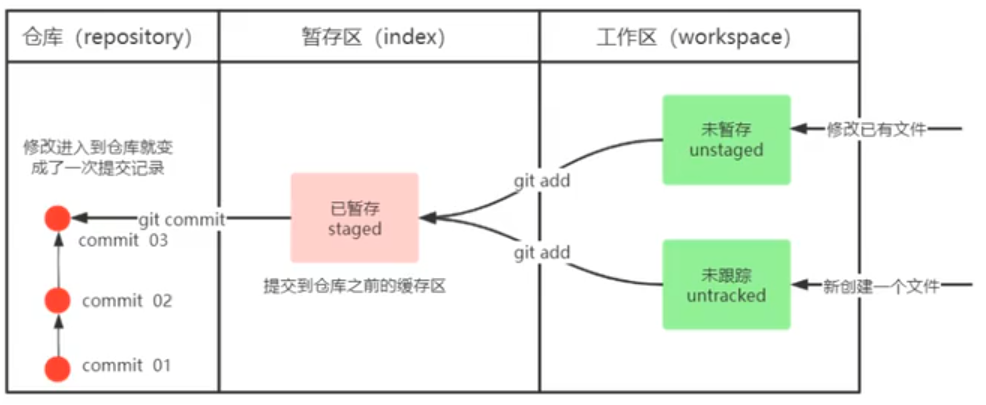
Working tree → staging area: git add
Staging area → local repository: git commit
Check the current status:
git status
Viewing Commit History
git log
Configure a more readable log format:
vim ~/.gitconfig
[alias]
  lg = log --color --graph --pretty=format:'%Cred%h%Creset -%C(yellow)%d%Creset %s %Cgreen(%cr) %C(bold blue)<%an>%Creset' --abbrev-commit --branches
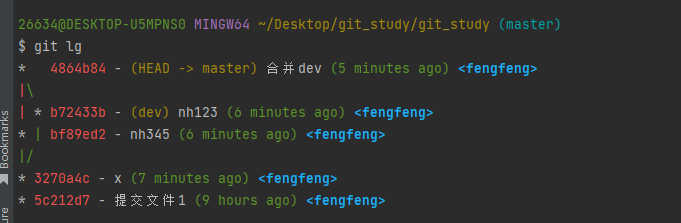
Move back to an earlier version:
git reset --hard commitID
Recover and move forward to another commit:
git reflog  // 历史记录
git reset --hard commitID
03 Ignoring Files with Git
.gitignore
.idea
A commonly used .gitignore for front-end projects:
.DS_Store
node_modules
/dist


# local env files
.env.local
.env.*.local

# Log files
npm-debug.log*
yarn-debug.log*
yarn-error.log*
pnpm-debug.log*

# Editor directories and files
.idea
.vscode
*.suo
*.ntvs*
*.njsproj
*.sln
*.sw?

package-lock.json
yarn.lock
Common patterns for Go projects:
Common patterns for Python projects:
https://blog.csdn.net/weixin_45515850/article/details/108340443
What Should Git Ignore?
- Compiled output
- Sensitive files
- Third-party dependencies or source packages
References
Detailed .gitignore guide: https://blog.csdn.net/nyist_zxp/article/details/119887324