This document combines the 20 chapters of the original Go basics series in its published order. Code examples and reference links are preserved from the source.
01 New golang course-environment construction
Compared with other languages, the go language environment is extremely simple to build.
Official website
If you can't access it, just visit the Chinese website.
go installation package download
Just install the installation package of the specified version
Installation under windows
Just choose windows-arm64.zip for windows
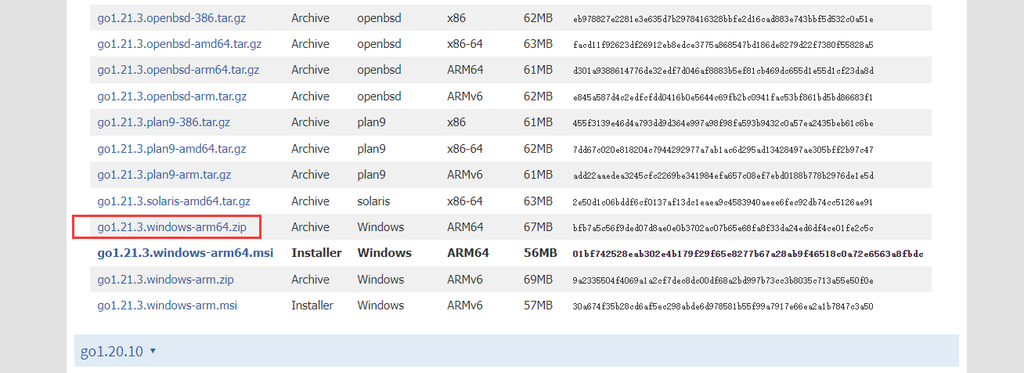
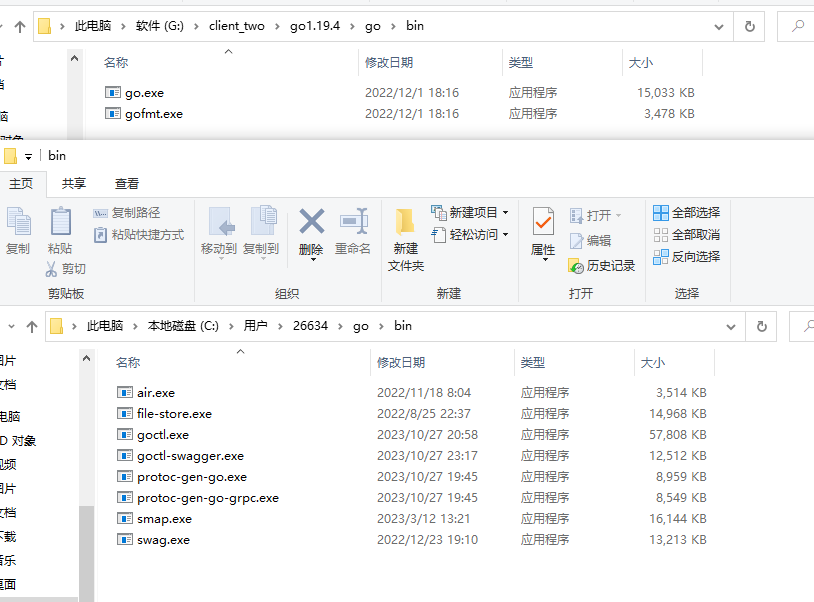
Then you need to set the corresponding bin directory of go as an environment variable. This step is convenient for using the go command directly in the command line.
You also need to set the third-party bin directory of go as an environment variable, usually in the user directory. This step is so that third-party executable files installed using go install can be used directly in the future.
Installation under linux
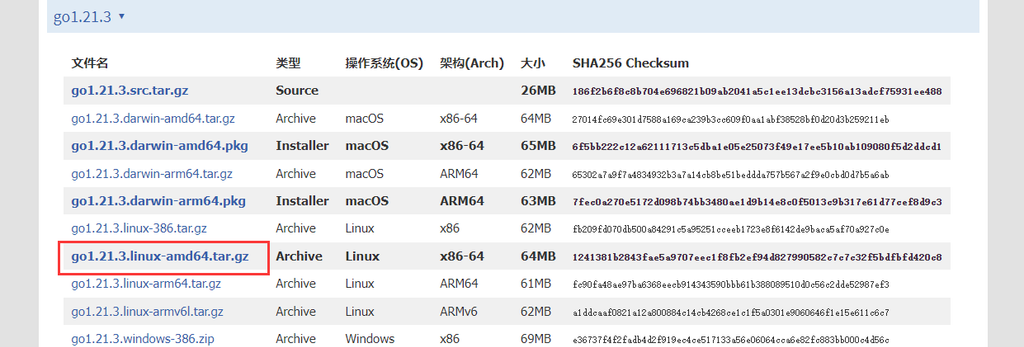
cd /opt
wget https://studygolang.com/dl/golang/go1.21.3.linux-amd64.tar.gz
tar -xvf go1.21.3.linux-amd64.tar.gz
Edit environment variables
vim /etc/profile

在文件后追加以下内容
export GOPROXY=https://goproxy.cn
export GOROOT=/opt/go
export PATH=$PATH:$GOROOT/bin
export GOPATH=/opt/go/pkg
export PATH=$PATH:$GOPATH/bin

退出并保存,刷新环境变量
source /etc/profile
Selection of development tools
Theoretically speaking, it is not impossible to use Notepad
But it would definitely be more suitable to have a handy weapon.
The first choice is definitely goland, of course vscode is also possible
https://www.jetbrains.com/zh-cn/go/download/other.html
The UI after version 2023.2 has become a style similar to vscode. If you don’t like it, you can choose the version before 2023.1
vscode download
https://code.visualstudio.com/
Then just download the go plug-in.
Reference documentation
vscode https://code.visualstudio.com/
vscode installation go environment https://blog.csdn.net/flurry_rain/article/details/128124573
goland https://www.jetbrains.com/zh-cn/go/download/other.html
go installation https://studygolang.com/dl
02 Variable definition and input and output
Variable definition
Standard variable definition
package main

import "fmt"

func main() {
  // 先定义,再赋值
  var name string
  name = "枫枫"
  fmt.Println(name)

  // var 变量名 类型 = "变量值"
  var userName string = "枫枫"
  fmt.Println(userName)
}
If a variable is defined but not assigned a value, the variable contains its type's
"zero value".
Variable type omitted
var name = "枫枫"
Short statement
name := "枫枫"
Global variables and local variables
- Variables defined in the function body (including the main function) are all local variables, and they must be used once defined.
- Variables defined externally are global variables and can be defined but not used.
package main

import "fmt"

var userName = "枫枫知道" // 可以不使用

func main() {
  // var 变量名 类型 = "变量值"
  var name = "枫枫"
  // 在函数体内定义的变量,必须要使用
  fmt.Println(name)
}
Define multiple variables
package main

func main() {
  var name1, name2, name3 string // 定义多个变量

  var a1, a2 = "枫枫", "知道" // 定义多个变量并赋值

  a3, a4 := "枫枫", "知道" // 简短定义多个变量并赋值
}
package main

import "fmt"

var (
  name     string = "枫枫"
  userName        = "枫枫知道"
)

func main() {
  fmt.Println(name, userName)
}
Constant definition
- Assign a value when defining
- Once assigned, it cannot be modified.
const name string = "枫枫" // 定义就要赋值
//name = "知道" // 不能再修改了
fmt.Println(name)
Naming convention
Core idea: variables and functions with capital letters. Methods, properties can be accessed outside the package
Output
Commonly used output functions
package main

import "fmt"

func main() {
  fmt.Println("枫枫知道")
  fmt.Println(1)
  fmt.Println(true)
  fmt.Println("什么", "都", "可以", "输出")
}
Format output
package main

import "fmt"

func main() {
  fmt.Printf("%v\n", "你好")          // 可以作为任何值的占位符输出
  fmt.Printf("%v %T\n", "枫枫", "枫枫") // 打印类型
  fmt.Printf("%d\n", 3)             // 整数
  fmt.Printf("%.2f\n", 1.25)        // 小数
  fmt.Printf("%s\n", "哈哈哈")         // 字符串
  fmt.Printf("%#v\n", "")           // 用go的语法格式输出,很适合打印空字符串
}
Another commonly used method is to assign the formatted content to a variable.
name := fmt.Sprintf("%v", "你好")
fmt.Println(name)
Input
package main

import "fmt"

func main() {
  fmt.Println("输入您的名字:")
  var name string
  fmt.Scan(&name)  // 这里记住,要在变量的前面加个&, 后面讲指针会提到
  fmt.Println("你输入的名字是", name)
}
Reference documentation
- Variable definition https://segmentfault.com/a/1190000042910744
- Input function https://www.php.cn/faq/507954.html
- Format https://www.php.cn/faq/527489.html
03 Basic data types
The basic data types of go language are
- Integer form
- Floating point type
- Plural numbers
- Boolean
- String
Integer type
The integer type of go language has many specific subdivisions.
var n1 uint8 = 2
var n2 uint16 = 2
var n3 uint32 = 2
var n4 uint64 = 2
var n5 uint = 2
var n6 int8 = 2
var n7 int16 = 2
var n8 int32 = 2
var n9 int64 = 2
var n10 int = 2
You just need to remember the following points
- The default number definition type is int type
- With u, it means it is unsigned and can only store positive integers.
- The following numbers are the number of digits in binary system
- uint8 also has an alias byte, one byte = 8 bits
- The size of the int type depends on the platform used
For example, uint8 means 8 binary bits, all used to store data. The minimum is 0 and the maximum is 2 to the eighth power -1=255.
As for int8, because it needs to use one bit to store it, only seven bits are actually available, so the smallest one is negative 2 to the seventh power = -128, and the largest one is 2 to the seventh power -1 = 127
As for why we need to subtract one, it is actually easy to understand, because when we reach the last number, we have already moved forward. For example, an hour is 60 minutes, but the maximum minute is only 59.
Test for point five
I have a 64-bit operating system, so I will try to see if int is the maximum limit of int64.
2 to the 63rd power -1=9223372036854775807
fmt.Printf("%.0f\n", math.Pow(2, 63))
var n1 int = 9223372036854775807
fmt.Println(n1)
var n2 int = 9223372036854775808 // 看它报不报错
fmt.Println(n2)
Floating point type
Go language supports two floating point types: float32 and float64
- The maximum range of float32 floating point numbers is about 3.4e38, which can be defined using constants:
math.MaxFloat32 - The maximum range of float64 floating point numbers is about 1.8e308, which can be defined by a constant:
math.MaxFloat64
If not explicitly declared, the default is float64
Character type
Note, it is a character, not a string
The two more important types are byte (single-byte characters) and rune (multi-byte characters)
package main

import "fmt"

func main() {
  var c1 = 'a'
  var c2 = 97
  fmt.Println(c1) // 直接打印都是数字
  fmt.Println(c2)

  fmt.Printf("%c %c\n", c1, c2) // 以字符的格式打印

  var r1 rune = '中'
  fmt.Printf("%c\n", r1)
}
- In Go, the essence of a character is an integer. When output directly, it is the UTF-8 code value corresponding to the character.
- You can directly assign a number to a variable, and then format the output using %c, and the unicode character corresponding to the number will be output.
- The character type can be operated on and is equivalent to an integer because it corresponds to Unicode code.
String type
Unlike characters, character assignments are in single quotes, and string assignments are in double quotes.
var s string = "枫枫知道"
fmt.Println(s)
Escape characters
Some commonly used escape characters
fmt.Println("枫枫\t知道")              // 制表符
fmt.Println("枫枫\n知道")              // 回车
fmt.Println("\"枫枫\"知道")            // 双引号
fmt.Println("枫枫\r知道")              // 回到行首
fmt.Println("C:\\pprof\\main.exe") // 反斜杠
Multi-line string
package main

import "fmt"

func main() {
  var s = `今天
天气
真好
`
  fmt.Println(s)
}
In ``, if the escape character appears again, it will be output as it is.
Boolean type
Boolean data has only two values: true (true) and false (false)
- The default value of a Boolean type variable is false.
- Casting integer to boolean is not allowed in Go language
- Boolean types cannot participate in numerical operations and cannot be converted to other types.
Zero value problem
If we only declare a basic data type without assigning a value
Then the value of this variable is the zero value of the corresponding type, for example, int is 0, bool is false, and string is ""
package main

import "fmt"

func main() {
  var a1 int
  var a2 float32
  var a3 string
  var a4 bool

  fmt.Printf("%#v\n", a1)
  fmt.Printf("%#v\n", a2)
  fmt.Printf("%#v\n", a3)
  fmt.Printf("%#v\n", a4)
}
Reference documentation
- go language type https://blog.csdn.net/weixin_44211968/article/details/121221309
- golang int length https://www.04ip.com/post/954343.html
- go int default length https://www.php.cn/faq/538086.html
04 Array, slice, map
Array
Array is a very common data type and is used in almost all computer programming languages.
- The elements in the array must all be of the same type, either all strings or all integers.
- When declaring an array, its length or size must be specified
package main

import "fmt"

func main() {
  var array [3]int = [3]int{1, 2, 3}
  fmt.Println(array)
  var array1 = [3]int{1, 2, 3}
  fmt.Println(array1)
  var array2 = [...]int{1, 2, 3}
  fmt.Println(array2)
}
If you want to modify a certain value, you can only find it based on the index and then replace it.
var array1 = [3]int{1, 2, 3}
array1[0] = 10 // 根据索引找到对应的元素位置,然后替换
fmt.Println(array1)
Index
Index this knowledge point. If you have just learned programming, then you have to listen carefully. I will assume that you already know this knowledge point later.
package main

import "fmt"

func main() {
  // 以定义一个字符串数组 a b c d 为例
  var sList = []string{"a", "b", "c", "d"}
  // 正向索引就从0开始,从左往右
  /*
    a     b     c     d
    0     1     2     3
  */
  // 取值就通过索引去取
  fmt.Println(sList[0]) // 拿到a这个元素
  // 当然,有的语言支持负向索引,go不支持
  /*
      a      b     c     d
      -4    -3    -2    -1
  */
  // 如果在go语言里面,我想拿到倒数第二个元素,怎么办?
  fmt.Println(sList[len(sList)-2]) // 拿到a这个元素
}
Slice
Obviously, the length of arrays in Go is limited, so they are not often used.
So go created an array plus, called slice (slice)
Slices are more flexible than arrays because their length is variable after they are declared.
package main

import "fmt"

func main() {
  // 定义一个字符串切片
  var list []string

  list = append(list, "枫枫")
  list = append(list, "知道")
  fmt.Println(list)
  fmt.Println(len(list)) // 切片长度
  // 修改第二个元素
  list[1] = "不知道"
  fmt.Println(list)
}
make function
In addition to basic data types, if other data types are only defined without assignment, the actual value is nil.
// 定义一个字符串切片
var list []string
fmt.Println(list == nil) // true
Then we can create a slice with known length and specified capacity through the make function.
make([]type, length, capacity)
package main

import "fmt"

func main() {
  // 定义一个字符串切片
  var list = make([]string, 0)
  fmt.Println(list, len(list), cap(list))
  fmt.Println(list == nil) // false

  list1 := make([]int, 2, 2)
  fmt.Println(list1, len(list1), cap(list1))
}
Why is it called slice?
Because slices are cut from arrays
package main

import "fmt"

func main() {
  var list = [...]string{"a", "b", "c"}
  slices := list[:] // 左一刀,右一刀  变成了切片
  fmt.Println(slices)
  fmt.Println(list[1:2]) // b
}
Slice sorting
var list = []int{4, 5, 3, 2, 7}
fmt.Println("排序前:", list)
sort.Ints(list)
fmt.Println("升序:", list)
sort.Sort(sort.Reverse(sort.IntSlice(list)))
fmt.Println("降序:", list)
map
A map (or dictionary) is a built-in Go data structure containing an unordered collection of key-value pairs.
The key of the map must be a basic data type, and the value can be of any type.
Note that map must be initialized before use
package main

import "fmt"

func main() {
  // 声明
  var m1 map[string]string
  // 初始化1
  m1 = make(map[string]string)
  // 初始化2
  m1 = map[string]string{}
  // 设置值
  m1["name"] = "枫枫"
  fmt.Println(m1)
  // 取值
  fmt.Println(m1["name"])
  // 删除值
  delete(m1, "name")
  fmt.Println(m1)
}
You can also declare and assign
// 声明并赋值
var m1 = map[string]string{}
var m2 = make(map[string]string)
map value
If there is only one parameter connected, then this parameter is the value. If there is no parameter, the value is the zero value of the type.
If the two parameters are connected, the second parameter is a Boolean value, indicating whether there is this element.
package main

import "fmt"

func main() {
  // 声明并赋值
  var m1 = map[string]int{
    "age": 21,
  }
  age1 := m1["age1"] // 取一个不存在的
  fmt.Println(age1)
  age2, ok := m1["age1"]
  fmt.Println(age2, ok)
}
Reference documentation
05 golang-judgment statement
if statement
Take age as an example. If the input age is within a certain range, the corresponding prompt information will be output.
<=0     未出生
1-18    未成年
18-35   青年
>=35    中年
Clearly, this is a multiple-choice situation
We have many ways to achieve this
Interrupted
package main

import "fmt"

func main() {
  fmt.Println("请输入你的年龄:")
  var age int
  fmt.Scan(&age)

  if age <= 0 {
    fmt.Println("未出生")
    return
  }
  if age <= 18 {
    fmt.Println("未成年")
    return
  }
  if age <= 35 {
    fmt.Println("青年")
    return
  }
  fmt.Println("中年")

}
It also has a nice name, Wei Jushu
Nested
package main

import "fmt"

func main() {
  fmt.Println("请输入你的年龄:")
  var age int
  fmt.Scan(&age)

  if age <= 18 {
    if age <= 0 {
      fmt.Println("未出生")
    } else {
      fmt.Println("未成年")
    }
  } else {
    if age <= 35 {
      fmt.Println("青年")
    } else {
      fmt.Println("中年")
    }
  }
}
multiple conditionals
package main

import "fmt"

func main() {
  fmt.Println("请输入你的年龄:")
  var age int
  fmt.Scan(&age)

  if age <= 0 {
    fmt.Println("未出生")
  }
  if age > 0 && age <= 18 {
    fmt.Println("未成年")
  }
  if age > 18 && age <= 35 {
    fmt.Println("青年")
  }
  if age > 35 {
    fmt.Println("中年")
  }
}
switch statement
Still in the above case, if you use switch, it will be very intuitive.
package main

import "fmt"

func main() {
  fmt.Println("请输入你的年龄:")
  var age int
  fmt.Scan(&age)

  switch {
  case age <= 0:
    fmt.Println("未出生")
  case age <= 18:
    fmt.Println("未成年")
  case age <= 35:
    fmt.Println("青年")
  default:
    fmt.Println("中年")
  }
}
In addition to this way of writing, there is also an enumeration of all possible values
For example
1   星期一
2   星期二
3   星期三
package main

import "fmt"

func main() {
  fmt.Println("请输入星期数字:")
  var week int
  fmt.Scan(&week)

  switch week {
  case 1:
    fmt.Println("周一")
  case 2:
    fmt.Println("周二")
  case 3:
    fmt.Println("周三")
  case 4:
    fmt.Println("周四")
  case 5:
    fmt.Println("周五")
  case 6, 7:
    fmt.Println("周末")
  default:
    fmt.Println("错误")
  }
}
It can be understood that the value of case is the enumeration result of switch
Generally speaking, go's switch selects one from multiple options. Once one of the results is satisfied, the switch ends.
For example
package main

import "fmt"

func main() {
  fmt.Println("请输入你的年龄:")
  var age int
  fmt.Scan(&age)

  switch {
  case age <= 0:
    fmt.Println("未出生")
  case age <= 18:
    fmt.Println("未成年")
  case age <= 35:
    fmt.Println("青年")
  default:
    fmt.Println("中年")
  }
}
I input a 12 and I want it to output all the conditions it meets, for example I want it to output, minor, youth
package main

import "fmt"

func main() {
  fmt.Println("请输入你的年龄:")
  var age int
  fmt.Scan(&age)

  switch {
  case age <= 0:
    fmt.Println("未出生")
    fallthrough
  case age <= 18:
    fmt.Println("未成年")
    fallthrough
  case age <= 35:
    fmt.Println("青年")
  default:
    fmt.Println("中年")
  }
}
Reference documentation
Wei statement https://blog.csdn.net/wangpaiblog/article/details/114909737
switch https://blog.csdn.net/qq_43470538/article/details/130436381
06 for loop
In any programming language, there will be a for loop. Its general way of writing is
for 初始化;条件;操作{
}
For example, find the sum of 1+2+...+100
package main

import "fmt"

func main() {

  var sum = 0
  for i := 0; i <= 100; i++ {
    sum += i
  }
  fmt.Println(sum)
}
Five variations of for loop
Traditional for loop
As above
Infinite loop
Print the current time every 1 second
package main

import (
  "fmt"
  "time"
)

func main() {

  for {
    time.Sleep(1 * time.Second)
    fmt.Println(time.Now().Format("2006-01-02 15:04:05")) // 年月日时分秒的固定格式
  }
}
while mode
Since golang does not have a while loop, if necessary, it is slightly modified from the for loop.
package main

import "fmt"

func main() {

  i := 0
  sum := 0
  for i <= 100 {
    sum += i
    i++
  }
  fmt.Println(sum)
}
do-while mode
The do-while mode is to execute the loop body once first and then judge
package main

import "fmt"

func main() {

  i := 0
  sum := 0
  for {
    sum += i
    i++
    if i == 101 {
      break
    }
  }
  fmt.Println(sum)
}
Traverse slices, map
Traverse slices
The first parameter is the index and the second parameter is
package main

import "fmt"

func main() {

  s := []string{"枫枫", "知道"}
  for index, s2 := range s {
    fmt.Println(index, s2)
  }
}
Traverse the map
The first parameter is the key, and the second parameter is the value.
package main

import "fmt"

func main() {

  s := map[string]int{
    "age":   24,
    "price": 1000,
  }
  for key, val := range s {
    fmt.Println(key, val)
  }
}
break,continue
break is used to jump out of the current loop
continue is used to skip this cycle
For example, print the multiplication table
package main

import "fmt"

func main() {

  for i := 1; i <= 9; i++ {
    for j := 1; j <= i; j++ {
      fmt.Printf("%d * %d = %d\t", i, j, i*j)
    }
    fmt.Println()
  }
}
In addition to writing like this, you can also write like this
package main

import "fmt"

func main() {

  for i := 1; i <= 9; i++ {
    for j := 1; j <= 9; j++ {
      if j > i {
        // 去掉 列比行大的数据
        continue
      }
      fmt.Printf("%d * %d = %d\t", i, j, i*j)
    }
    fmt.Println()
  }
}
07 go function
A function is a reusable block of code that encapsulates specific functionality and is used to perform a specific task or calculation.
Functions accept inputs (parameters) and produce outputs (return values)
Function definition
package main

import "fmt"

// 使用func关键字定义一个函数
func sayHello() {
  fmt.Println("hello")
}

func main() {
  // 函数()调用函数
  sayHello()
}
Function parameters
package main

import "fmt"

func add(n1 int, n2 int) {
  fmt.Println(n1, n2)
}

// 参数类型一样,可以合并在一起
func add1(n1, n2 int) {
  fmt.Println(n1, n2)
}

// 多个参数
func add2(numList ...int) {
  fmt.Println(numList)
}

func main() {
  add(1, 2)
  add1(1, 2)
  add2(1, 2)
  add2(1, 2, 3, 4)
}
Function return value
package main

import "errors"

// 无返回值
func fun1() {
  return // 也可以不写
}

// 单返回值
func fun2() int {
  return 1
}

// 多返回值
func fun3() (int, error) {
  return 0, errors.New("错误")
}

// 命名返回值
func fun4() (res string) {
  return // 相当于先定义再赋值
  //return "abc"
}

func main() {

}
Anonymous function
package main

import "fmt"

func main() {
  var add = func(a, b int) int {
    return a + b
  }
  fmt.Println(add(1, 2))
}
Higher-order functions
Perform different operations based on user input
package main

import "fmt"

func main() {
  fmt.Println("请输入要执行的操作:")
  fmt.Println(`1:登录
2:个人中心
3:注销`)
  var num int
  fmt.Scan(&num)
  var funcMap = map[int]func(){
    1: func() {
      fmt.Println("登录")
    },
    2: func() {
      fmt.Println("个人中心")
    },
    3: func() {
      fmt.Println("注销")
    },
  }
  funcMap[num]()
}
extract it
package main

import "fmt"

func login() {
  fmt.Println("登录")
}

func userCenter() {
  fmt.Println("个人中心")
}

func logout() {
  fmt.Println("注销")
}

func main() {
  fmt.Println("请输入要执行的操作:")
  fmt.Println(`1:登录
2:个人中心
3:注销`)
  var num int
  fmt.Scan(&num)
  var funcMap = map[int]func(){
    1: login,
    2: userCenter,
    3: logout,
  }
  funcMap[num]()
}
Closure
Design a function that first passes a parameter to represent the delay, and then passes the parameter again to sum the parameters.
For example
fun(2)(1,2,3) // 延时2秒求1+2+3
package main

import (
  "fmt"
  "time"
)

func awaitAdd(t int) func(...int) int {
  time.Sleep(time.Duration(t) * time.Second)
  return func(numList ...int) int {
    var sum int
    for _, i2 := range numList {
      sum += i2
    }
    return sum
  }
}

func main() {
  fmt.Println(awaitAdd(2)(1, 2, 3))
}
Pass by value and pass by reference
Anyone who has a little knowledge of programming should know that all the data displayed on the computer is in the memory.
In other words, a variable we define also has a place in the memory.
Normally, the parameter of the function is a copy of the previous piece of land.
How to prove it
package main

import "fmt"

func add(num int) {
  fmt.Println(&num) // 可以看到,这个n的内存地址和外面num的内存地址是明显不一样的
  num = 2           // 这里的修改不会影响外面的num
}

func main() {
  num := 20
  fmt.Println(&num)
  add(num)
  fmt.Println(num) // 20
}
In other words, no matter how you modify this parameter in the function, it will not affect the original value.
But what if I need to modify the value of a variable within the function body?
This requires passing by reference
We directly pass the memory address of the variable into it
package main

import "fmt"

func add(num *int) {
  fmt.Println(num) // 内存值是一样的
  *num = 2         // 这里的修改会影响外面的num
}

func main() {
  num := 20
  fmt.Println(&num)
  add(&num)
  fmt.Println(num) // 成功修改 2
}
Pointer
After the above case is understood, the pointer will not be difficult.
we just need to know
& is to get the address, * is to dereference, and get the value pointed to by this address.
Reference documentation
Function https://zhuanlan.zhihu.com/p/635927865
Pointer https://c.biancheng.net/view/21.html
go language function https://blog.csdn.net/weixin_44211968/article/details/121295530
08 init and defer functions
init function
The init() function is a special function with the following characteristics:
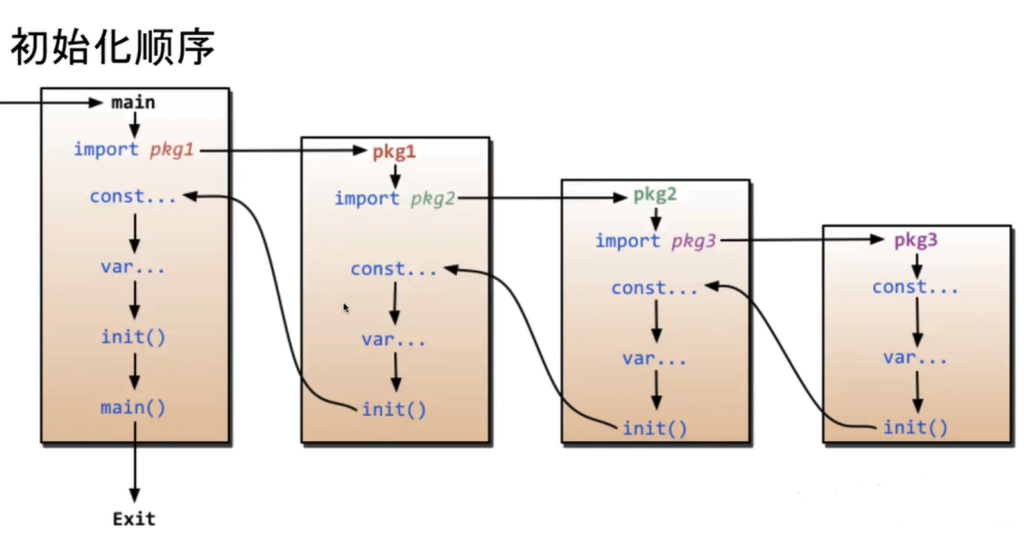
- It cannot be called by other functions, but is automatically called before the main function is executed.
- The init function cannot be passed in as a parameter
- There cannot be any incoming parameters or return values.
A go file can have multiple init functions, whichever one is in front will be executed first.
package main

import "fmt"

func init() {
  fmt.Println("init1")
}
func init() {
  fmt.Println("init2")
}
func init() {
  fmt.Println("init3")
}

func main() {
  fmt.Println("main")
}
Execution order
init1
init2
init3
main
defer function
- The keyword defer is used to register delayed calls
- These calls are not executed until return. Therefore, it can be used for resource cleanup
- Multiple defer statements are executed in a first-in, last-out manner. The one closest to return will be executed first.
- The variables in the defer statement are determined when the defer is declared.
package main

import "fmt"

func Func() {
  defer fmt.Println("defer2")
  fmt.Println("func")
  defer fmt.Println("defer1")
}

func main() {
  defer fmt.Println("defer4")
  Func()
  defer fmt.Println("defer3")
}
Execution order
func
defer1
defer2
defer3
defer4
Reference documentation
init function https://blog.csdn.net/bestzy6/article/details/122503275
defer function https://blog.csdn.net/m0_52896752/article/details/130191669
09 Structure
Structure definition
type 结构体名称 struct{
    名称 类型//成员或属性
}
package main

import "fmt"

// Student 定义结构体
type Student struct {
  Name string
  Age  int
}

// PrintInfo 给机构体绑定一个方法
func (s Student) PrintInfo() {
  fmt.Printf("name:%s age:%d\n", s.Name, s.Age)
}

func main() {
  s := Student{
    Name: "枫枫",
    Age:  21,
  }
  s.Name = "枫枫知道" // 修改值
  s.PrintInfo()
}
Inheritance
package main

import "fmt"

type People struct {
  Time string
}

func (p People) Info() {
  fmt.Println("people ", p.Time)
}

// Student 定义结构体
type Student struct {
  People
  Name string
  Age  int
}

// PrintInfo 给机构体绑定一个方法
func (s Student) PrintInfo() {
  fmt.Printf("name:%s age:%d\n", s.Name, s.Age)
}

func main() {
  p := People{
    Time: "2023-11-15 14:51",
  }
  s := Student{
    People: p,
    Name:   "枫枫",
    Age:    21,
  }
  s.Name = "枫枫知道" // 修改值
  s.PrintInfo()
  s.Info()                   // 可以调用父结构体的方法
  fmt.Println(s.People.Time) // 调用父结构体的属性
  fmt.Println(s.Time)        // 也可以这样
}
Structure pointer
We learned about value transfer and reference transfer before. If I want to modify the properties of the structure in a function or method
Only structure pointers or pointer methods can be used
package main

import "fmt"

type Student struct {
  Name string
  Age  int
}

func SetAge(info Student, age int) {
  info.Age = age
}

func SetAge1(info *Student, age int) {
  info.Age = age
}

func main() {
  s := Student{
    Name: "枫枫",
    Age:  21,
  }
  fmt.Println(s.Age)
  SetAge(s, 18)
  fmt.Println(s.Age)
  SetAge1(&s, 17)
  fmt.Println(s.Age)
}
package main

import "fmt"

type Student struct {
  Name string
  Age  int
}

func (s Student) SetAge(age int) {
  s.Age = age
}
func (s *Student) SetAge1(age int) {
  s.Age = age
}

func main() {
  s := Student{
    Name: "枫枫",
    Age:  21,
  }
  s.SetAge(18)
  fmt.Println(s.Age)
  s.SetAge1(18)
  fmt.Println(s.Age)
}
Structure tag
package main

import (
  "encoding/json"
  "fmt"
)

type Student struct {
  Name string `json:"name"`
  Age  int    `json:"age"`
}

func main() {
  s := Student{
    Name: "枫枫",
    Age:  21,
  }
  byteData, _ := json.Marshal(s)
  fmt.Println(string(byteData))
}
json tag
- If this is converted to json without writing the json tag, the field name will be the name of the attribute.
- Lowercase attributes will not be converted.
empty
If I don't want a certain field to be transferred out when converting to json, I can write -
package main

import (
  "encoding/json"
  "fmt"
)

type Student struct {
  Name     string `json:"name"`
  Age      int    `json:"age"`
  Password string `json:"-"`
}

func main() {
  s := Student{
    Name:     "枫枫",
    Age:      21,
    Password: "123456",
  }
  byteData, _ := json.Marshal(s)
  fmt.Println(string(byteData)) // {"name":"枫枫","age":21}
}
omitempty
Null values omitted
package main

import (
  "encoding/json"
  "fmt"
)

type Student struct {
  Name string `json:"name"`
  Age  int    `json:"age,omitempty"`
}

func main() {
  s := Student{
    Name: "枫枫",
    Age:  0, // 空值会被省略
  }
  byteData, _ := json.Marshal(s)
  fmt.Println(string(byteData)) // {"name":"枫枫"}
}
Reference documentation
go language structure https://blog.csdn.net/qq_27870421/article/details/118489821
Structure nesting https://blog.csdn.net/demored/article/details/124197637
Structure pointer https://www.runoob.com/note/67933
Structure tag https://c.biancheng.net/view/112.html
10 Custom data types and type aliases
In the Go language, a custom type refers to a new type defined using the type keyword. It can be an alias of a basic type, or a new type composed of a structure, function, etc. Custom types can help us better abstract and encapsulate data, making the code more readable, understandable and maintainable.
Custom type
Structure is one of the custom types
In addition, we use custom types to make the code combination more standardized.
For example, in response to the client's request code, I give him a custom type
package main

import "fmt"

type Code int

const (
  SuccessCode    Code = 0
  ValidCode      Code = 7 // 校验失败的错误
  ServiceErrCode Code = 8 // 服务错误
)

func (c Code) GetMsg() string {
  // 可能会有更加响应码返回不同消息内容的要求,我们在这个函数里面去实现即可
  // 可能还会有国际化操作
  return "成功"
}

func main() {
  fmt.Println(SuccessCode.GetMsg())
  var i int
  fmt.Println(int(SuccessCode) == i) // 必须要转成原始类型才能判断
}
Type alias
It's very similar to custom types, but there are some big differences from custom types.
- Cannot bind method
- Print type or original type?
- Compared with the original type, the type alias does not need to be converted.
package main

import "fmt"

type AliasCode = int
type MyCode int

const (
  SuccessCode      MyCode    = 0
  SuccessAliasCode AliasCode = 0
)

// MyCodeMethod 自定义类型可以绑定自定义方法
func (m MyCode) MyCodeMethod() {

}

// MyAliasCodeMethod 类型别名 不可以绑定方法
func (m AliasCode) MyAliasCodeMethod() {

}

func main() {
  // 类型别名,打印它的类型还是原始类型
  fmt.Printf("%T %T \n", SuccessCode, SuccessAliasCode) // main.MyCode int
  // 可以直接和原始类型比较
  var i int
  fmt.Println(SuccessAliasCode == i)
  fmt.Println(int(SuccessCode) == i) // 必须转换之后才能和原始类型比较
}
Reference documentation
Custom data type https://www.jb51.net/article/282910.htm
Custom type https://www.cnblogs.com/whiteBear/p/15549604.html
Custom types and type aliases https://blog.csdn.net/alexchenyang/article/details/120604452
11 Interface
An interface is a collection of unimplemented methods that only contain method names, parameters, and return values.
package main

import "fmt"

// Animal 定义一个animal的接口,它有唱,跳,rap的方法
type Animal interface {
  sing()
  jump()
  rap()
}

// Chicken 需要全部实现这些接口
type Chicken struct {
  Name string
}

func (c Chicken) sing() {
  fmt.Println("chicken 唱")
}

func (c Chicken) jump() {
  fmt.Println("chicken 跳")
}
func (c Chicken) rap() {
  fmt.Println("chicken rap")
}

// 全部实现完之后,chicken就不再是一只普通的鸡了

func main() {
  var animal Animal

  animal = Chicken{"ik"}

  animal.sing()
  animal.jump()
  animal.rap()

}
The interface itself cannot bind methods
The interface is a value type, and what is saved is: value + original type
package main

import "fmt"

// Animal 定义一个animal的接口,它有唱,跳,rap的方法
type Animal interface {
  sing()
  jump()
  rap()
}

// Chicken 需要全部实现这些接口
type Chicken struct {
  Name string
}

func (c Chicken) sing() {
  fmt.Println("chicken 唱")
}

func (c Chicken) jump() {
  fmt.Println("chicken 跳")
}
func (c Chicken) rap() {
  fmt.Println("chicken rap")
}

// Cat 需要全部实现这些接口
type Cat struct {
  Name string
}

func (c Cat) sing() {
  fmt.Println("cat 唱")
}

func (c Cat) jump() {
  fmt.Println("cat 跳")
}
func (c Cat) rap() {
  fmt.Println("cat rap")
}

func sing(obj Animal) {
  obj.sing()
}

// 全部实现完之后,chicken就不再是一只普通的鸡了

func main() {
  chicken := Chicken{"ik"}
  cat := Cat{"阿狸"}
  sing(chicken)
  sing(cat)
}
Implement interface:
A type implements all methods of an interface
That is, the interface is implemented
Type assertion
When using the interface, I still want to know what the specific type is. We can get it through assertions.
func sing(obj Animal) {
  // 通过断言来获取此时的具体类型
  switch obj.(type) {
  case Chicken:
    fmt.Println("鸡")
  case Cat:
    fmt.Println("猫")
  }
  obj.sing()
}
Or assert a certain type
func sing(obj Animal) {
  c, ok := obj.(Chicken) // 两个参数    断言之后的类型   是否是对应类型
  fmt.Println(c, ok)
  d := obj.(Cat) // 一个参数 就是断言之后的类型,注意,类型不对是要报错的 main.Animal is main.Chicken, not main.Cat
  fmt.Println(d)
}
Empty interface
An empty interface can accept any type
In other words, any type implements the definition of the empty interface
Reference documentation
What is an interface https://studygolang.com/articles/20117
Go interface https://zhuanlan.zhihu.com/p/453799496
12 Coroutines and channels
Coroutine
Goroutines are lightweight threads managed by the Go runtime
In go, starting a coroutine is very simple
package main

import (
  "fmt"
  "time"
)

func sing() {
  fmt.Println("唱歌")
  time.Sleep(1 * time.Second)
  fmt.Println("唱歌结束")
}

func main() {
  go sing()
  go sing()
  go sing()
  go sing()
  time.Sleep(2 * time.Second)
}
If I remove the delay in the main thread, you will find that the program ends without any output.
why is this
That's because the main thread ends automatically when the coroutine ends, and the main thread does not wait for the end of the coroutine.
WaitGroup
We just need to let the main thread wait for the coroutine. Its usage is like this
package main

import (
  "fmt"
  "sync"
  "time"
)

var (
  wait = sync.WaitGroup{}
)

func sing() {
  fmt.Println("唱歌")
  time.Sleep(1 * time.Second)
  fmt.Println("唱歌结束")
  wait.Done()
}

func main() {
  wait.Add(4)
  go sing()
  go sing()
  go sing()
  go sing()
  wait.Wait()
  fmt.Println("主线程结束")
}
channel
Have you ever thought about a question, I generate data in the coroutine, how do I pass it to the main thread?
Or how to pass it to other coroutine functions?
At this time the channel comes
Basic definition
package main

import "fmt"

func main() {
  var c chan int // 声明一个传递整形的通道
  // 初始化通道
  c = make(chan int, 1) //  初始化一个 有一个缓冲位的通道
  c <- 1
  //c <- 2 // 会报错 deadlock
  fmt.Println(<-c) // 取值
  //fmt.Println(<-c) // 再取也会报错  deadlock

  c <- 2
  n, ok := <-c
  fmt.Println(n, ok)
  close(c) // 关闭协程
  c <- 3   // 关闭之后就不能再写或读了  send on closed channel
  fmt.Println(c)
}
Of course, in synchronous mode, channel has no meaning
You need to use channel in asynchronous mode, write it in the coroutine function, and receive data in the main thread.
package main

import (
  "fmt"
  "sync"
  "time"
)

var moneyChan = make(chan int) // 声明并初始化一个长度为0的信道

func pay(name string, money int, wait *sync.WaitGroup) {
  fmt.Printf("%s 开始购物\n", name)
  time.Sleep(1 * time.Second)
  fmt.Printf("%s 购物结束\n", name)

  moneyChan <- money

  wait.Done()
}

// 协程
func main() {
  var wait sync.WaitGroup
  startTime := time.Now()
  // 现在的模式,就是购物接力
  //shopping("张三")
  //shopping("王五")
  //shopping("李四")
  wait.Add(3)
  // 主线程结束,协程函数跟着结束
  go pay("张三", 2, &wait)
  go pay("王五", 3, &wait)
  go pay("李四", 5, &wait)

  go func() {
    defer close(moneyChan)
    // 在协程函数里面等待上面三个协程函数结束
    wait.Wait()
  }()

  for {
    money, ok := <-moneyChan
    fmt.Println(money, ok)
    if !ok {
      break
    }
  }

  //time.Sleep(2 * time.Second)

  fmt.Println("购买完成", time.Since(startTime))
  fmt.Println("moneyList", moneyList)
}
If receiving data in this way is not elegant, there is a more elegant way of writing it.
  for money := range moneyChan {
    moneyList = append(moneyList, money)
  }
If the channel is closed, the for loop will end by itself, which is very elegant.
select
If a coroutine function writes something to multiple channels, how does it get the data in the main thread?
Go provides us with options for asynchronously fetching data from multiple channels.
package main

import (
  "fmt"
  "sync"
  "time"
)

var moneyChan1 = make(chan int)    // 声明并初始化一个长度为0的信道
var nameChan1 = make(chan string)  // 声明并初始化一个长度为0的信道
var doneChan = make(chan struct{}) // 声明一个用于关闭的信道

func send(name string, money int, wait *sync.WaitGroup) {
  fmt.Printf("%s 开始购物\n", name)
  time.Sleep(1 * time.Second)
  fmt.Printf("%s 购物结束\n", name)

  moneyChan1 <- money
  nameChan1 <- name

  wait.Done()
}

// 协程
func main() {
  var wait sync.WaitGroup
  startTime := time.Now()
  // 现在的模式,就是购物接力
  //shopping("张三")
  //shopping("王五")
  //shopping("李四")
  wait.Add(3)
  // 主线程结束,协程函数跟着结束
  go send("张三", 2, &wait)
  go send("王五", 3, &wait)
  go send("李四", 5, &wait)

  go func() {
    defer close(moneyChan1)
    defer close(nameChan1)
    defer close(doneChan)
    wait.Wait()
  }()

  var moneyList []int
  var nameList []string

  var event = func() {
    for {
      select {
      case money := <-moneyChan1:
        moneyList = append(moneyList, money)
      case name := <-nameChan1:
        nameList = append(nameList, name)
      case <-doneChan:
        return
      }
    }
  }
  event()
  fmt.Println("购买完成", time.Since(startTime))
  fmt.Println("moneyList", moneyList)
  fmt.Println("nameList", nameList)

}
Coroutine timeout processing
package main

import (
  "fmt"
  "time"
)

var done = make(chan struct{})

func event() {
  fmt.Println("event执行开始")
  time.Sleep(2 * time.Second)
  fmt.Println("event执行结束")
  close(done)
}

func main() {
  go event()

  select {
  case <-done:
    fmt.Println("协程执行完毕")
  case <-time.After(1 * time.Second):
    fmt.Println("超时")
    return
  }

}
Reference documentation
go channel https://zhuanlan.zhihu.com/p/643013131
go select https://zhuanlan.zhihu.com/p/617487667
13 Thread safety and sync.Map
Thread safety
What is thread safety?
Now there are two coroutines, which are triggered at the same time. One coroutine performs a 100 completion++ operation on a global variable, and the other performs an operation on the global variable -
Then, when the two coroutines end, the final value should be 0.
package main

import (
  "fmt"
  "sync"
)

var num int
var wait sync.WaitGroup

func add() {
  for i := 0; i < 1000000; i++ {
    num++
  }
  wait.Done()
}
func reduce() {
  for i := 0; i < 1000000; i++ {
    num--
  }
  wait.Done()
}

func main() {
  wait.Add(2)
  go add()
  go reduce()
  wait.Wait()
  fmt.Println(num)

}
But you will find that the result of this output is completely unpredictable
Why is this?
The fundamental reason is that the CPU scheduling method is preemptive execution and random scheduling.
Synchronization lock
So can we solve this problem by locking the operation?
The answer is yes
package main

import (
  "fmt"
  "sync"
)

var num int
var wait  sync.WaitGroup
var lock  sync.Mutex

func add() {
  // 谁先抢到了这把锁,谁就把它锁上,一旦锁上,其他的线程就只能等着
  lock.Lock()
  for i := 0; i < 1000000; i++ {
    num++
  }
  lock.Unlock()
  wait.Done()
}
func reduce() {
  lock.Lock()
  for i := 0; i < 1000000; i++ {
    num--
  }
  lock.Unlock()
  wait.Done()
}

func main() {
  wait.Add(2)
  go add()
  go reduce()
  wait.Wait()
  fmt.Println(num)

}
Map under thread safety
If we are in a coroutine function, reading and writing map will cause an error
concurrent map read and map write
I hope that when everyone sees this error, they will know that this is the thread safety error of map.
package main

import (
  "fmt"
  "sync"
  "time"
)

var wait sync.WaitGroup
var mp = map[string]string{}

func reader() {
  for {
    fmt.Println(mp["time"])
  }
  wait.Done()
}
func writer() {
  for {
    mp["time"] = time.Now().Format("15:04:05")
  }
  wait.Done()
}

func main() {
  wait.Add(2)
  go reader()
  go writer()
  wait.Wait()

}
We cannot read and write map in concurrent mode
if you want to do this
- Lock read and write operations
- Use sync.Map
Lock
package main

import (
  "fmt"
  "sync"
  "time"
)

var wait sync.WaitGroup
var mp = map[string]string{}
var lock sync.Mutex

func reader() {
  for {
    lock.Lock()
    fmt.Println(mp["time"])
    lock.Unlock()
  }
  wait.Done()
}
func writer() {
  for {
    lock.Lock()
    mp["time"] = time.Now().Format("15:04:05")
    lock.Unlock()
  }
  wait.Done()
}

func main() {
  wait.Add(2)
  go reader()
  go writer()
  wait.Wait()
}
sync.Map
package main

import (
  "fmt"
  "sync"
  "time"
)

var wait sync.WaitGroup
var mp = sync.Map{}

func reader() {
  for {

    fmt.Println(mp.Load("time"))
  }
  wait.Done()
}
func writer() {
  for {
    mp.Store("time", time.Now().Format("15:04:05"))
  }
  wait.Done()
}

func main() {
  wait.Add(2)
  go reader()
  go writer()
  wait.Wait()

}
In fact, looking at its source code, it also uses synchronization locks internally.
14 go exception handling
Go's exception handling may be the only criticism of this language.
Since the Go language does not have a mechanism to catch exceptions, every time a function is called, the error of the function must be received.
There is a meme on the Internet called error is a first-class citizen of go
Common exception handling
Throw upward
Hand over the error to the higher level for processing
It is generally used at the framework level. Some errors cannot be made at the framework level. It is a good idea to throw errors upward.
package main

import (
  "errors"
  "fmt"
)

func Parent() error {
  err := method() // 遇到错误向上抛
  return err
}
func method() error {
  return errors.New("出错了")
}

func main() {
  fmt.Println(Parent())
}
Interrupt program
Stop the program directly when an error occurs
This is generally used for initialization. Once an error occurs during initialization, there is little point in continuing the program. It is better to interrupt it.
package main

import (
  "fmt"
  "os"
)

func init() {
  // 读取配置文件中,结果路径错了
  _, err := os.ReadFile("xxx")
  if err != nil {
    panic(err.Error())
  }
}

func main() {
  fmt.Println("啦啦啦")
}
Recovery procedure
We can use a defer in a function to capture panic
So that if an error occurs, the program will not crash directly.
This is generally done by exception handling at the framework layer.
package main

import (
  "fmt"
  "runtime/debug"
)

func read() {
  defer func() {
    if err := recover(); err != nil {
      fmt.Println(err) // 捕获异常,打印错误信息
      // 打印错误的堆栈信息
      s := string(debug.Stack())
      fmt.Println(s)
    }
  }()
  var list = []int{2, 3}
  fmt.Println(list[2]) // 肯定会有一个panic
}

func main() {

  read()
}
Of course, this defer delay function for catching exceptions can be on any function on the calling chain.
Generally used in the top-level function to catch all exceptions
Reference documentation
golang exception handling https://www.cnblogs.com/ShineLeBlog/p/17648132.html
Print error stack https://blog.csdn.net/qq_41767116/article/details/128229430
15 go generics
Starting with version 1.18, Go added support for generics, i.e. type parameters
Generic functions
If we want to implement a summation function of type int
func add(a, b int) int {
  return a + b
}
But after writing this way, if the parameters are float type, int32 type, etc., it cannot be used.
Do we need to write such a function for each type?
Obviously this is unreasonable
At this time, generics come into play
func add[T int | float64 | int32](a, b T) T {
  return a + b
}
Generic structure
package main

import (
  "encoding/json"
  "fmt"
)

type Response[T any] struct {
  Code int    `json:"code"`
  Msg  string `json:"msg"`
  Data T      `json:"data"`
}

func main() {
  type User struct {
    Name string `json:"name"`
  }

  type UserInfo struct {
    Name string `json:"name"`
    Age  int    `json:"age"`
  }

  //user := Response{
  //  Code: 0,
  //  Msg:  "成功",
  //  Data: User{
  //    Name: "枫枫",
  //  },
  //}
  //byteData, _ := json.Marshal(user)
  //fmt.Println(string(byteData))
  //userInfo := Response{
  //  Code: 0,
  //  Msg:  "成功",
  //  Data: UserInfo{
  //    Name: "枫枫",
  //    Age:  24,
  //  },
  //}
  //byteData, _ = json.Marshal(userInfo)
  //fmt.Println(string(byteData))

  var userResponse Response[User]
  json.Unmarshal([]byte(`{"code":0,"msg":"成功","data":{"name":"枫枫"}}`), &userResponse)
  fmt.Println(userResponse.Data.Name)
  var userInfoResponse Response[UserInfo]
  json.Unmarshal([]byte(`{"code":0,"msg":"成功","data":{"name":"枫枫","age":24}}`), &userInfoResponse)
  fmt.Println(userInfoResponse.Data.Name, userInfoResponse.Data.Age)
}
Generic slice
package main

type MySlice[T any] []T

func main() {
  var mySlice MySlice[string]
  mySlice = append(mySlice, "枫枫")
  var intSlice MySlice[int]
  intSlice = append(intSlice, 2)
}
Generic map
package main

import "fmt"

type MyMap[K string | int, V any] map[K]V

func main() {
  var myMap = make(MyMap[string, string])
  myMap["name"] = "枫枫"
  fmt.Println(myMap)
}
16 go file operation
File reading
Read once
byteData, _ := os.ReadFile("go_study/hello.txt")
fmt.Println(string(byteData))
Get the path of the current go file
You can get the path of the current go file and then open the file using the path relative to the current go file.
// GetCurrentFilePath 获取当前文件路径
func GetCurrentFilePath() string {
  _, file, _, _ := runtime.Caller(1)
  return file
}
Shard reading
file, _ := os.Open("go_study/hello.txt")
defer file.Close()
for {
  buf := make([]byte, 1)
  _, err := file.Read(buf)
  if err == io.EOF {
    break
  }
  fmt.Printf("%s", buf)
}
Buffered read
read line by line
file, _ := os.Open("go_study/hello.txt")
buf := bufio.NewReader(file)
for {
  line, _, err := buf.ReadLine()
  fmt.Println(string(line))
  if err != nil {
    break
  }
}
Specify separator
file, _ := os.Open("go_study/hello.txt")
scanner := bufio.NewScanner(file)
scanner.Split(bufio.ScanWords) // 按照单词读
//scanner.Split(bufio.ScanLines) // 按照行读
//scanner.Split(bufio.ScanRunes) // 按照中文字符读
//scanner.Split(bufio.ScanBytes) // 按照字节读读,中文会乱码

for scanner.Scan() {
  fmt.Println(scanner.Text())
}
File writing
Write once
err := os.WriteFile("go_study/file1.txt", []byte("这是内容"), os.ModePerm)
fmt.Println(err)
How to open files
Some common opening modes
// 如果文件不存在就创建
os.O_CREATE|os.O_WRONLY
// 追加写
os.O_APPEND|os.O_WRONLY
// 可读可写
os.O_RDWR
complete pattern
const (
  O_RDONLY int = syscall.O_RDONLY // 只读
  O_WRONLY int = syscall.O_WRONLY // 只写
  O_RDWR   int = syscall.O_RDWR   // 读写

  O_APPEND int = syscall.O_APPEND // 追加
  O_CREATE int = syscall.O_CREAT  // 如果不存在就创建
  O_EXCL   int = syscall.O_EXCL   // 文件必须不存在
  O_SYNC   int = syscall.O_SYNC   // 同步打开
  O_TRUNC  int = syscall.O_TRUNC  // 打开时清空文件
)
File permissions
Mainly used in Linux systems. This parameter will be ignored under Windows and represents the mode and permission bits of the file.
three placeholders
The first is the permissions owned by the file owner
The second is the permissions that the group to which the file belongs has on it.
The third placeholder refers to the permissions others have on the file
According to the permission model of the UNIX system, the permission mode of a file or directory is represented by three numbers, which respectively represent the permissions of the owner (Owner), group (Group) and other users (Other). Each number consists of three bits, representing read, write and execute permissions respectively. Therefore, for a mode parameter value, each number is an octal number, representing a three-bit permission combination.
R:读,Read的缩写,八进制值为 4;
W:写,Write的缩写,八进制值为 2;
X:执行,Execute的缩写,八进制值为 1;
For example
0444 表示三者均为只读的权限;
0666 表示三者均为“读写”的权限;
0777 表示三者均为读写执行的权限;
0764 表示所有者有读写执行(7=4+2+1)的权限,组有读写(6=4+2)的权限,其他用户则为只读(4=4);
File copy
io.Copy(dst Writer, src Reader) (written int64, err error)
Copy the contents of the src file to the dst file
read, _ := os.Open("go_study/file1.txt")
write, _ := os.Create("go_study/file3.txt") // 默认是 可读可写,不存在就创建,清空文件
n, err := io.Copy(write, read)
fmt.Println(n, err)
Directory operations
dir, _ := os.ReadDir("go_study")
for _, entry := range dir {
  info, _ := entry.Info()
  fmt.Println(entry.Name(), info.Size()) // 文件名,文件大小,单位比特
}
Reference documentation
File opening mode https://zhuanlan.zhihu.com/p/602074026
go file permissions https://blog.csdn.net/qq_35844043/article/details/129380567
17 go unit testing
The Go language comes with a lightweight testing framework and its own go test command to implement unit testing and performance testing. The testing framework is similar to the testing frameworks of other languages. Test cases for corresponding functions can be written based on this framework, and corresponding stress test cases can also be written based on this framework. Through unit testing, you can solve:
- Make sure each function is runnable and the running results are correct
- Ensure that the performance of the written code is good
- Unit testing can promptly discover logic errors in program design or implementation, exposing problems and facilitating problem location and solution. The focus of performance testing is to discover some problems in program design so that the program can remain stable under high concurrency conditions.
Go language recommends that test files and source code files be placed together, and the test files end with _test.go
It should be noted that
- The test case file name must end with _test.go
- The test case function must start with Test, which is generally Test+the name of the function being tested.
Unit testing
For example, I currently have two files used for calculations, called calc.go
package main

func Add(a int, b int) int {
    return a + b
}

func Mul(a int, b int) int {
    return a * b
}
Then my test file is calc_test.go
package main

import "testing"

func TestAdd(t *testing.T) {
  if ans := Add(1, 2); ans != 3 {
    // 如果不符合预期,那就是测试不通过
    t.Errorf("1 + 2 expected be 3, but %d got", ans)
  }

  if ans := Add(-10, -20); ans != -30 {
    t.Errorf("-10 + -20 expected be -30, but %d got", ans)
  }
}
If you want to test, just click the green button on the interface.
If it is an order
go test // 可以运行某个包下的所有测试用例
The -v parameter will display the test results of each use case
The -run parameter can specify a function to be tested
Logging methods provided by the unit testing framework
| Method | Remarks | Test results |
|---|---|---|
| Log | Print the log and end the test | PASS |
| Logf | Format the print log and end the test | PASS |
| Error | Print the error log and end the test | FAIL |
| Errorf | Format and print the error log and end the test | FAIL |
| Fatal | Print the fatal log and end the test | FAIL |
| Fatalf | Format and print the fatal log and end the test | FAIL |
Subtest
If you need to call different test cases for a function, you can use subtests
Fatal in the subtest will not terminate the program.
package main

import (
  "testing"
)

func TestAdd(t1 *testing.T) {
  t1.Run("add1", func(t *testing.T) {
    if ans := Add(1, 2); ans != 3 {
      // 如果不符合预期,那就是测试不通过
      t.Fatalf("1 + 2 expected be 3, but %d got", ans)
    }
  })
  t1.Run("add2", func(t *testing.T) {
    if ans := Add(-10, -20); ans != -30 {
      t.Fatalf("-10 + -20 expected be -30, but %d got", ans)
    }
  })

}
If there are many test cases, you can also use a similar table to represent them
package main

import (
  "testing"
)

func TestAdd(t *testing.T) {
  cases := []struct {
    Name           string
    A, B, Expected int
  }{
    {"a1", 2, 3, 5},
    {"a2", 2, -3, -1},
    {"a3", 2, 0, 2},
  }

  for _, c := range cases {
    t.Run(c.Name, func(t *testing.T) {
      if ans := Add(c.A, c.B); ans != c.Expected {
        t.Fatalf("%d * %d expected %d, but %d got",
          c.A, c.B, c.Expected, ans)
      }
    })
  }
}
TestMain function
It is the entrance to testing
We can implement the life cycle of the test process in TestMain
package main

import (
  "fmt"
  "os"
  "testing"
)

// 测试前执行
func setup() {
  fmt.Println("Before all tests")
}

// 测试后执行
func teardown() {
  fmt.Println("After all tests")
}

func Test1(t *testing.T) {
  fmt.Println("I'm test1")
}

func Test2(t *testing.T) {
  fmt.Println("I'm test2")
}

// 必须叫这个名字  测试主入口
func TestMain(m *testing.M) {
  // 测试前执行
  setup()
  code := m.Run()
  // 测试后执行
  teardown()
  os.Exit(code)
}
Reference documentation
go unit test https://blog.csdn.net/m0_56719679/article/details/131461113
go test https://blog.csdn.net/rhx_qiuzhi/article/details/129481723
18 go reflection
Type judgment
Determine whether a variable is a structure, slice, map
package main

import (
  "fmt"
  "reflect"
)

func refType(obj any) {
  typeObj := reflect.TypeOf(obj)
  fmt.Println(typeObj, typeObj.Kind())
  // 去判断具体的类型
  switch typeObj.Kind() {
  case reflect.Slice:
    fmt.Println("切片")
  case reflect.Map:
    fmt.Println("map")
  case reflect.Struct:
    fmt.Println("结构体")
  case reflect.String:
    fmt.Println("字符串")
  }
}

func main() {
  refType(struct {
    Name string
  }{Name: "枫枫"})
  name := "枫枫"
  refType(name)
  refType([]string{"枫枫"})
}
Get the value through reflection
func refValue(obj any) {
  value := reflect.ValueOf(obj)
  fmt.Println(value, value.Type())
  switch value.Kind() {
  case reflect.Int:
    fmt.Println(value.Int())
  case reflect.Struct:
    fmt.Println(value.Interface())
  case reflect.String:
    fmt.Println(value.String())

  }
}
Modify values through reflection
Note that if you need to modify the value through reflection, you must pass a pointer. Use Elem in reflection to get the value corresponding to the pointer.
func refSetValue(obj any) {
  value := reflect.ValueOf(obj)
  elem := value.Elem()
  // 专门取指针反射的值
  switch elem.Kind() {
  case reflect.String:
    elem.SetString("枫枫知道")
  }
}

func main() {
  name := "枫枫"
  refSetValue(&name)
  fmt.Println(name)
}
Structure reflection
Read the value corresponding to the json tag, if not, use the name of the attribute
package main

import (
  "fmt"
  "reflect"
)

type Student struct {
  Name string
  Age  int `json:"age"`
}

func main() {
  s := Student{
    Name: "枫枫知道",
    Age:  24,
  }
  t := reflect.TypeOf(s)
  v := reflect.ValueOf(s)

  for i := 0; i < t.NumField(); i++ {
    field := t.Field(i)
    jsonField := field.Tag.Get("json")
    if jsonField == "" {
      // 说明json的tag是空的
      jsonField = field.Name
    }
    fmt.Printf("Name: %s, type: %s, json: %s, value: %v\n", field.Name, field.Type, jsonField, v.Field(i))
  }
}
Of course, what we wrote is very simple and does not deal with - and omitempty situations.
Modify some values in the structure
For example, if there is a big tag in the structure tag, the value will be capitalized.
package main

import (
  "fmt"
  "reflect"
  "strings"
)

type Student struct {
  Name1 string `big:"-"`
  Name2 string
}

func main() {
  s := Student{
    Name1: "fengfeng",
    Name2: "zhangsan",
  }
  t := reflect.TypeOf(s)
  v := reflect.ValueOf(&s).Elem()

  for i := 0; i < t.NumField(); i++ {
    field := t.Field(i)
    bigField := field.Tag.Get("big")
    // 判断类型是不是字符串
    if field.Type.Kind() != reflect.String {
      continue
    }
    if bigField == "" {
      continue
    }
    // 修改值
    valueFiled := v.Field(i)
    valueFiled.SetString(strings.ToTitle(valueFiled.String()))
  }
  fmt.Println(s)
}
Call structure method
If the structure has a method named call, execute it
package main

import (
  "fmt"
  "reflect"
)

type Student struct {
  Name string
  Age  int
}

func (Student) See(name string) {
  fmt.Println("see name:", name)
}

func main() {
  s := Student{
    Name: "fengfeng",
    Age:  21,
  }
  t := reflect.TypeOf(s)
  v := reflect.ValueOf(s)

  for i := 0; i < t.NumMethod(); i++ {
    methodType := t.Method(i)
    fmt.Println(methodType.Name, methodType.Type)
    if methodType.Name != "See" {
      continue
    }
    methodValue := v.Method(i)
    methodValue.Call([]reflect.Value{
      reflect.ValueOf("枫枫"), // 注意这里的类型
    })
  }
}
A small case of orm
package main

import (
  "errors"
  "fmt"
  "reflect"
  "strings"
)

type Student struct {
  Name string `feng-orm:"name"`
  Age  int    `feng-orm:"age"`
}

type UserInfo struct {
  Id   int    `feng-orm:"id"`
  Name string `feng-orm:"name"`
  Age  int    `feng-orm:"age"`
}

func Find(obj any, query ...any) (sql string, err error) {
  // Find(Student, "name = ?", "fengfeng")
  // 希望能够生成 select name, age from  where  name = 'fengfeng'
  t := reflect.TypeOf(obj)
  //v := reflect.ValueOf(obj)
  // 首先得是结构体对吧
  if t.Kind() != reflect.Struct {
    err = errors.New("非结构体")
    return
  }
  // 拿全部字段

  // 拼接条件
  // 第二个参数,中的问号,就决定后面还能接多少参数
  var where string
  if len(query) > 0 {
    // 有第二个参数,校验第二个参数中的?个数,是不是和后面的个数一样
    q := query[0] // 理论上还要校验第二个参数的类型
    if strings.Count(q.(string), "?")+1 != len(query) {
      err = errors.New("参数个数不对")
      return
    }
    // 拼接where语句
    // 将?号带入后面的参数
    for _, a := range query[1:] {
      // 替换q
      // 这里要判断a的类型
      at := reflect.TypeOf(a)
      switch at.Kind() {
      case reflect.Int:
        q = strings.Replace(q.(string), "?", fmt.Sprintf("%d", a.(int)), 1)
      case reflect.String:
        q = strings.Replace(q.(string), "?", fmt.Sprintf("'%s'", a.(string)), 1)
      }
    }
    where += "where " + q.(string)
  }
  // 如果没有第二个参数,就是查全部

  // 拼接select
  // 拿所有字段,取feng-orm对应的值
  var columns []string
  for i := 0; i < t.NumField(); i++ {
    field := t.Field(i)
    f := field.Tag.Get("feng-orm")
    // 不考虑是空的情况
    columns = append(columns, f)
  }

  // 结构体的小写名字+s做表名
  name := strings.ToLower(t.Name()) + "s"

  // 拼接最后的sql
  sql = fmt.Sprintf("select %s from %s %s", strings.Join(columns, ","), name, where)
  return
}

func main() {
  sql, err := Find(Student{}, "name = ? and age = ?", "枫枫", 23)
  fmt.Println(sql, err) // select name,age from students where name = '枫枫' and age = 23
  sql, err = Find(UserInfo{}, "id = ?", 1)
  fmt.Println(sql, err) // select id,name,age from userinfos where id = 1
}
Some suggestions for reflection
If you are writing a framework, you will focus on the operations of low-level tool classes.
It is indeed not easy to write without reflection, but if it is in business, it is not appropriate to use reflection extensively.
Because the performance of reflection is not as high as that of normal code, it will be one to two orders of magnitude slower.
Using reflection is also not very readable, and errors cannot occur during compilation.
Reference documentation
go reflection https://blog.csdn.net/a1053765496/article/details/129904985
Reflection https://www.liwenzhou.com/posts/Go/reflect/
19 go network programming
TCP
Transmission Control Protocol (TCP, Transmission Control Protocol) is a connection-oriented, reliable, byte stream-based transport layer communication protocol
How to ensure reliable connection? (Common interview questions)
- Three-way handshake
- Wave four times
Server
package main

import (
  "fmt"
  "io"
  "net"
)

func main() {
  // 创建tcp的监听地址
  tcpAddr, _ := net.ResolveTCPAddr("tcp", "127.0.0.1:8080")
  // tcp监听
  listen, _ := net.ListenTCP("tcp", tcpAddr)
  for {
    // 等待连接
    conn, err := listen.AcceptTCP()
    if err != nil {
      fmt.Println(err)
      break
    }
    // 获取客户端的地址
    fmt.Println(conn.RemoteAddr().String() + " 进来了")
    // 读取客户端传来的数据
    for {
      var buf []byte = make([]byte, 1024)
      n, err := conn.Read(buf)
      // 客户端退出
      if err == io.EOF {
        fmt.Println(conn.RemoteAddr().String() + " 出去了")
        break
      }
      fmt.Println(string(buf[0:n]))
    }

  }

}
Client
package main

import (
  "fmt"
  "net"
)

func main() {
  conn, _ := net.DialTCP("tcp", nil,
    &net.TCPAddr{
      IP:   net.ParseIP("127.0.0.1"),
      Port: 8080})
  var s string
  for {
    fmt.Scanln(&s)
    if s == "q" {
      break
    }
    conn.Write([]byte(s))
  }

  conn.Close()
}
HTTP
Server
package main

import "net/http"

// handler
func handler(res http.ResponseWriter, req *http.Request) {
  res.Write([]byte("hello 枫枫"))
}

func main() {
  // 回调函数
  http.HandleFunc("/index", handler)
  // 绑定服务
  http.ListenAndServe(":8080", nil)
}
package main

import (
  "encoding/json"
  "fmt"
  "io"
  "net/http"
  "os"
)

func IndexHandler(res http.ResponseWriter, req *http.Request) {
  switch req.Method {
  case "GET":
    data, err := os.ReadFile("fengfengStudy/37.http/server/index.html")
    if err != nil {
      fmt.Println(data)
    }
    res.Write(data)
    //res.Write([]byte("<h1>hello 枫枫 GET</h1>"))
  case "POST":
    // 获取body数据
    data, err := io.ReadAll(req.Body)
    // 拿请求头
    contentType := req.Header.Get("Content-Type")
    fmt.Println(contentType)
    //switch contentType {
    //case "application/json":
    //
    //}

    if err != nil {
      fmt.Println(data)
    }
    ma := make(map[string]string)
    json.Unmarshal(data, &ma)
    fmt.Println(ma["username"])

    type User struct {
      Username string `json:"username"`
    }
    var user User
    json.Unmarshal(data, &user)
    fmt.Println(user)
    // 设置响应头
    header := res.Header()
    header["token"] = []string{"y1gyf156sdgT%d44hjgj"}
    res.Write([]byte("hello 枫枫 POST"))
  }
}

func main() {
  // 1. 绑定回调
  http.HandleFunc("/index", IndexHandler)
  // 2. 注册服务
  fmt.Println("listen server on http://localhost:8080")
  http.ListenAndServe(":8080", nil)
}
Client
package main

import (
  "fmt"
  "io"
  "net/http"
)

func main() {
  // 实例化一个http客户端
  client := new(http.Client)
  // 构造请求对象
  req, _ := http.NewRequest("GET", "http://localhost:8080/index", nil)
  // 发请求
  res, _ := client.Do(req)
  // 获取响应
  b, _ := io.ReadAll(res.Body)
  fmt.Println(string(b))

}
RPC
remote procedure call protocol
Server
package main

import (
  "fmt"
  "net"
  "net/http"
  "net/rpc"
)

type Server struct {
}
type Req struct {
  Num1 int
  Num2 int
}
type Res struct {
  Num int
}

func (s Server) Add(req Req, res *Res) error {
  res.Num = req.Num1 + req.Num2
  return nil
}

func main() {
  // 注册rpc服务
  rpc.Register(new(Server))
  rpc.HandleHTTP()
  listen, err := net.Listen("tcp", ":8080")
  if err != nil {
    fmt.Println(err)
    return
  }
  http.Serve(listen, nil)
}
Client
package main

import (
  "fmt"
  "net/rpc"
)

type Req struct {
  Num1 int
  Num2 int
}
type Res struct {
  Num int
}

func main() {
  req := Req{1, 2}
  client, err := rpc.DialHTTP("tcp", ":8080")
  if err != nil {
    fmt.Println(err)
    return
  }
  var res Res
  client.Call("Server.Add", req, &res)
  fmt.Println(res)
}
websocket
Websocket is a combination of socket connection and http protocol, which can realize long connections between web pages and servers.
go get github.com/gorilla/websocket
Server
package main

import (
  "fmt"
  "github.com/gorilla/websocket"
  "net/http"
)

var UP = websocket.Upgrader{
  ReadBufferSize:  1024,
  WriteBufferSize: 1024,
}

func handler(res http.ResponseWriter, req *http.Request) {
  // 服务升级
  conn, err := UP.Upgrade(res, req, nil)
  if err != nil {
    fmt.Println(err)
    return
  }
  for {
    // 消息类型,消息,错误
    t, p, err := conn.ReadMessage()
    if err != nil {
      break
    }
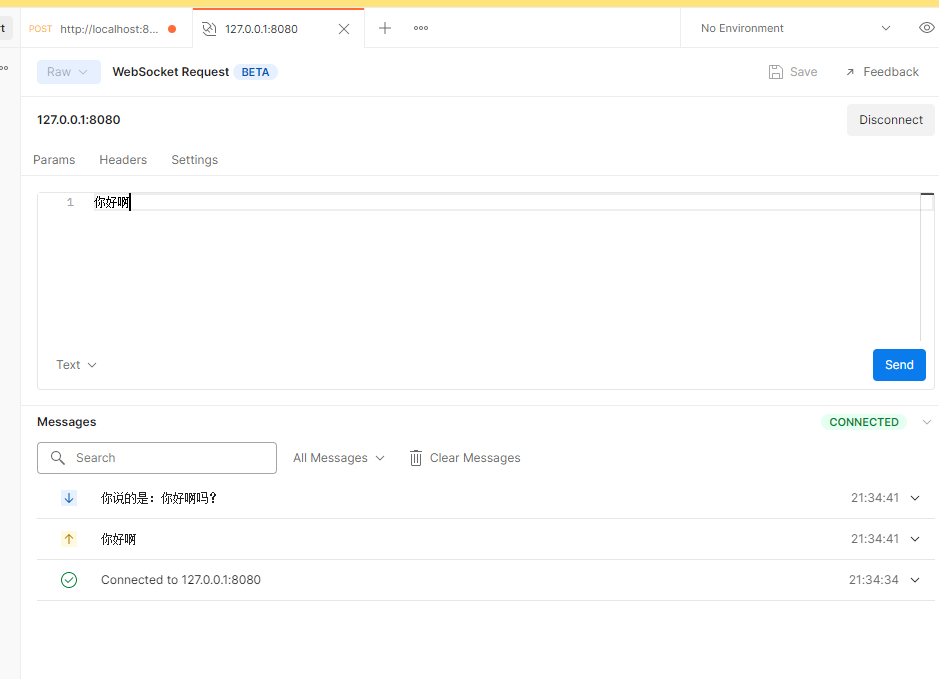
    conn.WriteMessage(websocket.TextMessage, []byte(fmt.Sprintf("你说的是:%s吗?", string(p))))
    fmt.Println(t, string(p))
  }
  defer conn.Close()
  fmt.Println("服务关闭")
}

func main() {
  http.HandleFunc("/", handler)
  http.ListenAndServe(":8080", nil)
}
Server sends to multiple clients
package main

import (
  "fmt"
  "github.com/gorilla/websocket"
  "net/http"
)

var UP = websocket.Upgrader{
  ReadBufferSize:  1024,
  WriteBufferSize: 1024,
}

var connLis []*websocket.Conn

func handler(res http.ResponseWriter, req *http.Request) {
  // 服务升级
  conn, err := UP.Upgrade(res, req, nil)
  if err != nil {
    fmt.Println(err)
    return
  }
  connLis = append(connLis, conn)
  for {
    // 消息类型,消息,错误
    t, p, err := conn.ReadMessage()
    if err != nil {
      break
    }
    for index := range connLis {
      connLis[index].WriteMessage(websocket.TextMessage, []byte(fmt.Sprintf("你说的是:%s吗?", string(p))))
    }
    fmt.Println(t, string(p))
  }
  defer conn.Close()
  fmt.Println("服务关闭")
}

func main() {
  http.HandleFunc("/", handler)
  http.ListenAndServe(":8080", nil)
}
Client
package main

import (
  "bufio"
  "fmt"
  "github.com/gorilla/websocket"
  "os"
)

func main() {
  dl := websocket.Dialer{}
  conn, _, err := dl.Dial("ws://127.0.0.1:8080", nil)
  if err != nil {
    fmt.Println(err)
    return
  }
  go send(conn)
  for {
    t, p, err := conn.ReadMessage()
    if err != nil {
      break
    }
    fmt.Println(t, string(p))
  }
}

func send(conn *websocket.Conn) {
  for {
    reader := bufio.NewReader(os.Stdin)
    l, _, _ := reader.ReadLine()
    conn.WriteMessage(websocket.TextMessage, l)
  }
}
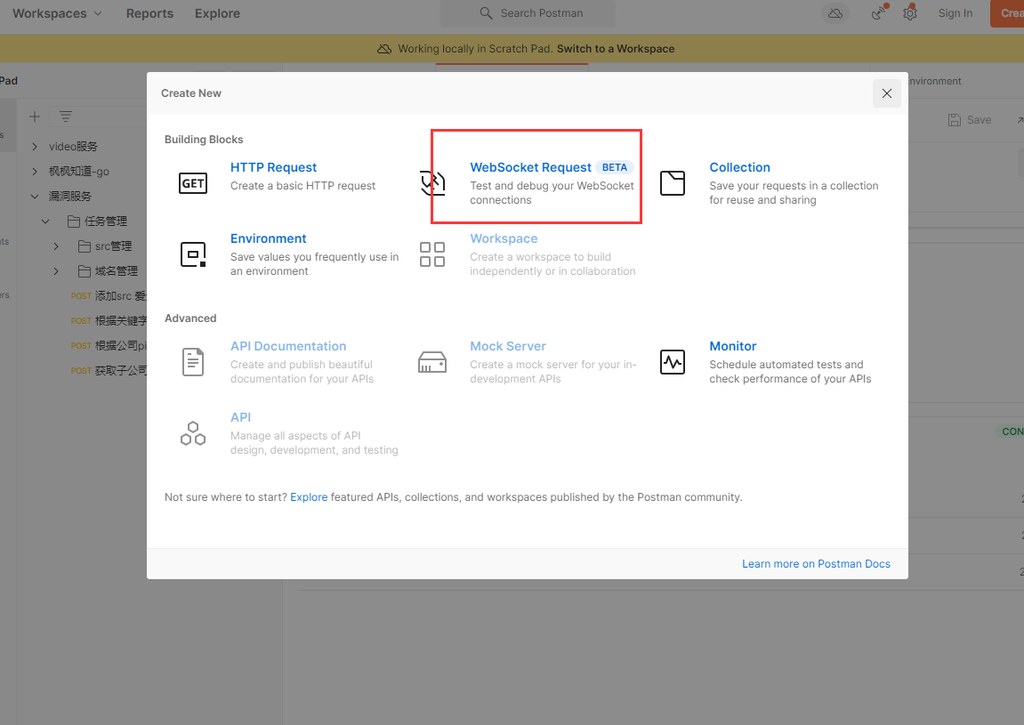
Postman as client
20 go deployment
The deployment of the go project is very simple. After the writing is completed, you only need to execute go build to package it into an executable file.
Note that this operation is different on different platforms.
Packaging under Windows is an exe file, and packaging under Linux is a binary file.
Packaging command
go build
Open the main package in the current directory. Note that there can only be one package with the main function.
go build xxx.go
Open the xxx.go package in the current directory. This package must be a main package, otherwise it will have no effect.
go build -o main.exe xxx.go
Force the output file to be renamed
The -o parameter must be at the beginning of the file
Cross compilation
What is cross-compilation? On Windows, the Go program I developed can also be packaged as an executable program on Linux.
For example, on the Windows platform, package Linux
Note that the set command must be executed under the cmd command line. Powershell is invalid.
set CGO_ENABLED=0
set GOOS=linux
set GOARCH=amd64
go build -o main main.go
CGO_ENABLED: CGO represents the tool in golang. CGO_ENABLED=0 means CGO is disabled. CGO cannot be used in cross-compilation. GOOS: Environment variables are used to specify the target operating system. Mac corresponds to darwin, linux corresponds to linux, windows corresponds to windows, and other freebsd, android, etc.
GOARCH: The environment variable is used to specify the type of processor. 386 is also called x86 for 32-bit operating systems. amd64 is also called x64 for 64-bit operating systems. arm This architecture is generally used for embedded development. For example, Android, iOS, Win mobile, etc.
For convenience, you can write a bat file in the root directory of the project
This will allow you to quickly build
Then put it under the linux server, set the file permissions and run it directly.
chmod +x main
./main
Please note again that when packaging web projects in the future, non-Go programs such as configuration files and static files must be copied to the target server together.
Reference documentation
go build command https://blog.csdn.net/wohu1104/article/details/106295007