01 go-zero’s pit-breaking work
go-zero is a web and rpc framework that integrates various engineering practices. The elastic design ensures the stability of the large-concurrency server and has withstood sufficient actual combat testing.
Official website:
What is microservices
As the name suggests, it is actually a small service.
The earliest business systems before were all single projects. For example, our previous Five Generations Blog and Seventh Generation Blog were all single projects.
What are the disadvantages of such a single project?
For example, if you want to change a small part of the backend, you need to rebuild the entire project, then stop the entire project, and then restart the project.
This is why corporate projects are released late at night.
So, what if it is a microservice?
Large systems can be divided into services according to functions or products to form an independent service.
Take my blog as an example
Can I split it into user service and article service?
Then if I change the code related to the article, the user service can ignore it and only care about its own service.
But when we were all together and harmonious before, suddenly we were separated, and there were a lot of things that needed to be done in an instant.
For example:
- How to solve the communication between services?
- How to find the address of each service?
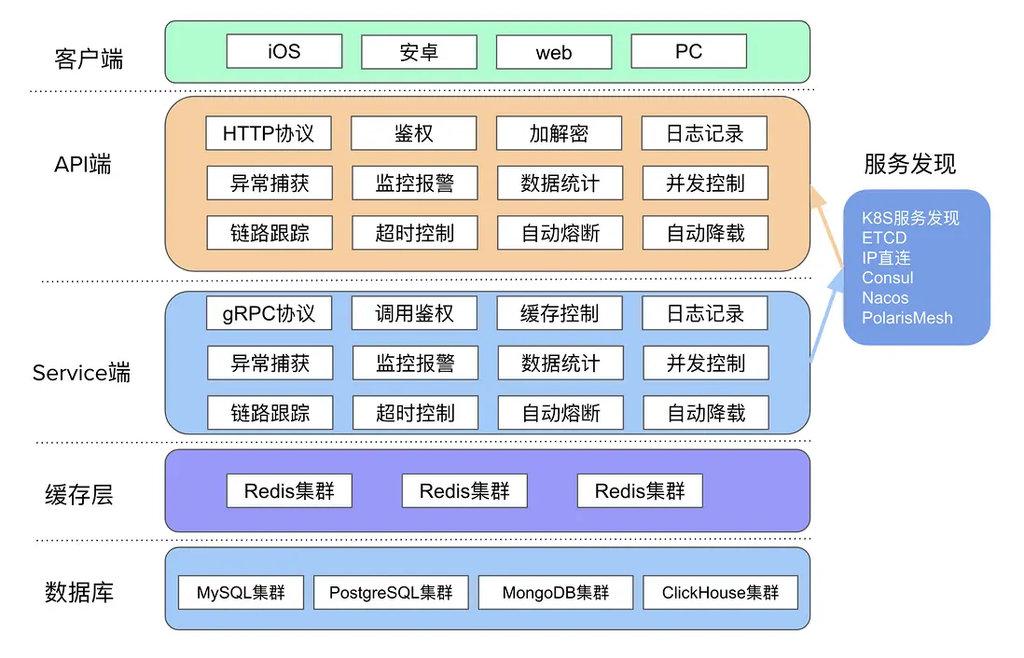
Simply put, go-zero helps us write repetitive code
Allow developers to focus more on business
When to use go-zero
Since go-zero has so many functions, do we have no idea about using go-zero?
The answer is not like this. In fact, we have to modify whatever out-of-the-box methods go-zero gives us.
In fact, many small projects do not require code layering like go-zero.
Blindly using code layering will only increase code complexity.
Moreover, Use of micro-services and Split Service are more important than the microservice itself in actual work scenarios.
Therefore, if you are doing a personal project (except for studying), it is actually not recommended to use a microservice architecture, regardless of whether you use go-zero
In my opinion, the most suitable projects for microservice architecture can only be large-scale projects of the company, where one group is responsible for the development of one of the services.
Tools required
- etcd
- mysql
- protoc (converting rpc code)
- goctl
Reference documentation
What are microservices https://zhuanlan.zhihu.com/p/160121839
02 go-zero environment installation
Install goctl
go install github.com/zeromicro/go-zero/tools/goctl@latest
Install protoc
goctl env check --install --verbose --force
go get -u github.com/zeromicro/go-zero@latest
goland install goctl plug-in
Quickly create an api service
goctl api new api
Then modify the user/api/internal/logic/apilogic.go file
func (l *ApiLogic) Api(req *types.Request) (resp *types.Response, err error) {
  // todo: add your logic here and delete this line

  return &types.Response{Message: "枫枫"}, nil
}
Quickly create an rpc service
goctl rpc new rpc
Then run in the user's api directory
go run api.go
Visit 127.0.0.1:8888/from/me. If you can see the data, it means the environment is installed.
Reference documentation
Environment setup https://blog.csdn.net/xwh3165037789/article/details/131577365
Official document https://go-zero.dev/docs/tasks/installation/goctl
03 go-zero’s etcd
Etcd is a highly available distributed key-value storage system, mainly used for sharing configuration information and service discovery. It uses Raft consistency algorithm to ensure strong consistency of data and supports monitoring and updating of data.
Why use etcd
Mainly used for the configuration center of microservices, service discovery 0
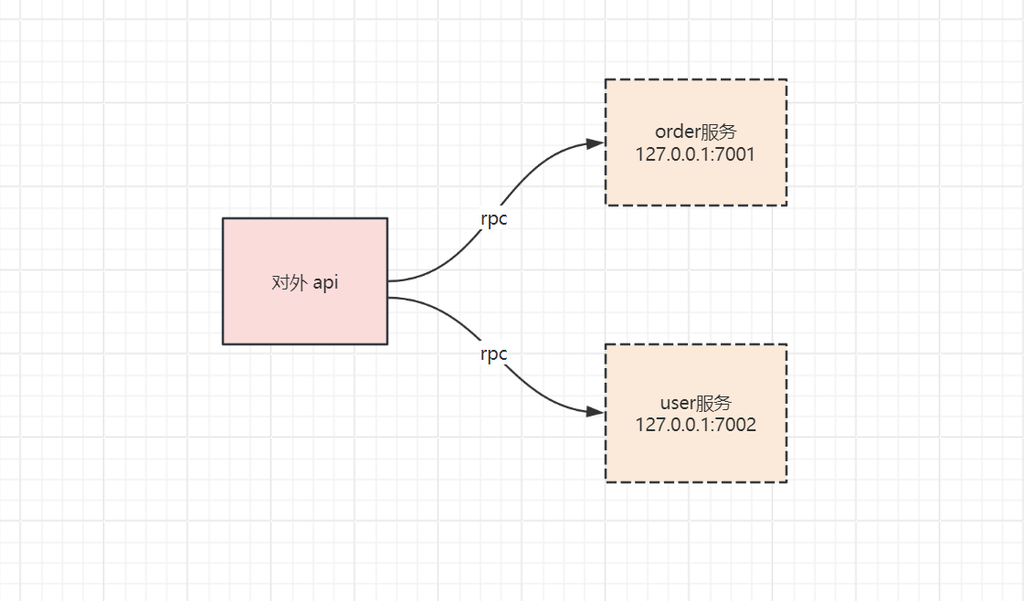
In the external API application, how do you know the RPC address of the order service?
Written in the configuration file?
What should I do if the IP address of the service changes? In the traditional configuration file mode, if you modify the configuration file, the application needs to be restarted to solve the problem.
So etcd is here to do this
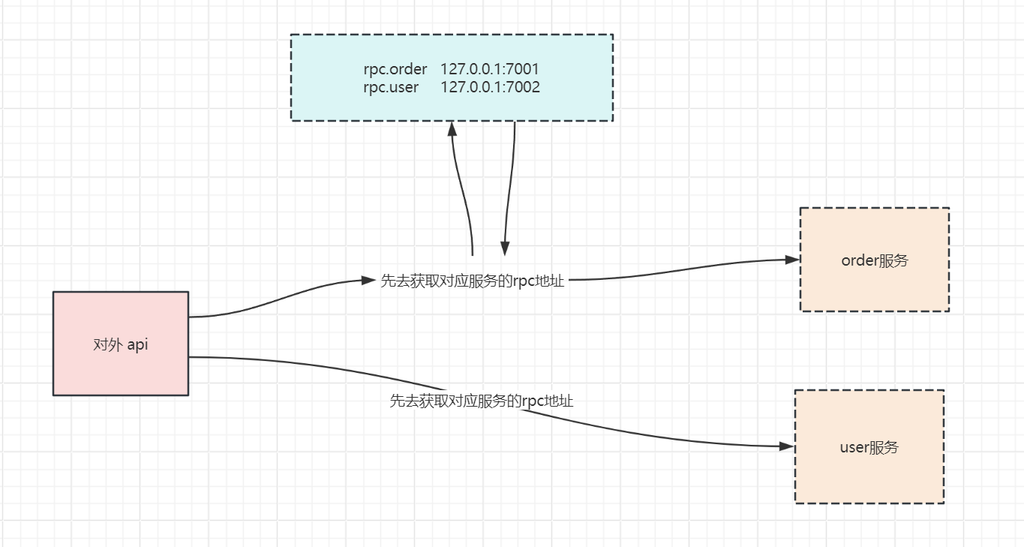
As for why redis is not used, everyone just needs to remember that etcd’s data is more reliable.
Installation
windows installation
https://github.com/etcd-io/etcd/releases
linux installation
Source code installation
https://blog.csdn.net/Mr_XiMu/article/details/127923827
yum installation
The version is generally older
docker installation
docker run --name etcd -d -p 2379:2379 -p 2380:2380 -e ALLOW_NONE_AUTHENTICATION=yes bitnami/etcd:3.3.11 etcd
Basic commands
// 设置或更新值
etcdctl put name 张三
// 获取值
etcdctl get name
// 只要value
etcdctl get name --print-value-only
// 获取name前缀的键值对
etcdctl get --prefix name
// 删除键值对
etcdctl del name
// 监听键的变化
etcdctl watch name
Reference documentation
etcd windows installation https://www.cnblogs.com/wujuntian/p/12837926.html
etcdctl command https://www.jianshu.com/p/67cbef492812
Why use etcd https://www.elecfans.com/d/1890103.html
04 The simplest go-zero demo
In this lesson, be sure to follow the tutorial and run the demo successfully first.
This demo is a user microservice and a video microservice
The video microservice needs to provide an http interface. The user can query the information of a video and find out the user name associated with the user ID.
Then the user microservice must provide a method to return user information based on the user ID.
User microservices
- Write the proto file of rpc
user/rpc/user.proto
syntax = "proto3";

package user;

option go_package = "./user";

message IdRequest {
  string id = 1;
}

message UserResponse {
  // 用户id
  string id = 1;
  // 用户名称
  string name = 2;
  // 用户性别
  bool gender = 3;
}

service User {
  rpc getUser(IdRequest) returns(UserResponse);
}

// goctl rpc protoc user/rpc/user.proto --go_out=user/rpc/types --go-grpc_out=user/rpc/types --zrpc_out=user/rpc/
- Generate code
goctl rpc protoc user/rpc/user.proto --go_out=user/rpc/types --go-grpc_out=user/rpc/types --zrpc_out=user/rpc/
- Fill in the necessary logic in
user/rpc/internal/logic/getuserlogic.go
func (l *GetUserLogic) GetUser(in *user.IdRequest) (*user.UserResponse, error) {
  // todo: add your logic here and delete this line
  return &user.UserResponse{
    Id:     in.Id,
    Name:   "湖南省,长沙市",
    Gender: true,
  }, nil
}
video microservice
- Create API
video/api/video.api
type (
  VideoReq {
    Id string `path:"id"`
  }

  VideoRes {
    Id   string `json:"id"`
    Name string `json:"name"`
  }
)
service video {
  @handler getVideo
  get /api/videos/:id (VideoReq) returns (VideoRes)
}

// goctl api go -api video/api/video.api -dir video/api/
- Generate code
goctl api go -api video/api/video.api -dir video/api/
- Add user rpc configuration
Because the user's rpc service needs to be called in the video
video/api/internal/config/config.go
package config

import (
  "github.com/zeromicro/go-zero/rest"
  "github.com/zeromicro/go-zero/zrpc"
)

type Config struct {
  rest.RestConf
  UserRpc zrpc.RpcClientConf
}
- Improve service dependencies
video/api/internal/svc/servicecontext.go
package svc

import (
  "github.com/zeromicro/go-zero/zrpc"
  "go_test/user/rpc/userclient"
  "go_test/video/api/internal/config"
)

type ServiceContext struct {
  Config  config.Config
  UserRpc userclient.User
}

func NewServiceContext(c config.Config) *ServiceContext {
  return &ServiceContext{
    Config:  c,
    UserRpc: userclient.NewUser(zrpc.MustNewClient(c.UserRpc)),
  }
}
- Add yaml configuration
video/api/etc/video.yaml
Name: video
Host: 0.0.0.0
Port: 8888
UserRpc:
  Etcd:
    Hosts:
      - 127.0.0.1:2379
    Key: user.rpc
- Improve service dependencies
video/api/internal/logic/getvideologic.go
func (l *GetVideoLogic) GetVideo(req *types.VideoReq) (resp *types.VideoRes, err error) {
  // todo: add your logic here and delete this line
  user1, err := l.svcCtx.UserRpc.GetUser(l.ctx, &user.IdRequest{
    Id: "1",
  })
  if err != nil {
    return nil, err
  }
  return &types.VideoRes{
    Id:   req.Id,
    Name: user1.Name,
  }, nil
}
Service startup
Run user rpc
go run user\rpc\user.go -f user\rpc\etc\user.yaml
Run video api
go run video\api\video.go -f video\api\etc\video.yaml
Request
curl 127.0.0.1:8888/api/videos/1

{"id":"1","name":"湖南省,长沙市"}
That's it you're done
Knowledge review
Let’s review what we did
- Write the proto file of the rpc service of the user microservice
- Generate code
- Add your own logic
- Write the api file of the video microservice api service
- Generate code
- Improve dependencies and configuration
- Add your own logic
This is the benefit of using go-zero, let us focus on business development
Create and modify the directory
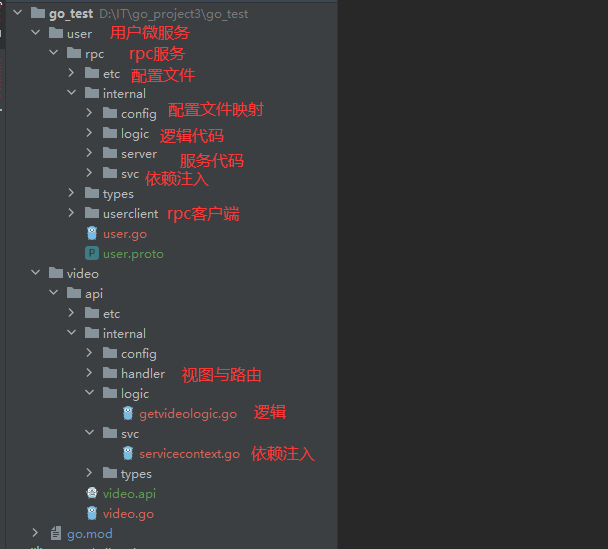
05 go-zero api service
api syntax
The api file is a description of all the APIs of this service.
Service name, function name, path, request method, request parameters, response parameters
Let’s take the two important interfaces of user management as examples to write its api files.
type LoginRequest {
  UserName string `json:"userName"`
  Password string `json:"password"`
}

type Response {
  Code int    `json:"code"`
  Data string `json:"data"`
  Msg  string `json:"msg"`
}

type UserInfo {
  UserName string `json:"userName"`
  Addr     string `json:"addr"`
  Id       uint   `json:"id"`
}

type UserInfoResponse {
  Code int      `json:"code"`
  Data UserInfo `json:"data"`
  Msg  string   `json:"msg"`
}

service users {
  @handler login
  post /api/users/login (LoginRequest) returns (Response)

  @handler userInfo
  get /api/users/info returns (UserInfoResponse)
}

// goctl api go -api v1.api -dir .
Through this example, we found that there are still some problems in actual operation
- How to encapsulate the response?
- Unify api prefix
- The user information interface should undergo jwt verification
- api documentation
Response encapsulation
Instead of writing code, data, and msg in the API, we respond uniformly through encapsulation.
Add code data msg in the unified response
type LoginRequest {
  UserName string `json:"userName"`
  Password string `json:"password"`
}

type UserInfoResponse {
  UserName string `json:"userName"`
  Addr     string `json:"addr"`
  Id       uint   `json:"id"`
}

service users {
  @handler login
  post /login (LoginRequest) returns (string)

  @handler userInfo
  get /info returns (UserInfoResponse)
}

// goctl api go -api v1.api -dir .
in common/response/enter.go
package response

import (
  "github.com/zeromicro/go-zero/rest/httpx"
  "net/http"
)

type Body struct {
  Code uint32      `json:"code"`
  Msg  string      `json:"msg"`
  Data interface{} `json:"data"`
}

// Response http返回
func Response(r *http.Request, w http.ResponseWriter, resp interface{}, err error) {
  if err == nil {
    //成功返回
    r := &Body{
      Code: 0,
      Msg:  "成功",
      Data: resp,
    }
    httpx.WriteJson(w, http.StatusOK, r)
    return
  }
  //错误返回
  errCode := uint32(10086)
  // 可以根据错误码,返回具体错误信息
  errMsg := "服务器错误"

  httpx.WriteJson(w, http.StatusBadRequest, &Body{
    Code: errCode,
    Msg:  errMsg,
    Data: nil,
  })

}
Modify the response logic of the handler
l := logic.NewLoginLogic(r.Context(), svcCtx)
resp, err := l.Login(&req)
response.Response(r, w, resp, err)
Then just perfect the logic
func (l *LoginLogic) Login(req *types.LoginRequest) (resp string, err error) {
  // todo: add your logic here and delete this line
  fmt.Println(req.UserName, req.Password)
  return "xxxx.xxxx.xxx", nil
}
Template customization
Of course, the official provides a way to modify the template to avoid having to modify it every time it is generated.
https://go-zero.dev/docs/tutorials/customization/template
First search the file handler.tpl globally
If not, use this command to generate it first
goctl template init
Modify to:
package handler

import (
    "net/http"
    "github.com/zeromicro/go-zero/rest/httpx"
    "go_test/common/response"
    {{.ImportPackages}}
)

func {{.HandlerName}}(svcCtx *svc.ServiceContext) http.HandlerFunc {
    return func(w http.ResponseWriter, r *http.Request) {
        {{if .HasRequest}}var req types.{{.RequestType}}
        if err := httpx.Parse(r, &req); err != nil {
            httpx.Error(w, err)
            return
        }{{end}}

        l := logic.New{{.LogicType}}(r.Context(), svcCtx)
        {{if .HasResp}}resp, {{end}}err := l.{{.Call}}({{if .HasRequest}}&req{{end}})
        {{if .HasResp}}response.Response(r, w, resp, err){{else}}response.Response(r, w, nil, err){{end}}

    }
}
api prefix
For user services, the api prefix is /api/users
@server (
    prefix: /api/users
)
service users {
    @handler login
    post /login (LoginRequest) returns (string)

    @handler userInfo
    get /info returns (UserInfoResponse)
}
jwt and verification
type LoginRequest {
  UserName string `json:"userName"`
  Password string `json:"password"`
}

type UserInfoResponse {
  UserName string `json:"userName"`
  Addr     string `json:"addr"`
  Id       uint   `json:"id"`
}

@server(
  prefix: /api/users
)
service users {
  @handler login
  post /login (LoginRequest) returns (string)
}


@server(
  jwt: Auth
  prefix: /api/users
)
service users {
  @handler userInfo
  get /info returns (UserInfoResponse)
}
After conversion, modify the configuration file
The unit of AccessExpire is seconds
Name: users
Host: 0.0.0.0
Port: 8888
Auth:
  AccessSecret: duerueudfnd235sdh
  AccessExpire: 3600
jwt public code
package jwts

import (
  "errors"
  "github.com/golang-jwt/jwt/v4"
  "time"
)

// JwtPayLoad jwt中payload数据
type JwtPayLoad struct {
  UserID   uint   `json:"user_id"`
  Username string `json:"username"` // 用户名
  Role     int    `json:"role"`     // 权限  1 普通用户  2 管理员
}

type CustomClaims struct {
  JwtPayLoad
  jwt.RegisteredClaims
}

// GenToken 创建 Token
func GenToken(user JwtPayLoad, accessSecret string, expires int64) (string, error) {
  claim := CustomClaims{
    JwtPayLoad: user,
    RegisteredClaims: jwt.RegisteredClaims{
      ExpiresAt: jwt.NewNumericDate(time.Now().Add(time.Hour * time.Duration(expires))),
    },
  }

  token := jwt.NewWithClaims(jwt.SigningMethodHS256, claim)
  return token.SignedString([]byte(accessSecret))
}

// ParseToken 解析 token
func ParseToken(tokenStr string, accessSecret string, expires int64) (*CustomClaims, error) {

  token, err := jwt.ParseWithClaims(tokenStr, &CustomClaims{}, func(token *jwt.Token) (interface{}, error) {
    return []byte(accessSecret), nil
  })
  if err != nil {
    return nil, err
  }
  if claims, ok := token.Claims.(*CustomClaims); ok && token.Valid {
    return claims, nil
  }
  return nil, errors.New("invalid token")
}
Issue jwt after successful login
loginlogic.go
func (l *LoginLogic) Login(req *types.LoginRequest) (resp string, err error) {
  // todo: add your logic here and delete this line
  auth := l.svcCtx.Config.Auth
  token, err := jwts.GenToken(jwts.JwtPayLoad{
    UserID:   1,
    Username: "枫枫",
    Role:     1,
  }, auth.AccessSecret, auth.AccessExpire)
  if err != nil {
    return "", err
  }
  return token, err
}
Then add the necessary logic in userinfologic
func (l *UserInfoLogic) UserInfo() (resp *types.UserInfoResponse, err error) {
  // todo: add your logic here and delete this line

  userId := l.ctx.Value("user_id").(json.Number)
  fmt.Printf("%v, %T, \n", userId, userId)
  username := l.ctx.Value("username").(string)
  uid, _ := userId.Int64()

  return &types.UserInfoResponse{
    UserId:   uint(uid),
    Username: username,
  }, nil
}
The userinfo interface has automatically added jwt verification.
But this token needs to be added like this
headers:{
  Authorization: "Bearer token"
}
The response that does not pass jwt is 401. You need to pay attention to this.
Of course, you can also modify the response of jwt verification
In main, add the callback function of jwt verification.
func main() {
  flag.Parse()

  var c config.Config
  conf.MustLoad(*configFile, &c)

  server := rest.MustNewServer(c.RestConf, rest.WithUnauthorizedCallback(JwtUnauthorizedResult))
  defer server.Stop()

  ctx := svc.NewServiceContext(c)
  handler.RegisterHandlers(server, ctx)

  fmt.Printf("Starting server at %s:%d...\n", c.Host, c.Port)
  server.Start()
}

// JwtUnauthorizedResult jwt验证失败的回调
func JwtUnauthorizedResult(w http.ResponseWriter, r *http.Request, err error) {
  fmt.Println(err) // 具体的错误,没带token,token过期?伪造token?
  httpx.WriteJson(w, http.StatusOK, response.Body{10087, "鉴权失败", nil})
}
Generate api documentation
The external API of the back end must be connected with the front end.
So how to generate api interface documents in go-zero?
- Install goctl-swagger
go install github.com/zeromicro/goctl-swagger@latest
- Generate app.json
If there is no doc directory, you need to create it
goctl api plugin -plugin goctl-swagger="swagger -filename app.json -host localhost:8888 -basepath /" -api v1.api -dir ./doc
- Use docker to view this swagger page
docker run -d --name swag -p 8087:8080 -e SWAGGER_JSON=/opt/app.json -v D:\IT\go_project3\go_test\v1\api\doc\:/opt swaggerapi/swagger-ui
You can improve the api information
@server(
  prefix: /api/users
)
service users {
  @doc(
    summary: "用户登录"
  )
  @handler login
  post /login (LoginRequest) returns (string)
}

@server(
  jwt: Auth
  prefix: /api/users
)
service users {
  @doc(
    summary: "获取用户信息"
  )
  @handler userInfo
  get /info returns (UserInfoResponse)
}
Regenerate json instead
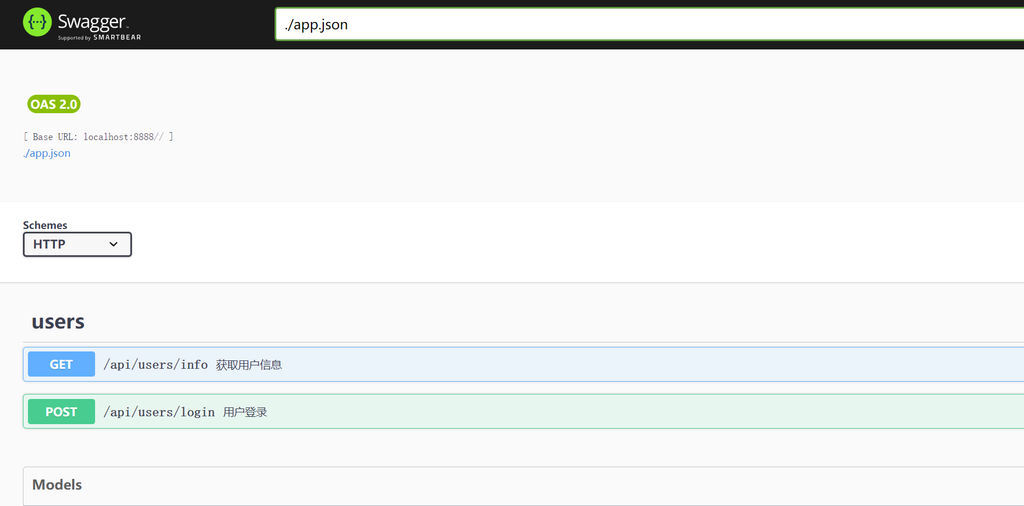
However, I found that the swagger experience is not very good. After using the custom response, the swag cannot be changed.
For company projects, they all have their own API platform.
For team projects, you can also use apifox
Therefore, if you use swagger personally, it is not impossible to make ends meet.
Reference documentation
api syntax https://blog.csdn.net/chinus_yan/article/details/129674455
Official api specification https://go-zero.dev/docs/tutorials#token
go-zero uses jwt https://blog.csdn.net/Mr_XiMu/article/details/128343072
Custom jwt error https://blog.csdn.net/gzyx1988/article/details/128991504
The pitfalls of goctl-swagger https://www.cnblogs.com/eatfishcat/p/17238521.html
goctl-swagger uses https://blog.csdn.net/weixin_49369316/article/details/129439722
06 go-zero mysql operation
go-zero native operation mysql
Code generation
v1/model/user.sql
CREATE TABLE user
(
    id        bigint AUTO_INCREMENT,
    username  varchar(36) NOT NULL,
    password  varchar(64) default '',
    UNIQUE name_index (username),
    PRIMARY KEY (id)
) ENGINE = InnoDB COLLATE utf8mb4_general_ci;
Generate go code
goctl model mysql ddl --src user.sql --dir .
The generated go code automatically generates code for addition, deletion, modification and query for us.
How do we use it?
Code usage
Write mysql configuration in config
package config

import "github.com/zeromicro/go-zero/rest"

type Config struct {
  rest.RestConf
  Mysql struct {
    DataSource string
  }
  Auth struct {
    AccessSecret string
    AccessExpire int64
  }
}
Configuration file
Name: users
Host: 0.0.0.0
Port: 8888
Mysql:
  DataSource: root:root@tcp(127.0.0.1:3306)/zero_db?charset=utf8mb4&parseTime=True&loc=Local
Auth:
  AccessSecret: dfff1234
  AccessExpire: 3600
First create a connection where dependency injection occurs
v1/api/internal/svc/servicecontext.go
package svc

import (
  "github.com/zeromicro/go-zero/core/stores/sqlx"
  "go_test/v1/api/internal/config"
  "go_test/v1/model"
)

type ServiceContext struct {
  Config     config.Config
  UsersModel model.UserModel
}

func NewServiceContext(c config.Config) *ServiceContext {
  mysqlConn := sqlx.NewMysql(c.Mysql.DataSource)
  return &ServiceContext{
    Config:     c,
    UsersModel: model.NewUserModel(mysqlConn),
  }
}
For the sake of simplicity, I wrote the logic directly in the login logic.
func (l *LoginLogic) Login(req *types.LoginRequest) (resp string, err error) {
  // 增
  l.svcCtx.UsersModel.Insert(context.Background(), &model.User{
    Username: "枫枫",
    Password: "123456",
  })

  // 查
  user, err := l.svcCtx.UsersModel.FindOne(context.Background(), 1)
  fmt.Println(user, err)
  // 查
  user, err = l.svcCtx.UsersModel.FindOneByUsername(context.Background(), "枫枫")
  fmt.Println(user, err)

  // 改
  l.svcCtx.UsersModel.Update(context.Background(), &model.User{
    Username: "枫枫1",
    Password: "1234567",
    Id:       1,
  })
  user, err = l.svcCtx.UsersModel.FindOne(context.Background(), 1)
  fmt.Println(user, err)
  // 删
  l.svcCtx.UsersModel.Delete(context.Background(), 1)
  user, err = l.svcCtx.UsersModel.FindOne(context.Background(), 1)
  fmt.Println(user, err)
  return
}
Combined with gorm
In the above situation, the query is almost directly performed using native sql.
In fact, in most scenarios, it will be more efficient when combined with gorm.
Of course, you can also use other ORMs
Write model files directly
Because directly writing the sql file and then converting it, there will be some problems.
package model

import "gorm.io/gorm"

type UserModel struct {
  gorm.Model
  Username string `gorm:"size:32" json:"username"`
  Password string `gorm:"size:64" json:"password"`
}
Write the gorm connection statement in common
common/init_db/init_gorm.go
package init_db

import (
  "fmt"
  "gorm.io/driver/mysql"
  "gorm.io/gorm"
)

// InitGorm gorm初始化
func InitGorm(MysqlDataSource string) *gorm.DB {
  db, err := gorm.Open(mysql.Open(MysqlDataSource), &gorm.Config{})
  if err != nil {
    panic("连接mysql数据库失败, error=" + err.Error())
  } else {
    fmt.Println("连接mysql数据库成功")
  }
  return db
}
Then inject it in the context
package svc

import (
  "go_test/common/init_db"
  "go_test/v1/api/internal/config"
  "go_test/v1/model"
  "gorm.io/gorm"
)

type ServiceContext struct {
  Config config.Config
  DB     *gorm.DB
}

func NewServiceContext(c config.Config) *ServiceContext {
  mysqlDb := init_db.InitGorm(c.Mysql.DataSource)
  mysqlDb.AutoMigrate(&model.User{})
  return &ServiceContext{
    Config: c,
    DB:     mysqlDb,
  }
}
It’s very simple to use, exactly the same as gorm.
func (l *LoginLogic) Login(req *types.LoginRequest) (resp string, err error) {
  var user models.UserModel
  err = l.svcCtx.DB.Take(&user, "username = ? and password = ?", req.Username, req.Password).Error
  if err != nil {
    return "", errors.New("登录失败")
  }
  return user.Username, nil
}
Reference documentation
sqlx uses https://blog.csdn.net/Mr_XiMu/article/details/131658247
07 go-zero rpc operation
For writing proto files, you can refer to my previous tutorial on grpc.
Single rpc service mode
We write a proto file
Provide two services, one is a method to obtain user information, and the other is a method for users to add
user.proto
syntax = "proto3";

package user;
option go_package = "./user";

message UserInfoRequest {
  uint32 user_id = 1;
}

message UserInfoResponse {
  uint32 user_id = 1;
  string username = 2;
}


message UserCreateRequest {
  string username = 1;
  string password = 2;
}

message UserCreateResponse {

}

service Users {
  rpc UserInfo(UserInfoRequest) returns(UserInfoResponse);
  rpc UserCreate(UserCreateRequest) returns(UserCreateResponse);
}


// goctl rpc protoc user.proto --go_out=./types --go-grpc_out=./types --zrpc_out=.
Unlike traditional grpc, the proto file in go-zero cannot import messages externally.
Perfect the corresponding logic in logic
func (l *UserInfoLogic) UserInfo(in *user.UserInfoRequest) (*user.UserInfoResponse, error) {
  fmt.Println(in.UserId)
  return &user.UserInfoResponse{
    UserId:   in.UserId,
    Username: "枫枫",
  }, nil
}
func (l *UserCreateLogic) UserCreate(in *user.UserCreateRequest) (*user.UserCreateResponse, error) {
  fmt.Println(in.Username, in.Password)

  return &user.UserCreateResponse{}, nil
}
Use apifox to call grpc
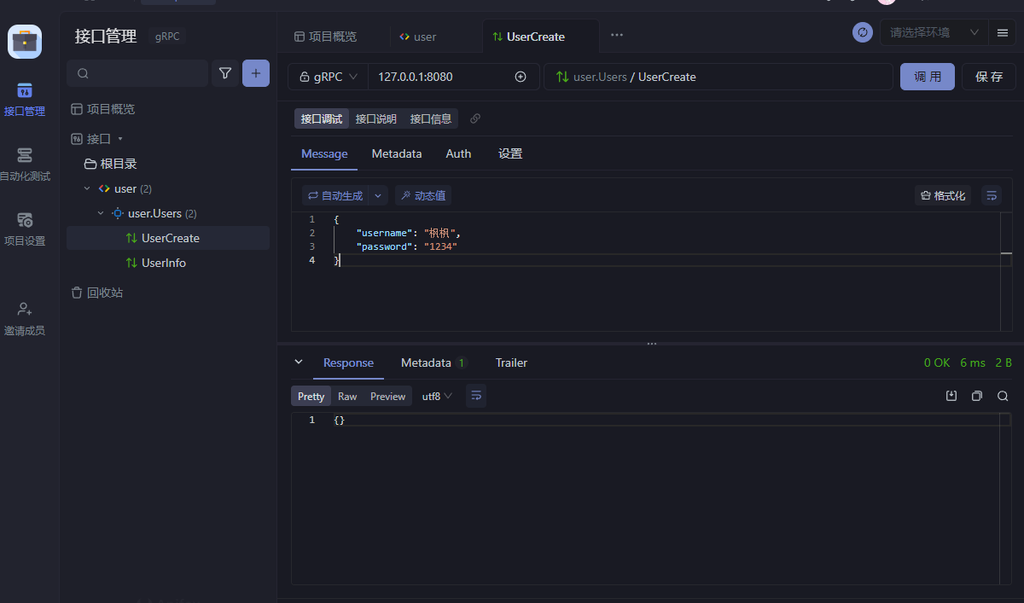
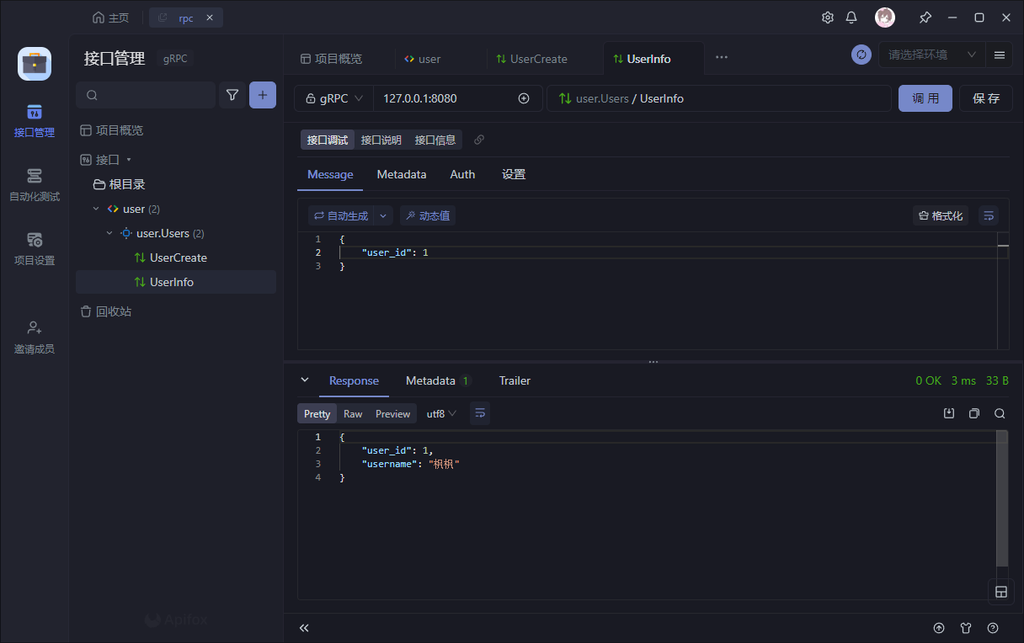
Service grouping
By default, there can only be one service in a proto file.
If there are more than one, the conversion will report an error.
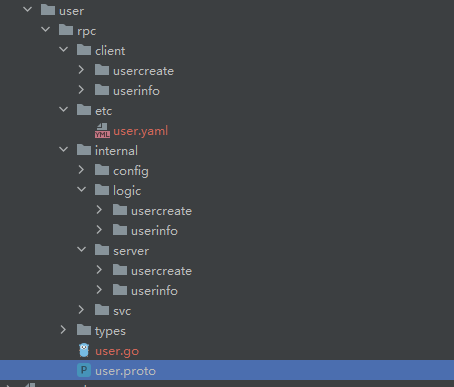
If there are many methods for an rpc service, the directory after conversion will be very unintuitive.
We can use the -m parameter to specify the service group during conversion
syntax = "proto3";

package user;
option go_package = "./user";

message UserInfoRequest {
  uint32 user_id = 1;
}

message UserInfoResponse {
  uint32 user_id = 1;
  string username = 2;
}


message UserCreateRequest {
  string username = 1;
  string password = 2;
}

message UserCreateResponse {

}

service UserCreate {
  rpc UserCreate(UserCreateRequest) returns(UserCreateResponse);
}


service UserInfo {
  rpc UserInfo(UserInfoRequest) returns(UserInfoResponse);
}


// goctl rpc protoc user.proto --go_out=./types --go-grpc_out=./types --zrpc_out=. -m
Combined with gorm
syntax = "proto3";

package user;

option go_package = "./user";


message UserInfoRequest {
  uint32 user_id = 1;
}
message UserInfoResponse {
  uint32 user_id = 1;
  string username = 2;
}


message UserCreateRequest {
  string username = 1;
  string password = 2;
}
message UserCreateResponse {
  uint32 user_id = 1;
  string err = 2;
}


service user{
  rpc UserInfo(UserInfoRequest)returns(UserInfoResponse);
  rpc UserCreate(UserCreateRequest)returns(UserCreateResponse);
}


// goctl rpc protoc user.proto --go_out=./types --go-grpc_out=./types --zrpc_out=.
models definition
rpc_study/user_gorm/models/user_model.go
package models

import "gorm.io/gorm"

type UserModel struct {
  gorm.Model
  Username string `gorm:"size:32" json:"username"`
  Password string `gorm:"size:64" json:"password"`
}
Configuration file, add related configuration of mysql
rpc_study/user_gorm/rpc/etc/user.yaml
Name: user.rpc
ListenOn: 0.0.0.0:8080
Etcd:
  Hosts:
  - 127.0.0.1:2379
  Key: user.rpc
Mysql:
  DataSource: root:root@tcp(127.0.0.1:3307)/zero_db?charset=utf8mb4&parseTime=True&loc=
Fill in the corresponding configuration mapping
rpc_study/user_gorm/rpc/internal/config/config.go
package config

import "github.com/zeromicro/go-zero/zrpc"

type Config struct {
  zrpc.RpcServerConf
  Mysql struct {
    DataSource string
  }
}
Where the service depends, enter injection
rpc_study/user_gorm/rpc/internal/svc/servicecontext.go
package svc

import (
  "gorm.io/gorm"
  "zero_study/common/init_gorm"
  "zero_study/rpc_study/user_gorm/models"
  "zero_study/rpc_study/user_gorm/rpc/internal/config"
)

type ServiceContext struct {
  Config config.Config
  DB     *gorm.DB
}

func NewServiceContext(c config.Config) *ServiceContext {
  db := init_gorm.InitGorm(c.Mysql.DataSource)
  db.AutoMigrate(&models.UserModel{})
  return &ServiceContext{
    Config: c,
    DB:     db,
  }
}
Create logic
func (l *UserCreateLogic) UserCreate(in *user.UserCreateRequest) (pd *user.UserCreateResponse, err error) {

  pd = new(user.UserCreateResponse)
  var model models.UserModel
  err = l.svcCtx.DB.Take(&model, "username = ?", in.Username).Error
  if err == nil {
    pd.Err = "该用户名已存在"
    return
  }
  model = models.UserModel{
    Username: in.Username,
    Password: in.Password,
  }
  err = l.svcCtx.DB.Create(&model).Error
  if err != nil {
    logx.Error(err)
    pd.Err = err.Error()
    err = nil
    return
  }
  pd.UserId = uint32(model.ID)
  return
}
Query logic
func (l *UserInfoLogic) UserInfo(in *user.UserInfoRequest) (*user.UserInfoResponse, error) {
  var model models.UserModel
  err := l.svcCtx.DB.Take(&model, in.UserId).Error
  if err != nil {
    return nil, errors.New("用户不存在")
  }
  return &user.UserInfoResponse{
    UserId:   uint32(model.ID),
    Username: model.Username,
  }, nil
}
Combined with api
api
type UserCreateRequest {
  Username string `json:"username"`
  Password string `json:"password"`
}

type UserInfoRequest {
  ID uint `path:"id"`
}

type UserInfoResponse {
  UserId   uint   `json:"user_id"`
  Username string `json:"username"`
}

@server(
  prefix: /api/users
)
service users {
  @handler userInfo
  get /:id (UserInfoRequest) returns (UserInfoResponse)
  @handler userCreate
  post / (UserCreateRequest) returns (string )
}

// goctl api go -api user.api -dir .
Fill in the key of the rpc service in the configuration file
Name: users
Host: 0.0.0.0
Port: 8888
UserRpc:
  Etcd:
    Hosts:
      - 127.0.0.1:2379
    Key: user.rpc
Fill out the configuration file
package config

import (
  "github.com/zeromicro/go-zero/rest"
  "github.com/zeromicro/go-zero/zrpc"
)

type Config struct {
  rest.RestConf
  UserRpc zrpc.RpcClientConf
}
Dependency injection, initializing the rpc client
package svc

import (
  "github.com/zeromicro/go-zero/zrpc"
  "zero_study/rpc_study/user_api_rpc/api/internal/config"
  "zero_study/rpc_study/user_api_rpc/rpc/userclient"
)

type ServiceContext struct {
  Config  config.Config
  UserRpc userclient.User
}

func NewServiceContext(c config.Config) *ServiceContext {
  return &ServiceContext{
    Config:  c,
    UserRpc: userclient.NewUser(zrpc.MustNewClient(c.UserRpc)),
  }
}
Create user
func (l *UserCreateLogic) UserCreate(req *types.UserCreateRequest) (resp string, err error) {

  response, err := l.svcCtx.UserRpc.UserCreate(l.ctx, &user.UserCreateRequest{
    Username: req.Username,
    Password: req.Password,
  })
  if err != nil {
    return "", err
  }
  if response.Err != "" {
    return "", errors.New(response.Err)
  }
  return
}
User information
func (l *UserInfoLogic) UserInfo(req *types.UserInfoRequest) (resp *types.UserInfoResponse, err error) {

  response, err := l.svcCtx.UserRpc.UserInfo(l.ctx, &user.UserInfoRequest{
    UserId: uint32(req.ID),
  })

  if err != nil {
    return nil, err
  }

  return &types.UserInfoResponse{UserId: uint(response.UserId), Username: response.Username}, nil
}
Reference documentation
Service Group https://go-zero.dev/docs/tutorials/proto/services/group