Part 1: Vue 3
Vue 3 Reactivity Fundamentals
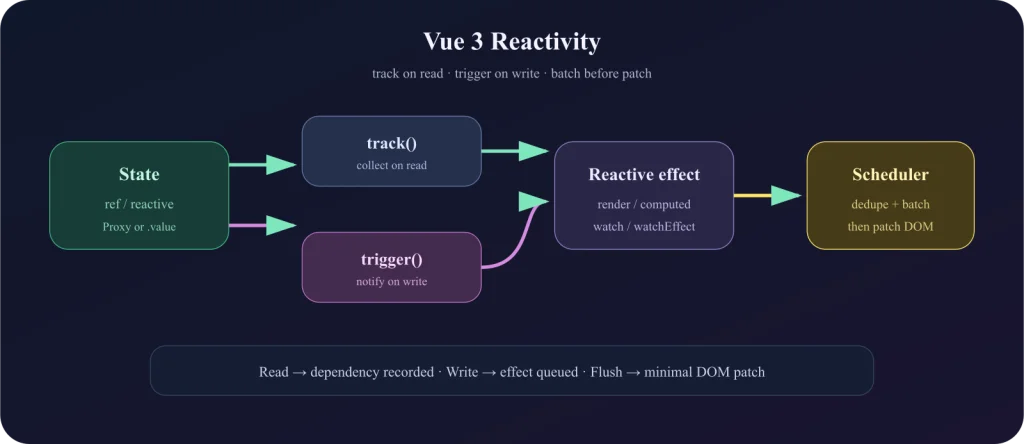
Vue 3 uses Proxy traps for object operations: track collects dependencies on reads, trigger notifies effects on writes, and the scheduler batches rendering work.
| API | Best for | Watch out for |
|---|---|---|
ref | Primitives or objects; the general default | Use .value in scripts; templates unwrap it automatically |
reactive | Object state with a stable shape | Replacing the object or destructuring primitive properties breaks the reactive connection |
toRef / toRefs | Preserving reactivity while destructuring | The result stays linked to the source property; it is not a snapshot |
shallowRef / markRaw | Large immutable data or third-party instances | Make update boundaries explicit; do not use them by default |
Interview focus: the proxy and raw object have different identities. Mutate the proxy, and explain the boundaries around destructuring, object replacement, and large deeply reactive structures.
computed, watch, and watchEffect
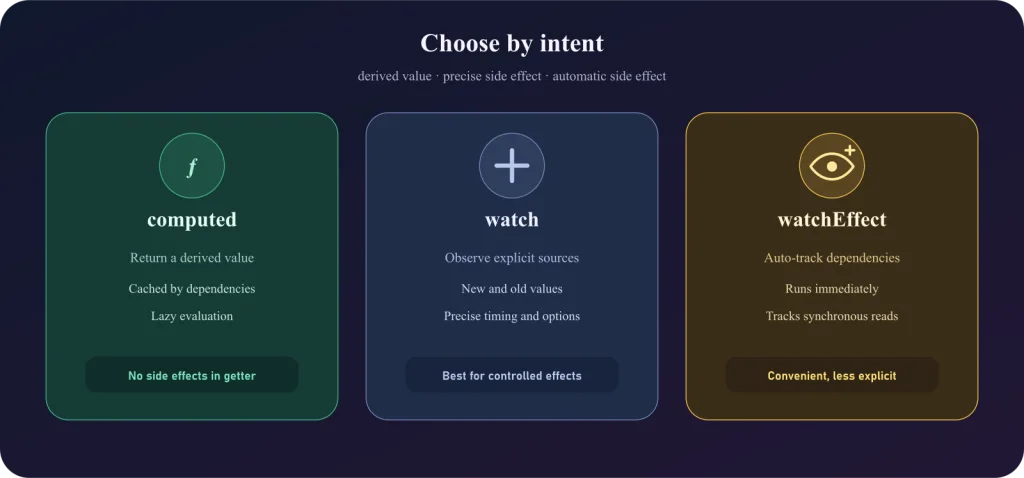
| API | Main purpose | Key behavior |
|---|---|---|
computed | Derive a value from existing state | Lazy and cached; keep the getter pure |
watch | Observe explicit sources precisely | Provides new and old values; suited to requests, logging, and other effects |
watchEffect | Automatically track dependencies read during synchronous execution | Runs immediately by default; concise, but dependencies are less explicit |
Async watchers should cancel or invalidate stale work to avoid races. watchEffect only tracks dependencies accessed synchronously before the first await. Avoid deep watching large object trees.
nextTick and Batched DOM Updates
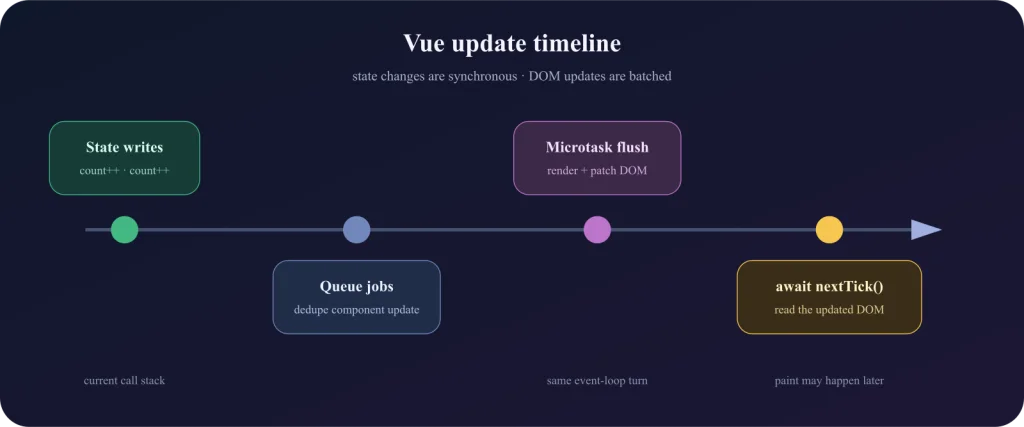
- Reactive state changes synchronously, while DOM updates are queued, deduplicated, and batched.
await nextTick()means Vue has finished the current DOM patch; it does not guarantee browser paint or wait for network and image loading.- Use it only when you must read or manipulate the latest DOM after changing state. Regular data flow should not depend on it.
Composition API and Composables
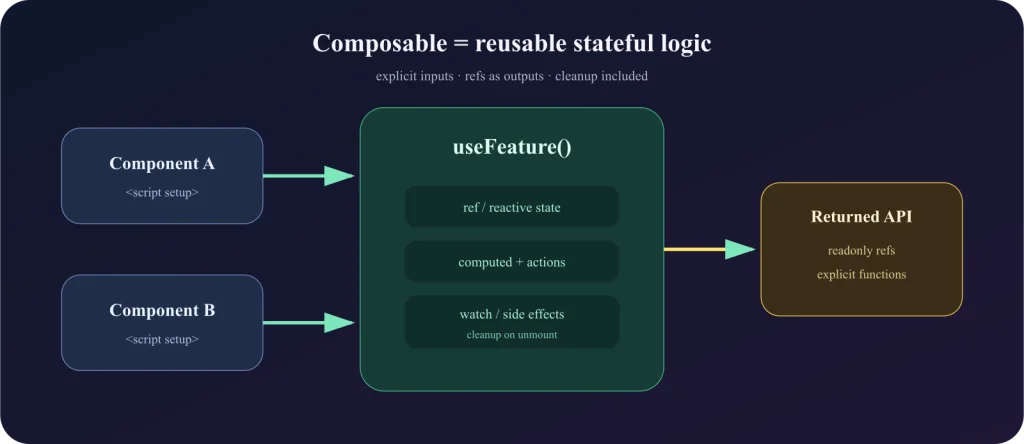
<script setup>is the recommended single-file component syntax for the Composition API, and top-level bindings are available directly in templates.- A composable is a function for reusable stateful logic, usually prefixed with
use; keep inputs, outputs, and side effects explicit. - Return refs, readonly state, and action functions so destructuring preserves reactivity. Put DOM effects in lifecycle hooks and clean them up.
- Reuse UI with components, stateful logic with composables, and stateless calculations with plain utility functions.
Compared with mixins, composables make data origins clearer, avoid most naming collisions, and improve type inference and composition.
This is Part 1 of the front-end interview notes. It distills the existing Vue 3 notes into common conclusions, mechanisms, and pitfalls. A strong answer starts with the conclusion, then adds the mechanism and applicable scenario.
Vue 3 lifecycle
A Vue component goes through creation, mounting, updating, and unmounting. Lifecycle hooks let us run side effects at those stages, such as fetching data, reading the DOM, registering listeners, and releasing resources.
Common hook equivalents
| Stage | Options API | Composition API | Typical use |
|---|---|---|---|
| Before creation | beforeCreate | setup() itself | Early initialization; rarely needed separately |
| Created | created | setup() itself | Establish non-DOM state |
| Before mount | beforeMount | onBeforeMount | Final work before the first render |
| Mounted | mounted | onMounted | Access the DOM or initialize third-party libraries |
| Before update | beforeUpdate | onBeforeUpdate | Read the old DOM state before an update |
| Updated | updated | onUpdated | Work that depends on the latest DOM |
| Before unmount | beforeUnmount | onBeforeUnmount | Last work before cleanup |
| Unmounted | unmounted | onUnmounted | Remove listeners, timers, and subscriptions |
| Cache activated | activated | onActivated | A KeepAlive component becomes active |
| Cache deactivated | deactivated | onDeactivated | A KeepAlive component enters the cache |
| Descendant error | errorCaptured | onErrorCaptured | Local error boundaries and reporting |
There are no onBeforeCreate or onCreated hooks. In the Composition API, setup() already covers the main use cases of those two Options API hooks.
Parent-child mounting generally runs as: parent beforeMount → child mounting → parent mounted. Update order follows the dependencies that changed; during unmounting, the parent enters first and completes after its children.
Common pitfalls
- Register hooks synchronously from
setup(). onMounteddoes not guarantee that images, async components, or requests are complete.- Avoid unconditional state mutations in
onUpdatedto prevent update loops. - Clear timers, events, observers, and subscriptions on unmount.
- SSR does not run
onMounted,onUpdated, oronUnmounted.
Vue 2 vs Vue 3
Vue 3 changed more than reactivity: application instances, logic reuse, compiler optimizations, TypeScript support, and tooling also evolved. Templates, components, and one-way data flow remain familiar.
| Area | Vue 2 | Vue 3 |
|---|---|---|
| Reactive objects | Primarily Object.defineProperty | reactive primarily uses Proxy; ref tracks .value through accessors |
| Adding or deleting properties | Often needs Vue.set and Vue.delete | Proxy can track additions and deletions |
| API organization | Primarily Options API | Options API remains available; Composition API is added |
| Application entry | new Vue() and global APIs | createApp() returns an isolated application instance |
| Root nodes | One root node | Components support fragments and multiple root nodes |
| Logic reuse | Mixins can obscure sources and cause name collisions | Composables group capabilities explicitly with type inference |
| TypeScript | Added later, with a limited type experience | The core is written in TypeScript and SFC tooling is stronger |
| Rendering | Mostly runtime diffing | Compiler-provided patch flags, static caching, and block information |
| State management | Vuex is the common solution | Pinia is recommended for new projects; Vuex 4 remains viable for migration |
| Build tooling | Vue CLI and webpack are common | Vite is the default recommendation for new projects |
Reactivity differences
Vue 2 recursively walks an object and converts existing properties to getters and setters. This creates special constraints around new properties and array indexes. Vue 3 proxies objects and can intercept more operations. That does not make every variable reactive, however: destructuring a reactive object can still disconnect a value from reactivity.
Common migration changes
beforeDestroyanddestroyedbecamebeforeUnmountandunmounted.- Declare events with
emitsordefineEmits; componentv-modelusesmodelValueplusupdate:modelValue. $on,$off,$once, filters, and$childrenwere removed;$listenerswas merged into$attrs.v-ifhas higher priority thanv-foron the same element, though mixing them is still discouraged.
Avoid the vague interview answer that “Vue 3 is simply faster.” A more precise explanation is that Vue 3 uses compile-time hints to reduce runtime traversal and comparison while also improving reactivity, logic reuse, and typing.
Passing data in Vue 3
Vue 3 still follows “props down, events up.” Other mechanisms address two-way binding, deep dependencies, slots, imperative access, and shared state.
| Relationship or scenario | Preferred mechanism | Notes |
|---|---|---|
| Parent to child | props / defineProps | The child reads data owned by the parent |
| Child to parent | emit / defineEmits | Send payloads through clearly named events |
| Controlled two-way binding | Component v-model / defineModel | A prop combined with an update:* event |
| Fallthrough attributes and listeners | $attrs / useAttrs | Useful for wrappers; multi-root components need an explicit target |
| Parent-provided template content | Slots / defineSlots | Scoped slots expose child data to parent-authored templates |
| Deep component tree | provide / inject | Suitable for themes, form context, and component-library internals |
| Imperative parent access | Template refs / defineExpose | Reserve for focus, scrolling, dialogs, and similar capabilities |
| Shared application state | Pinia | Suitable for users, permissions, carts, and other cross-page state |
props and emit
Props are shallowly readonly. A child should not mutate a prop or change an object's nested fields merely to bypass clear ownership. Emit an event and let the parent update its own state.
Component v-model
Starting with Vue 3.4, defineModel() is the recommended way to implement component v-model. It returns a ref; underneath, the contract is still a prop and an update:* event.
<script setup lang="ts">
const model = defineModel<string>({ required: true })
</script>

<template>
  <input v-model="model" />
</template>
The parent can use <SearchInput v-model="keyword" />. Before Vue 3.4, declare a modelValue prop and emit update:modelValue explicitly.
provide and inject
For deep dependencies, prefer a Symbol and InjectionKey to prevent collisions and share types. Expose mutation functions from the provider so ownership stays clear.
Do not reach for Pinia solely because a dependency crosses several levels. Context limited to one component subtree usually belongs in provide/inject; business state independent of the component tree and shared across pages is a better fit for Pinia.
Vue 3 diffing
Diffing does not seek the theoretical minimum edit distance. It synchronizes the new VNode tree with the real DOM at a predictable cost by combining compiler hints with runtime diffing.
From a template to a page update
- Compile: the template becomes a render function that returns a VNode tree.
- Mount: the renderer runs that function and creates real DOM while a reactive effect records the dependencies read during rendering.
- Patch: after a dependency changes, Vue creates a new VNode tree, compares it with the previous tree, and applies the necessary DOM changes.
Vue 3 compiler optimizations
- Static caching: static VNodes are reused after the first render and skipped during updates.
- Patch flags: the compiler records whether only text,
class,style, or specific props can change. - Block tree / tree flattening: a block collects only dynamic descendants, avoiding a walk through the entire static tree.
- Stable fragments: when child order is known to be stable, runtime child-order reconciliation can be skipped.
How keyed children are compared
For a keyed list, the core process can be summarized as follows:
- Synchronize nodes with the same type and key from the start.
- Synchronize matching nodes from the end.
- If the old list ends first, mount the remaining new nodes; if the new list ends first, unmount the remaining old nodes.
- Build a
key → new indexmap for the unordered middle section. - Walk the old middle section. Unmount missing nodes, patch reusable nodes, and record the old-to-new index relationship.
- Compute the longest increasing subsequence for nodes that may move. Nodes in the sequence stay in place; the others are inserted or moved in reverse order, reducing DOM movement.
The longest increasing subsequence optimizes movement only; reuse is decided first by VNode type and key.
Rules for keys
- A
keyshould be unique among siblings, stable, and represent a business entity. - Do not use an array index when the list can be inserted, deleted, or reordered.
- A random key changes every render and repeatedly destroys and recreates nodes.
- An unkeyed list tends to patch same-type nodes in place, which may preserve unexpected input state.
- More keys are not automatically better. A key is an identity hint and can intentionally force component replacement or lifecycle execution.
Vue Router
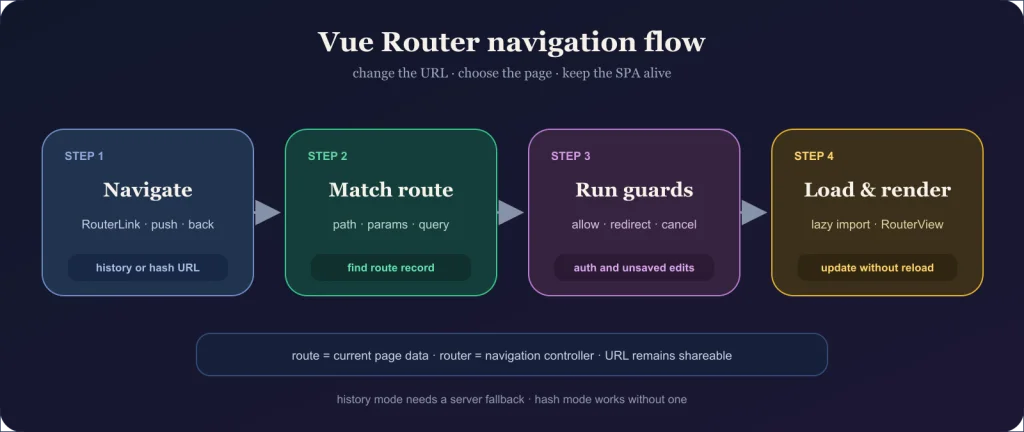
Vue Router is Vue's official client-side router. It changes page components when the URL changes without reloading the whole document, while preserving browser history and shareable links.
Common objects
| API | Purpose | Typical use |
|---|---|---|
useRoute() | Information about the current page | Read params, query, meta, and the current path |
useRouter() | Navigation controller | Call push(), replace(), or back() |
<RouterLink> | Declarative navigation link | Navigate inside the app instead of using a plain <a> |
<RouterView> | Outlet for page components | Displays the component matched by the current URL |
params form part of the path, such as 10 in /users/10; query contains filters after ?, such as /users?page=2. Moving from /users/1 to /users/2 may reuse the same component, so watch the parameter or use onBeforeRouteUpdate() to reload data.
History modes
| Mode | URL | Important detail |
|---|---|---|
createWebHistory() | /users/10 | Recommended; the server must fall back unknown paths to index.html or refreshes return 404 |
createWebHashHistory() | /#/users/10 | Needs no server fallback, but includes # and is weaker for SEO |
createMemoryHistory() | Does not control the browser URL | Common in SSR and tests |
Guards and lazy loading
router.beforeEach()performs global checks such as authentication and permissions. Returnfalseto cancel or a route location to redirect.beforeEnterprotects one route.onBeforeRouteLeave()can warn about unsaved edits.- Define a route component with
() => import(...)so its code is downloaded only when the user visits it.
const routes = [
  {
    path: "/users/:id",
    name: "user",
    component: () => import("./views/UserPage.vue"),
    meta: { requiresAuth: true },
  },
]

router.beforeEach((to) => {
  if (to.meta.requiresAuth && !isLoggedIn) {
    return { name: "login" }
  }
})
Remember: route describes the current page, while router controls navigation. History mode needs a server fallback, permissions belong in guards, and page components should be lazy-loaded by route.
State management with Pinia
Pinia is the officially recommended state-management solution for Vue. Stores are defined with defineStore(), there is no Vuex mutation layer, and the library provides strong TypeScript inference, Devtools integration, plugins, and SSR support.
The three core concepts
state: mutable data, comparable to componentdata.getters: values derived from state, comparable tocomputed.actions: synchronous or asynchronous business operations, comparable to methods.
Pinia supports Option Stores and Setup Stores: the former are structured, while the latter can directly use refs, computed values, watchers, and composables.
// stores/counter.ts
import { computed, ref } from "vue"
import { defineStore } from "pinia"

export const useCounterStore = defineStore("counter", () => {
  const count = ref(0)
  const doubleCount = computed(() => count.value * 2)

  function increment() {
    count.value += 1
  }

  async function loadCount() {
    const response = await fetch("/api/count")
    const data: { count: number } = await response.json()
    count.value = data.count
  }

  function $reset() {
    count.value = 0
  }

  return { count, doubleCount, increment, loadCount, $reset }
})
A Setup Store must return every state property managed by Pinia. Hiding state or making it readonly can break SSR, Devtools, and plugin behavior.
A store is reactive; directly destructuring state or getters breaks reactivity, so use storeToRefs(). Bound actions can be destructured directly.
Mutations and common pitfalls
- State can be changed directly or grouped with
$patch(). - Option Stores provide
$reset(); Setup Stores implement it themselves. - Actions can be asynchronous and do not need a separate Vuex-style mutation step.
- Do not move every piece of temporary component state into Pinia. Local state belongs in a component or composable.
- Persistence is not a Pinia core feature; storage requires attention to sensitive data, migrations, serialization, and SSR.
- Stores can call one another, but avoid circular dependencies during definition. Cross-store reads usually belong inside an action or getter at execution time.
A concise interview answer is: Pinia centralizes business state shared across components and pages; state holds data, getters derive data, and actions implement business operations; use storeToRefs() when destructuring reactive store data in a component.
Vuex vs Pinia
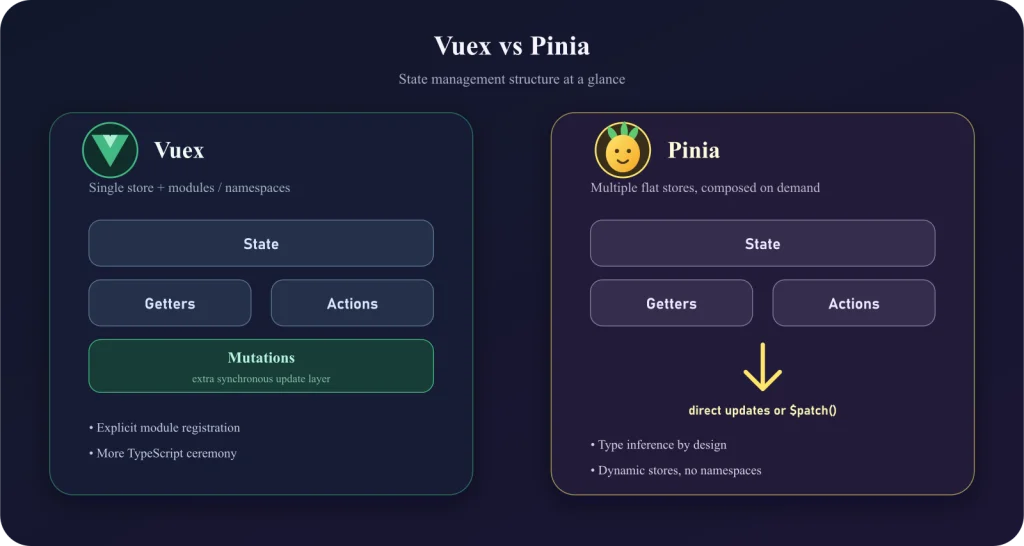
Pinia is the next generation of Vue state management. Instead of continuing with Vuex 5, the Vue team made Pinia the default recommendation because it already implemented most of the intended design.
| Area | Vuex 3 / 4 | Pinia |
|---|---|---|
| Core structure | state, getters, mutations, actions | state, getters, actions |
| State updates | An action usually commits a mutation | Direct updates, actions, or $patch() |
| Modules | Modules and namespaces under one Store | Multiple flat Stores, isolated by Store ID |
| TypeScript | Often needs type wrappers or string keys | Designed for direct inference and autocomplete |
| Dynamic behavior | Dynamic modules require registration | Stores are created on demand |
| Composition API | Supported, but not the original design center | Native Option Store and Setup Store APIs |
Why Pinia is preferred for new projects
- Less ceremony: no mutation layer or nested namespaces, so update paths are shorter.
- Stronger typing: import Stores directly without extensive string keys or custom wrappers.
- Natural composition: Stores can call other Stores and reuse composables.
- Complete tooling: Devtools, SSR, plugins, testing utilities, and HMR remain supported.
- Simpler splitting: independent Stores are easier to maintain and load on demand than deeply nested modules.
“Better” refers mainly to API, typing, and maintainability in new projects. Stable Vuex 3/4 applications do not need an immediate rewrite: they can migrate module by module, and Vuex can coexist with Pinia during the transition.
Part 2: Advanced JavaScript
Start with the conclusion, then explain the runtime mechanism and its boundaries. The goal is not API recall, but explaining why code behaves as it does.
Scope, Execution Context, and Closures
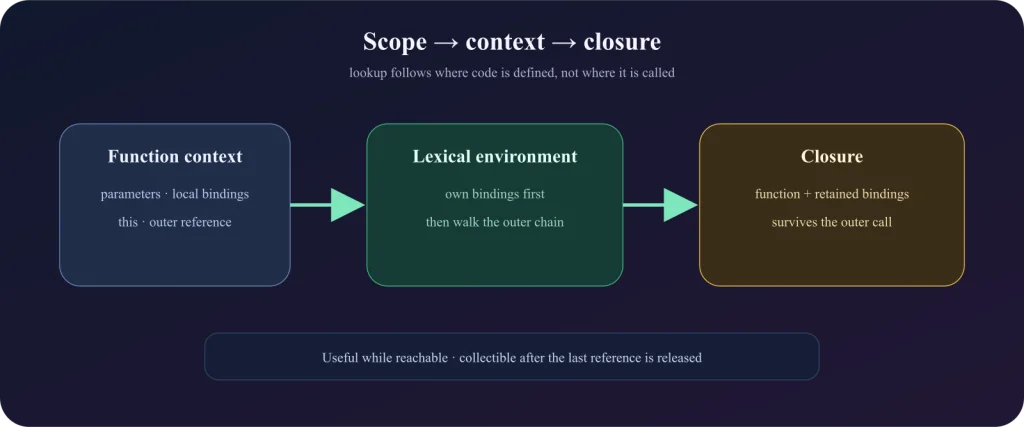
- Scope is determined by where code is defined. Identifier lookup walks outward through lexical environments.
- Every function call creates an execution context containing parameters, local bindings,
this, and an outer reference. varis hoisted and initialized toundefined;letandconststay in the temporal dead zone before declaration.- A closure is a function together with the outer bindings it can access. Those bindings remain alive while the closure is reachable.
this and Function Calls
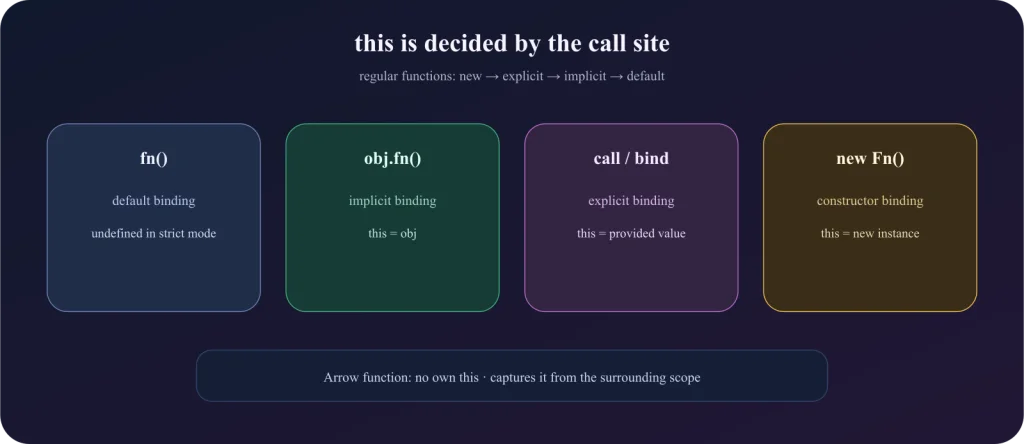
| Call form | this in a regular function |
|---|---|
fn() | undefined in strict mode; usually the global object in a non-strict script |
obj.fn() | The receiver before the dot, obj |
call / apply / bind | The explicitly supplied value |
new Fn() | The newly created instance |
For regular functions, inspect the call site. A useful priority is new > explicit > implicit > default. Arrow functions have no own this, capture it lexically, and cannot be constructors.
Prototype Chain, new, and class
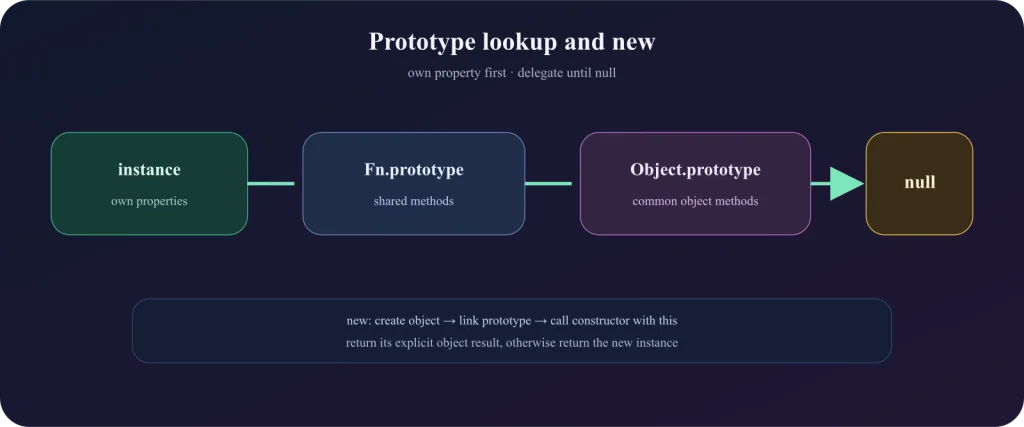
- Property lookup starts on the object and follows
[[Prototype]]untilnull. - An instance delegates to the constructor's
prototype;instanceofessentially checks this chain. newcreates an object, links its prototype, calls the constructor with that object asthis, and then determines the return value.classis clearer syntax built on the prototype mechanism; shared methods still live on the prototype.
Promise and async/await
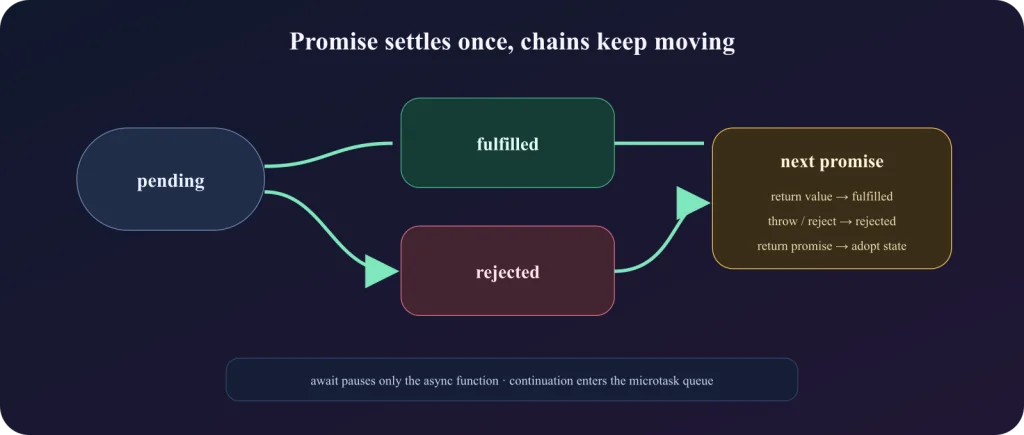
- A Promise moves once from
pendingtofulfilledorrejected; settlement is irreversible. thenandcatchreturn a new Promise: a value fulfills it, a thrown error rejects it, and a returned Promise is adopted.finallynormally preserves the prior result.- An
asyncfunction always returns a Promise.awaitpauses only that function, and its continuation runs as a microtask.
Iterator → Generator → async/await
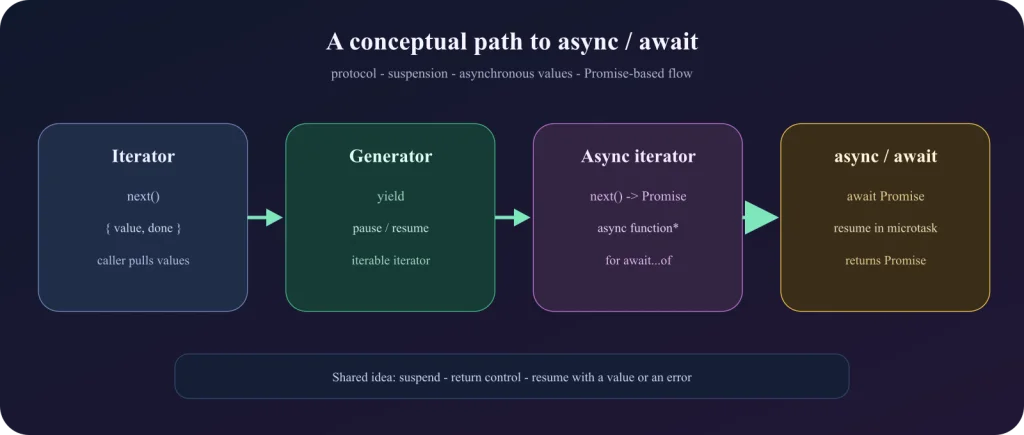
This is a learning path for suspension and resumption, not a specification claim that async/await must be implemented with generators.
| Mechanism | Core contract | Suspension and resumption |
|---|---|---|
| Iterator | next() synchronously returns { value, done } | The consumer pulls the next value; an iterator does not suspend an ordinary function |
| Generator | function* returns an iterable iterator | yield suspends; next(value) passes a value and resumes, while .throw(error) injects an error |
| Async iterator | next() returns Promise<IteratorResult> | async function* can use both await and yield, and for await...of consumes it |
async/await | async returns a Promise; await accepts any value | The value follows Promise resolution, continuation resumes as a microtask, and rejection throws at await |
It is useful to model async/await as “generator-like suspension plus a Promise runner,” but the returned objects and language semantics differ. Even an already-settled Promise does not continue after await on the current synchronous stack.
| Combinator | Result |
|---|---|
Promise.all | Fulfills when all fulfill; rejects early but does not cancel the other work |
Promise.allSettled | Waits for every result and preserves each outcome |
Promise.race | Adopts the first settlement, whether fulfilled or rejected |
Promise.any | Adopts the first fulfillment; rejects only if all reject |
For concurrency, start the work before awaiting it together. When requests can become stale, use AbortController or a result version to prevent races.
The JavaScript Event Loop
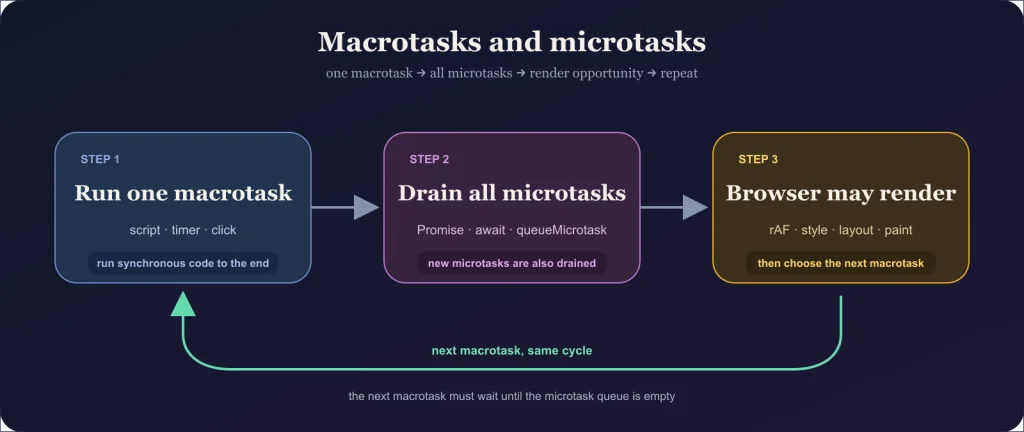
Start with two kinds of work:
- A macrotask is one complete job, such as running a script, handling one click, or running one timer callback. Each turn selects only one macrotask.
- A microtask is follow-up work that must run immediately after the current macrotask. It has priority over the next macrotask, and the whole microtask queue must be drained.
Execution process
- Select and run one macrotask. On initial page load, the whole synchronous script is the first macrotask.
- New macrotasks and microtasks created during execution are placed in their matching queues.
- When the current macrotask finishes, drain all microtasks. Microtasks created by other microtasks are also processed.
- Once the microtask queue is empty, the browser may update the page.
- Select the next macrotask and repeat.
The exact order is therefore: one macrotask → all microtasks → possible rendering → next macrotask. The browser does not run every macrotask first and postpone all microtasks until later.
Common macrotasks and microtasks
| Type | Common source | Meaning |
|---|---|---|
| Macrotask | The initial whole script | Synchronous code that starts when the page loads |
| Macrotask | setTimeout and setInterval callbacks | Expiry only queues the callback; it does not run immediately |
| Macrotask | DOM events such as click and input | User events enter a task queue |
| Macrotask | postMessage and MessageChannel callbacks | Messages wait in a task queue |
| Microtask | Promise.then/catch/finally | Queued after the Promise settles |
| Microtask | Code after await | Promise continuation work |
| Microtask | queueMicrotask | Directly adds a microtask |
| Microtask | MutationObserver callbacks | Reports DOM changes as microtasks |
The browser handles the network part of fetch, so the request itself should not simply be labeled a macrotask or microtask. Code in .then() or after await is a microtask. requestAnimationFrame belongs to the rendering stage and should not be forced into either queue.
Execution-order example
console.log(1)

setTimeout(() => console.log(5), 0)

Promise.resolve().then(() => console.log(3))
queueMicrotask(() => console.log(4))

console.log(2)
The output is 1 → 2 → 3 → 4 → 5. The whole script is the first macrotask and prints 1, 2; the two microtasks then print 3, 4; finally, the timer macrotask prints 5.
Remember: one macrotask at a time, but drain every microtask each time. If microtasks keep creating more microtasks, rendering and the next macrotask continue to wait. Node.js has different phases and queues; this section describes the browser event loop.
Deep Copy vs Shallow Copy
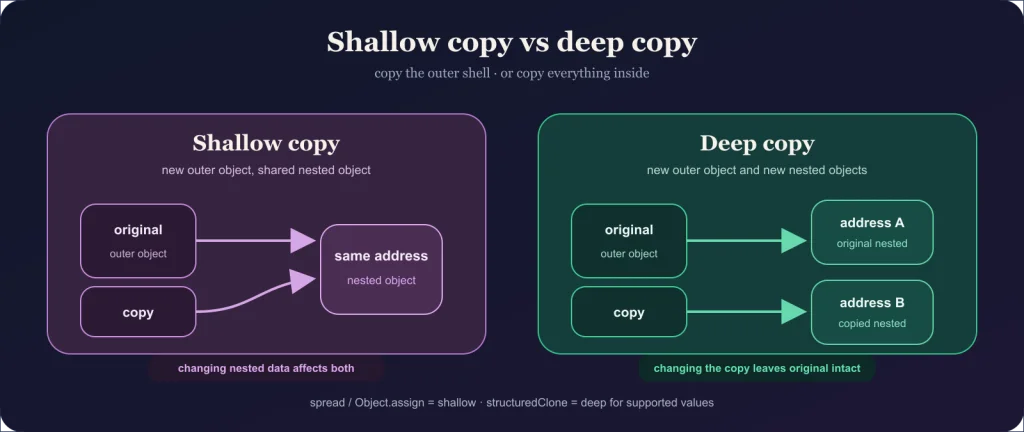
- A shallow copy copies only the outer layer. The two outer objects differ, but nested objects are still shared, so changing nested data affects both.
- A deep copy also copies nested objects. Changing the copy no longer changes the original.
Shallow copy
Spread syntax and Object.assign() copy only the first layer.
const original = {
  name: "Jack",
  address: { city: "Shanghai" },
}

const shallowCopy = { ...original }

shallowCopy.name = "Tom"
shallowCopy.address.city = "Beijing"

console.log(original.name) // "Jack": outer values are independent
console.log(original.address.city) // "Beijing": nested object is shared
Deep copy
Modern browsers provide structuredClone(), which also copies supported nested data.
const original = {
  name: "Jack",
  address: { city: "Shanghai" },
}

const deepCopy = structuredClone(original)

deepCopy.address.city = "Beijing"

console.log(original.address.city) // "Shanghai"
console.log(deepCopy.address.city) // "Beijing"
Writing const copy = original only makes two variables point to the same object; it is not a copy. structuredClone() supports objects, arrays, Map, Set, dates, and cycles, but not functions or DOM nodes. JSON.parse(JSON.stringify(value)) loses some data types and is not a general-purpose deep-copy solution.
Remember: a shallow copy replaces the outer shell; a deep copy also duplicates what is inside.
Browser Rendering and Performance
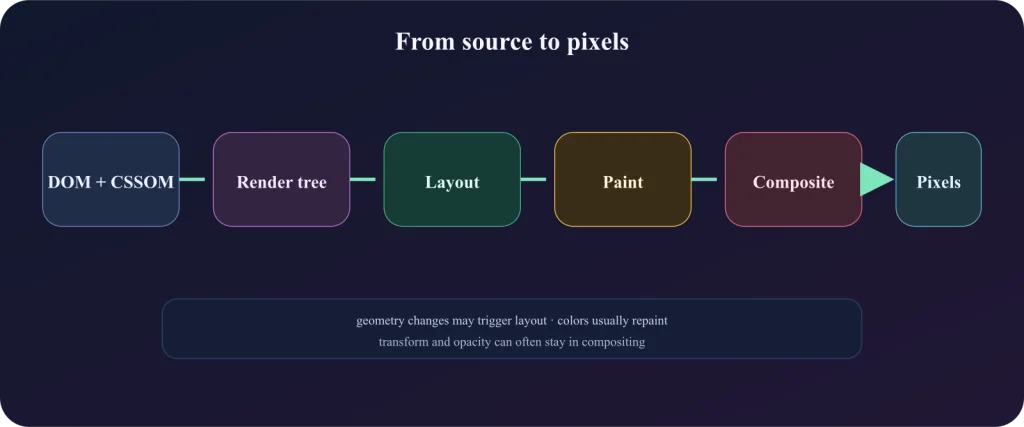
You can think of browser rendering as: read HTML for structure → read CSS for styles → calculate size and position → draw pixels → combine layers.
- Layout (reflow) recalculates how large elements are and where they belong.
- Paint (repaint) redraws pixels such as colors, borders, and shadows.
- Compositing places already-painted layers in the right position and is usually cheaper.
| Common situation | Possible problem | Better approach |
|---|---|---|
Animating width, height, top, or left | Layout is recalculated repeatedly | Prefer transform and opacity for animation |
| Reading dimensions and changing styles in the same loop | The browser repeatedly forces layout | Read everything first, then write everything |
| Updating the screen on every scroll event | Too many calls can drop frames | Throttle the handler and update inside requestAnimationFrame |
| Rendering thousands of rows at once | DOM, layout, and paint all become expensive | Use pagination or a virtual list |
| Loading many large images | Downloading, decoding, and painting take time | Compress images, set dimensions, and lazy-load them |
Script loading also affects the first screen. Normal application scripts usually use defer: they keep document order and run after HTML parsing. Independent scripts such as analytics may use async: they run as soon as they are ready and do not preserve order.
Remember: avoid repeated calculations and avoid drawing invisible content. Move layers for animation instead of repeatedly changing layout. transform and opacity often make compositing possible, but they do not guarantee zero painting cost in every case.
Events, Debounce, and Throttle
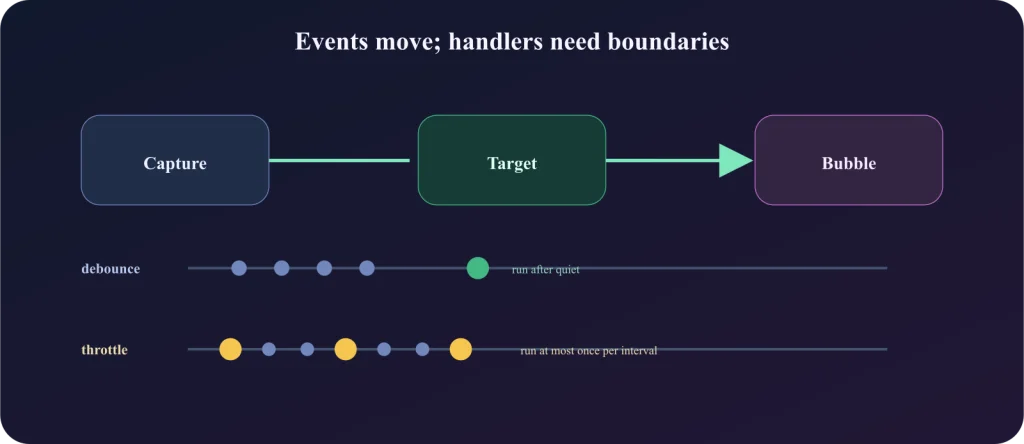
When an element is clicked, the event travels from the outside to the target and then bubbles back out. We can use bubbling to place one listener on a parent and handle all of its buttons. This is event delegation, and it is useful for lists, tables, and elements added later.
| Common situation | Choose | Why |
|---|---|---|
| Search input, form validation, relayout after resizing stops | Debounce | Wait until the user pauses, then run only the last call |
| Scrolling, dragging, mouse movement, scroll progress | Throttle | Run at a fixed interval while the action continues |
| Many delete or edit buttons in a list | Event delegation | Listen on the parent instead of binding every button |
Debounce
Think of it as “wait until the user is finished.” Every trigger restarts the timer, which makes it suitable for search input.
function debounce(fn, delay = 300) {
  let timer

  return (...args) => {
    clearTimeout(timer)
    timer = setTimeout(() => fn(...args), delay)
  }
}

const search = debounce((keyword) => {
  console.log("Search:", keyword)
}, 300)
Throttle
Think of it as “run at most once per time window while the action continues.” This simple version runs immediately on the first trigger.
function throttle(fn, interval = 200) {
  let canRun = true

  return (...args) => {
    if (!canRun) return

    canRun = false
    setTimeout(() => {
      canRun = true
    }, interval)

    fn(...args)
  }
}

const updateScrollProgress = throttle(() => {
  console.log("Update scroll progress")
}, 200)
Remember: use debounce when only the final action matters; use throttle when updates are still needed during continuous activity. Search should also cancel stale requests, and submit buttons need a request lock rather than relying only on debounce or throttle.
Part 3: React
This part starts with what happens after state changes and keeps only the React topics most often discussed in interviews: rendering, Hooks, data flow, performance, and routing. Explain how data moves first, then name the APIs.
React Rendering, Fiber, and Diffing
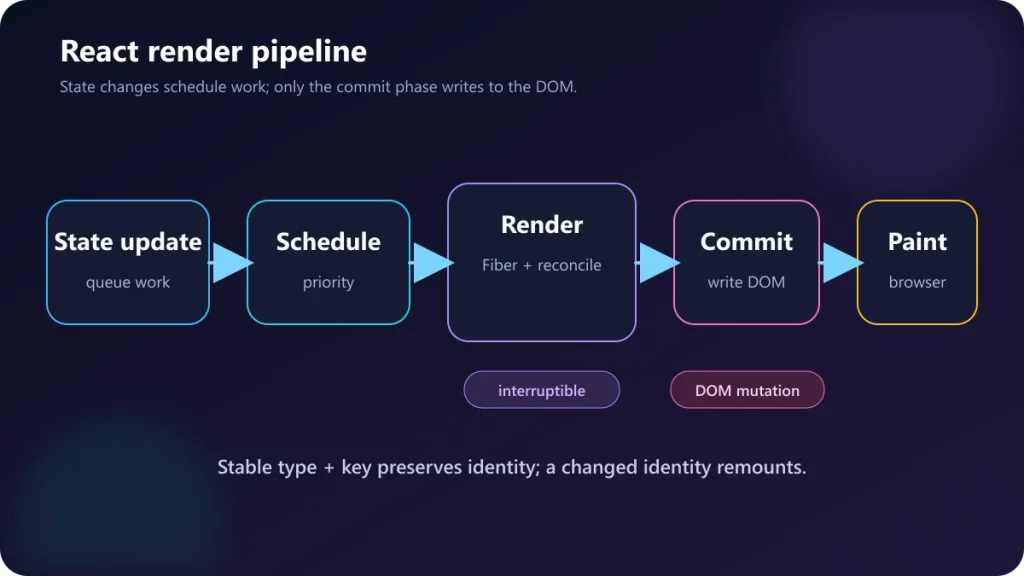
Remember an update as: trigger → schedule → calculate during Render → change the DOM during Commit → browser paint.
| Phase | What happens | May touch the DOM? |
|---|---|---|
| Trigger and scheduling | A state setter requests an update; React schedules work by priority | No |
| Render | React calls components, builds the next element tree, and reconciles differences | No; rendering must stay pure |
| Commit | React applies DOM changes, updates refs, and runs layout-related effects | Yes; this phase cannot be interrupted |
| After browser paint | React normally runs useEffect | It may sync external systems; keep it light |
What Fiber solves
Fiber breaks the component tree into schedulable units of work. React may pause, resume, or discard uncommitted Render work so urgent updates such as typing can go first. Commit must still finish as one unit, so users never see a half-updated page.
Fiber's main value is scheduling, not simply “making Diff faster.” Render may run more than once, so a component body must not send requests, mutate the DOM, or change external variables.
Diffing and keys
- When element types differ, React normally removes the old subtree and mounts a new one. Matching types continue with props and children.
- Type and
keytogether identify a component. A stable identity under the same parent lets React preserve state and DOM correctly. - Do not use an array index when a list can be inserted into, deleted from, or reordered. A random key remounts the item on every render.
- A key only needs to be unique among siblings and is not passed to the component as a normal prop.
Remember: Render calculates, Commit changes; type and key decide whether an identity can be reused.
Core React Hooks
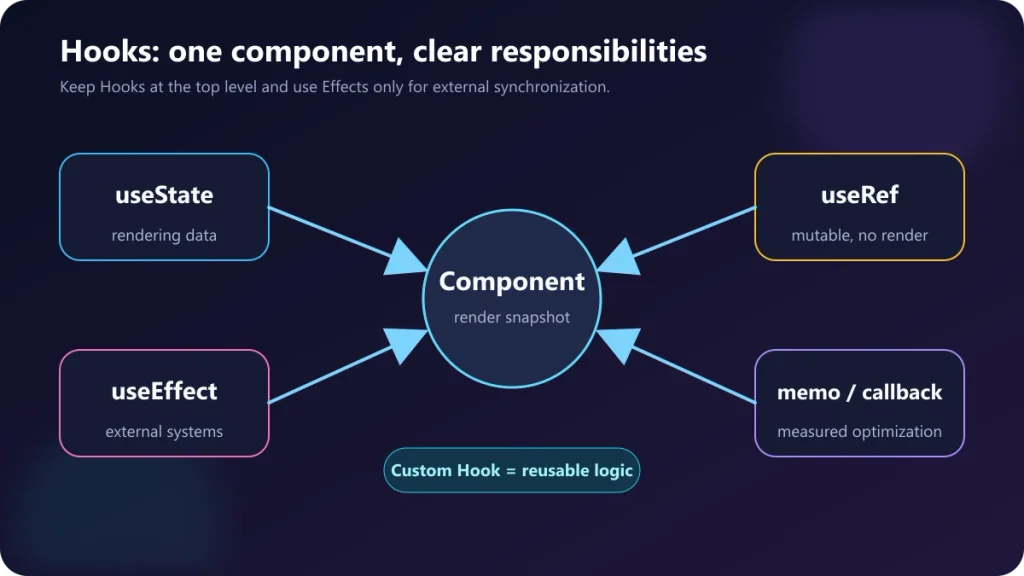
Call Hooks only at the top level of a function component or custom Hook—not inside conditions, loops, or ordinary functions. React relies on a stable call order to associate each Hook with its state.
| Hook | Main use | Common pitfall |
|---|---|---|
useState | Data that affects rendering | Each render sees a snapshot; use functional updates for old values |
useEffect | Synchronizing requests, subscriptions, and timers | Declare every dependency and clean up before reruns and unmounts |
useRef | A DOM node or mutable value outside rendering | Changing .current does not trigger a render |
useMemo | Caching an expensive calculation | It is an optimization, not a correctness guarantee |
useCallback | Caching a function identity | Usually useful with a memoized child or as a Hook dependency |
| Custom Hook | Reusing stateful logic | Start with use; callers reuse logic, not the same state |
State snapshots and batching
State is fixed within one render. When several updates depend on the previous value, give React a function that calculates the next one:
setCount((count) => count + 1)
setCount((count) => count + 1)
React batches updates from the same turn to avoid redundant renders. Calling a setter requests the next render; it does not change the variable already captured by the current function.
useEffect and the lifecycle
useEffect is not a lifecycle bucket for arbitrary logic. It synchronizes a component with systems outside React. If a value can be calculated during rendering, do not store another copy through an Effect.
useEffect(() => {
  const controller = new AbortController()

  loadUser(userId, controller.signal)
  return () => controller.abort()
}, [userId])
- Setup runs after the first commit—similar to mounting.
- When dependencies change, cleanup runs with old values before setup runs with new values—similar to updating.
- Cleanup runs one final time on unmount.
- In development, Strict Mode may run setup → cleanup → setup once more to reveal incomplete cleanup.
Component Communication and State Management
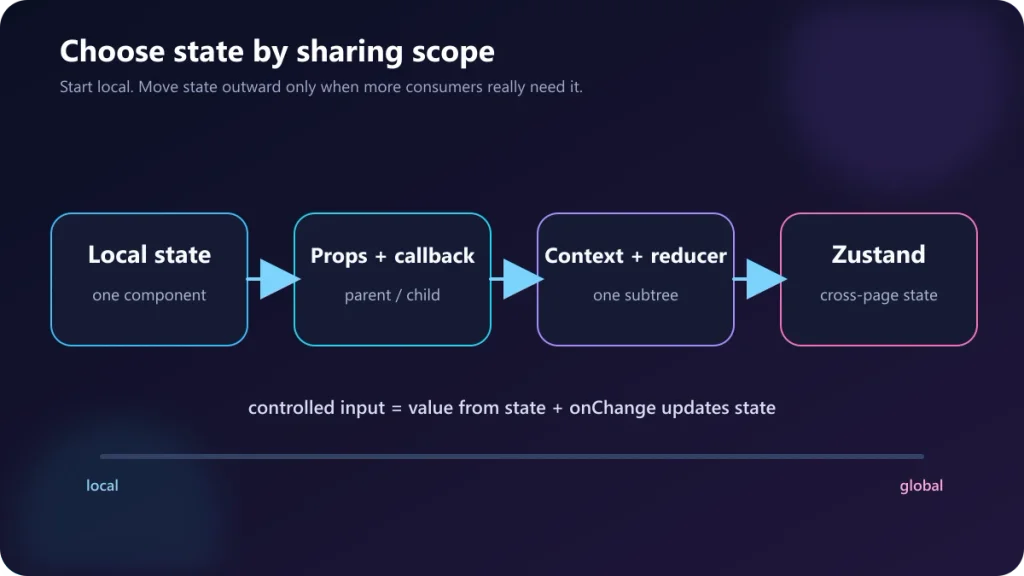
Keep state as close as possible to where it is used. Lift it or move it into a global store only when several consumers genuinely need it.
| Scope or relationship | Preferred approach | Typical examples |
|---|---|---|
| One component | useState / useReducer | Open state, a form draft |
| Parent to child | Props | Data, configuration, event handlers |
| Child to parent | Callback prop | Save, delete, input changes |
| Siblings | Lift state to their common parent | A filter and its result list |
| One stable subtree | Context | Theme, locale, auth, form context |
| Complex cross-page state | An external store such as Zustand | User, permissions, cart, editor state |
Controlled vs uncontrolled components
- A controlled component gets its value from React state and writes changes back through
onChange. Validation, coordination, and submission stay in one place. - An uncontrolled component keeps its value mainly in the DOM and is read through a ref. It suits simple forms, file inputs, or integration with non-React code.
Context, useReducer, and Zustand
- Context solves deep value passing; it is not a complete state manager. When a Provider value changes, its consumers render again, so split large, frequently changing values.
useReducersuits state with several update rules inside a component or subtree. The reducer centralizes what each action means.- Zustand suits shared state independent of component depth. A store also works outside components, and selectors let a component subscribe only to the slice it needs.
Remember: keep local state local; props preserve one-way flow, Context crosses levels, and a store crosses pages.
React Performance
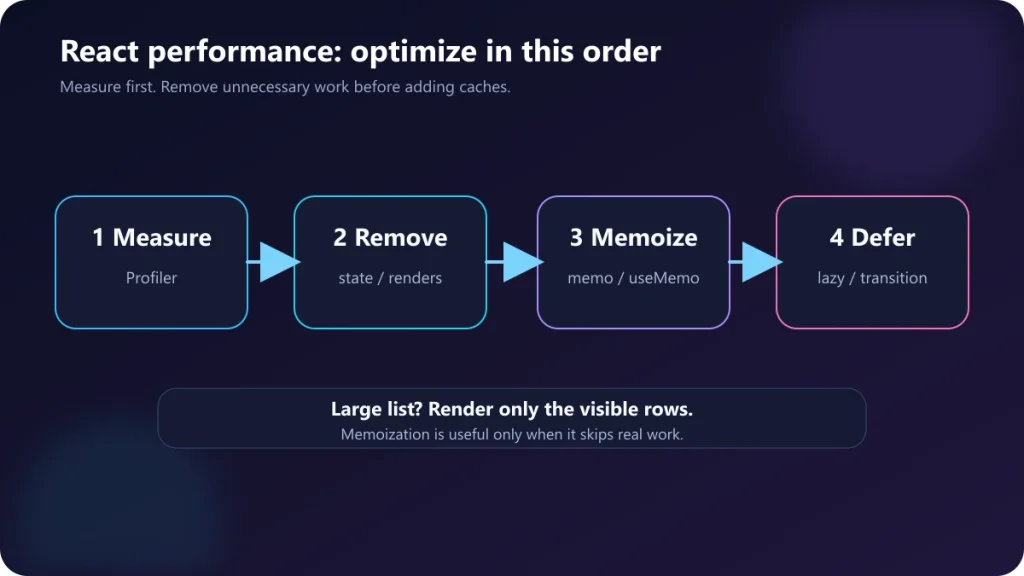
Use this order: measure → remove unnecessary work → cache → split or defer. Do not begin by wrapping every object and function in a memoization Hook.
| Technique | Use it when |
|---|---|
| Smaller components and local state | A parent update currently rerenders a large area |
memo | A child is noticeably expensive and its props usually stay the same |
useMemo | A calculation is measurably expensive or feeds a memoized child |
useCallback | A function goes to a memoized child or is another Hook's dependency |
lazy + Suspense | A page, dialog, or editor does not belong in the initial bundle |
useTransition | Search results, charts, or tab content must not block typing |
| List virtualization | A long list should render only rows near the viewport |
memo shallowly compares props. A newly created object, array, or function is still a new reference. Do not add useMemo or useCallback only to make references look stable; they also add comparisons and code complexity.
Use React DevTools Profiler to find the actual slow component, then verify that the change helped. The goal is less real work, not more Hooks.
React Router
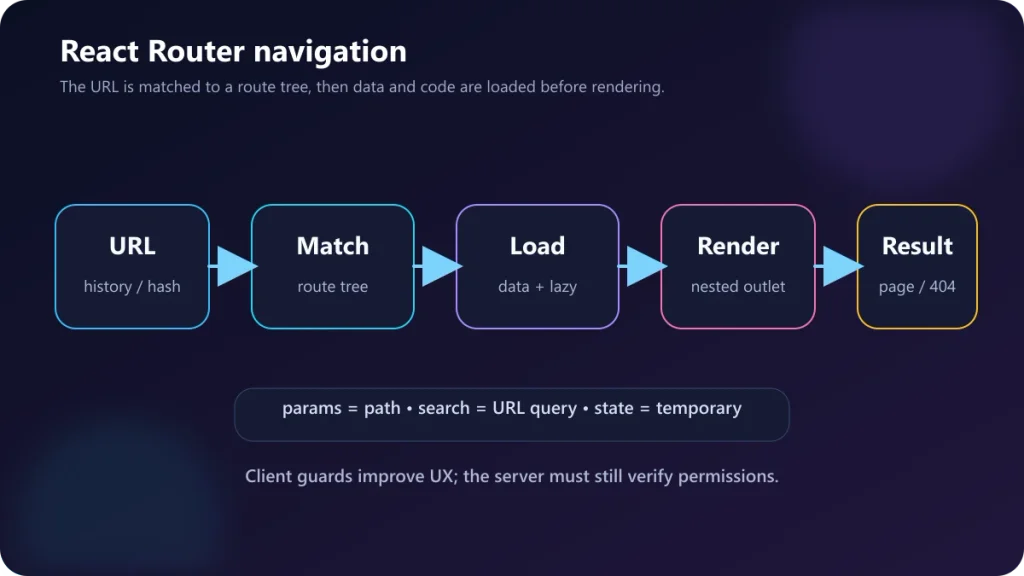
A client-side router watches the URL, matches a route tree, and renders the corresponding components so a single-page app can switch screens without a full reload.
Routing modes and values
| Item | Key point |
|---|---|
| Browser History | Clean URLs; the server must send index.html for unknown application paths |
| Hash | Includes # and normally needs no server fallback configuration |
| Params | Part of the path, such as /users/:id; use for resource identity |
| Search Params | ?page=2&sort=time; good for filters and pagination, shareable and refresh-safe |
| Location State | Hidden from the URL; good for temporary navigation data, not a shareable or durable source |
What matters in a real project
- Nested routes reuse navigation, sidebars, and other shells through a parent layout and
<Outlet />. - Lazy-load page code. A data-aware route can load data before rendering and expose a clear pending state.
- Show a 404 for unmatched paths and use the nearest error boundary for rendering or loading failures.
- Centralize login and permission checks in a route layout or loader. Client checks improve UX; the server must still enforce authorization.
- Use
navigatefor programmatic navigation and prefer<Link>for links so accessibility and browser behavior are preserved.
Remember: the URL is part of page state. Match the route, load code and data, then render the nested page.
Part 4: Other Topics
i18n Internationalization
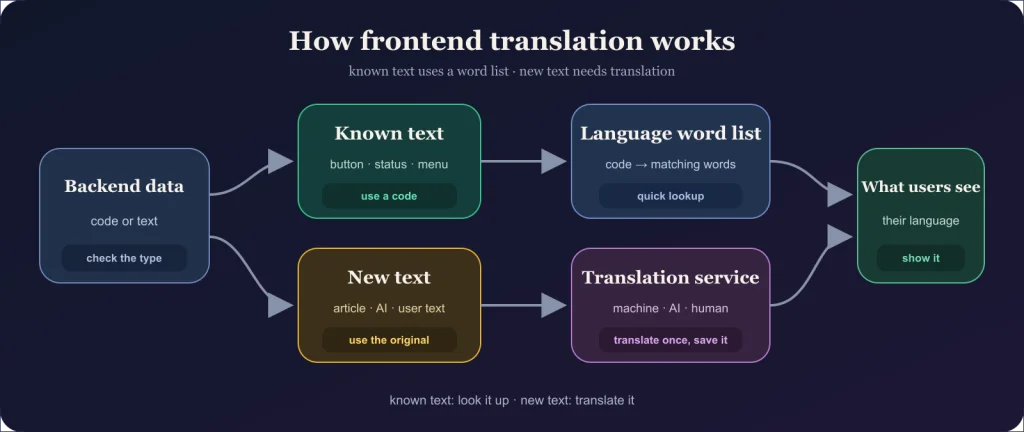
Think of i18n as a fill-in-the-blank system. Remove the words from the page but keep named spaces for them. When the user chooses a language, fill those spaces from the matching language word list.
When the backend sends English, first decide which kind it is:
| English content | What to do | Examples |
|---|---|---|
| Fixed text | The backend returns a stable code; the frontend looks it up in the language word list | Buttons, menus, order statuses, error messages |
| Text that changes every time | The backend calls a translation service or AI, saves the result, and returns it | Articles, AI responses, user input |
For example, the backend should return PAYMENT_FAILED instead of making the frontend guess what Payment failed means. The frontend can then show the matching text in any language. An “English → code” converter can temporarily support an old API, but it breaks when the English wording changes.
Tools such as Vue I18n manage the frontend's language word lists; they do not translate articles automatically. Dynamic text needs a service such as DeepL, Google Translate, or an AI model. The backend normally calls it so credentials stay private and results can be cached to control cost.
Remember: look up fixed text and translate changing text. The frontend displays it; the backend provides codes, translation, and caching.