My notes on JavaScript syntax, common methods, and browser interactions.
Running the examples: Run each language example independently in a modern browser or Node.js. DOM, event, and BOM examples require a browser. Save complete HTML examples as HTML files and open them directly. ES modules run in strict mode automatically.
01 Language and runtime
ECMAScript defines syntax, types, operators, and standard built-in objects. A JavaScript runtime also supplies host APIs.
| Layer | Responsibility | Typical APIs |
|---|---|---|
| ECMAScript | Language core | Array, Math, JSON |
| DOM | Document trees and node operations | document, Element |
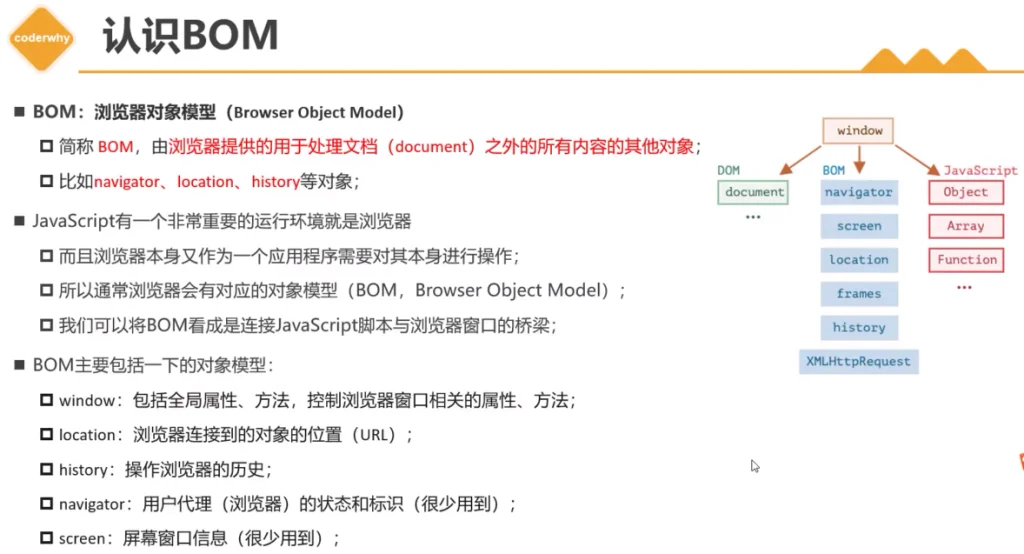
| BOM | Traditional umbrella term for browser windows, addresses, and history | window, location, history |
alert() and prompt() are browser APIs. The host supplies console, with implementations in both browsers and Node.js. Node.js has no page DOM by default. BOM is not a separate, unified specification.
02 Comments, variables, and scope
Comments and naming
Use // for single-line comments and /* ... */ for block comments. The /** ... */ form is commonly used for JSDoc: it helps editors understand parameters and return values, but does not perform runtime type validation.
/**
 * @param {string} name
 * @returns {string}
 */
function greet(name) {
  return "Hello, " + name
}

console.log(greet("Jack")) // "Hello, Jack"
Identifiers are case-sensitive. Common names start with a letter, _, or $; later characters can include digits. Many Unicode characters are also permitted. Reserved words cannot be used directly as variable names. Use camelCase for variables and functions and PascalCase for classes and constructors. foo, bar, and baz are placeholder names with no special meaning.
const, let, and var
| Declaration | Scope | Reassignment | Access before initialization |
|---|---|---|---|
const | Block | No | Temporal dead zone; throws ReferenceError |
let | Block | Yes | Temporal dead zone; throws ReferenceError |
var | Function or global | Yes | Declaration is hoisted; value is undefined |
Prefer const; use let when reassignment is necessary. const fixes the binding, so object properties can still change. After let value executes, its value is undefined. A regular const declaration requires an initializer.
const user = { name: "Jack" }
user.name = "Jill"
console.log(user.name) // "Jill"

let count
console.log(count) // undefined
count = 1
Scope and the global object
Functions can access outer scopes. Identifier lookup starts in the current scope and proceeds outward along the scope chain. A local name can shadow an outer name. Block scope for let and const also applies to loops and conditional blocks.
In a browser's classic script, a top-level var declaration normally corresponds to a window property; top-level let and const do not. ES module declarations have module scope, and Node.js modules have their own scope too. Thus var does not always add properties to window. Reading an undeclared identifier normally throws ReferenceError; avoid accidental global properties created by assignments in non-strict mode.
03 Types and conversion
Seven primitive types and Object
JavaScript has 8 language types: 7 primitive types and Object. Functions and arrays are objects.
| Type | Examples | typeof result |
|---|---|---|
| Undefined | undefined | "undefined" |
| Null | null | "object", a historical quirk |
| Boolean | true, false | "boolean" |
| Number | 42, NaN, Infinity | "number" |
| BigInt | 42n | "bigint" |
| String | "hello" | "string" |
| Symbol | Symbol("id") | "symbol" |
| Object | {}, [] | "object" |
typeof is an operator that returns a string; for an ordinary function it returns "function". It never returns "null". Test for null with value === null and for arrays with Array.isArray(value). See ECMAScript language types.
Number, BigInt, and Symbol
Number uses double-precision floating-point values. Infinity and -Infinity represent positive and negative infinity. NaN represents an invalid numeric result and is unequal to itself. Use Number.isNaN() to detect it; unlike global isNaN(), this method does not first coerce its argument to a number.
Number.MIN_VALUE is the smallest positive value, not the most negative value. Safe integer limits are Number.MIN_SAFE_INTEGER and Number.MAX_SAFE_INTEGER. Consider BigInt for larger exact integers; do not directly mix it with Number in arithmetic. Each Symbol() creates a unique value that can serve as an object property key.
console.log(0.1 + 0.2 === 0.3) // false
console.log(Number.isNaN(NaN)) // true
console.log(Number.isNaN("hello")) // false
console.log(Number.MAX_SAFE_INTEGER) // 9007199254740991
console.log(9_007_199_254_740_993n + 1n) // 9007199254740994n
console.log(Symbol("id") === Symbol("id")) // false
String, Boolean, undefined, and null
Strings use single quotes, double quotes, or backticks. Template literals support ${expression} interpolation. Common escapes include \n, \t, \", and \'. Boolean has only two values: true and false.
undefined commonly appears for uninitialized variables, missing properties or arguments, and functions without a returned value. null commonly expresses an intentional absence. Choose {} when you need an empty object and null when no object is currently available; objects do not have to be initialized to null.
Explicit conversion and truthiness
Use String(), Number(), and Boolean() to make conversions explicit. You cannot call .toString() directly on null or undefined, but both can be passed to String(). The + operator may concatenate strings, so it is not simply a numeric conversion.
console.log(String(null)) // "null"
console.log(Number("42")) // 42
console.log(Number("")) // 0
console.log(Number(undefined)) // NaN
console.log("5" + 2) // "52"
console.log("5" - 2) // 3
console.log(Boolean([])) // true
console.log(Boolean({})) // true
The usual falsy values are false, 0, -0, 0n, "", null, undefined, and NaN. Other common values are truthy, including [], {}, "0", and "false". The legacy browser object document.all is a special falsy exception; avoid it in new code.
04 Operators and control flow
Arithmetic, comparison, and precedence
** performs exponentiation and % computes a remainder. Compound assignments such as += and -= update a variable. a = b = c = 4 associates right to left, but separate declarations are easier to read. Common arithmetic precedence is parentheses → exponentiation → multiplication, division, remainder → addition, subtraction. Use parentheses for complex expressions.
=== does not coerce types. == follows abstract equality rules; it does not always convert both sides to Number. For example, null == undefined is true, while null == 0 is false. Prefer === and !== in everyday code.
console.log(2 ** 3) // 8
console.log(7 % 3) // 1
console.log(0 == false) // true
console.log(0 === false) // false
console.log(null == undefined) // true
console.log(null == 0) // false
Logical operators, short-circuiting, and XOR
| Operator | Return rule | Example |
|---|---|---|
a && b | Return a if falsy, otherwise b | 0 && 10 → 0 |
| `a | b` | |
!a | Negate the Boolean conversion; return a Boolean | !0 → true |
a ?? b | Return b only if a is null or undefined | 0 ?? 10 → 0 |
&&, ||, and ?? short-circuit and return operands, which need not be Booleans. For Boolean conditions, && requires both sides to be true; || requires at least one.
console.log("" || "guest") // "guest"
console.log(0 ?? 10) // 0
console.log(5 ^ 3) // 6
console.log(5 ^ 0) // 5
console.log(5 ^ 5) // 0
console.log((5 ^ 3) === (3 ^ 5)) // true
^ is bitwise XOR, not exponentiation or logical OR. Number bitwise operations use 32-bit integer semantics, so large integers and fractions may lose information. Do not assume x ^ 0 === x for every Number. Parenthesize XOR expressions when comparing their results.
Branches and switch
if converts its condition to a Boolean. Keep braces even for a single statement. The conditional operator suits short either-or expressions. switch matches cases using strict equality. Without break or another control-flow exit, execution falls through to following cases.
const score = 85
let grade
if (score >= 90) {
  grade = "A"
} else if (score >= 60) {
  grade = "B"
} else {
  grade = "C"
}
console.log(grade) // "B"
console.log(score >= 60 ? "pass" : "retry") // "pass"

switch (grade) {
  case "A":
    console.log("excellent")
    break
  case "B":
    console.log("good")
    break
  default:
    console.log("keep practicing")
}
Loops and iterables
Use for when an index is useful. while checks before each iteration, while do...while executes at least once. break exits a loop; continue moves to the next iteration. for...of iterates values of iterables such as arrays and strings. Plain objects are not iterable by default; use Object.entries() instead.
for (let index = 0; index < 3; index++) {
  console.log(index)
}

let remaining = 2
while (remaining > 0) {
  remaining--
}

do {
  remaining++
} while (remaining < 1)

for (const value of ["a", "b"]) {
  console.log(value)
}
05 Functions and callbacks
Declarations, expressions, and return values
Functions are callable objects and values that can be passed around. A function declaration can normally be called before its declaration within the same scope. A function expression becomes usable after the expression is evaluated and assigned. return exits the current function immediately; without an explicit returned value the result is undefined.
console.log(add(2, 3)) // 5
function add(left, right) {
  return left + right
}

const multiply = function (left, right) {
  return left * right
}
const square = (value) => value ** 2
console.log(multiply(2, 3), square(4)) // 6 16
arguments and rest parameters
Ordinary functions can read supplied arguments through the array-like arguments object, which is not an array. Arrow functions have no own arguments binding and resolve it from an outer scope. Prefer rest parameters such as ...values in new code: they produce a real array.
function inspectArguments() {
  return Array.from(arguments)
}

function sum(...values) {
  return values.reduce((total, value) => total + value, 0)
}

console.log(inspectArguments(1, 2)) // [1, 2]
console.log(sum(1, 2, 3)) // 6
First-class functions, callbacks, and closures
Functions can be assigned to variables, stored in objects or arrays, passed as arguments, and returned. A function that accepts or returns a function is commonly called a higher-order function. A callback is handed to other code to be called; it may run synchronously or later, so callbacks are not necessarily asynchronous. A closure preserves access to a function's lexical environment.
function apply(value, transform) {
  return transform(value)
}
console.log(apply(3, (value) => value * 2)) // 6

function createCounter() {
  let count = 0
  return () => ++count
}
const next = createCounter()
console.log(next(), next()) // 1 2

const actions = { next }
console.log(actions.next()) // 3
Immediately invoked function expressions
An IIFE is a function expression called immediately after it is defined. It was often used to isolate scope and can accept arguments and return a value. Modern code can also use block scope and ES modules. The leading semicolon prevents accidental continuation of a preceding expression.
;(() => {
  const message = "isolated"
  console.log(message)
})()

const result = (function (name) {
  return "Hello, " + name
})("Jack")
console.log(result) // "Hello, Jack"
06 Objects, this, and construction
Properties and enumeration
Property keys are strings or Symbols; numeric keys become strings. Object literals {} are common, and constructors or classes provide other ways to create objects.
| Operation | Scope |
|---|---|
Object.keys(obj) | Own enumerable string keys |
Object.values(obj) | Corresponding property values |
Object.entries(obj) | Corresponding key-value pairs |
for...in | Enumerable string keys, including inherited ones |
Reflect.ownKeys(obj) | All own keys, including Symbols and non-enumerable keys |
Prefer Object.keys() or Object.entries() when only own properties matter. With for...in, use Object.hasOwn() to filter inherited properties when needed.
const user = { name: "Jack", age: 18 }
for (const [key, value] of Object.entries(user)) {
  console.log(key, value)
}
Passing values, shared references, and shallow copies
JavaScript arguments are always passed by value. For an object, the copied value is a reference, so two variables can refer to the same object. Mutating that object is visible through either reference; reassigning a parameter does not replace the caller's variable.
“Primitives on the stack, objects on the heap” is a teaching model, not an ECMAScript guarantee about physical memory layout. Reason in terms of values, references, object identity, and reachability.
const user = { name: "Jack", profile: { city: "Shanghai" } }
const alias = user
console.log(alias === user) // true
console.log({} === {}) // false

function rename(person) {
  person.name = "Jill"
}
function replace(person) {
  person = { name: "Other" }
  return person
}
rename(user)
replace(user)
console.log(user.name) // "Jill"

const copy = { ...user }
copy.profile.city = "Tokyo"
console.log(user.profile.city) // "Tokyo"
Object spread { ...user } makes a shallow copy: nested objects still share references. A shallow copy is not a deep clone.
this depends on the call
| Call form | this inside an ordinary function |
|---|---|
obj.method() | The receiver obj at call time |
fn() | undefined in strict mode; usually the global object otherwise |
fn.call(obj) / fn.apply(obj) | Explicitly supplied value, with substitution or boxing possible in non-strict mode |
fn.bind(obj) | Returns a function with bound this; constructor calls have additional rules |
new Fn() | Normally the newly created instance |
Arrow functions have no own this binding and capture it from their enclosing lexical environment. call, apply, and bind cannot change that binding. “The object one level above” is therefore not a general rule. See MDN: this.
"use strict"

const user = {
  name: "Jack",
  getName() {
    return this.name
  },
  makeReader() {
    return () => this.name
  },
}
console.log(user.getName()) // "Jack"
console.log(user.getName.call({ name: "Jill" })) // "Jill"
const readName = user.makeReader()
console.log(readName.call({ name: "Other" })) // "Jack"

function inspectThis() {
  return this
}
console.log(inspectThis()) // undefined
Factories, constructors, and classes
A factory directly returns an object. A constructor is used with new and is conventionally named in PascalCase. Both create objects; choose based on needs such as shared prototype behavior and instance relationships. A factory can also return objects with custom prototypes, so factory-created objects are not inherently untyped.
function createStudent(name) {
  return { name }
}

function Student(name) {
  this.name = name
}
Student.prototype.greet = function () {
  return "Hello, " + this.name
}

class Learner {
  constructor(name) {
    this.name = name
  }
  greet() {
    return "Hello, " + this.name
  }
}

console.log(createStudent("Jack").name) // "Jack"
console.log(new Student("Jack").greet()) // "Hello, Jack"
console.log(new Learner("Jill").greet()) // "Hello, Jill"
For an ordinary constructor, understand new as follows:
- Create an object whose internal
[[Prototype]]points to the constructor'sprototype, or a default prototype if that property is not an object. - Run the constructor body with
thisbound to the new object. - Use an explicitly returned object if present; otherwise return the new object.
An instance's internal prototype is not its own .prototype property. Classes build on prototypes but add semantics such as requiring new and strict mode within the class body. Arrow functions cannot be constructors.
07 Built-in objects and useful methods
Wrappers, Number, and Math
Primitive strings and numbers can use methods because property access performs wrapper conversion. Usually use primitive values rather than new Number(), new String(), or new Boolean(). For example, new Boolean(false) is an object and is truthy in a condition.
| API | Meaning and limits |
|---|---|
number.toString(radix) | Convert to a base from 2 to 36 |
Number.parseInt(text, radix) | Parse an integer prefix; specify the base explicitly |
Number.parseFloat(text) | Parse a decimal floating-point prefix |
number.toFixed(digits) | Return a fixed-point string; digits ranges from 0 to 100 |
Math.floor(x) / Math.ceil(x) | Round down / up |
Math.round(x) | Round to nearest, with ties toward positive infinity |
Math.random() | Return a pseudorandom value in [0, 1) |
Math.pow(x, y) | Exponentiation; also written x ** y |
parseInt and parseFloat can accept a valid prefix without validating the entire input. toFixed() does not guarantee the elimination of binary floating-point error.
console.log((10).toString(8)) // "12"
console.log(Number.parseInt("12", 8)) // 10
console.log(Number.parseInt("12px", 10)) // 12
console.log(Number("12px")) // NaN
console.log(Number.parseFloat("3.14rem")) // 3.14
console.log((12.345).toFixed(2)) // "12.35"
console.log(Math.floor(-1.2), Math.ceil(-1.2)) // -2 -1
console.log(Math.round(-1.5)) // -1
Strings: immutability and UTF-16
String methods return new values without mutating the original string. length and indexing count UTF-16 code units. for...of iterates Unicode code points, but a code point is not necessarily a complete user-perceived character.
const message = "Hello, Jack"
console.log(message.length) // 11
console.log(message[99]) // undefined
console.log(message.charAt(99)) // ""
console.log(message.toUpperCase()) // "HELLO, JACK"
console.log(message) // "Hello, Jack"
console.log("😀".length) // 2
console.log([..."😀"].length) // 1
| Need | Methods | Notes |
|---|---|---|
| Search | indexOf(), includes() | Index or -1; Boolean result |
| Prefix / suffix | startsWith(), endsWith() | Boolean result |
| Extract | slice(start, end) | Start inclusive, end exclusive; negative indices allowed |
| Extract | substring(start, end) | Treat negatives as 0; swap reversed endpoints |
| Replace | replace(), replaceAll() | With a string search, replace() replaces only the first match |
| Trim outer whitespace | trim() | Keeps internal whitespace |
| Split / join | split() / array join() | Convert between strings and arrays |
| Concatenate | concat(), +, template literals | Return a new string |
substr() is a legacy API; prefer slice() in new code.
const text = "  hello-world  "
console.log(text.trim().split("-").join(" ")) // "hello world"
console.log("hello".slice(-2)) // "lo"
console.log("hello".substring(4, 1)) // "ell"
console.log("a-a".replace("a", "b")) // "b-a"
console.log("a-a".replaceAll("a", "b")) // "b-b"
Arrays: indices, length, and mutation
Array indexing starts at 0. arr[-1] is a property named "-1", not the last element; use arr.at(-1) for that. Increasing length creates empty slots, decreasing it truncates the array, and setting it to 0 clears the array. delete arr[i] leaves a hole without changing length; use splice() when following elements should shift.
| Method | Mutates array | Purpose / return value |
|---|---|---|
push() / unshift() | Yes | Append / prepend; return new length |
pop() / shift() | Yes | Remove last / first; return removed item |
splice() | Yes | Delete or insert; return removed items |
sort() / reverse() | Yes | Sort / reverse; return original array |
slice() / concat() | No | Extract / combine; return shallow arrays |
indexOf() / includes() | No | Find index / membership |
find() / findIndex() | No | First match / index; undefined / -1 if absent |
join() | No | Join into a string using a separator |
includes(NaN) can match NaN, while indexOf(NaN) cannot. Object elements are compared by identity, not contents.
const values = [10, 20, 30]
console.log(values.at(-1)) // 30
const removed = values.splice(1, 1, 99)
console.log(removed, values) // [20] [10, 99, 30]
console.log(values.slice(0, 2)) // [10, 99]
console.log(values.includes(99)) // true
console.log(values.findIndex((value) => value > 50)) // 1
Sorting and higher-order methods
By default, sort() compares string representations. Use (a, b) => a - b for numeric ascending order and (a, b) => b - a for descending order. A negative comparator result places a before b, a positive result places it after b, and 0 means equivalent sort order.
forEach() iterates and returns undefined; map() returns transformed values; filter() returns matching items; reduce() accumulates a result, preferably with an explicit initial value. These methods do not directly mutate the input array, but callbacks can do so.
const numbers = [11, 2, 30, 4]
console.log([...numbers].sort((a, b) => a - b)) // [2, 4, 11, 30]
console.log(numbers.filter((value) => value % 2 === 0)) // [2, 30, 4]
console.log(numbers.map((value) => value * 2)) // [22, 4, 60, 8]
console.log(numbers.reduce((total, value) => total + value, 0)) // 47

const students = [
  { name: "Jack", age: 18 },
  { name: "Jill", age: 22 },
]
console.log(students.find((student) => student.age > 20).name) // "Jill"
console.log([...students].sort((a, b) => b.age - a.age)[0].name) // "Jill"
Implementing forEach, find, and quicksort
These learning implementations accept arrays; they are not complete polyfills and do not modify Array.prototype. forEach skips holes, whereas find visits them and treats missing values as undefined. Both capture the initial length. Full specification behavior includes further array-like and coercion cases.
function myForEach(array, callback, thisArg) {
  const length = array.length
  for (let index = 0; index < length; index++) {
    if (index in array) {
      callback.call(thisArg, array[index], index, array)
    }
  }
}

function myFind(array, predicate, thisArg) {
  const length = array.length
  for (let index = 0; index < length; index++) {
    const value = array[index]
    if (predicate.call(thisArg, value, index, array)) return value
  }
  return undefined
}

myForEach([2, 4], (value) => console.log(value))
console.log(myFind([2, 4, 6], (value) => value > 3)) // 4

function quickSort(array) {
  if (array.length <= 1) return [...array]
  const [pivot, ...rest] = array
  const left = []
  const right = []
  for (const value of rest) {
    if (value < pivot) left.push(value)
    else right.push(value)
  }
  return [...quickSort(left), pivot, ...quickSort(right)]
}
console.log(quickSort([3, 1, 2, 1])) // [1, 1, 2, 3]
This quicksort illustrates partitioning and recursion. Average time is O(n log n), but the worst case is O(n²). A first-element pivot performs poorly on sorted inputs or many equal values. It also allocates extra arrays, so it is unsuitable for very large inputs as written.
Date: timestamps and time zones
JavaScript timestamps use milliseconds since 1970-01-01T00:00:00Z. Unix timestamps commonly use seconds, so check units when converting. A Date stores a numeric time instant, not a local time zone.
| API / form | Meaning |
|---|---|
new Date() / Date.now() | Current Date object / millisecond timestamp |
new Date(milliseconds) | Create from a millisecond timestamp |
new Date(year, monthIndex, day) | Create in local time; month starts at 0 |
getFullYear(), getMonth(), getDate() | Local year, month (0–11), day of month |
getDay() | Local weekday; Sunday is 0 |
getHours() etc. / getUTC*() | Local fields / UTC fields |
setFullYear() etc. | Mutate the Date object |
getTime() / valueOf() | Millisecond timestamp |
toISOString() | UTC string ending in Z |
Date.parse(text) | Parse a timestamp; return NaN on failure |
Prefer ISO date-time strings with an explicit offset or Z. Date-only strings such as "2026-10-19" are interpreted as UTC. Date-time strings without an offset, such as "2026-10-19T09:00:00", use local time. Do not rely on consistent parsing of nonstandard strings across environments. See MDN: Date.
const date = new Date("2026-10-19T09:00:00+08:00")
console.log(date.toISOString()) // "2026-10-19T01:00:00.000Z"
console.log(date.getTime() === Date.parse("2026-10-19T01:00:00Z")) // true
console.log(new Date(1000).toISOString()) // "1970-01-01T00:00:01.000Z"
console.log(Number.isNaN(Date.parse("invalid"))) // true
08 DOM: a document as a tree
Nodes, elements, and inheritance
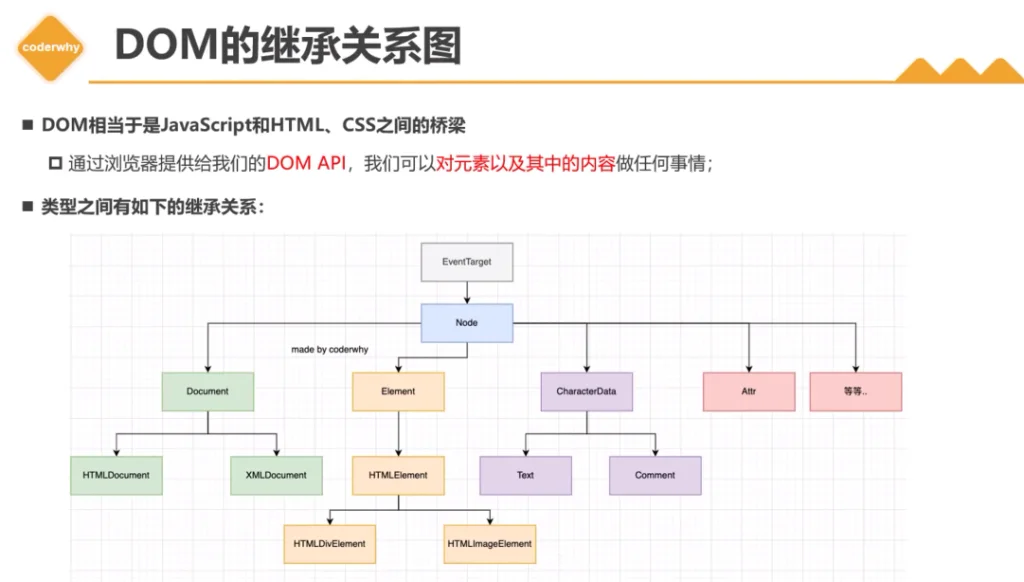
DOM stands for Document Object Model. Elements, text, and comments are nodes; only element nodes are Elements. A typical interface hierarchy is EventTarget → Node → Element → HTMLElement → HTMLDivElement. Document also inherits from Node, but not Element. Inheritance provides shared node operations and event capabilities.
Figure 01 DOM overview
| Need | All nodes | Elements only |
|---|---|---|
| Parent | parentNode | parentElement |
| Children | childNodes | children |
| First / last child | firstChild / lastChild | firstElementChild / lastElementChild |
| Previous / next sibling | previousSibling / nextSibling | previousElementSibling / nextElementSibling |
Whitespace in HTML can create text nodes, so firstChild may not be the first visible tag.
Finding elements, tables, and forms
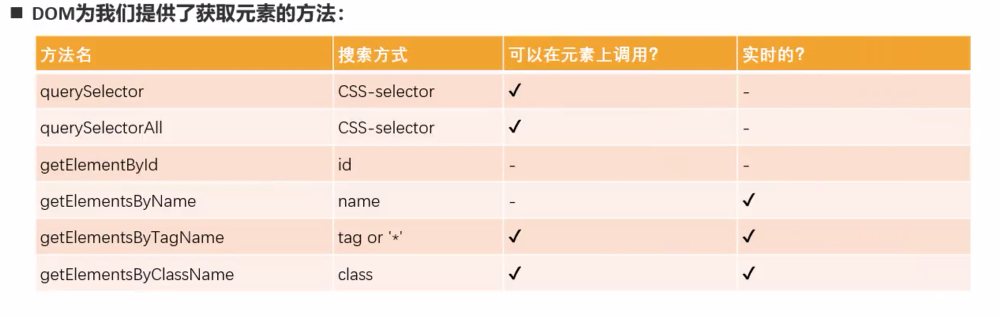
| API | Result / notes |
|---|---|
getElementById(id) | One element or null; still a useful common API |
querySelector(selector) | First matching element or null |
querySelectorAll(selector) | Static NodeList; empty if no matches |
getElementsByClassName(name) | Live HTMLCollection |
getElementsByTagName(name) | Live HTMLCollection |
table.rows / row.cells | Table rows / row cells |
document.forms / form.elements | Forms / form controls |
Static collections do not update automatically as the DOM changes; live collections do. Check query results before using them. Use Array.from() to snapshot a live collection before bulk changes when appropriate. Form control names and IDs can conflict with property names, so prefer explicit collection lookups.
Figure 02 Table and form navigation
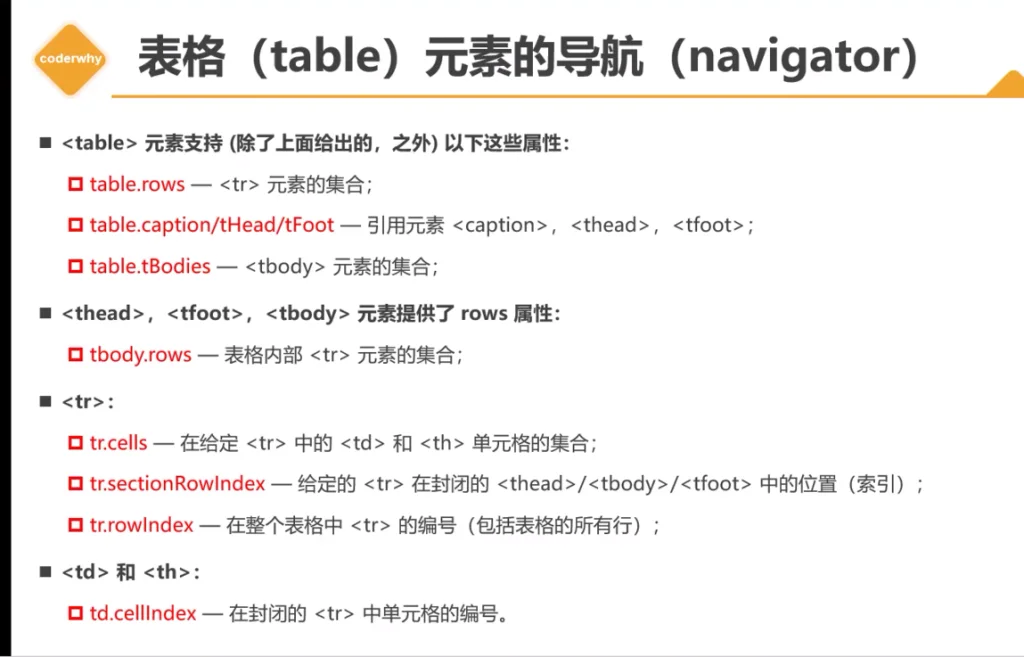
Figure 03 Element selection methods
Node types and names
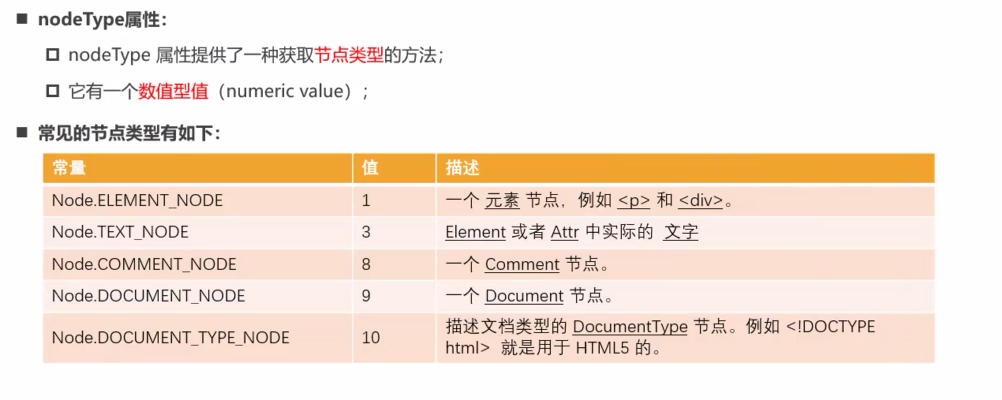
Common nodeType values are element 1, text 3, comment 8, document 9, and document fragment 11. Prefer constants such as Node.ELEMENT_NODE.
Figure 04 Node types and nodeType
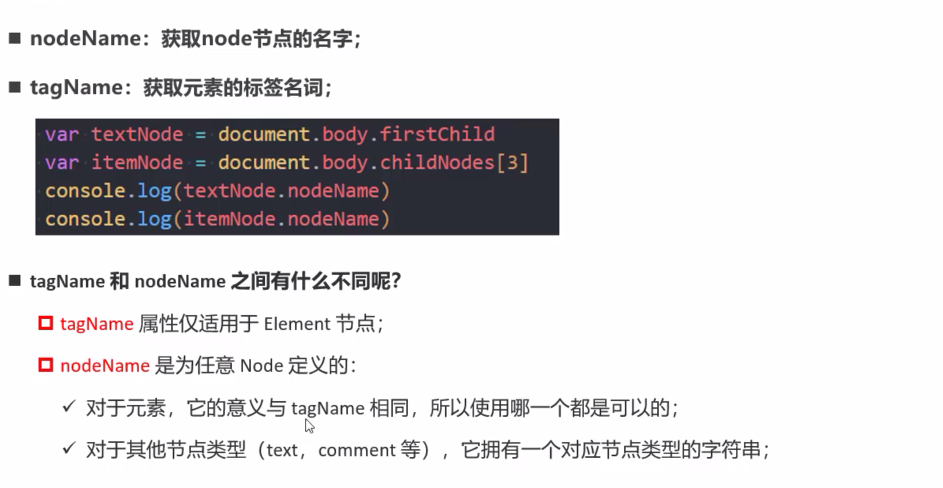
nodeName applies to different node types; tagName applies to elements. Tag names in HTML documents normally return uppercase.
Figure 05 nodeName and tagName
Text, attributes, classes, and styles
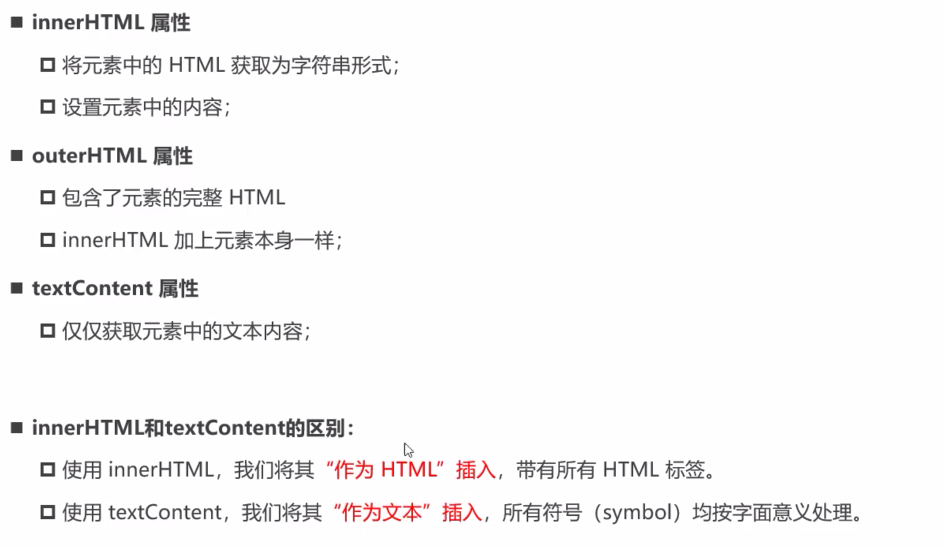
textContent reads or writes plain text; innerHTML parses or serializes HTML. Prefer textContent for user-provided text rather than passing untrusted input directly to innerHTML.
Figure 06 innerHTML and textContent
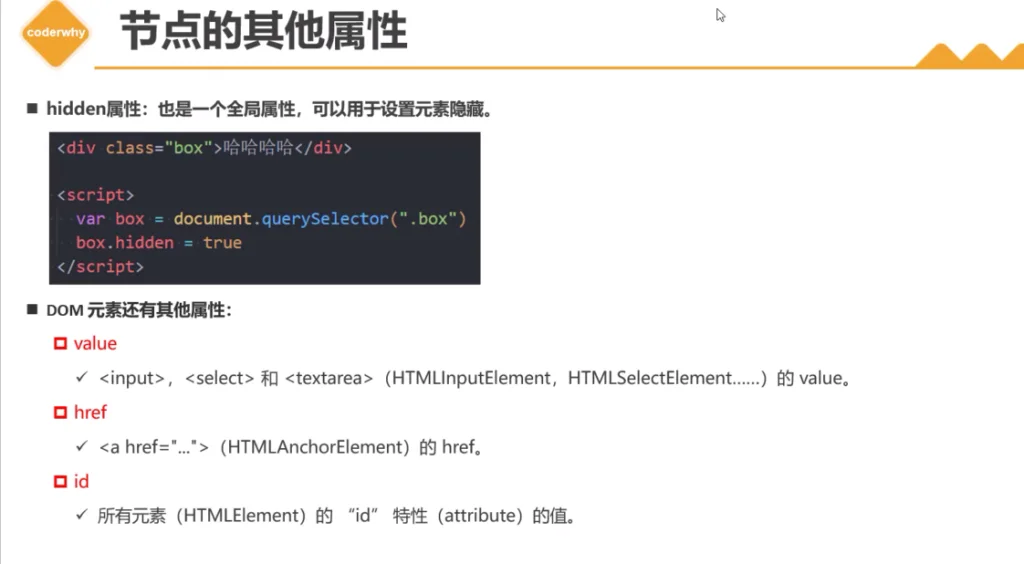
The hidden property can control whether an element is hidden.
Figure 07 Other node properties
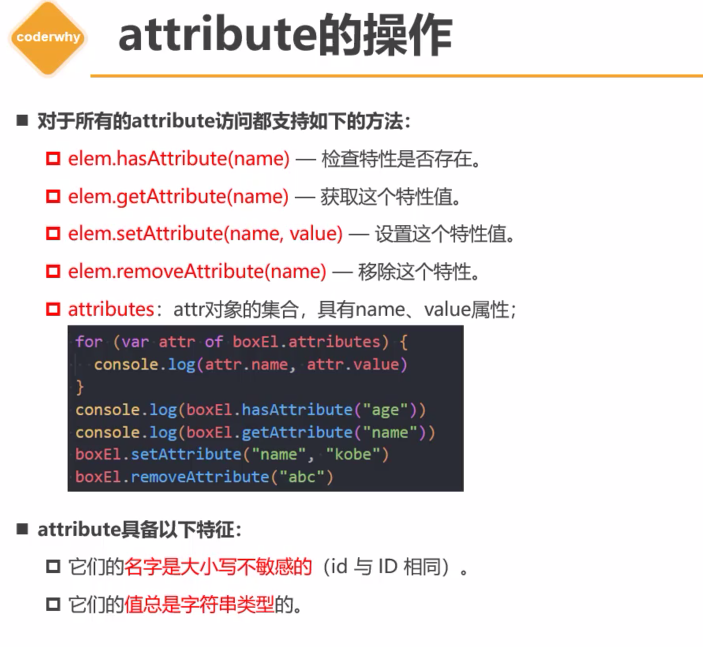
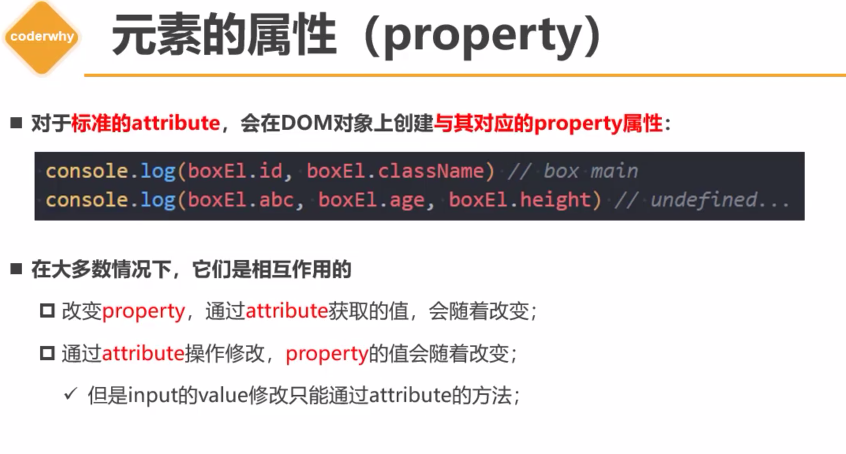
HTML attributes and JavaScript properties are different concepts. getAttribute() returns a string or null; property types depend on the interface.
Boolean attributes depend on presence, so disabled="false" still disables a control.
Figure 08 HTML attributes 1
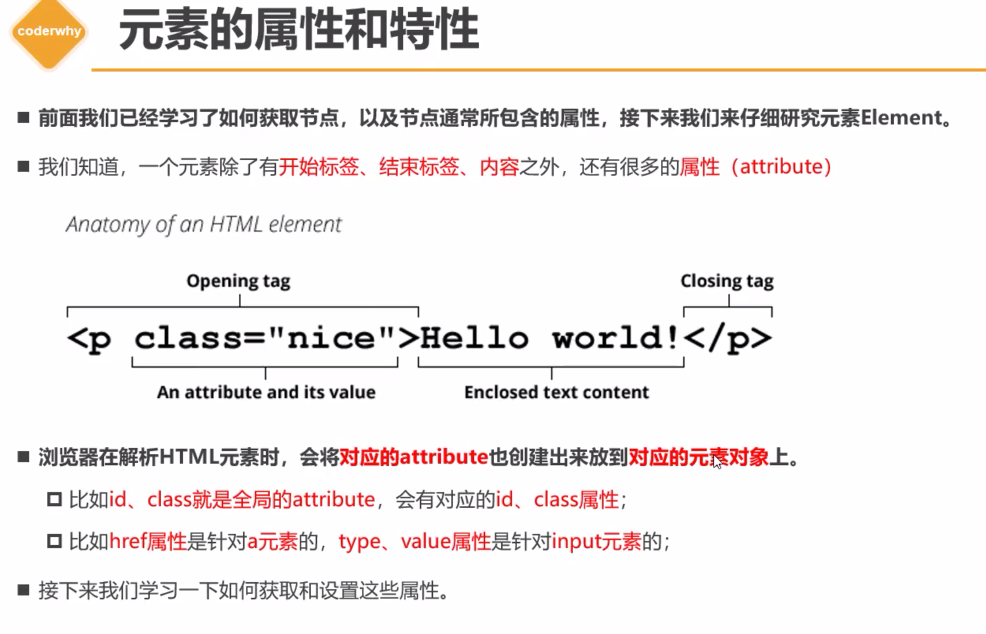
Figure 09 HTML attributes 2

Figure 10 HTML attributes 3
For an input, the value attribute represents its default value, while .value represents its current value.
Figure 11 DOM properties
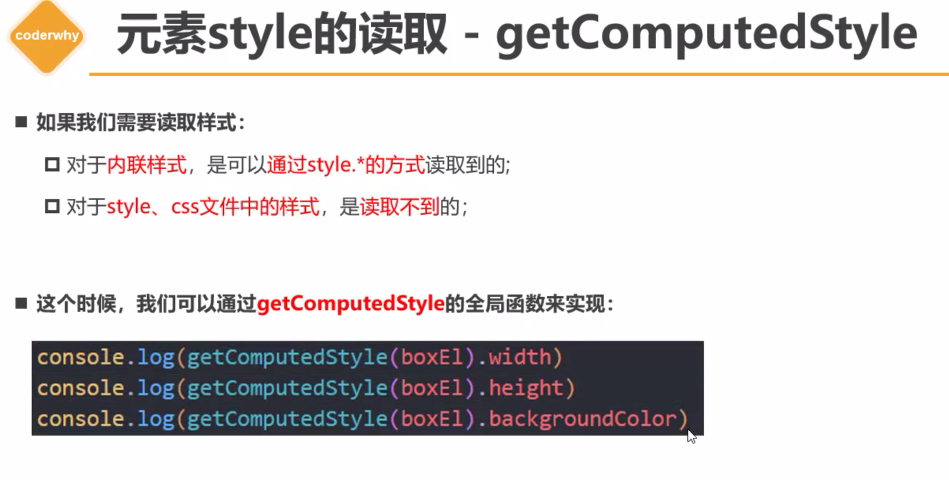
Prefer classList.add(), remove(), toggle(), and contains() for classes; className replaces the whole class string. element.style mainly accesses inline styles; use getComputedStyle() for computed styles.
Figure 12 Classes and styles 1

Figure 13 Classes and styles 2
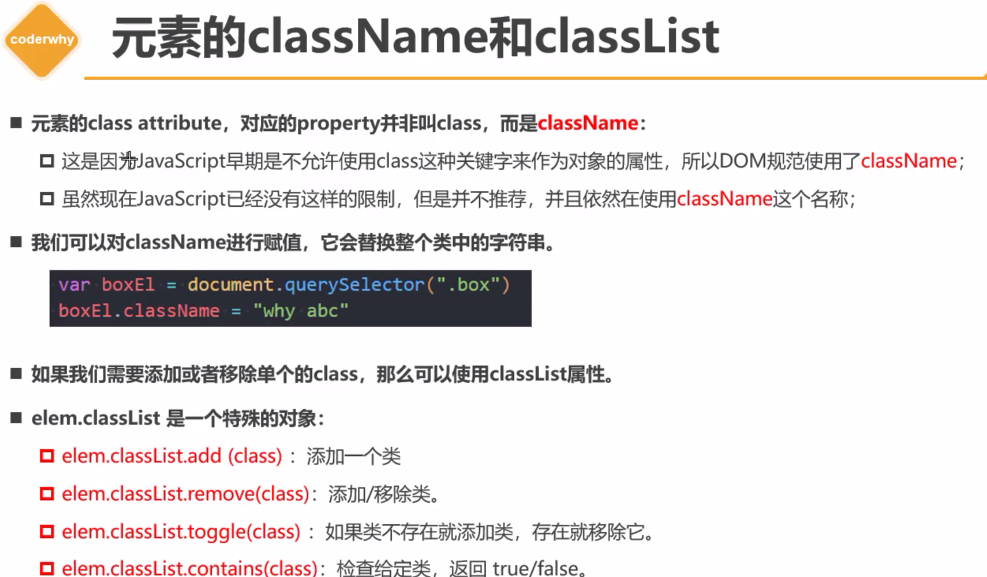
Figure 14 Classes and styles 3
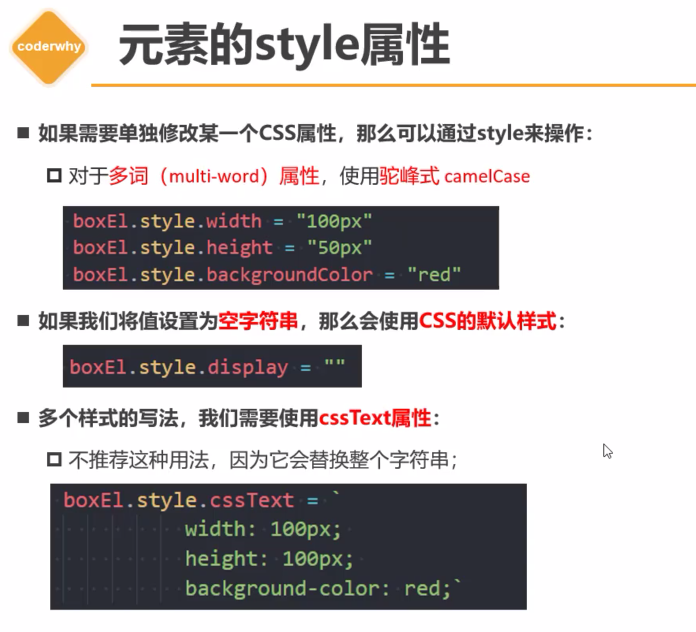
Figure 15 Classes and styles 4
data-user-id maps to dataset.userId, whose value is a string.
<div id="profile" data-user-id="18"></div>
<input id="name" value="Jack" />
<script>
  const profile = document.querySelector("#profile")
  profile.textContent = "Hello, Jack"
  profile.classList.add("active")
  profile.style.color = "teal"
  console.log(profile.dataset.userId === "18")

  const input = document.querySelector("#name")
  input.value = "Jill"
  console.log(input.getAttribute("value")) // "Jack"
  console.log(input.value) // "Jill"
</script>
Creating, inserting, removing, and cloning
| Operation | API |
|---|---|
| Create | document.createElement(), createTextNode() |
| Insert | append(), prepend(), before(), after() |
| Replace / clear | replaceWith(), replaceChildren() |
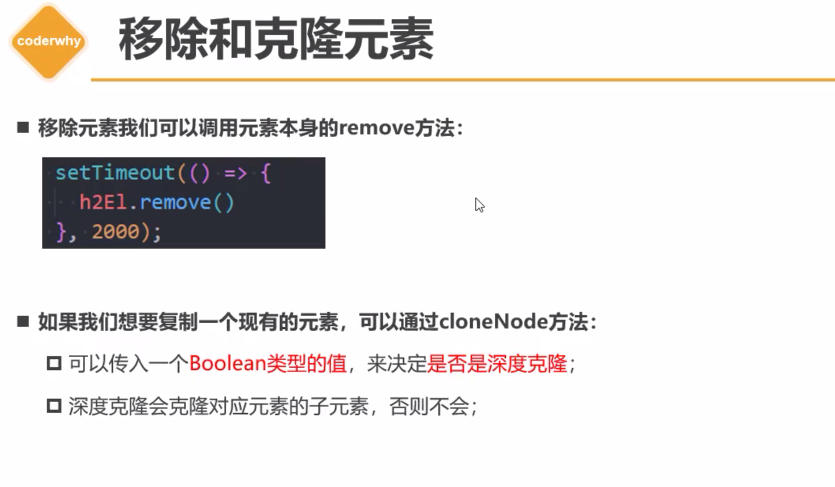
| Remove | remove() |
| Clone | cloneNode(false) is shallow; cloneNode(true) includes descendants |
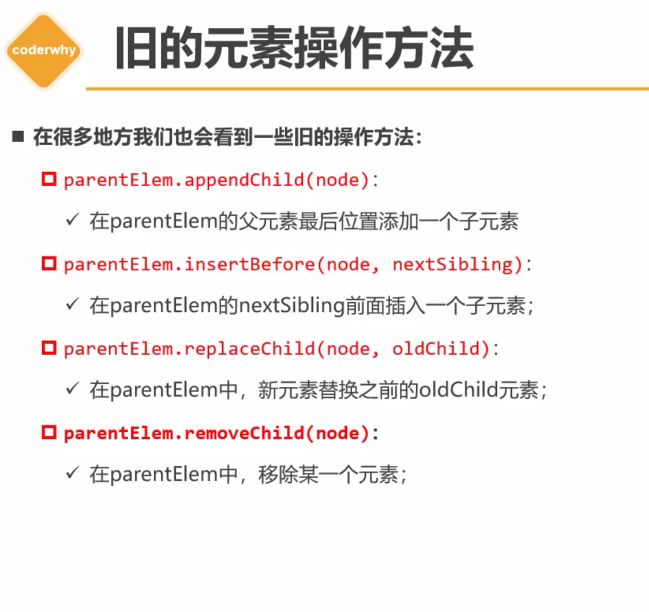
| Older node APIs | appendChild(), insertBefore(), removeChild(), replaceChild() |
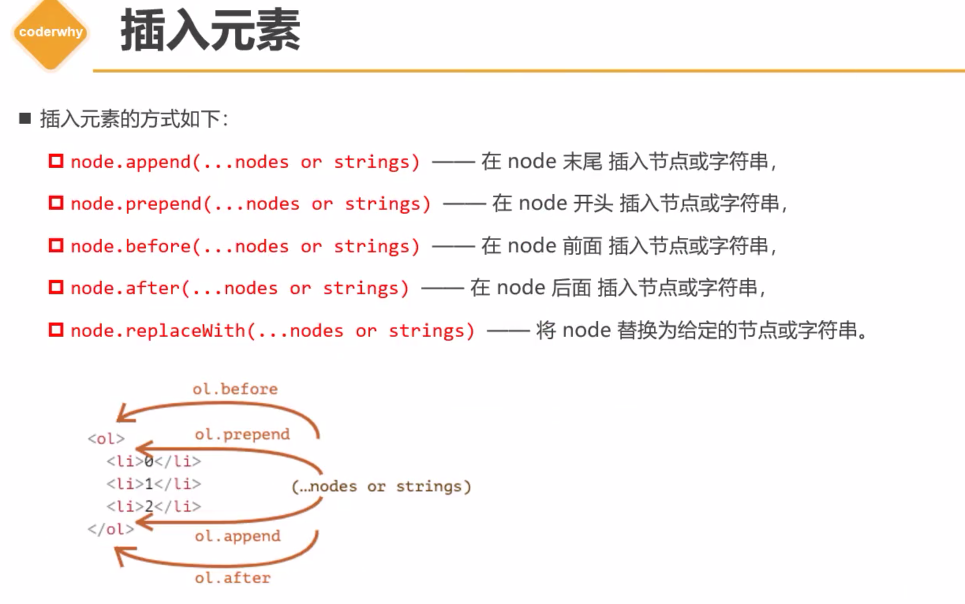
Inserting an existing node moves it rather than copying it.
Figure 16 Inserting elements
cloneNode() does not copy listeners registered with addEventListener(). Avoid duplicate IDs after cloning.
Figure 17 Removing and cloning elements
document.write() is a legacy API that can overwrite a document after loading; avoid it in new code.
Figure 18 Earlier node manipulation APIs
const list = document.createElement("ul")
const item = document.createElement("li")
item.textContent = "Learn JavaScript"
list.append(item)
document.body.append(list)

const copy = item.cloneNode(true)
copy.textContent = "Practice DOM"
item.after(copy)
item.remove()
Dimensions, position, and scrolling
| Property / method | Meaning |
|---|---|
clientWidth / clientHeight | Content and padding, excluding borders and scrollbars |
offsetWidth / offsetHeight | Layout size including padding, borders, and scrollbars |
scrollWidth / scrollHeight | Size including overflow content |
scrollTop / scrollLeft | Readable and writable element scroll offsets |
getBoundingClientRect() | Viewport-relative rectangle reflecting transforms |
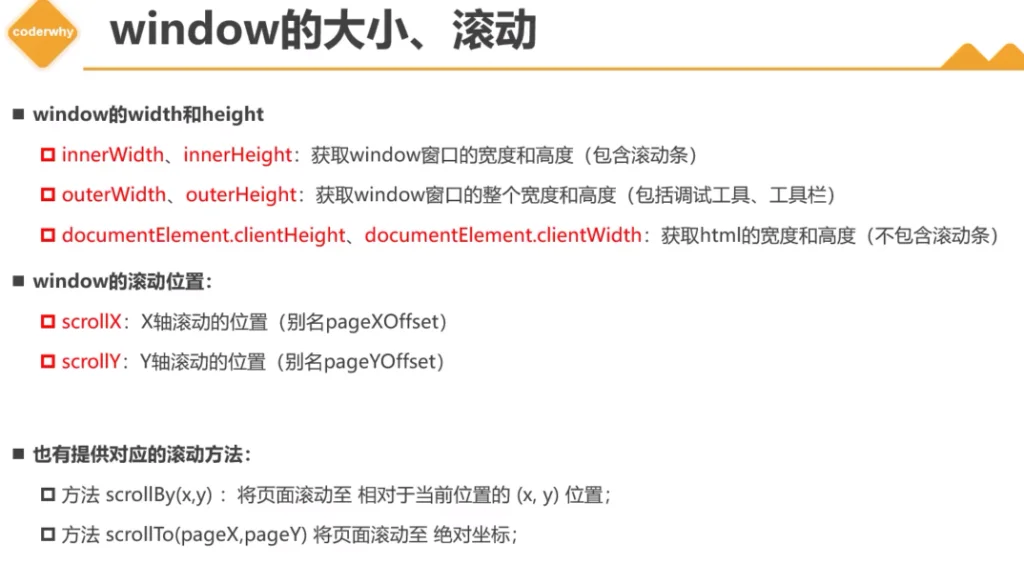
window.innerWidth / innerHeight | Layout viewport size including scrollbars |
window.scrollX / scrollY | Page scroll offsets |
scrollTo() / scrollBy() / scrollIntoView() | Absolute / relative scrolling / reveal an element |
Distinguish viewport coordinates, page coordinates, and element scroll offsets.
Figure 19 Element dimensions and scrolling
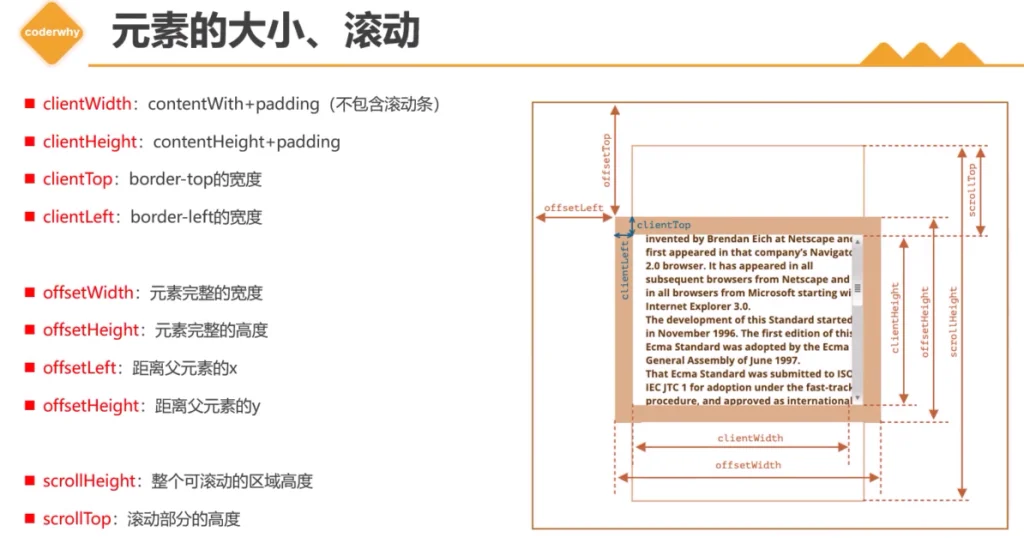
Figure 20 Window dimensions and scrolling
09 Events: making pages respond
Registering and removing listeners
Register handlers through HTML event attributes, DOM properties such as onclick, or addEventListener(). Prefer addEventListener() in typical code and retain the function reference for removal.
const button = document.createElement("button")
button.textContent = "Click me"
document.body.append(button)

function handleClick(event) {
  console.log(event.type)
}
button.addEventListener("click", handleClick)
button.click()
button.removeEventListener("click", handleClick)
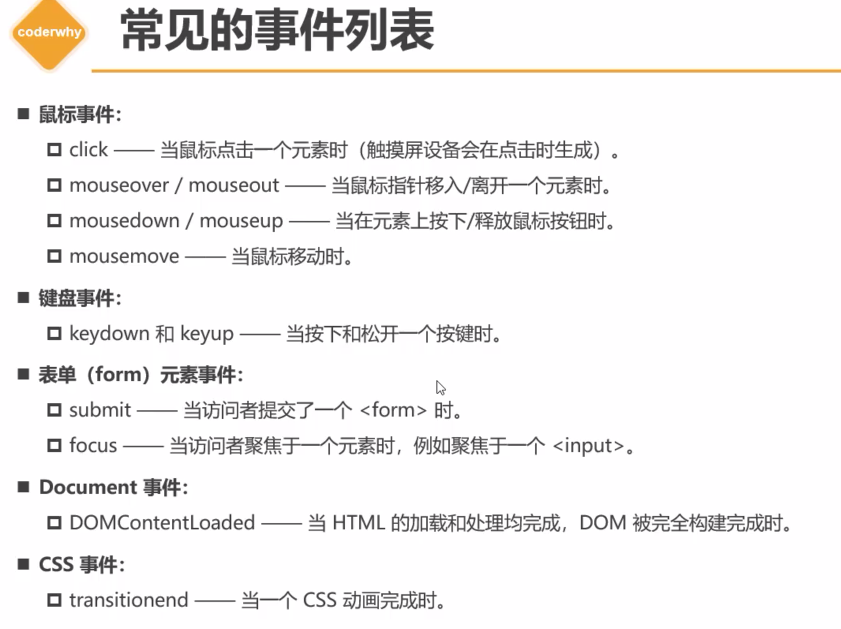
Figure 21 Common events
Capture, target, and bubbling
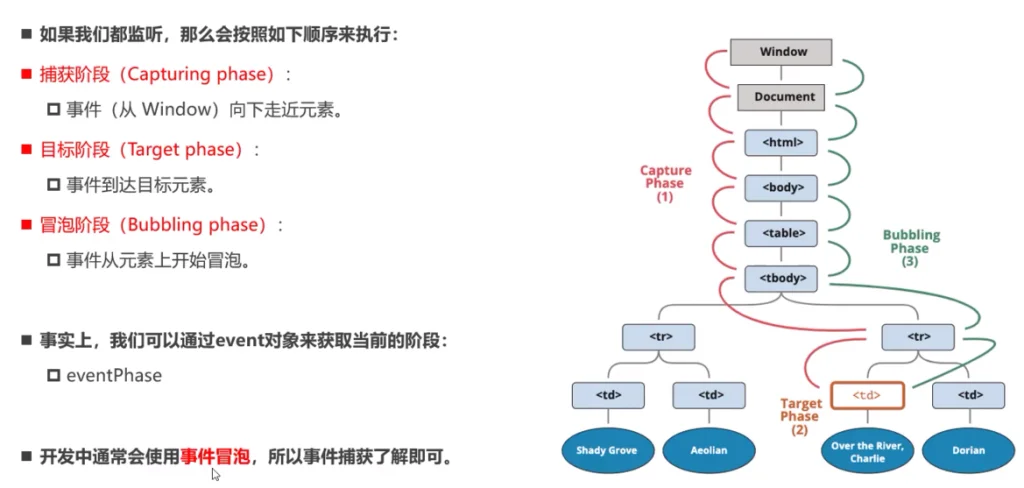
The usual DOM propagation path is capture → target → bubble. Capture travels through ancestors toward the target; bubbling travels outward through ancestors. Not all events bubble. By default, addEventListener() registers a non-capturing listener, which can also run at the target.
Figure 22 Capture and bubbling 1

Figure 23 Capture and bubbling 2
Event objects and delegation
| Event member | Purpose |
|---|---|
target | Event target; may be retargeted across Shadow DOM boundaries |
currentTarget | Object whose listener is currently running |
eventPhase | Current propagation phase |
preventDefault() | Cancel the default action of a cancelable event; does not stop propagation |
stopPropagation() | Stop propagation to later nodes; does not cancel the default action |
stopImmediatePropagation() | Also prevent later listeners on the current node |
Figure 24 Event objects 1
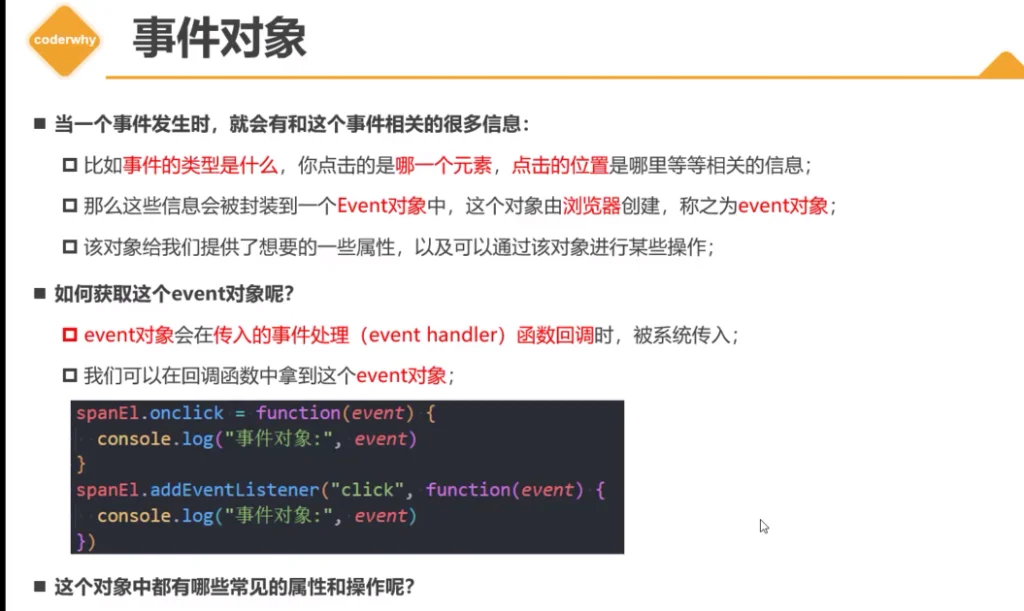
Figure 25 Event objects 2
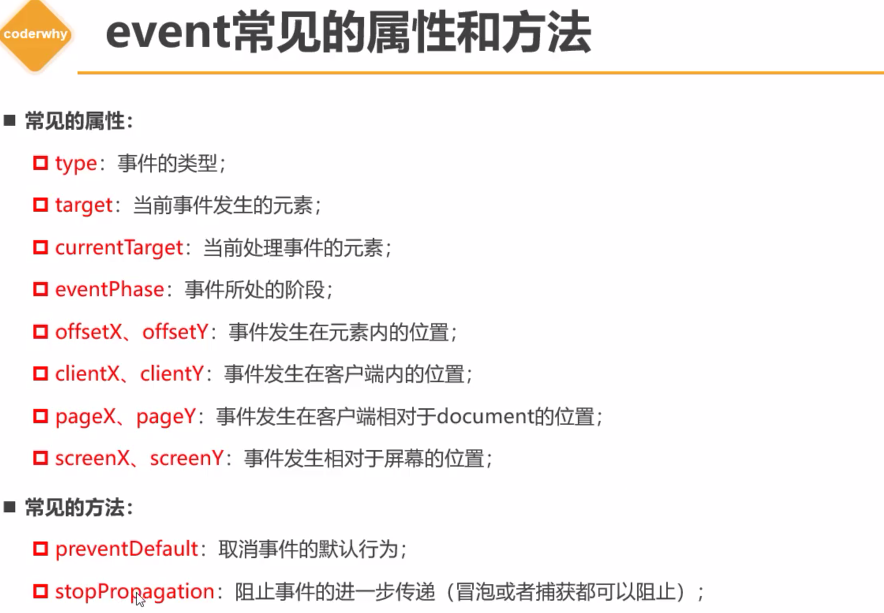
A passive: true listener cannot cancel the default action with preventDefault(). Listening on a parent for child interactions is event delegation, commonly using bubbling. A complete example follows:
<ul id="tasks">
  <li><button data-action="complete">Learn JavaScript</button></li>
</ul>
<script>
  const tasks = document.querySelector("#tasks")
  tasks.addEventListener("click", (event) => {
    if (!(event.target instanceof Element)) return
    const button = event.target.closest("button[data-action]")
    if (!button || !tasks.contains(button)) return
    button.closest("li")?.classList.toggle("done")
    console.log(event.target, event.currentTarget)
  })
</script>
EventTarget and listeners
EventTarget provides addEventListener(), removeEventListener(), and dispatchEvent(). DOM nodes and objects such as window support events. Compared with inline handlers or onclick, addEventListener() supports multiple listeners and options such as capture, once, passive, and signal. Removal requires the same function reference and matching capture flag.
Figure 26 EventTarget
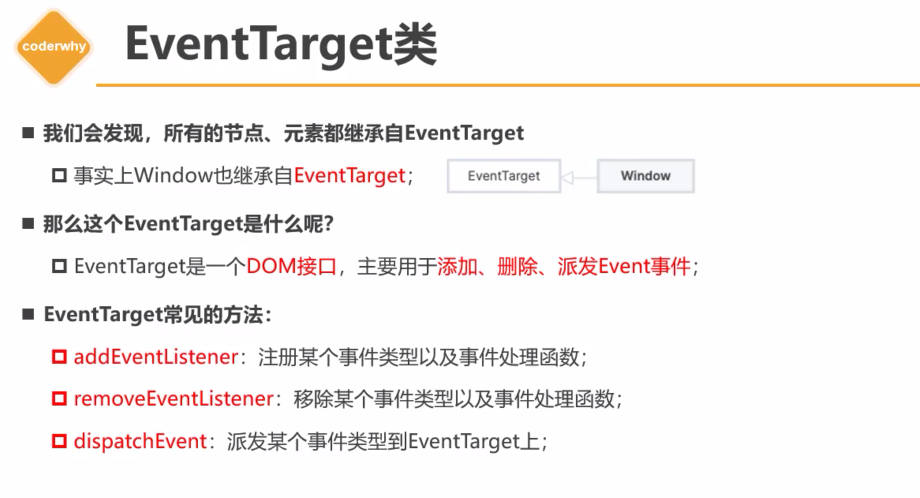
Common events and event data
| Context | Events / properties | Notes |
|---|---|---|
| Clicks and mouse | click, dblclick, mousedown, mouseup, mousemove | button identifies a button; clientX/Y use viewport coordinates, pageX/Y page coordinates |
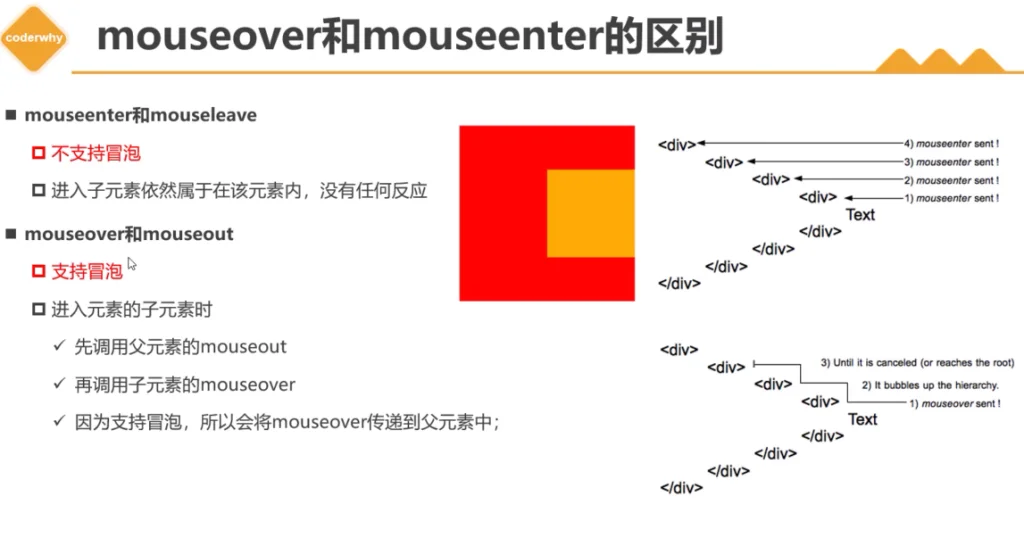
| Enter / leave | mouseenter / mouseleave, mouseover / mouseout | First pair does not bubble; second pair does |
| Multiple input devices | pointerdown, pointermove, pointerup | Can unify mouse, touch, and pen handling |
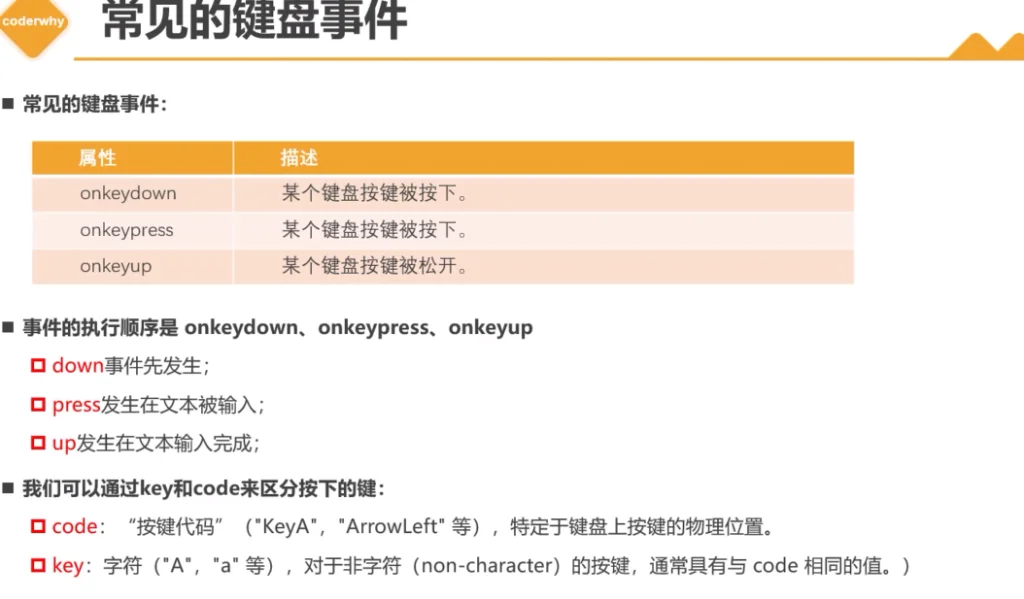
| Keyboard | keydown, keyup | key is the key value, code the physical position, repeat signals repetition |
| Input and forms | input, change, submit | Change and commit timing depend on the control |
| Focus | focus / blur, focusin / focusout | First pair does not bubble; second pair does |
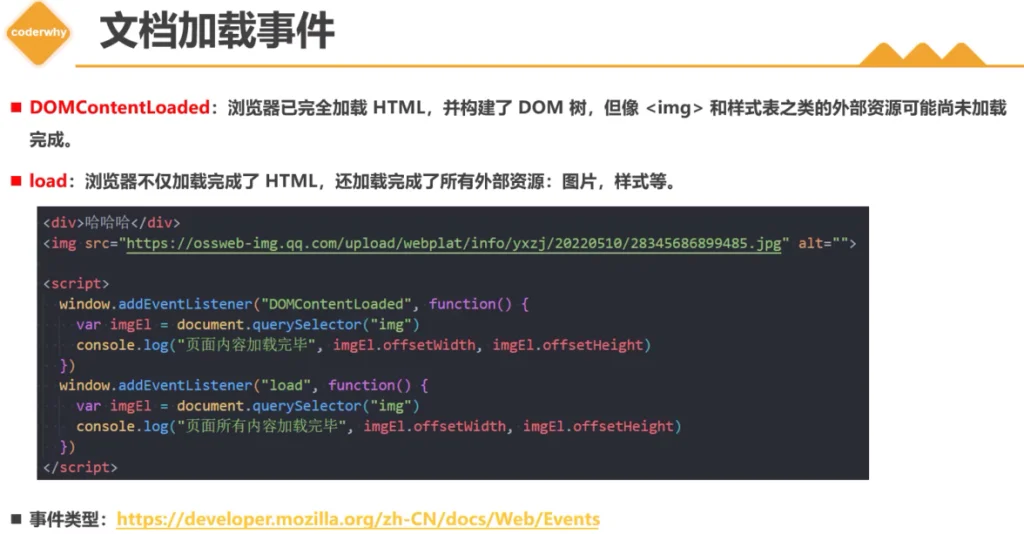
| DOM readiness | DOMContentLoaded | Parsing is complete and deferred / default module scripts have executed |
| Resource loading | Window load | Waits for the page and dependent resources, excluding lazy-loaded resources |
Figure 27 Common mouse events
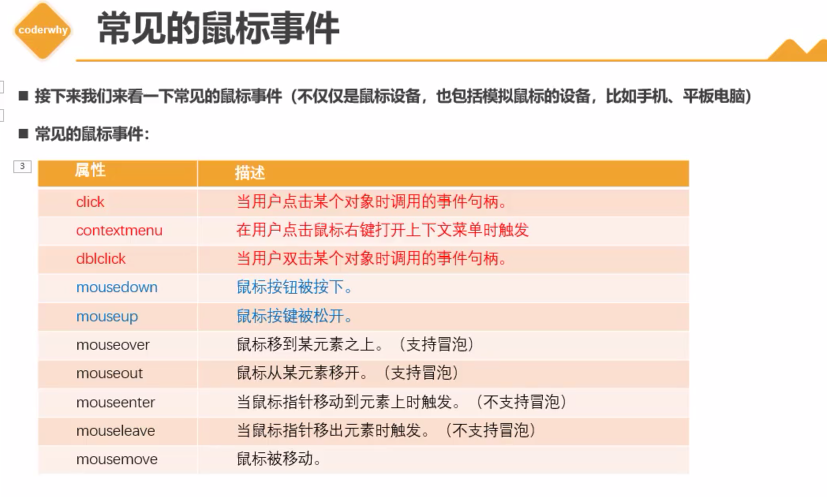
Figure 28 Mouse event data
keypress is deprecated; prefer keydown or keyup. For input methods such as Chinese or Japanese IMEs, consider compositionstart, compositionend, and isComposing.
Figure 29 Keyboard events
DOMContentLoaded does not wait for async scripts, asynchronous operations, or module code following a top-level await to finish. A script may load after DOM readiness. Check document.readyState rather than only registering an event that may already have fired:
function init() {
  console.log("DOM ready")
}
if (document.readyState === "loading") {
  document.addEventListener("DOMContentLoaded", init, { once: true })
} else {
  init()
}
Figure 30 Document loading events
Timers
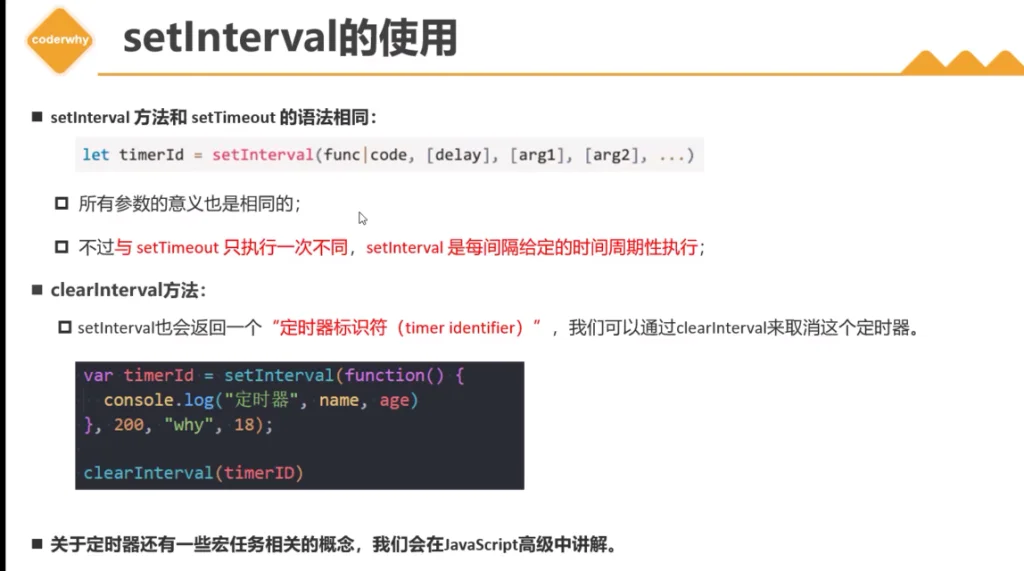
setTimeout() schedules one later call; setInterval() schedules repeated calls. Cancel them with clearTimeout() and clearInterval(). Delays are in milliseconds and indicate a minimum scheduling delay, not an exact execution time. Current tasks and background throttling can postpone callbacks; setTimeout(fn, 0) is not immediate. For long-running polling work, schedule a recursive timeout after each operation completes. See HTML: timers.
const timeoutId = setTimeout(() => console.log("later"), 1000)
clearTimeout(timeoutId)

let ticks = 0
const intervalId = setInterval(() => {
  console.log(++ticks)
  if (ticks === 3) clearInterval(intervalId)
}, 1000)
Figure 31 Timers 1
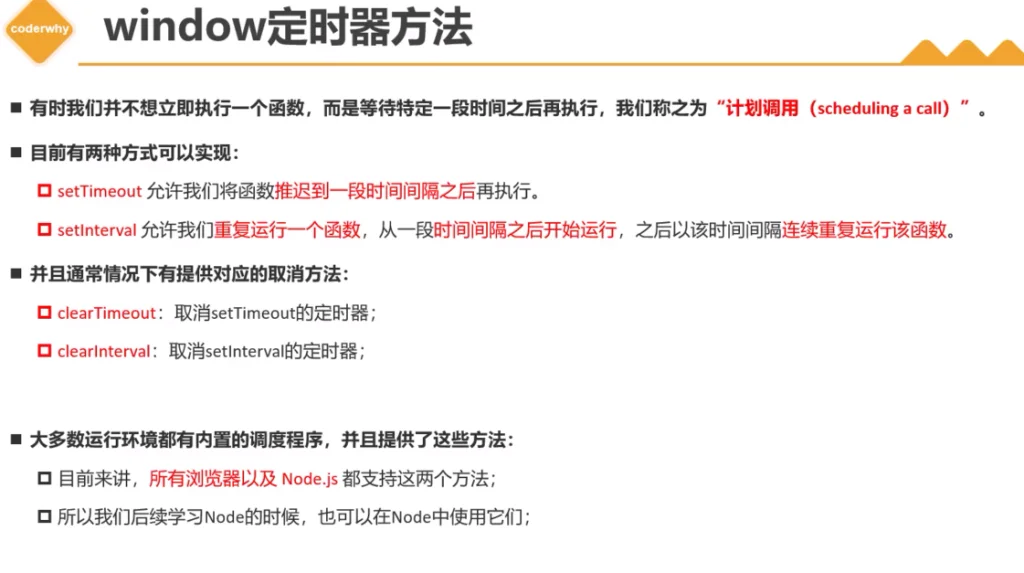
Figure 32 Timers 2
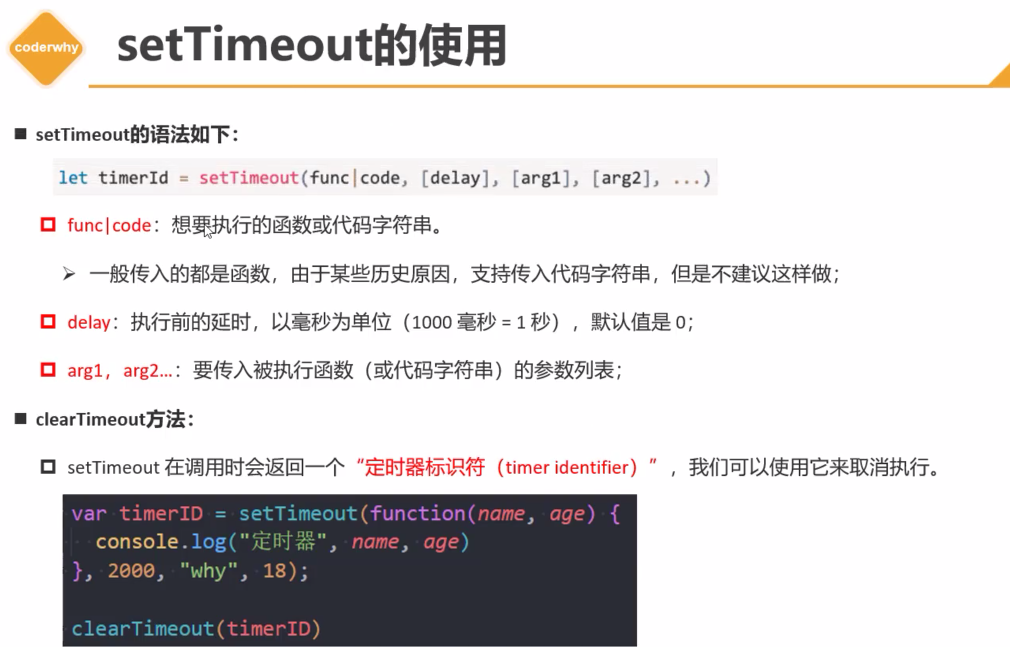
Figure 33 Timers 3
10 BOM: windows, URLs, and history
| Object | Common members | Purpose |
|---|---|---|
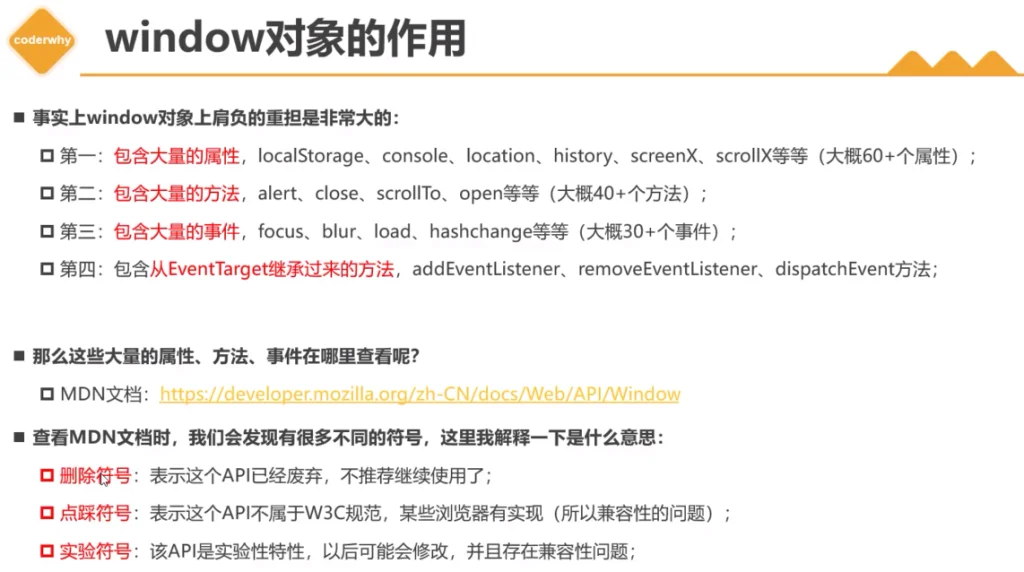
window | document, innerWidth, scrollTo() | Entry point to browser window and page capabilities |
location | href, origin, pathname, search, hash | Read the current URL |
location | assign(), replace(), reload() | Navigate, replace the current history entry, reload |
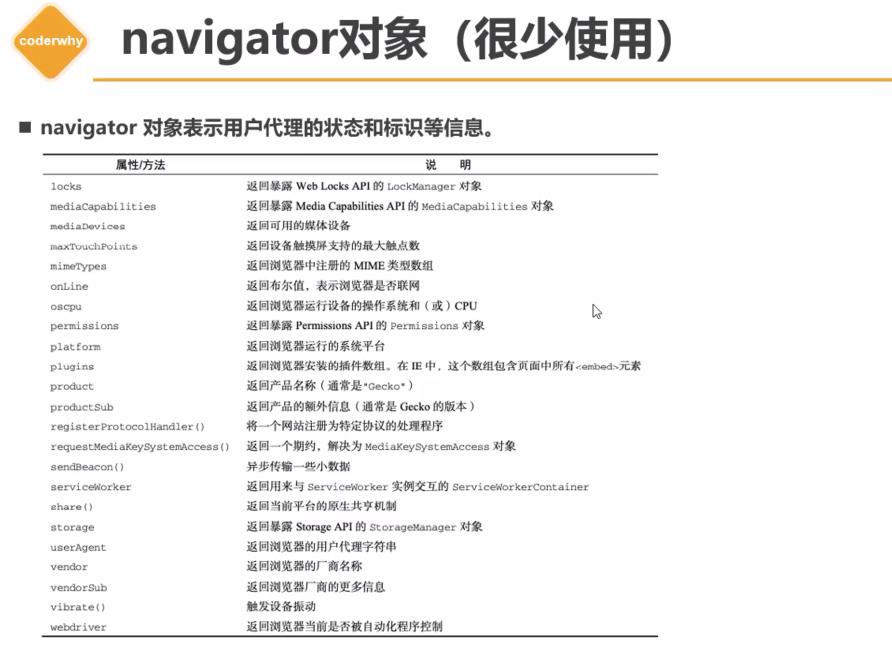
navigator | language, languages, onLine | Language preferences and connectivity hints |
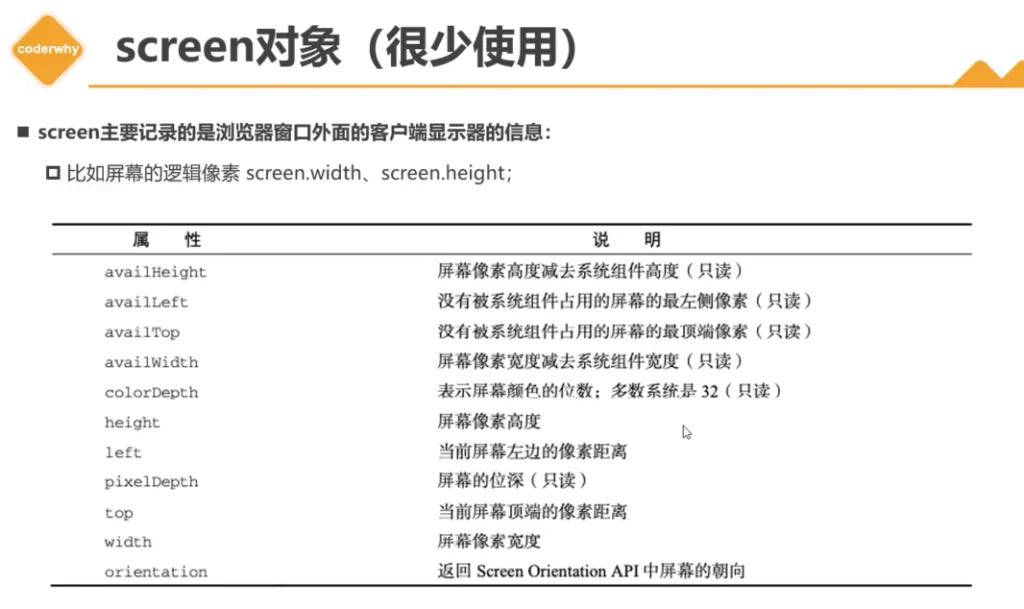
screen | width, height, availWidth, availHeight | Screen information, distinct from the page viewport |
Figure 34 BOM overview
The window object
In browser pages, globalThis offers a common way to access the global object. window does not exist in every JavaScript environment.
Figure 35 The window object 1
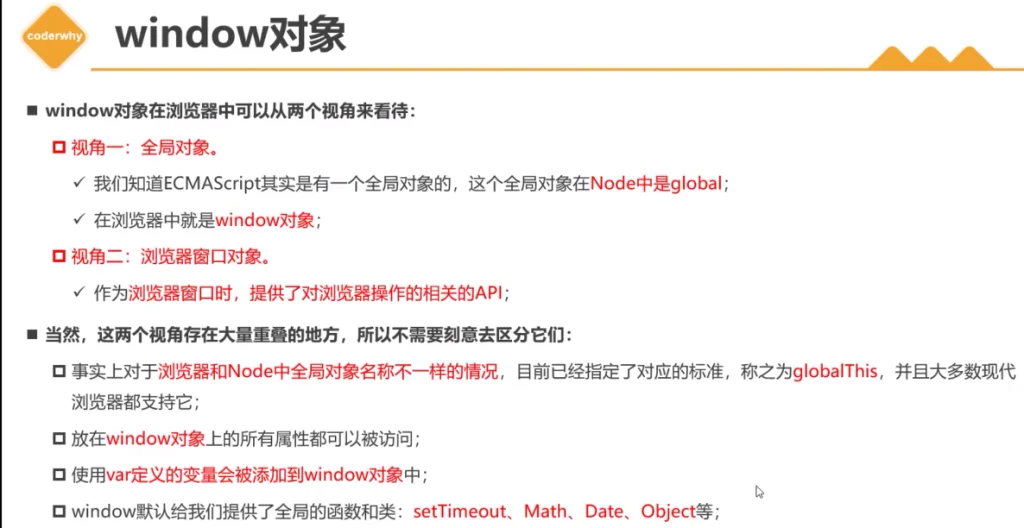
Figure 36 The window object 2
location and URLs
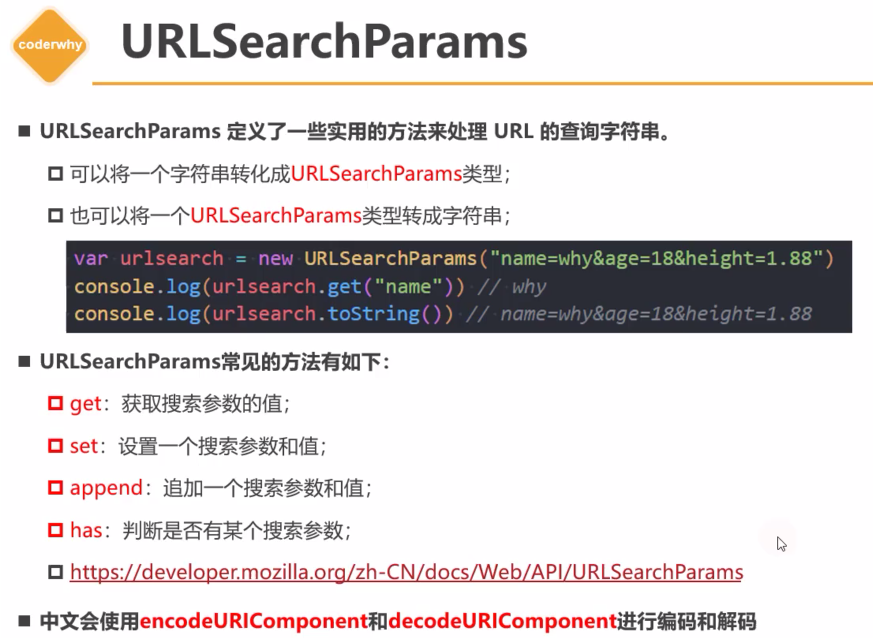
location.href, origin, pathname, search, and hash expose the full address, origin, path, query, and fragment. assign() navigates, replace() replaces the current history entry, and reload() reloads the page. The following standalone URL example parses an address without navigating.
const url = new URL("https://example.com/notes?page=2#intro")
console.log(url.pathname) // "/notes"
console.log(url.searchParams.get("page")) // "2"
console.log(url.hash) // "#intro"
Figure 37 The location object 1
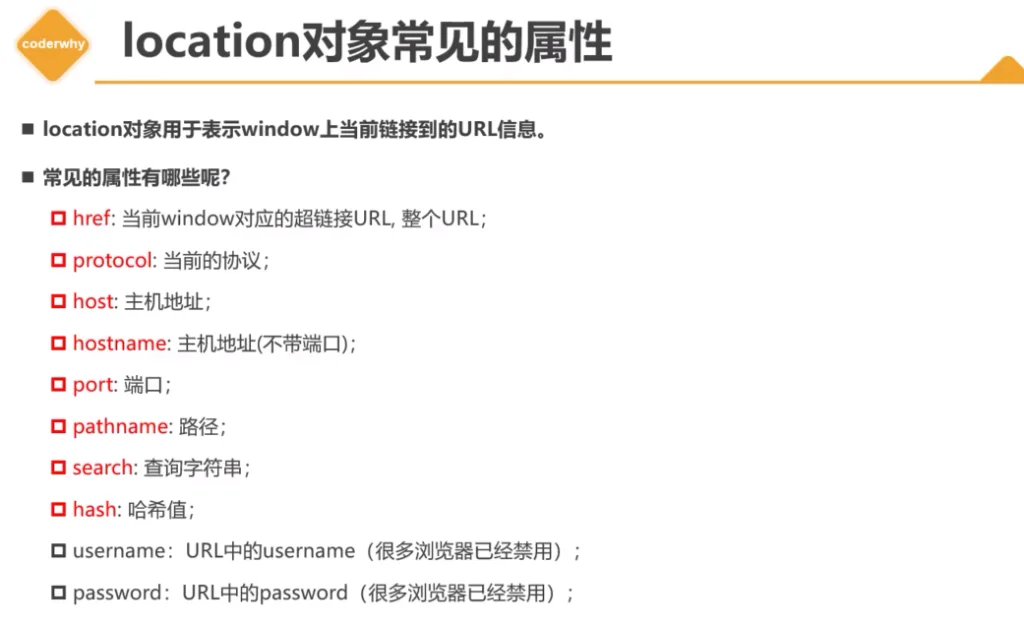
Figure 38 The location object 2
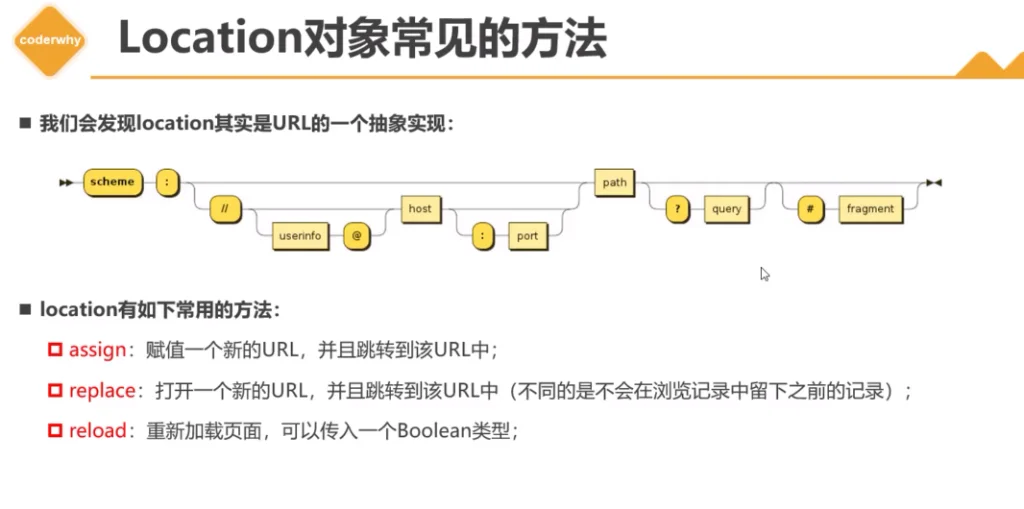
Figure 39 The location object 3
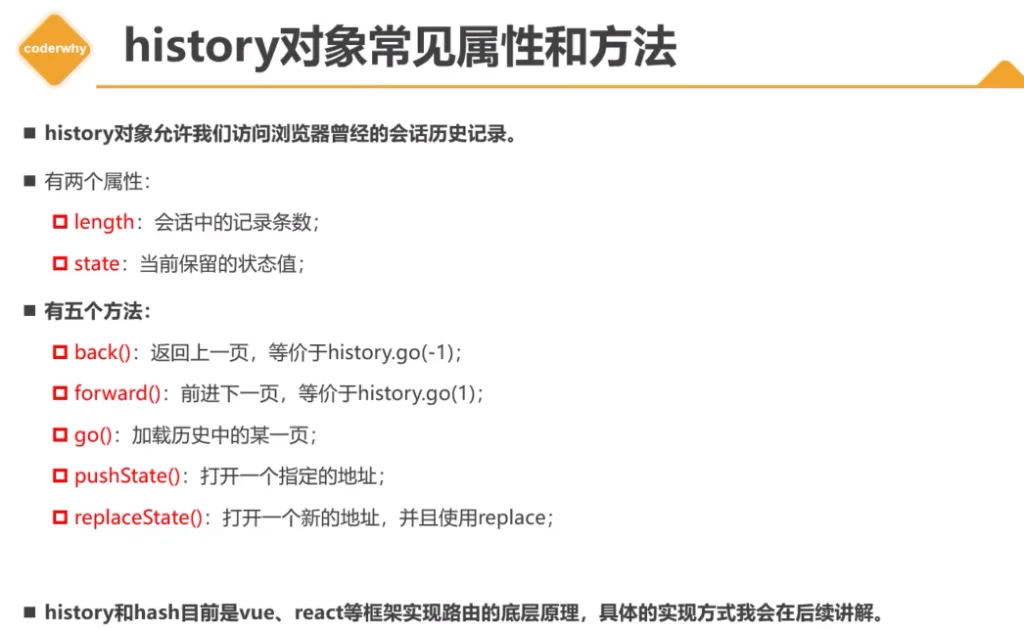
history and client-side routing
history.back(), forward(), and go() traverse session history. Hash routing and the History API are two common single-page approaches:
| Approach | Update URL | Observe navigation |
|---|---|---|
| Hash | Change location.hash | Usually listen for hashchange |
| History API | pushState(), replaceState() | Listen for popstate on back / forward navigation |
pushState() and replaceState() do not immediately fire popstate, nor do hash changes made through them fire hashchange. The application must update its view explicitly. These methods require same-origin URLs and do not themselves reload the page. History routes also need server support for directly opening or refreshing paths, commonly an entry-page fallback. See HTML: navigation and history APIs.
Figure 40 The history object
navigator and screen
navigator.language and languages provide language preferences.
navigator.onLine cannot guarantee that a target server is reachable. Prefer feature detection over decisions based solely on user agent strings.
Figure 41 The navigator object
screen.width, height, availWidth, and availHeight describe the screen and available area, not the page viewport.
Figure 42 The screen object
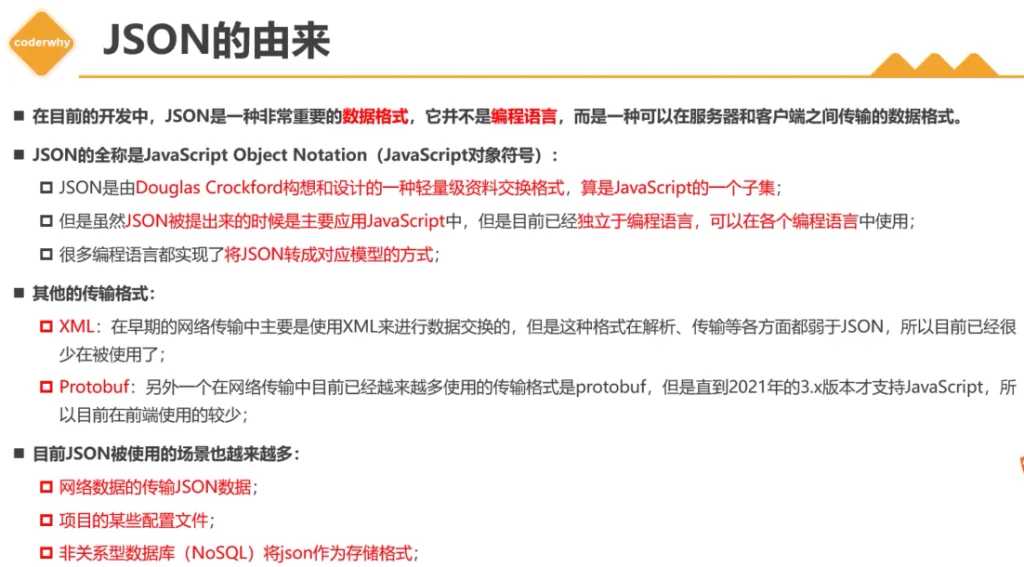
11 JSON: data exchange, not JavaScript code
Figure 43 JSON background
Syntax and parsing
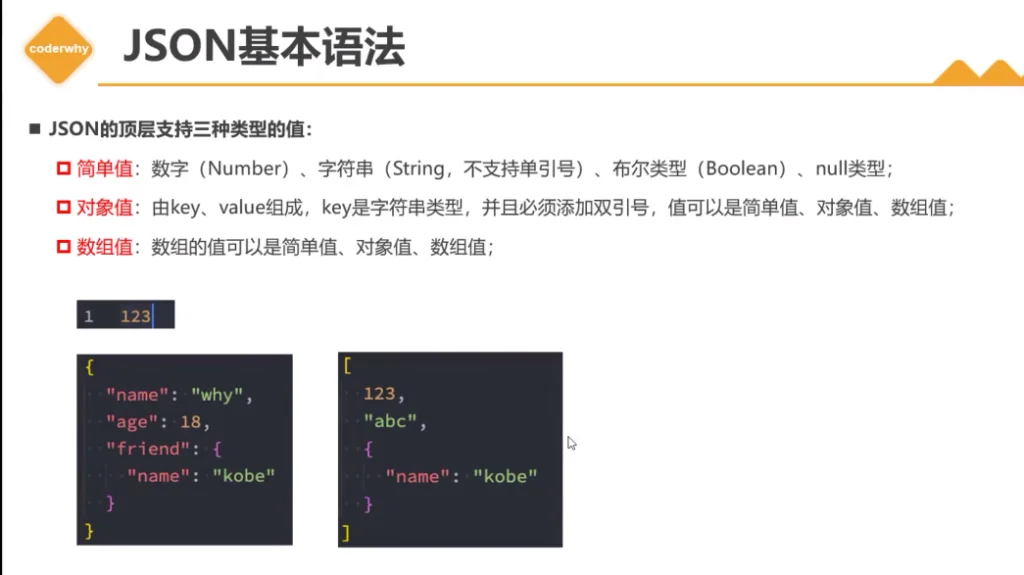
JSON supports objects, arrays, strings, numbers, Booleans, and null; any of these can be the top-level value. Keys and strings require double quotes. Comments, trailing commas, undefined, functions, Symbols, BigInt, NaN, and Infinity are not supported. VS Code may allow comments in JSONC configurations, but JSONC is not standard JSON.
Figure 44 JSON syntax
JSON.parse() converts text into a value and throws SyntaxError for invalid syntax. JSON.stringify() serializes a value to text; its third argument controls indentation. Successful parsing validates syntax, not application-specific fields.
Figure 45 JSON parsing and serialization
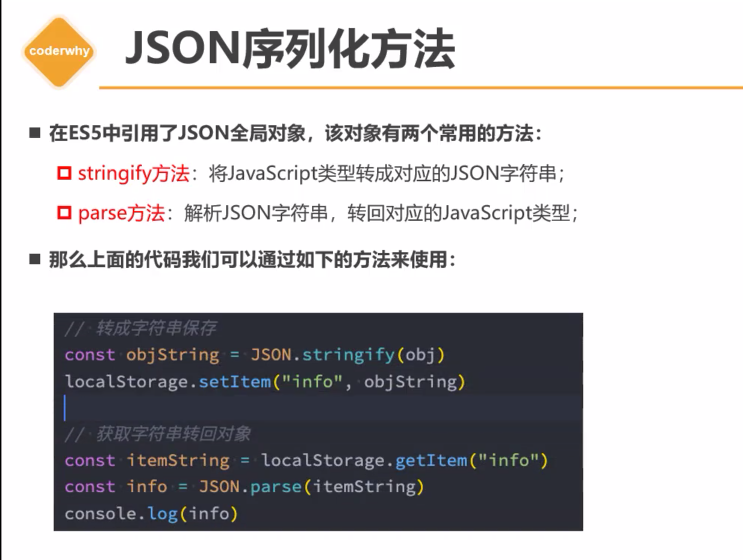
const source = '{"name":"Jack","skills":["JavaScript"]}'
const user = JSON.parse(source)
console.log(user.skills[0]) // "JavaScript"
console.log(JSON.stringify(user, null, 2))

try {
  JSON.parse('{"name":}')
} catch (error) {
  console.log(error instanceof SyntaxError) // true
}
replacer, toJSON, and reviver
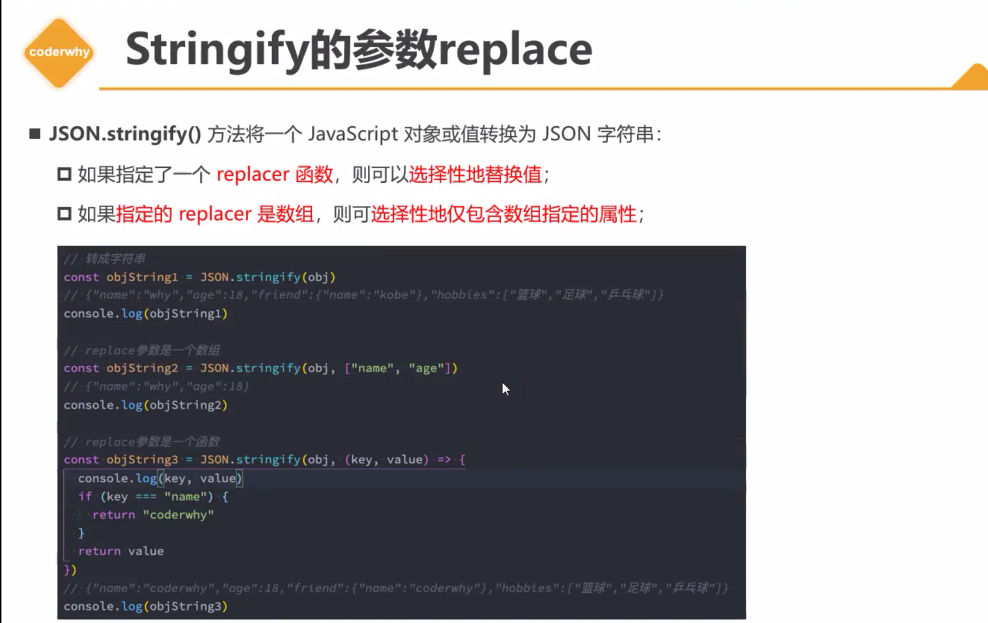
The second argument of JSON.stringify() is replacer: a function can transform values, while an array of strings or numbers selects property names to retain.
Figure 46 The stringify replacer parameter
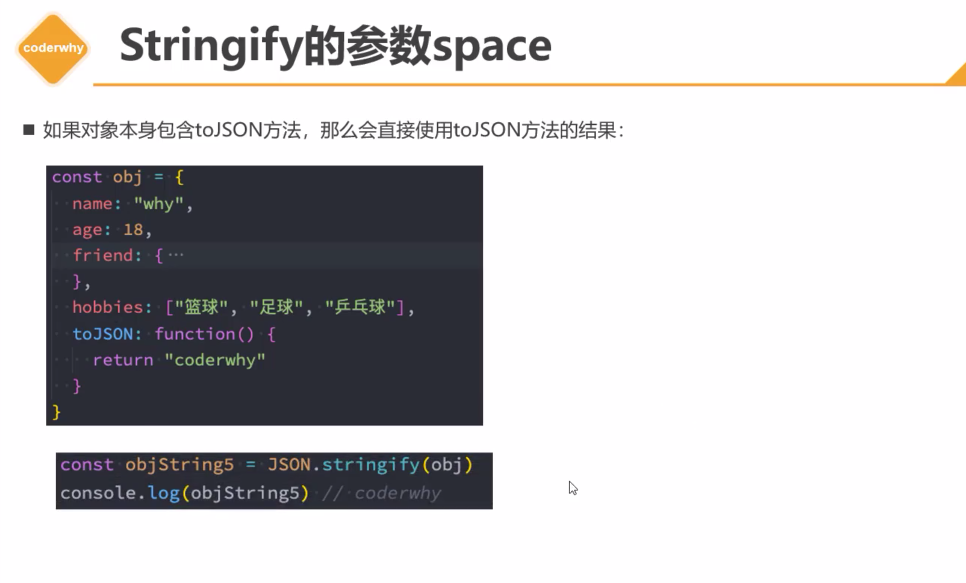
When an object has a callable toJSON(), serialization first uses its returned value. The third argument of JSON.stringify(), space, controls indentation.
Figure 47 Custom serialization with toJSON
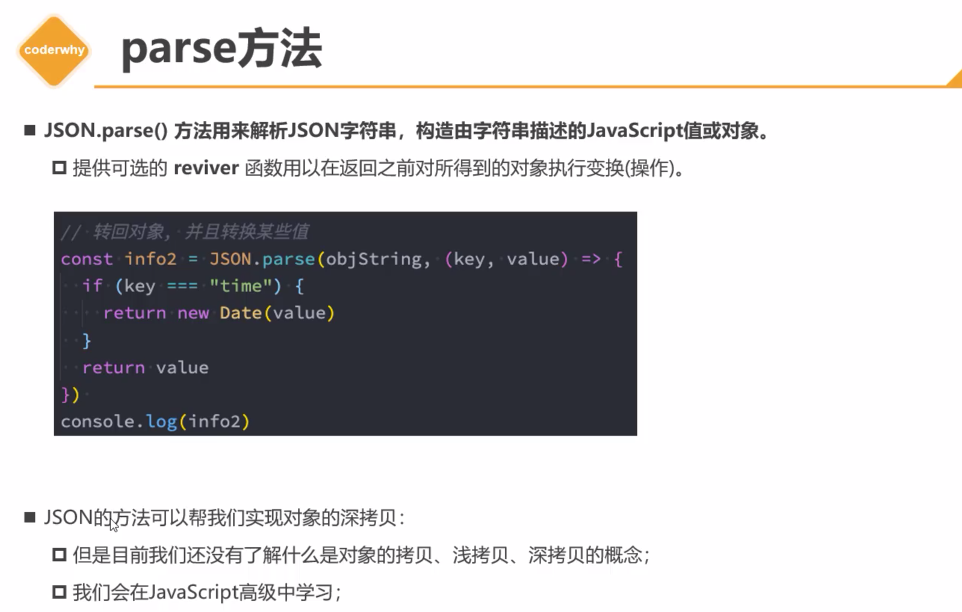
JSON.parse() accepts an optional second argument, reviver, for transforming parsed property values. JSON cloning applies only to data that JSON can fully represent; see the limits below.
Figure 48 The parse reviver parameter
Serialization limits
| Input | Default serialization |
|---|---|
Object property containing undefined, a function, or a Symbol | Property omitted |
| Array item containing one of those values, or a hole | Becomes null |
Top-level undefined, function, or Symbol | Returns undefined, not a JSON string |
NaN, Infinity, -Infinity | Becomes null |
| Valid Date | ISO string through toJSON() |
| BigInt or circular reference | Throws TypeError by default |
JSON.parse(JSON.stringify(value)) is not a general deep-cloning solution: it loses types and some data. Consider structuredClone() for supported structured data, but it cannot clone functions or DOM nodes either. See MDN: JSON.stringify.
console.log(JSON.stringify({ value: undefined, score: NaN }))
// '{"score":null}'
console.log(JSON.stringify([undefined, NaN])) // "[null,null]"
console.log(JSON.stringify(undefined)) // undefined
12 Review and further reading
- Can you explain the difference between
typeof null,typeof [], andArray.isArray([])? - Can you identify the operand returned by
&&,||, and??, and when they short-circuit? - Can you distinguish object mutation, reassignment, and shallow copying?
- Can you determine
thisfor ordinary and arrow functions from their call context? - Can you distinguish
slice()/splice()andmap()/forEach()? - Can you explain
target/currentTarget, and default cancellation / propagation control? - Can you explain millisecond timestamps, UTC strings, and JSON data loss?
Further reading: lexical grammar, operator precedence, Number, String, Math, array specification, and DOM Standard.