This article combines 15 chapters into a learning document that can be read continuously according to the original order of the PostgreSQL quick-start topic. Code examples, tables, images, and reference content are retained as in the original text, and title levels and code block tags are unified.
Original topic: https://www.fengfengzhidao.com/special/12/123
01 Getting started with PostgreSQL from scratch
PostgreSQL is known as "the world's most advanced open source relational database". With its extreme rigor, powerful JSON support and nearly unlimited plug-in expansion capabilities, it has become the ultimate choice for developers to handle complex business and high-reliability data.
This course only explains pgsql related knowledge and is not linked to specific programming languages. In other words, no matter what language you are learning, as long as you want to learn pgsql, this course is suitable for you.
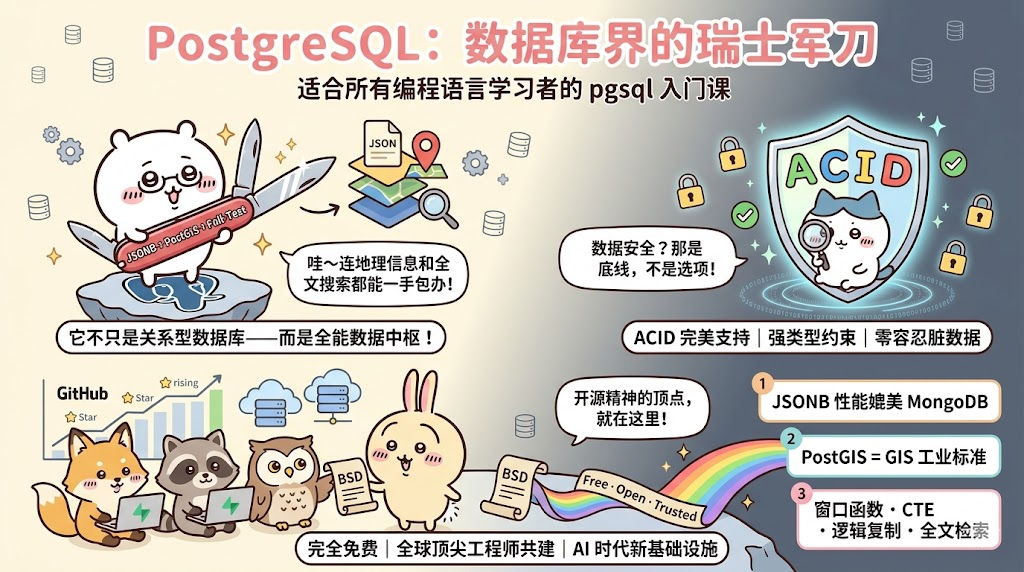
Why postgresql
- It’s the “Swiss Army Knife” of databases
Most databases are good at one thing (like MySQL for simple web applications, MongoDB for document storage), but Postgres is good at almost everything.
- Not just relational: Its support for JSON (JSONB) is excellent, and its performance is even comparable to the professional document database MongoDB.
- Geo Information Processing: Its extension PostGIS is the industry standard in the field of Geographic Information Systems (GIS) without any rivals.
- Full text search: With built-in powerful search capabilities, in many cases you don’t even need to install Elasticsearch specifically.
- Extreme rigor (data security is the bottom line)
In the database world, losing data or generating dirty data is a disaster. Postgres is known for being "old-fashioned" and "rigorous":
- ACID perfect support: It handles transactions very robustly, ensuring that every order and every penny you make will not be miscalculated due to accidents.
- Strong type constraints: It will strictly check data types. Compared with some databases that sacrifice principles for convenience, Postgres can help you avoid a lot of programming bugs at the bottom level.
- The pinnacle of the open source spirit
This is crucial for developers.
- Completely Free: Postgres is licensed under a BSD-like license without the commercial restrictions of giant companies like Oracle.
- Ecological prosperity: The world's top engineers are contributing code to it. The current trend is that almost all emerging AI platforms and cloud services (such as Supabase, Neon) choose Postgres as the underlying layer.
- The “moat” for career development
If you learn Postgres, you'll find that switching to MySQL or SQLite is a piece of cake.
- Advanced Features: It supports advanced SQL syntax such as window functions, common table expressions (CTE), stored procedures, logical replication, etc.
- Standard configuration of major manufacturers: From startups to large enterprises like Apple and Instagram, Postgres is used on a large scale. Mastering it means that you have the ability to handle complex business scenarios.
02 Install PostgreSQL
Beginner users of Windows and MacOS can use the graphical installation package (suitable for beginners, comes with its own management tools). Later, when you are familiar with it, you can directly use Docker installation, which is suitable for development environments and keeps the system clean.
Graphical interface installation
This is the most traditional method, which will install database services, command line tools and pgAdmin (a powerful graphical management interface).
- Download the installation package: Go to the official PostgreSQL download page and click "Download the Interactive Installer by EDB".
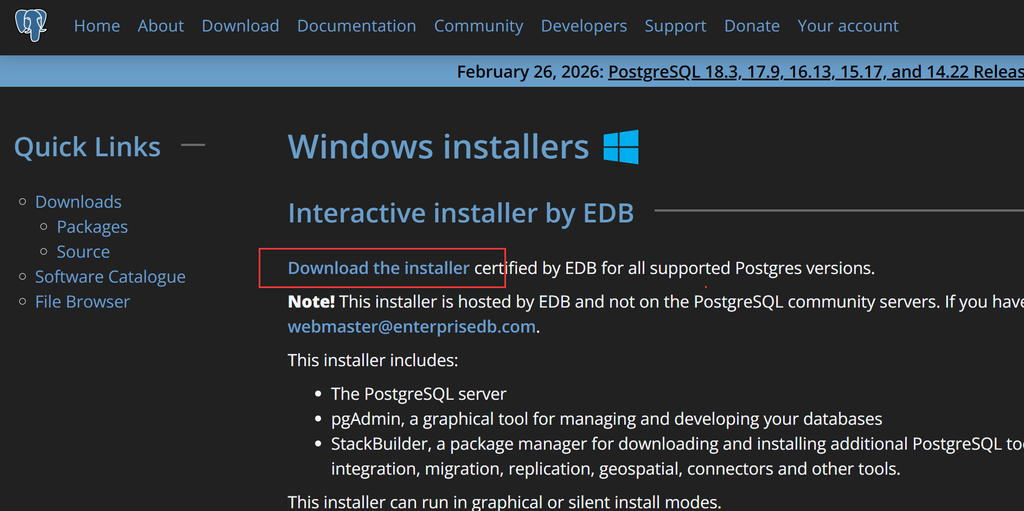
- Run the installer: It is recommended to download the latest version (such as PostgreSQL 17 or 18).
- Select components: By default, all are selected, including:
PostgreSQL Server: Core database.pgAdmin 4: Graphical management tool (required).Stack Builder: Used to download additional drivers and plug-ins (optional).
- Set the password: During installation, you will be asked to set a password for the
postgressuperuser. Be sure to remember it! - Select port: The default is
5432. Do not modify it unless it is occupied. - Complete the installation: Search for and open pgAdmin 4 from the Start menu.
After installation, set the postgresql bin directory to the environment variable so that you can use the pgsql command from any location.
After setting the environment variables, the previously opened terminal and editor need to be reopened for the environment variables to take effect.
Connect to pgsql
Connect to pgsql, two methods
The first is to use the SQL Shell (psql) in the installation package and just follow the process and press Enter.
The second is to use the psql command (environment variables need to be set, which have been set above)
psql -U postgres -d postgres
-U: Specify username.-d: Specify the database name.- Press Enter to enter the password. The password is the password entered when following the graphical interface.
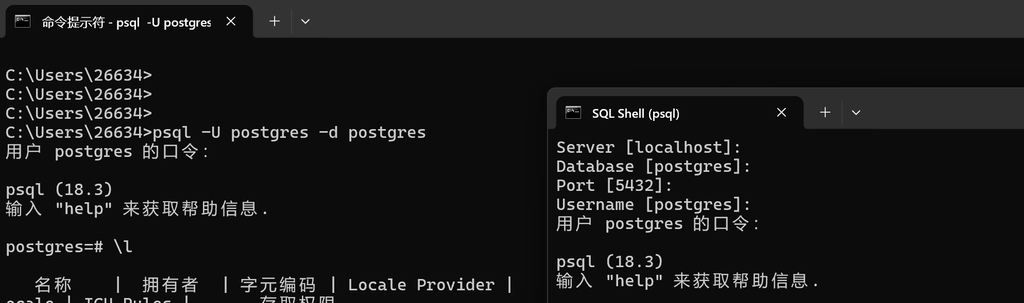
If you don’t want to enter the password every time, you can set the password to an environment variable.
set PGPASSWORD=root
# 这个只针对当前shell生效
pgAdmin4 settings Chinese
If it is pgAdmin4, it needs to be set to Chinese
- In the menu tree on the left, scroll down to find Miscellaneous.
- Click User Interface under Miscellaneous.
- Among the options that appear on the right, find the Language drop-down box.
- Select Chinese (Simplified) (Simplified Chinese) in the drop-down list.
- Click the Save button at the top of the page (that little disk icon)
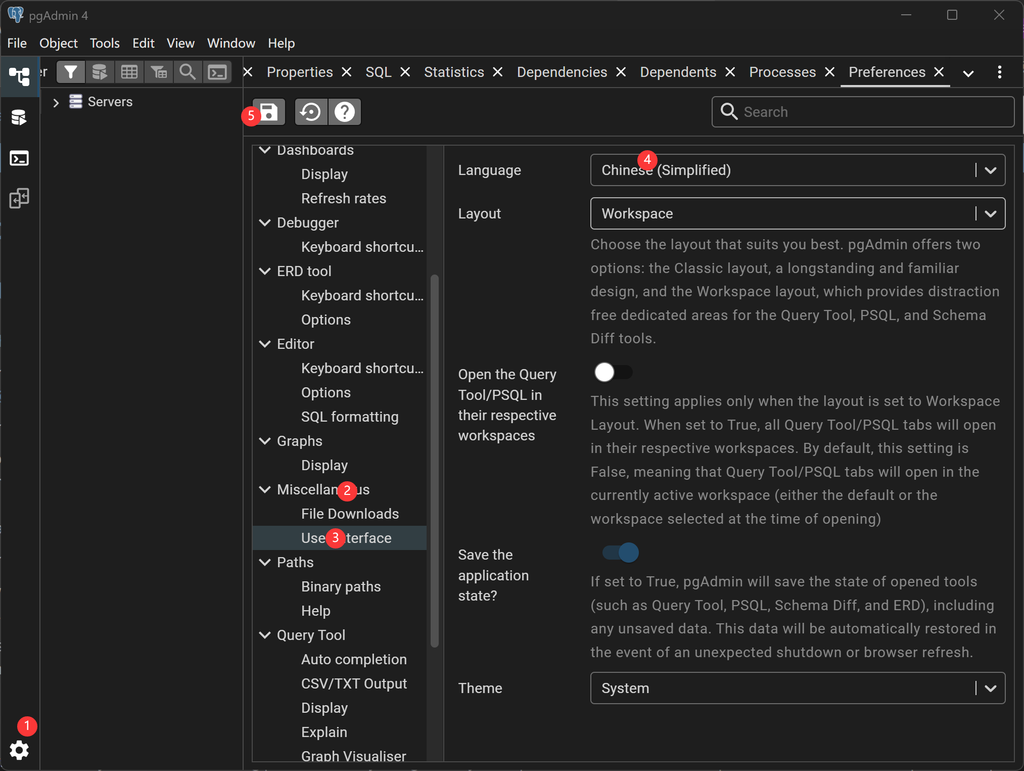
But I think this thing is not easy to use. What I use more is the database client in the IDE editor, which is very convenient.
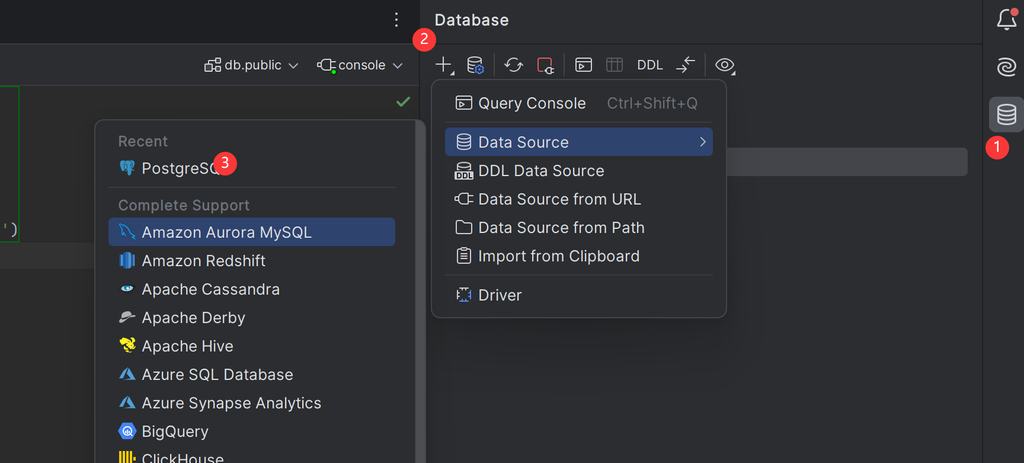
Docker installation method
More convenient installation method, you can switch versions at the same time, which is the best choice for development and deployment
docker run -d --name pg-study -p 5432:5432 -e POSTGRES_USER=fengfeng -e POSTGRES_PASSWORD=root -e POSTGRES_DB=fengfeng_db -e TZ=Asia/Shanghai -v pgdata:/var/lib/postgresql/data postgres:16.2
Parameter details:
--name my-postgres: Give your container a name-e POSTGRES_PASSWORD=your_password: Set the login password for userpostgres(replaceyour_passwordwith your own)-p 5432:5432: Map the container’s 5432 port to your host’s 5432 port-d: Running in the backgroundpostgres: Use the latest official PostgreSQL image
If you install it in this way, you will not have the psql tool on your local machine. Subsequent operations must either enter the container or use a separate client.
Connect to remote pgsql
psql -h <远程IP地址> -p <端口号> -U <用户名> -d <数据库名>
# psql -h 192.168.80.166 -p 5432 -U postgres -d db
# psql -h 192.168.80.166 -p 25432 -U fengfeng -d fengfeng_db
03 PostgreSQL basic structure
To understand the structure of PostgreSQL, you can think of it as an administrative office building.
In PostgreSQL, data is organized in layers, and each layer has its own specific boundaries and functions.
Core hierarchy
The logical structure of PostgreSQL from largest to smallest is: Instance > Database > Schema > Table > Row & Column
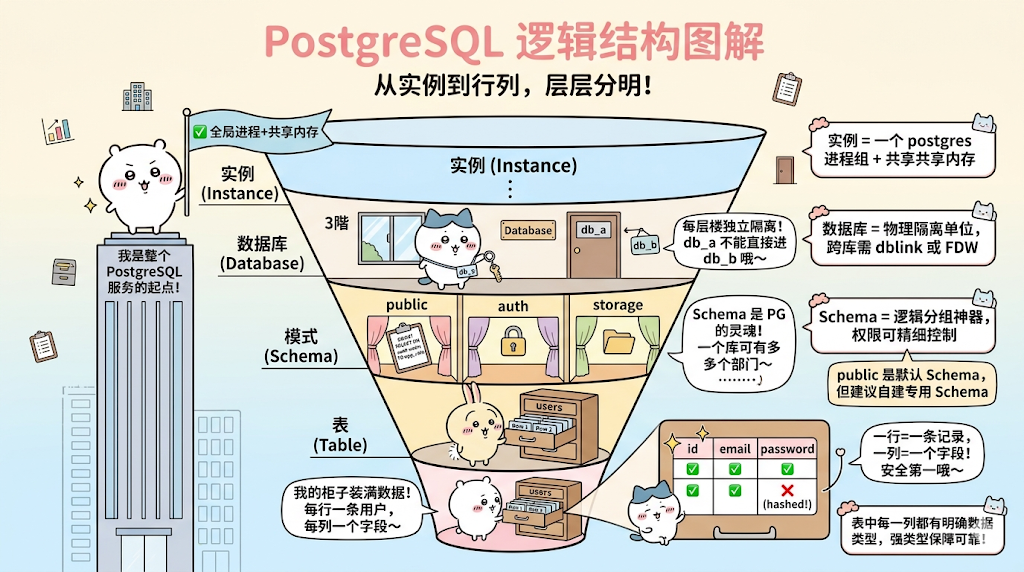
Level 1: Database
- Analogy: A certain floor in a building.
- Features: The database has the highest physical isolation level. Usually a project will occupy an independent database.
- Note: Data between different databases are not accessible by default. You cannot directly query the table of
db_bindb_a.
The second layer: Schema - this is the soul of PG
- Analogy: Various "departments" or "rooms" on a floor.
- Features: This is an important feature that distinguishes PostgreSQL from MySQL. There can be multiple Schema under a database.
- Default value: By default all tables are placed in the schema named
public. - Purpose: You can create the
authmode to put the user table, and thestoragemode to put the file table, so as to achieve logical grouping and permission control.
Third level: Table
- Analogy: A "file cabinet" in a room.
- Features: This is where the data is actually stored.
- Structure: Each row (Row) represents a record, and each column (Column) represents a field.
Why is it designed like this?
This "database -> schema -> table" design method allows you to be very comfortable when developing large and complex systems. For example, if you want to build a multi-tenant system (logical isolation of data for each customer), you can assign an independent Schema to each customer, but they share the same database connection pool, which is both safe and resource-saving.
Create libraries and patterns
Database operations
# 创建数据库
create database db_name;
// 查看数据库
\l 或者 SELECT datname FROM pg_database;
// 接入数据库
\c db_name;
// 删除数据库
drop database db_name; // 需要先切换到其他数据库才能删除,并且不能有会话连接
DROP DATABASE db WITH (FORCE); // 强制删除
Mode operation
If it is a small project, just use public mode.
// 如果不存在,就创建
CREATE SCHEMA IF NOT EXISTS storage;
// 查看模式
\dn
// 删除模式
-- 只有模式为空时才能删除
DROP SCHEMA IF EXISTS storage;

-- 【慎用】级联删除:删除模式以及模式里的所有表、视图、函数等
DROP SCHEMA IF EXISTS storage CASCADE;
pgsql table operations
1. Create table (CREATE TABLE)
When building a table, in addition to field names and types, Constraints are the key to ensuring data quality.
// storage.files  这样写表示在storage下创建files表
// 如果要在public模式下创建files表,直接写files或者public.files
CREATE TABLE IF NOT EXISTS storage.files (
    id BIGINT GENERATED BY DEFAULT AS IDENTITY PRIMARY KEY, -- 自增主键
    file_id UUID DEFAULT gen_random_uuid(),             -- uuid
    file_name TEXT NOT NULL,                            -- 不能为空
    file_size BIGINT CHECK (file_size >= 0),            -- 检查约束:大小不能为负
    is_public BOOLEAN DEFAULT false,                    -- 默认值
    tags TEXT[],                                        -- 数组类型(PG特色!)
    created_at TIMESTAMPTZ DEFAULT NOW()                -- 带时区的时间
);
Check the table list under this library \d
SELECT
    schemaname AS 模式名,
    tablename AS 表名,
    tableowner AS 所有人
FROM pg_tables
WHERE schemaname NOT IN ('pg_catalog', 'information_schema')
ORDER BY schemaname, tablename;
Check the table structure of this table \d table name or \d+ table name
SELECT
    column_name AS 字段名,
    data_type AS 数据类型,
    is_nullable AS 是否允许为空,
    column_default AS 默认值,
    character_maximum_length AS 最大长度
FROM information_schema.columns
WHERE table_name = 'cloud_files'  -- 替换成你的表名
ORDER BY ordinal_position;      -- 按照表中定义的顺序排列
2. Modify table (ALTER TABLE)
Project requirements often change, and you need to modify the existing table structure.
- Add field:
ALTER TABLE storage.files ADD COLUMN download_count INT DEFAULT 0;
- Modify field type:
ALTER TABLE storage.files ALTER COLUMN file_name TYPE VARCHAR(255);
- Rename column name:
ALTER TABLE storage.files RENAME COLUMN is_public TO is_shared;
- DELETE FIELD:
ALTER TABLE storage.files DROP COLUMN tags;
3. DROP TABLE
Be very careful when deleting a table. Once deleted, all data in the table will be lost.
-- 基本删除
DROP TABLE IF EXISTS storage.files;

-- 级联删除(如果这个表被其他表作为外键关联,用CASCADE会连带删除关联)
DROP TABLE storage.files CASCADE;
4. Clear the table (TRUNCATE)
If you just want to delete all the data in the table but want to retain the structure of the table (like emptying the house of furniture but not demolishing the house), TRUNCATE is much faster than DELETE.
TRUNCATE TABLE storage.files;
TRUNCATE TABLE storage.files i; // 清空表并且重置自增id
5. View table information (meta-commands and queries)
When working with tables, you often need to confirm the current structure.
- In the psql command line:
\dt: List all tables in the current library.\d storage.files: View the detailed structure of this table (columns, types, indexes, constraints).
- Use an SQL query (common in pgAdmin):
SELECT column_name, data_type, is_nullable
FROM information_schema.columns
WHERE table_name = 'files';
6. Featured operation: Table inheritance (Inheritance)
This is one of the black technologies of PostgreSQL. You can create a "parent table" and then have the "child table" inherit it.
-- 父表:定义基础字段
CREATE TABLE content (
    title TEXT,
    author TEXT
);

-- 子表:继承基础字段,并增加自己的字段
CREATE TABLE video (
    duration INT
) INHERITS (content);
When querying the content table, you will find that it will automatically retrieve the data in the video table.
Data operations
Add, delete, modify and check data
Insert
-- 插入单条记录(注意数组用 ARRAY[...] 或 {'a','b'} 语法)
INSERT INTO files (file_name, file_size, is_public, tags)
VALUES ('课程大纲.pdf', 1024576, true, ARRAY['教育', 'PDF']);

-- 批量插入(Postgres 对批量插入的支持非常高效)
INSERT INTO files (file_name, file_size, tags)
VALUES
    ('demo.mp4', 50000000, '{"视频", "测试"}'),
    ('config.yaml', 1024, '{"配置"}');
If the constraint fails, the auto-incremented ID will also be consumed.
Query
-- 基础查询:查看所有公开的大文件
SELECT file_name, file_size, created_at
FROM files
WHERE is_public = true AND file_size > 1000000;

-- 模糊查询:查找所有 pdf
SELECT * FROM files WHERE file_name LIKE '%.pdf';

-- 数组查询(PG特色):查找标签中包含“视频”的文件
SELECT * FROM files WHERE '视频' = ANY(tags);
Modify
-- 模拟下载次数自增
UPDATE files
SET download_count = download_count + 1
WHERE file_name = 'demo.mp4';

-- 修改多个字段并切换布尔值
UPDATE files
SET is_public = false, tags = array_append(tags, '私有')
WHERE file_id = '你查出来的某个UUID';
Delete
-- 删除特定的文件
DELETE FROM files WHERE file_id = '某个UUID';

-- 删除所有下载次数为 0 的旧配置测试文件
DELETE FROM files
WHERE download_count = 0 AND tags @> ARRAY['测试'::text];
Create + echo
-- 插入并立刻返回新生成的 UUID 和创建时间
INSERT INTO files (file_name, file_size)
VALUES ('枫枫老师的私房课.zip', 999999)
RETURNING file_id, created_at;
04 Table structure definition
We have learned about some basic data types above. pgsql supports many data types.
Core Data Types (Data Types)
PostgreSQL is known for its rich data types, the following are the most commonly used types in development:
Numeric type
INTEGER/INT: A 4-byte integer with a range of roughly ±2.1 billion.BIGINT: 8-byte integer, used for large ID or large data volume counting.NUMERIC(p, s)/DECIMAL: An exact decimal type used for monetary values. $p$ is the total number of digits, and $s$ is the number of digits after the decimal point.SERIAL/BIGSERIAL: Auto-incrementing integers implemented using aSEQUENCE.
Character type
VARCHAR(n): Variable length string, with length limit.TEXT: variable-length string, no length limit (PostgreSQL recommends using this directly unless there are business hard length constraints).CHAR(n): Fixed-length string, with spaces added to the missing part.
date/time type
TIMESTAMP: date and time.TIMESTAMPTZ: date and time with time zone (recommended for production environment to avoid time zone confusion).DATE: Date only.INTERVAL: time interval (such as1 day 2 hours).tsrange: Corresponds to the range oftimestamp without time zone.tstzrange: Corresponds to the range oftimestamp with time zone(recommended for cross-time zone services).daterange: Corresponds to the range ofdate.
Featured/Advanced Types
BOOLEAN:TRUE,FALSE, orNULL.JSONB: Binary stored JSON data, supports indexing, and has excellent performance.UUID: Universal unique identification code.ARRAY: Array type, such asTEXT[], can store a list of tags.INET: ip type
Column Constraints
Constraints are used to ensure data accuracy and reliability (entity integrity, referential integrity).
| Constraint Type | Description | Example |
|---|---|---|
NOT NULL | The mandatory column cannot contain the NULL value. | name TEXT NOT NULL |
UNIQUE | Make sure that all values in the column are distinct from each other. | email TEXT UNIQUE |
PRIMARY KEY | Primary key, uniquely identifies each row. Implies NOT NULL and UNIQUE. | id SERIAL PRIMARY KEY |
FOREIGN KEY | Foreign keys, establish links between tables to prevent damage to relationships. | user_id INT REFERENCES users(id) |
CHECK | Checks whether a value meets specific logical conditions. | age INT CHECK (age >= 18) |
DEFAULT | If no value is specified when inserting, the default value is used. | created_at TIMESTAMPTZ DEFAULT NOW() |
Example
CREATE TABLE public.file_details (
    -- 1. 自增长整数主键 (BIGSERIAL)
    -- 知识点:BIGSERIAL 是 8 字节整数,支持极大数量级(达 922 亿亿次插入)
    -- 适合作为数据库内部的关联外键,性能优于 UUID
    id BIGSERIAL PRIMARY KEY,

    -- 2. 现代唯一标识 (UUID)
    -- 知识点:对外暴露的 ID,防止业务数据量泄露
    detail_id UUID UNIQUE DEFAULT gen_random_uuid(),

    -- 3. 时间范围类型 (TSTZRANGE)
    -- 知识点:存储文件的“有效期”起止时间。
    -- 例如:'[2023-01-01, 2024-01-01)' 表示从元旦开始,一年内有效。
    valid_period TSTZRANGE NOT NULL DEFAULT tstzrange(now(), NULL, '[)'),

    -- 4. 空间与网络 (INET)
    uploader_ip INET NOT NULL,

    -- 5. 集合容器 (ARRAY)
    tags TEXT[] DEFAULT '{}',

    -- 6. 半结构化神器 (JSONB)
    metadata JSONB DEFAULT '{}',

    -- 基础字段
    file_name TEXT NOT NULL,
    created_at TIMESTAMPTZ DEFAULT NOW()
);
Insert data
INSERT INTO public.file_details (uploader_ip, tags, metadata, file_name, valid_period)
VALUES
    -- 1. 文档:标准构造函数
    ('10.0.0.5', '{"PDF", "文档"}', '{"pages": 45, "author": "Fengfeng"}', 'PostgreSQL手册.pdf',
     tstzrange('2026-01-01 00:00:00Z', '2027-01-01 00:00:00Z', '[)')),

    -- 2. 图片:修正字符串格式 (去掉逗号后的空格)
    -- 注意:'[start,]' 表示包含起点,无终点
    ('127.0.0.1', '{"素材", "封面"}', '{"dpi": 300, "color": "RGB"}', 'bilibili横屏封面.png',
     '[2026-04-14 08:00:00+08,]'),

    -- 3. 简单文件:另一种写法,使用 NULL 表示无穷大
    ('172.16.0.100', '{}', '{}', 'test_file.txt',
     tstzrange('2025-01-01', NULL, '[)')),

    -- 4. 视频文件:直接使用 DEFAULT
    ('192.168.50.20', '{"视频"}', '{"video": {"resolution": {"width": 1920}}}', 'test_file.mp4',
     DEFAULT);
05 Single table query
The above briefly introduces some query statements. Let’s learn more about single-table queries in pgsql.
First insert some data in batches to facilitate subsequent queries.
INSERT INTO file_details (
    file_name,
    uploader_ip,
    tags,
    metadata,
    created_at
) VALUES
-- 1. 匹配 ILIKE '%.PNG' 和 2026 年时间点
('Logo_Design.png', '192.168.1.5', ARRAY['素材', '封面', '设计'], '{"author": "Fengfeng", "dpi": 300, "color": "RGB"}', '2026-02-15 10:30:00'),

-- 2. 匹配数组重叠 (&&) 和包含 (@>)
('Tutorial_Video.mp4', '172.16.10.1', ARRAY['视频', '素材', '教程'], '{"author": "Zhang", "video": {"resolution": {"width": 1920, "height": 1080}}}', '2026-05-20 14:00:00'),

-- 3. 匹配特定的作者和文本转换
('Annual_Report.pdf', '172.16.20.5', ARRAY['文档', 'PDF'], '{"author": "Fengfeng", "pages": 45}', '2026-08-01 09:15:00'),

-- 4. 匹配 inet 范围 (172.16.0.0/16)
('Backup_Config.txt', '172.16.50.12', ARRAY['文档', '系统'], '{"priority": "high"}', '2025-12-30 23:59:59'),

-- 5. 匹配 JSONB 键值对存在性 (?)
('Thumbnail.PNG', '127.0.0.1', ARRAY['封面'], '{"author": "Li", "color": "CMYK", "dpi": 72}', '2026-01-10 11:00:00'),

-- 6. 聚合统计测试案例 (同一 IP 多次上传)
('Meeting_Notes.docx', '127.0.0.1', ARRAY['文档'], '{"author": "Fengfeng"}', '2026-03-05 16:20:00');
Basic matching and fuzzy query
-- 查找所有 png 图片,忽略大小写
SELECT file_name, uploader_ip
FROM file_details
WHERE file_name ILIKE '%.PNG';

-- 查找 2026 年上传的文件
SELECT * FROM file_details
WHERE created_at >= '2026-01-01' AND created_at < '2027-01-01';
SELECT * FROM file_details
WHERE EXTRACT(YEAR FROM created_at) = 2026;
Depth search of array type
-- 匹配:查找标签中包含“文档”的所有文件
SELECT file_name, tags FROM file_details WHERE '文档' = ANY(tags);

-- 包含:查找同时包含“素材”和“封面”的文件 (@> 是包含操作符)
SELECT file_name, tags FROM file_details WHERE tags @> ARRAY['素材', '封面'];

-- 重叠:只要包含“PDF”或“视频”中的任意一个就行 (&& 是重叠操作符)
SELECT file_name, tags FROM file_details WHERE tags && ARRAY['PDF', '视频'];
jsonb operations
Note:
->>extracts text, and->extracts json object.
-- 提取:查找作者是 "Fengfeng" 的文件
SELECT file_name, metadata->>'author' AS author
FROM file_details
WHERE metadata->>'author' = 'Fengfeng';

-- 如果取出来的字段还是一个json,就得用->取了
SELECT file_name, metadata->'video' AS author
FROM file_details
WHERE (metadata->'video'->'resolution'->>'width')::int = 1920;

-- 嵌套判断:查找 DPI 等于 300 的图片 (将 text 转为 int 进行比较)
SELECT file_name, metadata FROM file_details
WHERE (metadata->>'dpi')::int = 300;

-- 键值对存在性判断:查询所有定义了 "color" 属性的文件
SELECT * FROM file_details WHERE metadata ? 'color';
Filtering of network address inet
-- 精确匹配 IP
SELECT * FROM file_details WHERE uploader_ip = '127.0.0.1';

-- 范围匹配:查找属于 172.16.0.0/16 网段的所有上传记录
SELECT file_name, uploader_ip FROM file_details
WHERE uploader_ip << '172.16.0.0/16';
Sorting and paging
-- 按创建时间倒序排列,取前 2 条
SELECT file_name, created_at
FROM file_details
ORDER BY created_at DESC
LIMIT 2 OFFSET 0;
Aggregation statistics
-- 统计每个 IP 上传了多少次,并计算每个 IP 上传文件包含的总标签数
-- 使用 unnest 把数组展开才能计数
SELECT
    uploader_ip,
    COUNT(*) AS upload_count,
    SUM(array_length(tags, 1)) AS total_tags
FROM file_details
GROUP BY uploader_ip;
Data conversion and formatting
-- 格式化输出:ID 前 8 位 + 文件名 + 简写日期
SELECT
    left(detail_id::text, 8) AS short_id,
    file_name,
    to_char(created_at, 'YYYY-MM-DD') AS simple_date
FROM file_details;
06 Common functions
In PostgreSQL, functions are like "built-in gadgets" that can help you process raw data into the final required format directly at the SQL layer.
We can divide commonly used functions into four categories: String processing, Numeric calculation, Date time and Aggregation processing.
String processing function (a powerful tool for cleaning data)
These functions can help a lot when your file paths and username formats are not uniform.
CONCAT(a, b)/||: Concatenate strings.UPPER()/LOWER(): Convert letter case.SUBSTR(string, start, len): intercept the string.REPLACE(string, from, to): Replacement content.COALESCE(value, default): [Super commonly used] If the field is NULL, give it a default value.
Numerical calculation function
ROUND(numeric, 2): Rounded.CEIL()/FLOOR(): Round up or down.ABS(): Take the absolute value.
Date and time function (the soul of time management)
NOW(): Get the current complete time.CURRENT_DATE: Get the current date.AGE(timestamp): Calculate the time difference.
-- 看看这个文件上传了多久了
SET TIME ZONE 'Asia/Shanghai';
SELECT file_name, AGE(created_at) AS active_time FROM file_details;
EXTRACT(field FROM source): Extract the year, month, day and hour.
-- 统计每个小时的上传量
SELECT EXTRACT(HOUR FROM created_at) AS hour, COUNT(*)
FROM file_details GROUP BY hour;
TO_CHAR(): Format the time into a string.
-- 变成类似 2026-04-14 14:30:00 的格式
SELECT TO_CHAR(created_at, 'YYYY-MM-DD HH24:MI:SS') FROM file_details;
Process control and aggregate functions
CASE WHEN:if-elsein SQL.
-- 给文件分等级
SELECT file_name,
       CASE
           WHEN file_size > 1024*1024*100 THEN '大文件'
           WHEN file_size > 1024*1024*10 THEN '中文件'
           ELSE '小文件'
           END AS file_level
FROM files;
STRING_AGG(field, delimiter): [PG Features] Merge multiple lines of results into one line of string.
-- 把某个用户的所有标签拼成一个逗号分隔的字符串
SELECT uploader_ip, STRING_AGG(tags::text, ' | ') FROM file_details GROUP BY uploader_ip;
or
SELECT
    uploader_ip,
    -- 先把所有数组合并成一个大数组,再转为字符串
    array_to_string(array_agg(unnest_tags), ', ')
FROM (
    SELECT uploader_ip, unnest(tags) AS unnest_tags FROM file_details
) t
GROUP BY uploader_ip;
07 Multi-table relationship
In real business, business logic often requires the close cooperation of multiple tables, and tables are related.
One-to-one relationship
A row in table A can only correspond to a row in table B. Usually used to separate "core high-frequency data" from "extended low-frequency data" to improve query efficiency
Example: Users vs. User_Profiles
In the user system, the user's account and password are the core, while personal introduction, avatar URL, and delivery address are extended information.
-- 主表:核心账户
CREATE TABLE users (
    id BIGINT GENERATED BY DEFAULT AS IDENTITY PRIMARY KEY,
    username TEXT NOT NULL UNIQUE
);

-- 扩展表:详细资料
CREATE TABLE user_profiles (
    user_id BIGINT PRIMARY KEY, -- 既是主键,也是外键
    avatar_url TEXT,
    bio TEXT,
    CONSTRAINT fk_user
        FOREIGN KEY (user_id) REFERENCES users(id) ON DELETE CASCADE
);
Implementation Points: In the child table, set the foreign key field to PRIMARY KEY or UNIQUE to ensure that a user ID can only appear once in the Profile table.
ON DELETE CASCADE (define "sitting together" logic) ——The core part
This defines what the slave table (user_profiles) should do when the data in the master table (users) is deleted.
CASCADE: Like dominoes: if the user with ID 1 is deleted, the database automatically deletes everyuser_id = 1row inuser_profiles.- Why use it: In a "one-to-one" or "one-to-many" relationship, if the subject (user) no longer exists, the relevant details or avatar information will have no meaning. Using cascades prevents the database from accumulating junk data.
In addition to CASCADE, you sometimes also see these writings:
| Options | Effects | Applicable Scenarios |
|---|---|---|
RESTRICT (Default) | If the user still has information, the user is not allowed to be deleted. | Protect important data from accidental deletion. |
SET NULL | The user deleted it, and user_id in the data table becomes NULL. | The user logged out, but you want to keep his comments or traces. |
NO ACTION | Similar to RESTRICT, but checked at the end of the transaction. | Complex transaction processing. |
Insert data
-- 第一步:插入核心用户
-- 我们利用 RETURNING 直接获取系统生成的自增 ID
INSERT INTO users (username)
VALUES ('fengfeng')
RETURNING id;

-- 假设上面返回的 ID 是 1
-- 第二步:插入对应的详细资料
INSERT INTO user_profiles (user_id, avatar_url, bio)
VALUES (1, 'https://example.com/avatar.png', '技术教育者,B站UP主');

-- 尝试再次为 ID 为 1 的用户插入资料(会报错!)
-- 报错信息:duplicate key value violates unique constraint "user_profiles_pkey"
-- 这正是我们设计成 PRIMARY KEY 的目的,保证了一对一的严格性。
Query data Forward join search and reverse search
select username, avatar_url from users join user_profiles up on users.id = up.user_id;

select avatar_url, username from user_profiles left join users u on u.id = user_profiles.user_id;
Delete data
After setting up CASCADE and deleting the user, the associated user details will also be deleted.
Foreign keys: In general business, foreign keys will be removed and logical foreign keys will be used.
One-to-many relationship
Concept: One row of table A can correspond to multiple rows of table B, but one row of table B can only belong to one entity of table A.
Example: Goddess and Licking Dog
A "goddess" can have thousands of "licking dogs", but a "licking dog" can only give money to one "goddess" within a specific period of time (in terms of business logic).
-- 1. 女神表 (一)
CREATE TABLE goddesses (
    id BIGINT GENERATED BY DEFAULT AS IDENTITY PRIMARY KEY,
    name TEXT NOT NULL,
    star_sign TEXT -- 星座
);

-- 2. 舔狗表 (多)
CREATE TABLE simps (
    id BIGINT GENERATED BY DEFAULT AS IDENTITY PRIMARY KEY,
    target_id BIGINT NOT NULL, -- 目标女神的ID (外键)
    nickname TEXT NOT NULL,    -- 舔狗昵称
    contributed_amount DECIMAL(10, 2) DEFAULT 0, -- 累计贡献(打钱)金额

    -- 外键约束:如果女神号注销了,舔狗记录也级联消失
    CONSTRAINT fk_goddess
        FOREIGN KEY (target_id) REFERENCES goddesses(id) ON DELETE CASCADE
);
- Implementation Points: Add a field to the "many" side (simps) to store the primary key of the "one" side (goddesses).
Insert data
-- 插入两位女神
INSERT INTO goddesses (name, star_sign)
VALUES ('林青霞', '天蝎座'), ('王祖贤', '水瓶座')
RETURNING id, name;
-- 假设 林青霞 ID=1, 王祖贤 ID=2

-- 为 林青霞 (ID: 1) 插入忠实粉丝
INSERT INTO simps (target_id, nickname, contributed_amount) VALUES
(1, '阿强', 520.00),
(1, '小明', 1314.00),
(1, '旺财', 9.90);

-- 为 王祖贤 (ID: 2) 插入忠实粉丝
INSERT INTO simps (target_id, nickname, contributed_amount) VALUES
(2, '大壮', 8888.88),
(2, '铁柱', 0.01);
Query
See who each licking dog is chasing
SELECT
    s.nickname AS 舔狗,
    g.name AS 女神,
    s.contributed_amount AS 贡献值
FROM simps s
JOIN goddesses g ON s.target_id = g.id
ORDER BY s.contributed_amount DESC;
See which goddess received the highest total "contribution"
SELECT
    g.name AS 女神,
    COUNT(s.id) AS 舔狗总数,
    SUM(s.contributed_amount) AS 收到总金额
FROM goddesses g
LEFT JOIN simps s ON g.id = s.target_id
GROUP BY g.name
ORDER BY 收到总金额 DESC;
Find licking dogs whose contribution amount is less than 10 yuan
SELECT nickname, contributed_amount
FROM simps
WHERE contributed_amount < 10.00;
Many-to-many relationship
Concept: A row of table A corresponds to multiple rows of table B, and vice versa.
Example: Students and Clubs.
- A student can join multiple clubs (for example, both the Badminton Club and the Code Mania Club).
- A club can also have many students.
- This relationship cannot be solved by adding a field to any table. There must be a "middleman" to bridge the gap.
-- 1. 学生表 (核心实体 A)
CREATE TABLE students (
    id BIGINT GENERATED BY DEFAULT AS IDENTITY PRIMARY KEY,
    name TEXT NOT NULL
);

-- 2. 社团表 (核心实体 B)
CREATE TABLE clubs (
    id BIGINT GENERATED BY DEFAULT AS IDENTITY PRIMARY KEY,
    club_name TEXT NOT NULL UNIQUE,
    description TEXT
);

-- 3. 成员关系表 (中间桥梁)
-- 这张表记录了“谁”参加了“哪个”社团
CREATE TABLE memberships (
    student_id BIGINT REFERENCES students(id) ON DELETE CASCADE,
    club_id BIGINT REFERENCES clubs(id) ON DELETE CASCADE,
    joined_at TIMESTAMPTZ DEFAULT NOW(), -- 甚至可以记录入社时间
    PRIMARY KEY (student_id, club_id)    -- 联合主键:保证一个学生不会在同一个社团里加两次
);
Insert data
-- 插入学生
INSERT INTO students (name) VALUES ('枫枫'), ('小红'), ('老王') RETURNING id;
-- 假设 ID 分别是 1, 2, 3

-- 插入社团
INSERT INTO clubs (club_name, description) VALUES
('Go语言社', '高性能后端开发探讨'),
('篮球社', '只因你太美'),
('钓鱼社', '永不空军')
RETURNING id;
-- 假设 ID 分别是 1, 2, 3

-- 建立关系 (多对多)
INSERT INTO memberships (student_id, club_id) VALUES
(1, 1), -- 枫枫 参加了 Go语言社
(1, 2), -- 枫枫 参加了 篮球社
(2, 2), -- 小红 参加了 篮球社
(3, 1), -- 老王 参加了 Go语言社
(3, 3); -- 老王 参加了 钓鱼社
Query
Check the members: Want to see who are the great masters in the "Go Language Club"?
Since the information is separated by two layers, we need to jump JOIN twice.
SELECT
    c.club_name AS 社团名,
    s.name AS 成员名,
    m.joined_at AS 入社时间
FROM clubs c
JOIN memberships m ON c.id = m.club_id
JOIN students s ON m.student_id = s.id
WHERE c.club_name = 'Go语言社';
Check the track: I want to see how many clubs "Fengfeng" has joined in total?
SELECT
    s.name AS 学生名,
    COUNT(m.club_id) AS 参加社团数,
    string_agg(c.club_name, ', ') AS 社团清单 -- 把社团名拼成字符串
FROM students s
LEFT JOIN memberships m ON s.id = m.student_id
LEFT JOIN clubs c ON m.club_id = c.id
WHERE s.name = '枫枫'
GROUP BY s.name;
Check popularity: Which club has the most people?
SELECT
    c.club_name,
    COUNT(m.student_id) AS 总人数
FROM clubs c
LEFT JOIN memberships m ON c.id = m.club_id
GROUP BY c.club_name
ORDER BY 总人数 DESC;
08 Index
What is an index?
When we were children, we looked up the dictionary. If we didn’t know what the word meant, we might have to turn through the dictionary page by page.
If you know the approximate pronunciation of this word, you can go directly to that area to look for it when looking in the dictionary.
Why do we need an index?
Imagine you have a files table with 10 million rows. If you execute SELECT * FROM files WHERE file_name = 'secret-file.zip'; without an index, the database must scan all 10 million rows. The disk stays busy, and users wait far too long.
Scenario: The number of users of your "Fengfeng Netdisk" has increased sharply, and querying file names has become extremely slow.
-- 1. 创建演示表
CREATE TABLE cloud_files (
    id BIGINT GENERATED BY DEFAULT AS IDENTITY PRIMARY KEY,
    file_name TEXT NOT NULL,
    file_type VARCHAR(20),
    created_at TIMESTAMPTZ DEFAULT NOW()
);

-- 2. 插入 100 万条模拟数据(演示时可以用这个快速生成)
INSERT INTO cloud_files (file_name, file_type)
SELECT
    'file_' || i || '.pdf',
    (ARRAY['video', 'image', 'doc'])[floor(random()*3)+1]
FROM generate_series(1, 1000000) s(i);

-- 3. 【未加索引前】查询耗时
EXPLAIN ANALYZE SELECT * FROM cloud_files WHERE file_name = 'file_999999.pdf';
-- 你会看到 "Seq Scan" (全表扫描),耗时可能在几十毫秒
Create index
-- 给文件名加上 B-Tree 索引(最常用的平衡树索引)
CREATE INDEX idx_file_name ON cloud_files(file_name);

-- 再次查询
EXPLAIN ANALYZE SELECT * FROM cloud_files WHERE file_name = 'file_999999.pdf';
-- 你会发现变成了 "Index Scan",速度提升几百倍!
Other types of indexes
-- 显式指定或默认不写都是 B-Tree
CREATE INDEX idx_file_name ON cloud_files USING btree (file_name);

-- 仅适用于 = 查询
CREATE INDEX idx_file_hash ON cloud_files USING hash (file_name);

-- 注意字段顺序:(user_id, file_type) 遵循最左匹配原则
CREATE INDEX idx_user_file_type ON cloud_files (user_id, file_type);

-- 如果你的网盘支持“标签查询”或者存储了 JSON 格式的元数据,GIN 索引是神器。
-- 假设有一个 tags 字段(类型为 TEXT[])
CREATE INDEX idx_files_tags ON cloud_files USING gin (tags);

-- 假设有一个 meta_data 字段(类型为 JSONB)
CREATE INDEX idx_files_meta ON cloud_files USING gin (meta_data jsonb_path_ops);

-- 唯一索引
CREATE UNIQUE INDEX idx_file_md5 ON cloud_files (file_md5);
Core bottom layer: Why is B-Tree so fast?
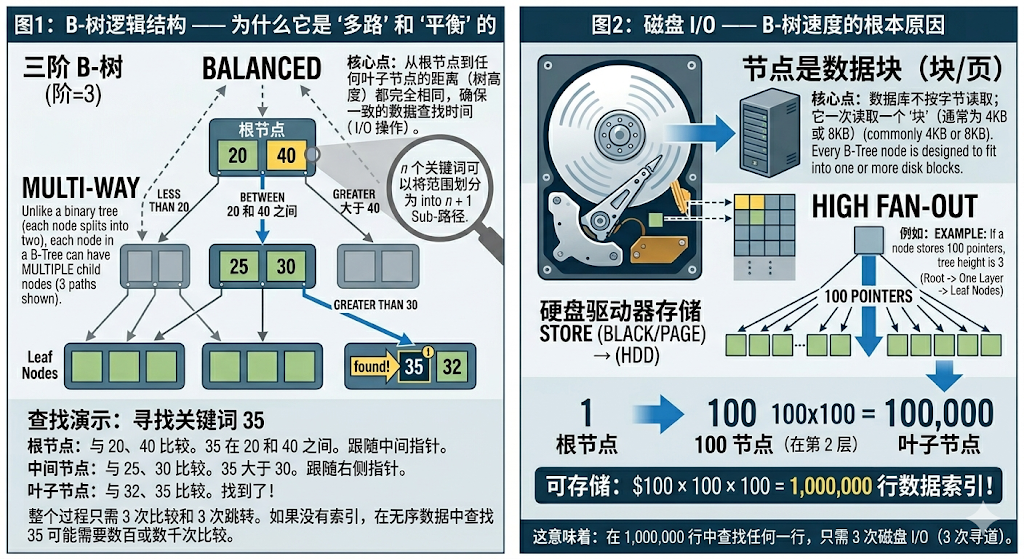
The default of CREATE INDEX is usually B-Tree index. Its core logic is balanced multi-way search tree.
- Logarithmic growth: In 10 million rows of data, a full table scan requires O(n) complexity (see 10 million times); while a B-Tree index only requires logₘ(n) complexity.
- Actual experience: Even if the data volume increases 10 times to 100 million rows, the height of the B-Tree may only increase by 1 layer, and the query time will hardly change significantly.
The "price" of indexing: There is no free lunch in the world
Although the index is good, it cannot add all fields in the entire table. Each index will bring the following overhead:
- Disk Space: The index itself is a tree and requires additional storage space.
- Write performance: When you execute
INSERT,UPDATE, orDELETE, the database must change the data and update the index tree. The more indexes there are, the slower writes become. - Maintenance Cost: As data changes frequently, the index may become fragmented, occasionally requiring
REINDEX(index rebuild) to restore performance.
In these cases the index will "fail"
Many novices have added indexes and found that queries are still slow. This is usually because index failure is triggered:
| Scenario | Error example (resulting in Seq Scan) | Correct posture |
|---|---|---|
| Fuzzy query | WHERE file_name LIKE '%file_999%'; | Only if the "left prefix" matches file_999%, the index can be used |
| Function operation | WHERE UPPER(file_name) = 'FILE.PDF'; | Create function index or process data before querying |
| Type mismatch | WHERE id = '123'; (id is a number, but a string is passed) | Keep the type consistent and avoid implicit conversion |
| Leftmost match | Compound index (a, b) only searches b | Compound index must match from the leftmost field |
09 Transactions and locks
Transaction
In the most popular terms, business is: "Either it is done completely, or it is not done at all, and it is never allowed to stop halfway."
Scenario: The user spends 100 yuan to buy VIP. If money is deducted, the database is powered off and members are not added.
-- 准备表
CREATE TABLE accounts (
    username TEXT PRIMARY KEY,
    balance DECIMAL(10, 2)
);

CREATE TABLE members (
    username TEXT PRIMARY KEY,
    expire_date DATE
);

INSERT INTO accounts VALUES ('小红', 150.00);
INSERT INTO members VALUES ('小红', '2026-01-01');
BEGIN; -- 开启事务,立下“生死状”

-- 1. 扣钱
UPDATE accounts SET balance = balance - 100 WHERE username = '小红';

-- 2. 增加会员时长 (假设这里 SQL 写错了或网络断了)
UPDATE members SET expire_date = expire_date + INTERVAL '1 year' WHERE username = '小红';

-- 检查一下:如果钱扣对了,会员也加了
COMMIT; -- 确认无误,正式写入硬盘
If something goes wrong halfway
ROLLBACK; -- 刚才的所有操作全部撤销,钱会回到小红账上,像没发生过一样
You can also set up a save point midway
BEGIN;             -- 开启事务
UPDATE ...;        -- 执行业务逻辑
SAVEPOINT my_sp;   -- (可选) 设置保存点,类似于单机游戏的存档
UPDATE ...;
ROLLBACK TO my_sp; -- (可选) 发现错了,回滚到存档点
COMMIT;            -- 提交,所有改动生效
ACID
Whether it is PG or other databases, transactions must comply with the ACID principle:
- A (Atomicity) atomicity: It’s what you call “either do it all or don’t do it at all”.
- C (Consistency) Consistency: Data must change from one legal state to another (for example, the balance cannot become a negative number).
- I (Isolation): Key point! Concurrent users must not interfere with one another.
- D (Durability) Durability: As long as you click
COMMIT, even if you unplug the power immediately, the data has been written to the hard disk.
Lock
In PostgreSQL, locks are the core mechanism to ensure database concurrency security (Consistency & Isolation). Simply put, it prevents confusion caused by multiple users modifying the same data at the same time.
PostgreSQL's lock system is very large and can be divided into the following three levels:
1. Table-Level Locks
Even if you just do a simple SELECT or UPDATE on the table, PostgreSQL will automatically add table-level locks.
- Common lock patterns:
- Access Share: Acquired automatically by
SELECT. Other transactions may read and write, but they cannot modify the table structure. - Row Exclusive: Acquired automatically by
INSERT,UPDATE, andDELETE. - Share (shared lock): Commonly used to create indexes, allowing reading but prohibiting modification.
- Access Exclusive: The strongest lock. It is triggered by
ALTER TABLE,DROP TABLE, andTRUNCATEand blocks every operation, includingSELECT.
- Access Share: Acquired automatically by
2. Row-Level Locks
Row-level locks are mainly used to process specific data records. They do not maintain a list in memory, but mark it directly in the data page.
- FOR SHARE: Guarantees that the rows you read will not be modified or deleted by others until you commit the transaction.
- FOR UPDATE: Lock the row for update. No other transaction can perform
UPDATE,DELETE, orSELECT FOR UPDATEon these rows. - FOR NO KEY UPDATE / FOR KEY SHARE: More fine-grained locks, mainly to optimize the concurrency performance during foreign key associations.
3. Advisory Locks
This is a great feature of PostgreSQL. It is not automatically added by the database engine, but a logical lock defined by the programmer.
- Use: For example, if you want to lock the "send email" action, or ensure that only one instance of a background task is running at the same time, you can use advisory locking.
- Features: It does not lock specific tables or rows, but only occupies an "identification bit" in the memory.
How to use?
Auto lock
In most cases, you don't need to lock it manually.
- When executing
UPDATE users SET name = 'Gemini' WHERE id = 1;, the database will automatically add an exclusive lock to the row.
Manually lock table
If you need to perform extensive maintenance and don't want others to interfere:
BEGIN;
-- 需要把这个锁放到事务里面
LOCK TABLE my_table IN ACCESS EXCLUSIVE MODE; -- 彻底锁死表
-- 执行操作
COMMIT;
Manually lock rows (solve issues like "oversold")
This is the standard way of writing when dealing with high-concurrency business (such as inventory deduction):
BEGIN;
-- 锁定 id 为 100 的行,别人必须等我处理完
SELECT * FROM products WHERE id = 100 FOR UPDATE;

UPDATE products SET stock = stock - 1 WHERE id = 100;
COMMIT;
Other connections can only perform ordinary select queries and cannot perform update or delete operations.
Use advisory lock
-- 获取一个编号为 12345 的逻辑锁
SELECT pg_advisory_lock(12345);

-- 执行你的业务逻辑...

-- 释放锁
SELECT pg_advisory_unlock(12345);
How to view the current lock?
If you find that the database is "stuck", you can use this table to check who is locking whom:
SELECT * FROM pg_locks l
JOIN pg_stat_activity a ON l.pid = a.pid;
10 Views and CTE
CTE
When we write sql, if the sql conditions are nested like that
SELECT * FROM (
    SELECT * FROM (
        SELECT ... -- 这里的代码已经缩进到太平洋了
    ) AS inner_data
) AS outer_data;
This sql seems very unintuitive. We can extract the sql inside into a variable.
For example, Fengfeng Netdisk requires statistics: "The total size of files uploaded by each user, and filter out wealthy users with more than 1GB".
-- 使用 CTE 让代码逻辑清晰
WITH user_file_stats AS (
    -- 第一步:先把每个人的总和算出来,起个名字叫 user_file_stats
    SELECT
        u.username,
        SUM(f.file_size) as total_size,
        COUNT(f.id) as file_count
    FROM users u
    LEFT JOIN cloud_files f ON u.id = f.user_id
    GROUP BY u.username
)
-- 第二步:直接像查表一样查这个“变量”
SELECT * FROM user_file_stats
WHERE total_size > 1024 * 1024 * 1024; -- 筛选超过 1GB 的人
View
View is a "virtual table". It does not store actual data, only a query statement. When you query a view, it runs through the underlying SQL.
If you often need to associate the three tables of users, files, and storage nodes through JOIN to view the "full file path", writing 10 lines of SQL each time will be very tiring.
-- 1. 创建视图:一次封装,永久受益
CREATE VIEW v_file_detail_full AS
SELECT
    f.id,
    f.file_name,
    u.username AS owner_name,
    n.node_name AS storage_location,
    f.created_at
FROM cloud_files f
JOIN users u ON f.user_id = u.id
JOIN storage_nodes n ON f.node_id = n.id;

-- 2. 以后查起来就像查单表一样爽
SELECT * FROM v_file_detail_full WHERE owner_name = 'fengfeng';
View vs CTE: How to choose?
| Features | CTE (WITH) | View (View) |
|---|---|---|
| Life cycle | Only valid in the current SQL | Permanently saved in the database |
| Analogy | Local variables | Global public functions |
| Applicable scenarios | Just to make this line-length query look good | Complex queries and report statistics that are often used |
| Permission Control | None | Very Powerful (can show the user the view, but not the original table) |
11 Users and Roles
As a "state-of-the-art" database, PostgreSQL's User and Privilege System (Role & Privilege) is its security moat.
At present, we have been using super administrator postgres to run naked, which is simply a "suicidal" behavior in a production environment.
Scenario: You are now a DBA. You need to create an account for a front-end developer. You can only view data and cannot delete the database.
-- 1. 创建一个组(不准登录)
CREATE ROLE managers;

-- 2. 创建一个用户(准许登录)
CREATE USER fengfeng WITH PASSWORD 'fengfeng';

-- 3. 让“用户”加入“组”
GRANT managers TO fengfeng;
See what roles I have \du
SELECT
    rolname AS 角色名,
    rolcanlogin AS 能否登录,
    rolsuper AS 是否超级管理员,
    rolcreatedb AS 能否建库
FROM pg_roles
WHERE rolname NOT LIKE 'pg_%';  -- 过滤掉所有以 pg_ 开头的系统角色
Now this user can log in and see which libraries and tables there are, but cannot create libraries, create tables, or query table data.
Example 1: Set read-only permissions for a certain library for users
-- 1. 创建用户
CREATE USER reader_user WITH PASSWORD 'fengfeng';

-- 2. 基础进门权
GRANT CONNECT ON DATABASE db TO reader_user;  -- 可以进入db这个库
GRANT USAGE ON SCHEMA public TO reader_user; -- 可以进入public这个模式

-- 3. 核心只读权(现在的表 + 序列)
GRANT SELECT ON ALL TABLES IN SCHEMA public TO reader_user;
GRANT SELECT ON ALL SEQUENCES IN SCHEMA public TO reader_user;

-- 4. 自动化(未来的表)
ALTER DEFAULT PRIVILEGES IN SCHEMA public
GRANT SELECT ON TABLES TO reader_user;
Example 2: Set the add, delete, modify and check permissions for a library for the user
CREATE USER feng_app WITH PASSWORD 'fengfeng';

GRANT CONNECT ON DATABASE fengfeng_db TO feng_app;
GRANT USAGE ON SCHEMA public TO feng_app;

-- 1. 针对表:赋予全部增删改查权限
GRANT SELECT, INSERT, UPDATE, DELETE ON ALL TABLES IN SCHEMA public TO feng_app;

-- 2. 针对序列:必须给权限!否则无法执行自增 ID 的插入
GRANT USAGE, SELECT, UPDATE ON ALL SEQUENCES IN SCHEMA public TO feng_app;

-- 后续新创建的表也拥有权限
ALTER DEFAULT PRIVILEGES IN SCHEMA public
GRANT SELECT, INSERT, UPDATE, DELETE ON TABLES TO feng_app;

ALTER DEFAULT PRIVILEGES IN SCHEMA public
GRANT USAGE, SELECT, UPDATE ON SEQUENCES TO feng_app;
12 Backup and recovery
In PostgreSQL, backups are mainly divided into two types: logical backup (exported SQL files, easy to read, easy to use across versions) and physical backup (direct copy of the underlying file, fast but not easy to read)
pg_dump single database backup
pg_dump is a command line tool that turns the table structure, data, sequences, permissions, etc. in the database into a long SQL script.
Open your computer's terminal (CMD or PowerShell) without entering psql.
# 格式:pg_dump -U [用户名] -d [数据库名] > [备份文件名.sql]
pg_dump -U postgres -d db > db_0414.sql
-U: Specify the username (usually superuser postgres).-t: Back up only a certain table (for example:-t cloud_files).-n: Only back up a certain mode (for example:-n storage).-F: Specify the format.-Fcgenerates a custom binary compression format with smaller size and supports parallel recovery (recommended!).
# 备份为压缩的二进制格式
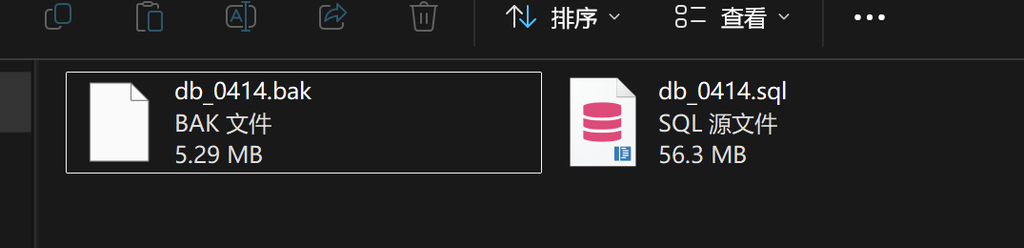
pg_dump -U postgres -F c -d db > db_0414.bak
There is still a big difference in size
restore
The method of recovery depends on the format of your backup.
- Restore plain text SQL backup
If you are backing up the .sql file, just run it directly with psql:
# 格式:psql -U [用户名] -d [目标数据库] < [备份文件]
psql -U postgres -d db1 < db_0414.sql
# 这个库要先创建好
- Restore binary backup (pg_restore)
If you use the -Fc compression format, you must use the exclusive pg_restore tool:
pg_restore -U postgres -d db2 -c db_0414.bak
- -c means clean (delete) the old table first and then restore it to prevent conflicts
pg_dumpall full database backup
If you want to take away all databases, all users and permissions (Role) in the entire PostgreSQL instance at once, use this:
set PGPASSWORD=root   # 不然就会导一个数据库输一次密码
pg_dumpall -U postgres > all_databases_backup.sql
# 格式:psql -U [用户名] -f [备份文件路径] [数据库名]
psql -U postgres -f all_databases_backup.sql postgres
-f: represents file, which specifies the SQL script file to be run.postgres(the final argument): This is the initial database to connect to. Because thepg_dumpallscript containsCREATE DATABASEand\ccommands, you only need to connect to an existing default database such aspostgres; the script creates and switches to the other databases automatically.
Safety Advice
The above is the basic knowledge of pgsql. Regarding the security of the database, we need to talk about it separately.
Because the databases of several of my students have been hacked and extorted, I hope everyone will pay attention after seeing this.
- The database on the cloud server must not open the port. The database on the cloud server can only be connected locally to the service on the cloud server.
- Be sure not to set a weak password and make it as complex as possible
- Change the default 22ssh port of the cloud server, such as 10022, 11222, etc., which can effectively prevent port scanning.
- Develop a good habit of backing up, preferably elsewhere
If you want to connect to a remote database locally, you can use an ssh tunnel.
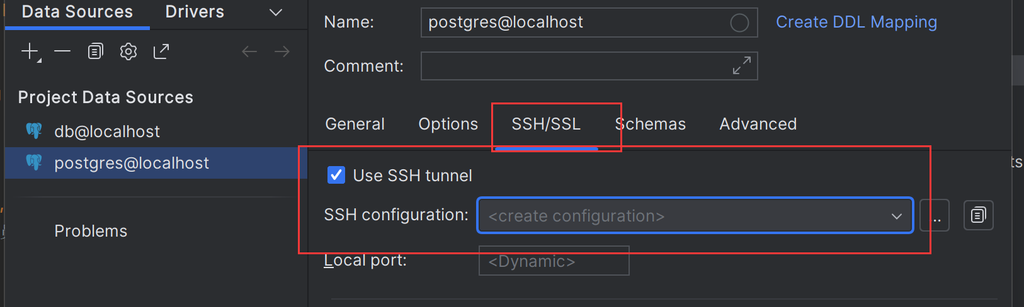
13 Extension: Full text search
Check what extensions pgsql has
SELECT * FROM pg_available_extensions;
See what extensions I have installed
SELECT * FROM pg_extension;
Many times, your project does not need to maintain a cumbersome ES cluster for hundreds of thousands of pieces of data. PG's built-in tsvector and tsquery can implement professional full-text search.
Core principle: tsvector: Segment the text into words and convert it into "search vectors".
- tsquery: your search keywords.
Basic search example:
-- 创建文章表
CREATE TABLE posts (
    id SERIAL PRIMARY KEY,
    title TEXT NOT NULL,
    content TEXT
);

-- 插入一些演示数据(包含英文和中文,方便对比)
INSERT INTO posts (title, content) VALUES
('PostgreSQL Tutorial', 'This is a comprehensive guide to PostgreSQL full-text search.'),
('Go Language Web Framework', 'Learn how to build high-performance web apps with Go and Gin.'),
('枫枫老师的数据库课', 'PostgreSQL 是一款功能强大的开源关系型数据库。'),
('枫枫网盘项目实战', '手把手教你用 Go 语言和 MinIO 实现分布式网盘。');
-
Chinese search: PostgreSQL does not support Chinese word segmentation by default, so the
zhparserextension is commonly installed. Like Elasticsearch, it can split “Fengfeng Netdisk Project” into separate terms for matching. -
Why use it?
Transaction consistency: After the data is updated, the search index takes effect immediately, and there is no synchronization delay like ES.
Save money and resources: One database does two jobs, and there is no need to open additional memory for the Java Virtual Machine (ES).
English full text search example
-- 场景:搜索包含 "PostgreSQL" 或 "Guide" 的文章
-- 使用 'english' 分词配置
SELECT title, content
FROM posts
WHERE to_tsvector('english', title || ' ' || content) @@ to_tsquery('english', 'PostgreSQL | Guide');
Principle dismantling:
to_tsvector: It will split a paragraph into "word elements" and remove meaningless function words such as "the" and "is".@@: This is the operator for full-text search, which means "match".&(AND),|(OR), and!(NOT) provide logical operations in queries.
Pre-segmentation
But this is to segment the words during query and then query. If the data volume is large, the performance will be poor, so under normal circumstances, the words are pre-segmented.
CREATE TABLE posts1 (
    id SERIAL PRIMARY KEY,
    title TEXT NOT NULL,
    content TEXT,
    -- 定义一个自动生成的列,专门用于搜索
    -- STORED 关键字表示这个结果会物理存储在硬盘上,而不是查询时才计算
    searchable_index_col tsvector GENERATED ALWAYS AS (
        to_tsvector('english', title || ' ' || content)
    ) STORED
);

-- 建完表后,紧接着给这个预处理好的列加上 GIN 索引
CREATE INDEX idx_posts_search ON posts1 USING GIN (searchable_index_col);

-- 插入时不需要管 searchable_index_col,数据库会自动生成它
INSERT INTO posts1 (title, content)
VALUES ('PostgreSQL Guide', 'This is a post about full-text search index.');

INSERT INTO posts1 (title, content)
VALUES ('Go Programming', 'Let us learn how to use Gin framework in Go.');

SELECT title, searchable_index_col FROM posts1;
-- 查包含 "PostgreSQL" 的文章
-- 注意:这里依然要用 to_tsquery 将你的搜索词转化为查询向量
SELECT title, content
FROM posts1
WHERE searchable_index_col @@ to_tsquery('english', 'PostgreSQL');

-- 复杂的逻辑查询:包含 "Go" 但不包含 "Gin"
SELECT * FROM posts1
WHERE searchable_index_col @@ to_tsquery('english', 'Go & !Gin');
Chinese word segmentation
pgsql only supports English word segmentation by default. Chinese word segmentation requires compilation and extension. It is recommended to use the corresponding docker image directly.
# 这里推荐使用社区预集成好的镜像,省去手动编译的痛苦
docker pull zhparser/zhparser:alpine-16
docker run -d --name pg-chinese -p 5432:5432 -e POSTGRES_PASSWORD=root zhparser/zhparser:alpine-16
Initialize the configuration in the library (you only need to do this once):
CREATE EXTENSION IF NOT EXISTS zhparser;
CREATE TEXT SEARCH CONFIGURATION chinese (PARSER = zhparser);
ALTER TEXT SEARCH CONFIGURATION chinese ADD MAPPING FOR n,v,a,i,e,l WITH simple;
How to check whether the installation is successful
SELECT to_tsvector('chinese', '枫枫老师的 Go 语言教程');
-- 看看这个能不能正常输出
-- 'go':4 '教程':6 '枫':1,2 '老师':3 '语言':5
Example of Chinese word segmentation
CREATE TABLE posts (
    id SERIAL PRIMARY KEY,
    title TEXT NOT NULL,
    content TEXT,
    -- 定义一个自动生成的列,专门用于搜索
    -- STORED 关键字表示这个结果会物理存储在硬盘上,而不是查询时才计算
    searchable_index_col tsvector GENERATED ALWAYS AS (
        to_tsvector('chinese', title || ' ' || content)
    ) STORED
);

-- 建完表后,紧接着给这个预处理好的列加上 GIN 索引
CREATE INDEX idx_posts_search ON posts USING GIN (searchable_index_col);

-- 插入时不需要管 searchable_index_col,数据库会自动生成它
INSERT INTO posts (title, content)
VALUES ('枫枫老师的pgsql视频教程', '这是一门非常有趣的数据库教程');

INSERT INTO posts (title, content)
VALUES ('刘波的mysql教程', '是一门有趣的数据库教程');

SELECT title, searchable_index_col FROM posts;

SELECT title, content
FROM posts
WHERE searchable_index_col @@ to_tsquery('chinese', '枫枫 | 数据库');

SELECT * FROM posts
WHERE searchable_index_col @@ to_tsquery('chinese', 'mysql');
14 Extension: Geolocation
In the field of geographic information systems (GIS), PostgreSQL's PostGIS plug-in is the absolute industry leader.
But it’s not in our pgsql. We can use the built-in earthdistance.
CREATE EXTENSION cube;          -- earthdistance 依赖它
CREATE EXTENSION earthdistance;
-- 计算 (经度1, 纬度1) 到 (经度2, 纬度2) 的距离
SELECT earth_distance(
    ll_to_earth(23.45, 113.12),
    ll_to_earth(23.50, 113.15)
) AS distance_meters;
Example
CREATE TABLE file_locations (
    id SERIAL PRIMARY KEY,
    file_name TEXT NOT NULL,
    lng DOUBLE PRECISION, -- 经度
    lat DOUBLE PRECISION  -- 纬度
);

-- 插入一些演示数据(以长沙市几个坐标为例)
INSERT INTO file_locations (file_name, lng, lat) VALUES
('项目文档.pdf', 112.937, 28.228),    -- 岳麓山附近
('假期照片.zip', 112.971, 28.191),    -- 五一广场附近
('代码备份.tar.gz', 113.007, 28.224); -- 长沙火车站附近
You can use the coordinate picking system of Baidu Maps
https://lbs.baidu.com/maptool/getpoint
Calculate the distance between two points
Assuming your current location is (112.94, 28.23), we want to see how far these files are from you.
-- earth_distance 函数返回的结果单位是“米”
SELECT
    file_name,
    earth_distance(
        ll_to_earth(28.23, 112.94), -- 当前位置 (纬度, 经度)
        ll_to_earth(lat, lng)       -- 目标位置 (纬度, 经度)
    ) AS distance_meters
FROM file_locations;
Find files within 5 kilometers
-- 搜索 5000 米范围内的文件,并按距离从近到远排序
SELECT
    file_name,
    earth_distance(ll_to_earth(28.23, 112.94), ll_to_earth(lat, lng)) / 1000 AS distance_km
FROM file_locations
WHERE earth_box(ll_to_earth(28.23, 112.94), 5000) @> ll_to_earth(lat, lng)
ORDER BY distance_km ASC;
If earthdistance is a "tape ruler" that can only calculate distance, then PostGIS is a complete "satellite mapping system".
The most special thing about it is that it allows the database to truly understand spatial geometric relationships, instead of just storing two numbers (latitude and longitude).
The four core “superpowers” of PostGIS
- Rich spatial geometry types
In addition to Point, it also supports complex graphics:
- LineString: For example, storing a route or highway.
- Polygon: For example, store a school, an administrative district, or even an irregular lake.
- Collection (Multi-Geometry): For example, store an archipelago composed of multiple islands.
- Strong spatial relationship judgment (not just distance)
This is the coolest thing about PostGIS. It can answer a variety of complex logic questions:
- Containment (
ST_Contains): Are the uploaded file's coordinates inside the Beijing polygon? - Intersection/overlap (
ST_Intersects): Do these two routes intersect? - Touching (
ST_Touches): Are these two parcels directly adjacent?
- Geometric calculation and processing
It can generate new graphics directly in the database:
- Buffer (
ST_Buffer): Extend 500 meters on both sides of a road to generate a demolition-compensation polygon. - Union/difference (
ST_Union/ST_Difference): Merge two adjacent campuses or calculate the overlapping portion of two parcels.
- Coordinate system conversion (solve the "map offset" artifact)
There is a very troublesome problem in the map industry: GPS coordinates (WGS84), Amap/Tencent coordinates (GCJ-02), and Baidu coordinates (BD-09) are offset.
- PostGIS has built-in thousands of coordinate systems (SRID) around the world.
- It can complete the conversion in one line of code:
ST_Transform(geometry, 4326).
15 Extension: Vector Database
Due to the existence of the plug-in pgvector, it has become one of the most mainstream choices in the current RAG (Retrieval Enhancement Generation) architecture.
You don’t need to buy Pinecone or Milvus specifically for vector retrieval, you can use PG to achieve “one library for multiple uses”.
docker pull pgvector/pgvector:pg16

docker run -d  --name pg-vector  -e POSTGRES_PASSWORD=root -p 15432:5432  pgvector/pgvector:pg16
-- 1. 开启扩展
CREATE EXTENSION IF NOT EXISTS vector;

-- 2. 验证:尝试创建一个 3 维向量字段
CREATE TABLE test_vector (
    id serial PRIMARY KEY,
    embedding vector(3)
);

-- 3. 插入一个向量数据
INSERT INTO test_vector (embedding) VALUES ('[1, 2, 3]'), ('[4, 5, 6]');

-- 4. 计算余弦相似度查询
SELECT
    id, embedding, 1 - (embedding <=> '[0, 2, 1]') AS similarity_score
FROM test_vector
ORDER BY similarity_score DESC; -- 相似度越高,排在越前面
Three core operators
| Operator | Calculation method | Applicable scenarios |
|---|---|---|
<=> | Cosine distance (Cosine) | RAG is most commonly used. Only focus on direction, not length (suitable for text semantic matching). |
<-> | L2 distance (Euclidean distance) | Suitable for image retrieval or scenarios where the absolute size of a value needs to be considered. |
<#> | Inner Product (Inner Product) | Suitable for recommendation systems, or scenarios where Embedding has been normalized. |