01 RabbitMQ Message Queue Basic Course
In my new course, we used the rabitMQ message queue.
The message queue is used to decorate our services.
And it's got to be good.
The Advantage of Message Queue
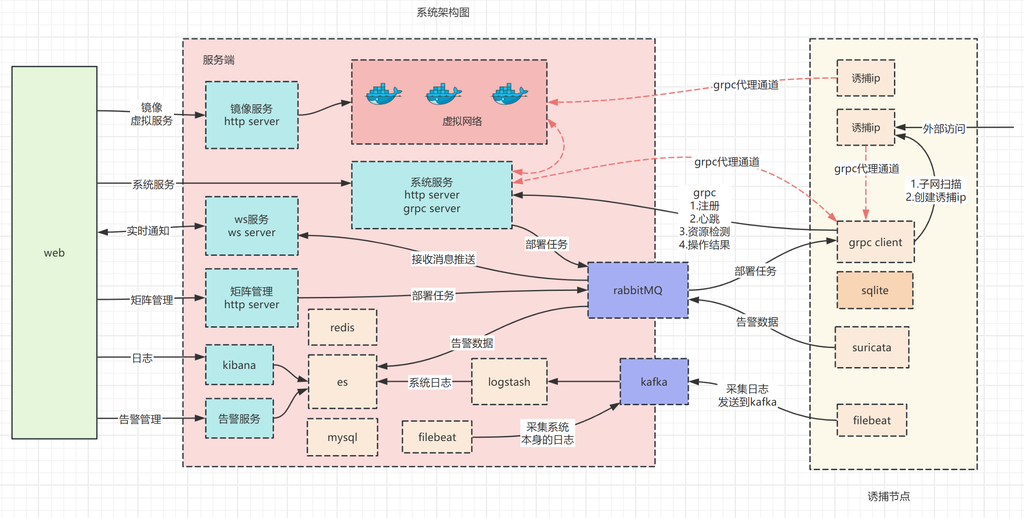
Solve
For example, in my threat trap project, system services and matrix management services only need to publish subscriptions.
We can just subscribe to each node, so the three services can be completely decoded.
Step
There is also a particularly obvious advantage in using the message queue, which is to move the logic of synchronization.
Peak
In systems that do not use message queues, the system is exposed to sudden and large flows that lead to a system collapse.
After using the message queue, a lot of information can be stored in the news queue, and downstream services can be slowly consumed in the news queue.
As long as it's in the news queue, it's got all the advantages, but it's a different skill point.
RabbitMQ installation
RabbitMQ installation is very simple.
version: '3'  # 使用Docker Compose版本3.8

services:
  rabbitmq:
    image: rabbitmq:3.9-management  # 使用带有管理插件的RabbitMQ镜像
    container_name: rabbitmq  # 容器名称
    ports:
      - "5672:5672"  # RabbitMQ的AMQP端口
      - "15672:15672"  # RabbitMQ的管理界面端口
    environment:
      RABBITMQ_DEFAULT_USER: admin  # 设置默认用户名
      RABBITMQ_DEFAULT_PASS: password  # 设置默认密码
5672 is the port of AMQP, the port where we use the code to interact with the message queue.
15672 is the web port where we can manage the message queue on the web interface
Security Configuration
The configuration above, it's easy to grab a package over the Internet, and you can see the message.
Many times you need to use tls for message encryption.
It's a little bit of a problem with configuration. If you've got an http ssl, you'll understand.
Write a shell script to generate ca certificates, service-end certificates, client certificates
ca.sh
# 创建根证书颁发机构(CA)
openssl genrsa -out ca_key.pem 2048
openssl req -x509 -new -nodes -key ca_key.pem -days 3650 -out ca_certificate.pem -subj "/CN=MyCA"
# 创建服务端私钥
openssl genrsa -out server_key.pem 2048

# 1. 创建配置文件 ssl.conf
cat > ssl.conf <<EOF
[req]
req_extensions = v3_req
distinguished_name = req_distinguished_name

[req_distinguished_name]

[v3_req]
basicConstraints = CA:FALSE
keyUsage = nonRepudiation, digitalSignature, keyEncipherment
subjectAltName = @alt_names

[alt_names]
IP.1 = 192.168.80.164
DNS.1 = rabbitmq-server
EOF

# 2. 生成服务器证书请求(包含SAN)
openssl req -new -key server_key.pem -out server.csr -subj "/CN=rabbitmq-server" -config ssl.conf

# 3. 使用CA签名(包含SAN扩展)
openssl x509 -req -in server.csr \
    -CA ca_certificate.pem \
    -CAkey ca_key.pem \
    -CAcreateserial \
    -out server_certificate.pem \
    -days 365 \
    -extensions v3_req \
    -extfile ssl.conf

# 生成客户端私钥(client_key.pem)和证书签名请求(client.csr)
openssl genrsa -out client_key.pem 2048
openssl req -new -key client_key.pem -out client.csr -subj "/CN=rabbitmq-client"
# 使用根 CA 对客户端证书请求进行签名,生成客户端证书(client_certificate.pem)
openssl x509 -req -in client.csr -CA ca_certificate.pem -CAkey ca_key.pem -CAcreateserial -out client_certificate.pem -days 365
When the certificate is generated, replace the pip address with your virtual machine.
rabbitmq.conf
listeners.ssl.default = 5671
ssl_options.cacertfile = /etc/rabbitmq/ssl/ca_certificate.pem
ssl_options.certfile = /etc/rabbitmq/ssl/server_certificate.pem
ssl_options.keyfile = /etc/rabbitmq/ssl/server_key.pem
ssl_options.verify = verify_peer
ssl_options.fail_if_no_peer_cert = false

management.ssl.port = 15671
management.ssl.cacertfile = /etc/rabbitmq/ssl/ca_certificate.pem
management.ssl.certfile = /etc/rabbitmq/ssl/server_certificate.pem
management.ssl.keyfile = /etc/rabbitmq/ssl/server_key.pem
Docker-compose Configuration
version: '3'

services:
  rabbitmq:
    image: rabbitmq:3.9-management  # 使用带有管理插件的RabbitMQ镜像
    container_name: rabbitmq  # 容器名称
    ports:
      - "5671:5671"  # RabbitMQ的AMQP端口
      - "15671:15671"  # RabbitMQ的管理界面端口
    environment:
      RABBITMQ_DEFAULT_USER: admin  # 设置默认用户名
      RABBITMQ_DEFAULT_PASS: password  # 设置默认密码
      RABBITMQ_CONFIG_FILE: /etc/rabbitmq/rabbitmq.conf
    volumes:
      - ./config/rabbitmq.conf:/etc/rabbitmq/rabbitmq.conf
      - ./ssl:/etc/rabbitmq/ssl          # SSL证书目录
Message Queue Modes
Download Library
go get github.com/streadway/amqp
Simple Mode
One-on-one transmission, one producer sends it to the queue and one consumer receives it from the queue.
Producers
- Connect mq
- Create Channel
- Declaration Queue
- Send Message
package main

import (
  "fmt"
  "github.com/sirupsen/logrus"
  "github.com/streadway/amqp"
  "log"
)

func main() {
  // 连接 RabbitMQ
  conn, err := amqp.Dial("amqp://admin:password@10.3.0.8:5672/")
  if err != nil {
    log.Fatalf("无法连接到 RabbitMQ: %v", err)
  }
  defer conn.Close()

  // 创建通道
  ch, err := conn.Channel()
  if err != nil {
    log.Fatalf("无法打开通道: %v", err)
  }
  defer ch.Close()

  queueName := "xxx"

  // 声明队列
  q, err := ch.QueueDeclare(
    queueName, // 队列名称
    false,     // 持久性
    false,    // 自动删除
    false,    // 排他性
    false,    // 非阻塞
    nil,      // 其他参数
  )
  if err != nil {
    log.Fatalf("无法声明队列: %v", err)
  }

  // 发送消息
  body := fmt.Sprintf("msg-%d", 1)
  err = ch.Publish(
    "",        // exchange
    q.Name, // routing key
    false,     // mandatory
    false,     // immediate
    amqp.Publishing{
      Body: []byte(body),
    })
  if err != nil {
    logrus.Errorf("发送失败: %v", err)
    return
  }
  fmt.Printf("发送消息: %s\n", body)
}
Consumer
package main

import (
  "fmt"
  "github.com/streadway/amqp"
  "log"
)

func main() {
  // 连接 RabbitMQ
  conn, err := amqp.Dial("amqp://admin:password@10.3.0.8:5672/")
  if err != nil {
    log.Fatalf("无法连接到 RabbitMQ: %v", err)
  }
  defer conn.Close()

  // 创建通道
  ch, err := conn.Channel()
  if err != nil {
    log.Fatalf("无法打开通道: %v", err)
  }
  defer ch.Close()

  queueName := "xxx"

  // 声明队列
  q, err := ch.QueueDeclare(
    queueName, // 队列名称
    false,     // 持久性
    false,     // 自动删除
    false,     // 排他性
    false,     // 非阻塞
    nil,       // 其他参数
  )
  if err != nil {
    log.Fatalf("无法声明队列: %v", err)
  }

  // 接收消息
  msgs, err := ch.Consume(
    q.Name, // 队列
    "",     // 消费者
    false,  // 自动确认
    false,  // 排他性
    false,  // 非本地
    false,  // 非阻塞
    nil,    // 其他参数
  )
  if err != nil {
    log.Fatalf("无法注册消费者: %v", err)
  }

  fmt.Println("等待接收消息")
  for d := range msgs {
    fmt.Printf("收到消息: %s\n", d.Body)
    fmt.Println("回复消息")
    d.Ack(false)
  }
}
SSL Security Configuration
All you have to do is configure the certificate and the key when you connect the mq.
  // 1. 加载客户端证书和密钥(双向认证时需要)
  cert, err := tls.LoadX509KeyPair("D:\\IT\\fengfeng\\honey\\honey_app\\deploy\\rabbitMQ\\ssl\\client_certificate.pem", "D:\\IT\\fengfeng\\honey\\honey_app\\deploy\\rabbitMQ\\ssl\\client_key.pem")
  if err != nil {
    log.Fatalf("加载客户端证书失败: %v", err)
  }

  // 2. 加载CA证书(验证服务器证书)
  caCert, err := os.ReadFile("D:\\IT\\fengfeng\\honey\\honey_app\\deploy\\rabbitMQ\\ssl\\ca_certificate.pem")
  if err != nil {
    log.Fatalf("读取CA证书失败: %v", err)
  }
  caCertPool := x509.NewCertPool()
  caCertPool.AppendCertsFromPEM(caCert)

  // 3. 配置TLS
  tlsConfig := &tls.Config{
    Certificates:       []tls.Certificate{cert}, // 客户端证书(双向认证时需要)
    RootCAs:            caCertPool,              // 信任的CA
    InsecureSkipVerify: false,                   // 必须验证服务器证书
  }

  // 连接 RabbitMQ
  conn, err := amqp.DialTLS("amqps://admin:password@192.168.80.165:5671/", tlsConfig)
  if err != nil {
    log.Fatalf("无法连接到 RabbitMQ: %v", err)
  }
Note that mq protocol is amqps, port 5671.
Task force line model
Producers produce news, which is being asked about Rund-Robin, distributed to different consumers to avoid overstretching individual consumers.
On the basis of a simple model, if there are multiple consumers, default is the task force line model.
Messages are basically distributed to different consumers.
The following configurations can be made if different consumers are configured to receive messages
// 消费者1
err = ch.Qos(
  1,     // prefetchCount: 未确认消息上限
  0,     // prefetchSize: 不限制消息大小
  false, // global: 仅对当前消费者生效
)
// 消费者2
err = ch.Qos(
  2,     // prefetchCount: 未确认消息上限
  0,     // prefetchSize: 不限制消息大小
  false, // global: 仅对当前消费者生效
)
This way, Consumer 2 will receive more information.
Must be configured before ch.Consume()
Organisation
Producer Production News, Multiple Consumer Subscriptions
In RabitMQ, publishing subscription mode (Publish/Subscribe Patterson) is a news broadcast mechanism where producers send messages to Exchange, which copys messages to all bound queues, each queue corresponds to one consumer
Producers
- Declared fanout-type switches
- Send message to switcher
package main

import (
  "fmt"
  "github.com/sirupsen/logrus"
  "github.com/streadway/amqp"
  "log"
)

func main() {
  // 连接 RabbitMQ
  conn, err := amqp.Dial("amqp://admin:password@10.3.0.8:5672/")
  if err != nil {
    log.Fatalf("无法连接到 RabbitMQ: %v", err)
  }
  defer conn.Close()

  // 创建通道
  ch, err := conn.Channel()
  if err != nil {
    log.Fatalf("无法打开通道: %v", err)
  }
  defer ch.Close()

  exChangeName := "logs"

  // 声明 fanout 类型的交换器
  err = ch.ExchangeDeclare(
    exChangeName, // 交换器名称
    "fanout",     // 交换器类型
    true,         // 持久化
    false,        // 非自动删除
    false,        // 内部使用
    false,        // 不等待服务器确认
    nil,          // 额外参数
  )
  if err != nil {
    log.Fatalf("声明交换器失败 %s", err)
  }

  for i := 0; i < 20; i++ {
    // 发送消息
    body := fmt.Sprintf("msg-%d", i)
    err = ch.Publish(
      exChangeName, //  交换器名称
      "",           // 路由键(fanout 类型忽略)
      false,        // mandatory
      false,        // immediate
      amqp.Publishing{
        Body: []byte(body),
      })
    if err != nil {
      logrus.Errorf("发送失败: %v", err)
      return
    }
    fmt.Printf("发送消息: %s\n", body)
  }
}
Consumer
- Declaration switch
- Create Temporary Queue
- Tie Queue to Switch
- Consumer Message
package main

import (
  "fmt"
  "github.com/streadway/amqp"
  "log"
)

func main() {
  // 连接 RabbitMQ
  conn, err := amqp.Dial("amqp://admin:password@10.3.0.8:5672/")
  if err != nil {
    log.Fatalf("无法连接到 RabbitMQ: %v", err)
  }
  defer conn.Close()

  // 创建通道
  ch, err := conn.Channel()
  if err != nil {
    log.Fatalf("无法打开通道: %v", err)
  }
  defer ch.Close()

  exChangeName := "logs"

  // 声明 fanout 类型的交换器
  err = ch.ExchangeDeclare(
    exChangeName, // 交换器名称
    "fanout",     // 交换器类型
    true,         // 持久化
    false,        // 非自动删除
    false,        // 内部使用
    false,        // 不等待服务器确认
    nil,          // 额外参数
  )
  if err != nil {
    log.Fatalf("声明交换器失败 %s", err)
  }

  // 创建临时队列(自动生成唯一名称,连接关闭后自动删除)
  q, err := ch.QueueDeclare(
    "",    // 空名称,让 RabbitMQ 自动生成
    false, // 非持久化
    true,  // 排他性(仅当前连接可见)
    true,  // 自动删除
    false, // 不等待服务器确认
    nil,   // 额外参数
  )
  if err != nil {
    log.Fatalf("声明临时队列失败 %s", err)
  }

  // 将队列绑定到交换器(关键步骤)
  err = ch.QueueBind(
    q.Name,       // 队列名称
    "",           // 路由键(fanout 类型忽略)
    exChangeName, // 交换器名称
    false,        // 不等待服务器确认
    nil,          // 额外参数
  )

  // 消费消息
  msgs, err := ch.Consume(
    q.Name, // 队列名称
    "",     // 消费者标签
    true,   // 自动确认(简单示例,生产环境建议手动确认)
    false,  // 非排他性
    false,  // 非本地消费者
    false,  // 不等待服务器确认
    nil,    // 额外参数
  )
  if err != nil {
    log.Fatalf("创建消费者失败 %s", err)
  }

  fmt.Println("准备接收消息")
  for d := range msgs {
    log.Printf("[x] 收到消息: %s\n", d.Body)
  }

}
In this pattern, consumers can only consume information about the producer's production after it runs.
Can not open message
Subscription mode above
If you run the producer, then the consumer, then the consumer has no access to the information previously uploaded by the producer.
The reason is simple, because the producer sends it directly to the switch, which is only for distribution and does not store the information.
It's easy to change.
When producers produce the news, they bind the consumers in advance.
When you're in the consumer's news, you can tie it to that queue.
Producers
package main

import (
  "fmt"
  "github.com/sirupsen/logrus"
  "github.com/streadway/amqp"
  "log"
)

func main() {
  // 连接 RabbitMQ
  conn, err := amqp.Dial("amqp://admin:password@10.3.0.8:5672/")
  if err != nil {
    log.Fatalf("无法连接到 RabbitMQ: %v", err)
  }
  defer conn.Close()

  // 创建通道
  ch, err := conn.Channel()
  if err != nil {
    log.Fatalf("无法打开通道: %v", err)
  }
  defer ch.Close()

  exChangeName := "logs1"

  // 声明 fanout 类型的交换器
  err = ch.ExchangeDeclare(
    exChangeName, // 交换器名称
    "fanout",     // 交换器类型
    true,         // 持久化
    false,        // 非自动删除
    false,        // 内部使用
    false,        // 不等待服务器确认
    nil,          // 额外参数
  )
  if err != nil {
    log.Fatalf("声明交换器失败 %s", err)
  }

  q1, err := ch.QueueDeclare(
    "log_queue_1",
    false,
    false,
    false,
    false,
    nil,
  )
  if err != nil {
    log.Fatalf("声明队列失败 %s", err)
  }
  q2, err := ch.QueueDeclare(
    "log_queue_2",
    false,
    false,
    false,
    false,
    nil,
  )
  if err != nil {
    log.Fatalf("声明队列失败 %s", err)
  }

  // 将队列绑定到交换器(关键步骤)
  err = ch.QueueBind(
    q1.Name,      // 队列名称
    "",           // 路由键(fanout 类型忽略)
    exChangeName, // 交换器名称
    false,        // 不等待服务器确认
    nil,          // 额外参数
  )
  err = ch.QueueBind(
    q2.Name,      // 队列名称
    "",           // 路由键(fanout 类型忽略)
    exChangeName, // 交换器名称
    false,        // 不等待服务器确认
    nil,          // 额外参数
  )
  if err != nil {
    log.Fatalf("队列绑定交换器失败 %s", err)
  }

  for i := 0; i < 20; i++ {
    // 发送消息
    body := fmt.Sprintf("msg-%d", i)
    err = ch.Publish(
      exChangeName, //  交换器名称
      "",           // 路由键(fanout 类型忽略)
      false,        // mandatory
      false,        // immediate
      amqp.Publishing{
        Body: []byte(body),
      })
    if err != nil {
      logrus.Errorf("发送失败: %v", err)
      return
    }
    fmt.Printf("发送消息: %s\n", body)
  }
}
Consumer
package main

import (
  "fmt"
  "github.com/streadway/amqp"
  "log"
)

func main() {
  // 连接 RabbitMQ
  conn, err := amqp.Dial("amqp://admin:password@10.3.0.8:5672/")
  if err != nil {
    log.Fatalf("无法连接到 RabbitMQ: %v", err)
  }
  defer conn.Close()

  // 创建通道
  ch, err := conn.Channel()
  if err != nil {
    log.Fatalf("无法打开通道: %v", err)
  }
  defer ch.Close()

  exChangeName := "logs1"

  // 声明 fanout 类型的交换器
  err = ch.ExchangeDeclare(
    exChangeName, // 交换器名称
    "fanout",     // 交换器类型
    true,         // 持久化
    false,        // 非自动删除
    false,        // 内部使用
    false,        // 不等待服务器确认
    nil,          // 额外参数
  )
  if err != nil {
    log.Fatalf("声明交换器失败 %s", err)
  }

  // 消费消息
  msgs, err := ch.Consume(
    "log_queue_2", // 队列名称
    "",            // 消费者标签
    true,          // 自动确认(简单示例,生产环境建议手动确认)
    false,         // 非排他性
    false,         // 非本地消费者
    false,         // 不等待服务器确认
    nil,           // 额外参数
  )
  if err != nil {
    log.Fatalf("创建消费者失败 %s", err)
  }

  fmt.Println("准备接收消息")
  for d := range msgs {
    log.Printf("[x] 收到消息: %s\n", d.Body)
  }

}
Route Mode
Producer-designated consumers
Message-based "Routing Key" accurately matches the distribution of the message, the producer specifies the route key when sending the message, and the consumer receives the specific message by tying the queue to the route key.
The type of switch must be direct
When sending messages, specify a route key.
Producers
package main

import (
  "fmt"
  "github.com/sirupsen/logrus"
  "github.com/streadway/amqp"
  "log"
)

func main() {
  // 连接 RabbitMQ
  conn, err := amqp.Dial("amqp://admin:password@10.3.0.8:5672/")
  if err != nil {
    log.Fatalf("无法连接到 RabbitMQ: %v", err)
  }
  defer conn.Close()

  // 创建通道
  ch, err := conn.Channel()
  if err != nil {
    log.Fatalf("无法打开通道: %v", err)
  }
  defer ch.Close()

  exChangeName := "logs_direct"

  // 声明 fanout 类型的交换器
  err = ch.ExchangeDeclare(
    exChangeName, // 交换器名称
    "direct",     // 交换器类型
    true,         // 持久化
    false,        // 非自动删除
    false,        // 内部使用
    false,        // 不等待服务器确认
    nil,          // 额外参数
  )
  if err != nil {
    log.Fatalf("声明交换器失败 %s", err)
  }

  for i := 0; i < 20; i++ {
    // 发送消息
    body := fmt.Sprintf("msg-%d", i)
    err = ch.Publish(
      exChangeName, //  交换器名称
      "node001",           //
      false,        // mandatory
      false,        // immediate
      amqp.Publishing{
        Body: []byte(body),
      })
    if err != nil {
      logrus.Errorf("发送失败: %v", err)
      return
    }
    fmt.Printf("发送消息: %s\n", body)
  }
  for i := 0; i < 10; i++ {
    // 发送消息
    body := fmt.Sprintf("msg-%d", i)
    err = ch.Publish(
      exChangeName, //  交换器名称
      "node002",           //
      false,        // mandatory
      false,        // immediate
      amqp.Publishing{
        Body: []byte(body),
      })
    if err != nil {
      logrus.Errorf("发送失败: %v", err)
      return
    }
    fmt.Printf("发送消息: %s\n", body)
  }
}
Consumer
package main

import (
  "fmt"
  "github.com/streadway/amqp"
  "log"
)

func main() {
  // 连接 RabbitMQ
  conn, err := amqp.Dial("amqp://admin:password@10.3.0.8:5672/")
  if err != nil {
    log.Fatalf("无法连接到 RabbitMQ: %v", err)
  }
  defer conn.Close()

  // 创建通道
  ch, err := conn.Channel()
  if err != nil {
    log.Fatalf("无法打开通道: %v", err)
  }
  defer ch.Close()

  exChangeName := "logs_direct"

  // 声明 fanout 类型的交换器
  err = ch.ExchangeDeclare(
    exChangeName, // 交换器名称
    "direct",     // 交换器类型
    true,         // 持久化
    false,        // 非自动删除
    false,        // 内部使用
    false,        // 不等待服务器确认
    nil,          // 额外参数
  )
  if err != nil {
    log.Fatalf("声明交换器失败 %s", err)
  }

  // 创建临时队列(自动生成唯一名称,连接关闭后自动删除)
  q, err := ch.QueueDeclare(
    "",    // 空名称,让 RabbitMQ 自动生成
    false, // 非持久化
    true,  // 排他性(仅当前连接可见)
    true,  // 自动删除
    false, // 不等待服务器确认
    nil,   // 额外参数
  )
  if err != nil {
    log.Fatalf("声明临时队列失败 %s", err)
  }

  // 将队列绑定到交换器(关键步骤)
  err = ch.QueueBind(
    q.Name,       // 队列名称
    "node002",           // 路由键(fanout 类型忽略)
    exChangeName, // 交换器名称
    false,        // 不等待服务器确认
    nil,          // 额外参数
  )

  // 消费消息
  msgs, err := ch.Consume(
    q.Name, // 队列名称
    "",     // 消费者标签
    true,   // 自动确认(简单示例,生产环境建议手动确认)
    false,  // 非排他性
    false,  // 非本地消费者
    false,  // 不等待服务器确认
    nil,    // 额外参数
  )
  if err != nil {
    log.Fatalf("创建消费者失败 %s", err)
  }

  fmt.Println("准备接收消息")
  for d := range msgs {
    log.Printf("[x] 收到消息: %s\n", d.Body)
  }

}
Theme Mode
"Soft Match" distribution based on route keys to support wildcards, more flexible than route mode
Use wildcards to bind queues:
*: Match a word (e.g.order.*matchorder.createbut notorder.create.success).#: Matches zero or more words (e.g.order.#matchesorder.create,order.create.success).
Producers
package main

import (
  "log"
  "os"
  "strings"

  "github.com/streadway/amqp"
)

func failOnError(err error, msg string) {
  if err != nil {
    log.Fatalf("%s: %s", msg, err)
  }
}

func main() {
  conn, err := amqp.Dial("amqp://admin:password@10.3.0.8:5672/")
  failOnError(err, "Failed to connect to RabbitMQ")
  defer conn.Close()

  ch, err := conn.Channel()
  failOnError(err, "Failed to open a channel")
  defer ch.Close()

  // 声明主题类型的交换器
  err = ch.ExchangeDeclare(
    "logs_topic", // name
    "topic",      // type
    true,         // durable
    false,        // auto-deleted
    false,        // internal
    false,        // no-wait
    nil,          // arguments
  )
  failOnError(err, "Failed to declare an exchange")

  // 设置路由键,默认为"anonymous.info"
  body := bodyFrom(os.Args)
  routingKey := severityFrom(os.Args)

  // 发布消息到交换器
  err = ch.Publish(
    "logs_topic", // exchange
    routingKey,   // routing key
    false,        // mandatory
    false,        // immediate
    amqp.Publishing{
      ContentType: "text/plain",
      Body:        []byte(body),
    })
  failOnError(err, "Failed to publish a message")

  log.Printf(" [x] Sent %s:%s", routingKey, body)
}

func bodyFrom(args []string) string {
  var s string
  if (len(args) < 3) || os.Args[2] == "" {
    s = "hello"
  } else {
    s = strings.Join(args[2:], " ")
  }
  return s
}

func severityFrom(args []string) string {
  var s string
  if (len(args) < 2) || os.Args[1] == "" {
    s = "anonymous.info"
  } else {
    s = os.Args[1]
  }
  return s
}
Consumer
package main

import (
  "log"
  "os"

  "github.com/streadway/amqp"
)

func failOnError(err error, msg string) {
  if err != nil {
    log.Fatalf("%s: %s", msg, err)
  }
}

func main() {
  conn, err := amqp.Dial("amqp://admin:password@10.3.0.8:5672/")
  failOnError(err, "Failed to connect to RabbitMQ")
  defer conn.Close()

  ch, err := conn.Channel()
  failOnError(err, "Failed to open a channel")
  defer ch.Close()

  // 声明主题类型的交换器
  err = ch.ExchangeDeclare(
    "logs_topic", // name
    "topic",      // type
    true,         // durable
    false,        // auto-deleted
    false,        // internal
    false,        // no-wait
    nil,          // arguments
  )
  failOnError(err, "Failed to declare an exchange")

  // 声明临时队列
  q, err := ch.QueueDeclare(
    "",    // name
    false, // durable
    false, // delete when unused
    true,  // exclusive
    false, // no-wait
    nil,   // arguments
  )
  failOnError(err, "Failed to declare a queue")

  // 获取命令行参数作为绑定键
  if len(os.Args) < 2 {
    log.Printf("Usage: %s [binding_key]...", os.Args[0])
    os.Exit(0)
  }
  for _, s := range os.Args[1:] {
    log.Printf("Binding queue %s to exchange %s with routing key %s",
      q.Name, "logs_topic", s)
    err = ch.QueueBind(
      q.Name,       // queue name
      s,            // routing key
      "logs_topic", // exchange
      false,
      nil)
    failOnError(err, "Failed to bind a queue")
  }

  msgs, err := ch.Consume(
    q.Name, // queue
    "",     // consumer
    true,   // auto-ack
    false,  // exclusive
    false,  // no-local
    false,  // no-wait
    nil,    // args
  )
  failOnError(err, "Failed to register a consumer")

  forever := make(chan bool)

  go func() {
    for d := range msgs {
      log.Printf(" [x] %s: %s", d.RoutingKey, d.Body)
    }
  }()

  log.Printf(" [*] Waiting for messages. To exit press CTRL+C")
  <-forever
}
Let's go.
go run 14.主题模式-消费者.go "kernal.*" # 接收内核相关的所有服务信息
go run 14.主题模式-消费者.go "*.error" # 接收所有服务的error信息
go run 14.主题模式-消费者.go "#" # 接收所有
And then run the producer.
go run 13.主题模式-生产者.go "auth.error" "认证服务错误"
go run 13.主题模式-生产者.go "kernal.error" "系统内核错误"
go run 13.主题模式-生产者.go "auth.warning" "认证警告"
Dead letter queue
Dealing with information that “can't be consumed” (e.g. consumption time out, consumption failed and the number of re-tests exhausted) and transferring it to a dedicated “death line” to facilitate subsequent queuing.
- Sets a dead letter exchange (
x-dead-letter-exchange) and a dead letter router (x-dead-letter-routing-key) for the normal queue. - When the message fulfils the condition of death (e.g. rejected
basic.rejectandrequeue=false, TTL expired, lined up) it is routed to the death line.
Normal producers
- First declare normal switches
- Declares normal queues, setting death exchange through extra parameters
- Tie normal queues to normal switches
- Send Message to Normal Queue
package main

import (
  "log"
  "os"
  "strings"

  "github.com/streadway/amqp"
)

func failOnError(err error, msg string) {
  if err != nil {
    log.Fatalf("%s: %s", msg, err)
  }
}

func main() {
  conn, err := amqp.Dial("amqp://admin:password@10.3.0.8:5672/")
  failOnError(err, "Failed to connect to RabbitMQ")
  defer conn.Close()

  ch, err := conn.Channel()
  failOnError(err, "Failed to open a channel")
  defer ch.Close()

  // 声明普通交换器
  err = ch.ExchangeDeclare(
    "normal_exchange", // name
    "direct",          // type
    true,              // durable
    false,             // auto-deleted
    false,             // internal
    false,             // no-wait
    nil,               // arguments
  )
  failOnError(err, "Failed to declare an exchange")

  // 声明普通队列并设置死信交换器
  args := amqp.Table{
    "x-dead-letter-exchange":    "dlx_exchange",
    "x-dead-letter-routing-key": "dlx_key",
  }
  _, err = ch.QueueDeclare(
    "normal_queue", // name
    true,           // durable
    false,          // delete when unused
    false,          // exclusive
    false,          // no-wait
    args,           // arguments
  )
  failOnError(err, "Failed to declare a queue")

  // 绑定普通队列到普通交换器
  err = ch.QueueBind(
    "normal_queue",       // queue name
    "normal_routing_key", // routing key
    "normal_exchange",    // exchange
    false,
    nil,
  )
  failOnError(err, "Failed to bind a queue")

  // 发送消息到普通队列
  body := bodyFrom(os.Args)
  err = ch.Publish(
    "normal_exchange",    // exchange
    "normal_routing_key", // routing key
    false,                // mandatory
    false,                // immediate
    amqp.Publishing{
      ContentType: "text/plain",
      Body:        []byte(body),
    })
  failOnError(err, "Failed to publish a message")

  log.Printf(" [x] Sent %s", body)
}

func bodyFrom(args []string) string {
  var s string
  if (len(args) < 2) || os.Args[1] == "" {
    s = "hello"
  } else {
    s = strings.Join(args[1:], " ")
  }
  return s
}
Normal consumers
package main

import (
  "log"

  "github.com/streadway/amqp"
)

func failOnError(err error, msg string) {
  if err != nil {
    log.Fatalf("%s: %s", msg, err)
  }
}

func main() {
  conn, err := amqp.Dial("amqp://admin:password@10.3.0.8:5672/")
  failOnError(err, "Failed to connect to RabbitMQ")
  defer conn.Close()

  ch, err := conn.Channel()
  failOnError(err, "Failed to open a channel")
  defer ch.Close()

  // 声明普通交换器
  err = ch.ExchangeDeclare(
    "normal_exchange", // name
    "direct",          // type
    true,              // durable
    false,             // auto-deleted
    false,             // internal
    false,             // no-wait
    nil,               // arguments
  )
  failOnError(err, "Failed to declare an exchange")

  // 声明普通队列并设置死信交换器
  args := amqp.Table{
    "x-dead-letter-exchange":    "dlx_exchange",
    "x-dead-letter-routing-key": "dlx_key",
  }
  _, err = ch.QueueDeclare(
    "normal_queue", // name
    true,           // durable
    false,          // delete when unused
    false,          // exclusive
    false,          // no-wait
    args,           // arguments
  )
  failOnError(err, "Failed to declare a queue")

  // 绑定普通队列到普通交换器
  err = ch.QueueBind(
    "normal_queue",       // queue name
    "normal_routing_key", // routing key
    "normal_exchange",    // exchange
    false,
    nil,
  )
  failOnError(err, "Failed to bind a queue")

  // 消费普通队列中的消息
  msgs, err := ch.Consume(
    "normal_queue", // queue
    "",             // consumer
    false,          // auto-ack设为false,手动处理确认
    false,          // exclusive
    false,          // no-local
    false,          // no-wait
    nil,            // args
  )
  failOnError(err, "Failed to register a consumer")

  forever := make(chan bool)

  go func() {
    for d := range msgs {
      log.Printf(" [x] Received %s", d.Body)
      // 拒绝消息,不重新入队,触发死信机制
      d.Reject(false)
      log.Printf(" [x] Rejected message and sent to DLX")
    }
  }()

  log.Printf(" [*] Waiting for messages. To exit press CTRL+C")
  <-forever
}
A dead letter consumer.
package main

import (
  "log"

  "github.com/streadway/amqp"
)

func failOnError(err error, msg string) {
  if err != nil {
    log.Fatalf("%s: %s", msg, err)
  }
}

func main() {
  conn, err := amqp.Dial("amqp://admin:password@10.3.0.8:5672/")
  failOnError(err, "Failed to connect to RabbitMQ")
  defer conn.Close()

  ch, err := conn.Channel()
  failOnError(err, "Failed to open a channel")
  defer ch.Close()

  // 声明死信交换器
  err = ch.ExchangeDeclare(
    "dlx_exchange", // name
    "direct",       // type
    true,           // durable
    false,          // auto-deleted
    false,          // internal
    false,          // no-wait
    nil,            // arguments
  )
  failOnError(err, "Failed to declare an exchange")

  // 声明死信队列
  _, err = ch.QueueDeclare(
    "dlx_queue", // name
    true,        // durable
    false,       // delete when unused
    false,       // exclusive
    false,       // no-wait
    nil,         // arguments
  )
  failOnError(err, "Failed to declare a queue")

  // 绑定死信队列到死信交换器
  err = ch.QueueBind(
    "dlx_queue",    // queue name
    "dlx_key",      // routing key
    "dlx_exchange", // exchange
    false,
    nil,
  )
  failOnError(err, "Failed to bind a queue")

  // 消费死信队列中的消息
  msgs, err := ch.Consume(
    "dlx_queue", // queue
    "",          // consumer
    true,        // auto-ack
    false,       // exclusive
    false,       // no-local
    false,       // no-wait
    nil,         // args
  )
  failOnError(err, "Failed to register a consumer")

  forever := make(chan bool)

  go func() {
    for d := range msgs {
      log.Printf(" [x] DLX Received %s", d.Body)
    }
  }()

  log.Printf(" [*] Waiting for DLX messages. To exit press CTRL+C")
  <-forever
}
Delay Queue Mode
Messages will not be consumed immediately after sending, but will be processed only after the time specified
It says the Death Line, so the producer can get the news out of time, so the news goes into the Death Line, and it's in chronological order.
So that consumers can consume dead letters.
Producers
package main

import (
  "log"
  "time"

  "github.com/streadway/amqp"
)

func failOnError(err error, msg string) {
  if err != nil {
    log.Fatalf("%s: %v", msg, err)
  }
}

func main() {
  conn, err := amqp.Dial("amqp://admin:password@10.3.0.8:5672/")
  failOnError(err, "Failed to connect to RabbitMQ")
  defer conn.Close()

  ch, err := conn.Channel()
  failOnError(err, "Failed to open a channel")
  defer ch.Close()

  // 声明死信交换器
  dlxExchange := "dlx_exchange"
  err = ch.ExchangeDeclare(
    dlxExchange, // name
    "direct",    // type
    true,        // durable
    false,       // auto-deleted
    false,       // internal
    false,       // no-wait
    nil,         // arguments
  )
  failOnError(err, "Failed to declare an exchange")

  // 声明死信队列
  dlQueueName := "dl_queue"
  _, err = ch.QueueDeclare(
    dlQueueName, // name
    true,        // durable
    false,       // delete when unused
    false,       // exclusive
    false,       // no-wait
    nil,         // arguments
  )
  failOnError(err, "Failed to declare a queue")

  // 绑定死信队列到死信交换器
  err = ch.QueueBind(
    dlQueueName, // queue name
    "dl_key",    // routing key
    dlxExchange, // exchange
    false,
    nil,
  )
  failOnError(err, "Failed to bind a queue")

  // 声明延迟队列(设置x-dead-letter-exchange和x-message-ttl参数)
  delayQueueName := "delay_queue"
  _, err = ch.QueueDeclare(
    delayQueueName, // name
    true,           // durable
    false,          // delete when unused
    false,          // exclusive
    false,          // no-wait
    amqp.Table{
      "x-dead-letter-exchange":    dlxExchange,
      "x-dead-letter-routing-key": "dl_key",
      "x-message-ttl":             5000, // 5秒后消息过期
    }, // arguments
  )
  failOnError(err, "Failed to declare a queue")

  // 发送消息到延迟队列
  body := "Hello, delayed message!"
  err = ch.Publish(
    "",             // exchange
    delayQueueName, // routing key
    false,          // mandatory
    false,          // immediate
    amqp.Publishing{
      ContentType: "text/plain",
      Body:        []byte(body),
    })
  failOnError(err, "Failed to publish a message")

  log.Printf(" [x] Sent %s", body)
  log.Println("消息已发送到延迟队列,5秒后将进入死信队列")

  time.Sleep(2 * time.Second) // 等待消息发送完成
}
Consumer
package main

import (
  "github.com/streadway/amqp"
  "log"
  "time"
)

func failOnError(err error, msg string) {
  if err != nil {
    log.Fatalf("%s: %v", msg, err)
  }
}

func main() {
  conn, err := amqp.Dial("amqp://admin:password@10.3.0.8:5672/")
  failOnError(err, "Failed to connect to RabbitMQ")
  defer conn.Close()

  ch, err := conn.Channel()
  failOnError(err, "Failed to open a channel")
  defer ch.Close()

  // 声明死信队列(消费者只需要关注死信队列)
  queueName := "dl_queue"
  _, err = ch.QueueDeclare(
    queueName, // name
    true,      // durable
    false,     // delete when unused
    false,     // exclusive
    false,     // no-wait
    nil,       // arguments
  )
  failOnError(err, "Failed to declare a queue")

  // 消费死信队列中的消息
  msgs, err := ch.Consume(
    queueName, // queue
    "",        // consumer
    true,      // auto-ack
    false,     // exclusive
    false,     // no-local
    false,     // no-wait
    nil,       // args
  )
  failOnError(err, "Failed to register a consumer")

  var forever chan struct{}

  go func() {
    for d := range msgs {
      log.Printf(" [x] Received %s", d.Body)
      log.Printf("当前时间: %s", time.Now().Format("2006-01-02 15:04:05"))
    }
  }()

  log.Printf(" [*] Waiting for messages. To exit press CTRL+C")
  <-forever
}
RabbitMQ Other Functions
Priority Queue
Declares priority queue
Set the maximum priority supported by x-max-priority Queue statements
Send messages with priority
Set Priority field to specify priority for message in amqp.Publishing
Consumers give priority to higher-priority news.
Producers
package main

import (
  "fmt"
  "github.com/streadway/amqp"
  "log"
  "mq_study/core"
)

func main() {
  ch := core.InitMQ()

  //声明优先级队列
  q, err := ch.QueueDeclare(
    "yxj", false, false, false, false,
    amqp.Table{
      "x-max-priority": 10, // 设置最大优先级
    },
  )
  if err != nil {
    log.Fatal(err)
  }
  // 发送不同优先级的消息
  messages := []struct {
    body     string
    priority uint8
  }{
    {"这是低优先级消息 (1)", 1},
    {"这是中优先级消息 (5)", 5},
    {"这是高优先级消息 (10)", 10},
    {"这是另一个低优先级消息 (2)", 2},
    {"这是另一个高优先级消息 (9)", 9},
  }

  for _, msg := range messages {
    err = ch.Publish(
      "",     // 交换机
      q.Name, // 路由键(队列名称)
      false,  // 非强制
      false,  // 非立即
      amqp.Publishing{
        ContentType: "text/plain",
        Body:        []byte(msg.body),
        Priority:    msg.priority, // 设置消息优先级
      })
    if err != nil {
      fmt.Println("消息发送失败", err)
      continue
    }
    log.Printf("已发送: %s 优先级: %d", msg.body, msg.priority)
  }
}
Consumers, just like those before.
package main

import (
  "fmt"
  "log"
  "mq_study/core"
)

func main() {
  ch := core.InitMQ()

  // 4.消费消息
  consumer, err := ch.Consume("yxj", "", false, false, false, false, nil)
  if err != nil {
    log.Fatal(err)
  }
  for msg := range consumer {
    fmt.Println("消息内容", string(msg.Body))
    //msg.Reject()
    msg.Ack(false)
  }
}
Queue back
Producer production, consumer consumption, and then back to the Quarter.
Producers
package main

import (
  "fmt"
  "github.com/google/uuid"
  "github.com/streadway/amqp"
  "log"
  "mq_study/core"
)

func main() {
  ch := core.InitMQ()

  //声明普通队列
  q, err := ch.QueueDeclare(
    "request_queue", false, false, false, false, nil)
  if err != nil {
    log.Fatal(err)
  }

  // 声明回调队列
  callbackQueue, err := ch.QueueDeclare(
    "",    // 空名称表示让RabbitMQ自动生成队列名
    false, // 非持久化(因为响应消息不需要长期保存)
    true,  // 自动删除(当消费者断开连接时)
    true,  // 排他性(只允许当前连接访问)
    false, // 非阻塞
    nil,
  )
  msgs, err := ch.Consume(
    callbackQueue.Name,  // 回调队列名
    "", // 消费者标签
    true,                // 自动确认
    false,               // 非排他性
    false,               // 不阻塞
    false,               // 无参数
    nil,
  )
  if err != nil {
    log.Fatal(err)
  }

  for i := 0; i < 5; i++ {
    msg := fmt.Sprintf("消息 %d", i)
    msgID := uuid.New().String() // 消息id,用于匹配回调队列中的消息
    err = ch.Publish(
      "",     // 交换机
      q.Name, // 路由键(队列名称)
      false,  // 非强制
      false,  // 非立即
      amqp.Publishing{
        Body:          []byte(msg),
        CorrelationId: msgID,
        ReplyTo:       callbackQueue.Name,
      })
    if err != nil {
      fmt.Println("消息发送失败", err)
      continue
    }
    log.Printf("已发送: %s 消息id %s", msg, msgID)
  }
  for d := range msgs {
    fmt.Printf("收到回调消息 %s %s\n", d.Body, d.CorrelationId)
  }
}
Consumer
package main

import (
  "fmt"
  "github.com/streadway/amqp"
  "log"
  "mq_study/core"
)

func main() {
  ch := core.InitMQ()

  // 4.消费消息
  consumer, err := ch.Consume("request_queue", "x1", true, false, false, false, nil)
  if err != nil {
    log.Fatal(err)
  }
  for msg := range consumer {
    fmt.Println("消息内容", string(msg.Body), msg.CorrelationId)
    m := fmt.Sprintf("这是回来的消息 %s", msg.CorrelationId)
    err = ch.Publish("", msg.ReplyTo, false, false, amqp.Publishing{
      Body:          []byte(m),
      CorrelationId: msg.CorrelationId,
    })
    if err != nil {
      fmt.Println("发送响应消息失败", err)
      continue
    }
    fmt.Println("发送响应消息", m)

  }
}
Traffic control
Producers send a message. If there's a backlog, producers slow down.
Consumers consume information according to their abilities
Producer to get queue status by c. QueueInspect(q.Name)
Consumers set up consumption capacity through ch.Qos()
package main

import (
  "fmt"
  "log"
  "mq_study/core"
  "time"

  "github.com/streadway/amqp"
)

func failOnError(err error, msg string) {
  if err != nil {
    log.Fatalf("%s: %s", msg, err)
  }
}

// 1. 使用 QoS 进行流量控制(最常用方式)
func consumerWithQoS(consumerID string, count int) {
  ch := core.InitMQ()
  // 声明队列
  q, err := ch.QueueDeclare(
    "flow_control_queue",
    true,
    false,
    false,
    false,
    nil,
  )
  failOnError(err, "Failed to declare a queue")

  // 设置 QoS (Quality of Service)
  // 第一个参数: prefetchCount - 每次从队列获取的最大消息数
  // 第二个参数: prefetchSize - 每次获取的最大字节数,0表示不限制
  // 第三个参数: global - 是否对整个连接生效,false表示只对当前通道生效
  err = ch.Qos(
    count, // 每次最多处理条消息,处理完再获取新的
    0,     // 不限制字节数
    false,
  )
  failOnError(err, "Failed to set QoS")

  // 消费消息
  msgs, err := ch.Consume(
    q.Name,
    consumerID,
    false, // 关闭自动确认,手动确认消息处理完成
    false,
    false,
    false,
    nil,
  )
  failOnError(err, "Failed to register a consumer")

  forever := make(chan bool)

  go func() {
    for d := range msgs {
      log.Printf("消费者 %s 收到消息: %s", consumerID, d.Body)

      // 模拟处理耗时
      time.Sleep(500 * time.Millisecond)

      // 手动确认消息已处理
      d.Ack(false)
      log.Printf("消费者 %s 确认消息处理完成", consumerID)
    }
  }()

  log.Printf("消费者 %s (QoS控制) 启动,等待消息...", consumerID)
  <-forever
}

// 基于队列长度的流量控制
func producerWithQueueLengthControl() {
  ch := core.InitMQ()

  // 声明队列
  q, err := ch.QueueDeclare(
    "flow_control_queue",
    true,
    false,
    false,
    false,
    nil,
  )
  failOnError(err, "Failed to declare a queue")

  maxQueueLength := 100 // 队列最大长度阈值

  for i := 1; i <= 1000; i++ {
    // 获取队列状态
    queueStatus, err := ch.QueueInspect(q.Name)
    failOnError(err, "Failed to inspect queue")

    // 如果队列长度超过阈值,等待
    if queueStatus.Messages >= maxQueueLength {
      log.Printf("队列长度 %d 超过阈值 %d,等待...", queueStatus.Messages, maxQueueLength)
      time.Sleep(2 * time.Second)
      i-- // 重试当前消息
      continue
    }

    body := fmt.Sprintf("这是第 %d 条消息", i)
    err = ch.Publish(
      "",
      q.Name,
      false,
      false,
      amqp.Publishing{
        DeliveryMode: amqp.Persistent,
        ContentType:  "text/plain",
        Body:         []byte(body),
      })
    failOnError(err, "Failed to publish a message")

    log.Printf("已发送消息 %d (当前队列长度: %d)", i, queueStatus.Messages)
  }

  log.Println("所有消息发送完成")
}

func main() {
  // 启动消费者(带QoS控制)
  go consumerWithQoS("consumer_1", 2)
  go consumerWithQoS("consumer_2", 1)

  // 启动生产者(选择一种流量控制方式)
  go producerWithQueueLengthControl()

  // 保持程序运行
  time.Sleep(5 * time.Minute)
}
Can not open message
Queue can set the entire message expiration time when you have to delay the queue
The message can also set the expiry time
The core is...
amqp.Publishing{
  Body:         []byte(msg.body),
  Expiration:   fmt.Sprintf("%d", msg.ttl), // 消息过期时间(毫秒)
})
Enduring
Need to set Queue and Endurance
Statement Enduring Queue
// 声明一个持久化的队列
  q, err := ch.QueueDeclare(
    "persistent_queue", // 队列名称
    true,               // 是否持久化
    false,              // 是否自动删除
    false,              // 是否排他
    false,              // 是否等待服务器响应
    nil,                // 额外参数
  )
Declared Exchange Persistence
ch.ExchangeDeclare(
  exchangeName, // name
  "direct",     // type
  true,         // 是否持久化
  false,        //
  false,        //
  false,        //
  nil,          //
)
Can not open message
// 要发送的消息
body := "Hello, persistent message!"
// 发布消息到队列,设置为持久化
err = ch.Publish(
  "",     // 交换器
  q.Name, // 路由键(队列名称)
  false,  // 是否强制
  false,  // 是否立即
  amqp.Publishing{
    ContentType: "text/plain",
    // 重要:将消息标记为持久化(2表示持久化)
    DeliveryMode: amqp.Persistent,
    Body:         []byte(body),
  })
High Available Configuration
Our RabbitMQ was on a single plane.
An intermediate service like this is very important.
With a single node, the rabbitMQ container hangs, and the entire news-dependent line will be compromised.
It's not acceptable in a productive environment.
There's three mq containers running on one machine.
version: '3'

services:
  rabbitmq1:
    image: rabbitmq:3.9-management
    container_name: rabbitmq1
    ports:
      - "5672:5672"  # mq端口,只映射一个
      - "15672:15672"  # RabbitMQ的管理界面端口
    environment:
      RABBITMQ_DEFAULT_USER: admin
      RABBITMQ_DEFAULT_PASS: password
      RABBITMQ_ERLANG_COOKIE: 'TDONUYAMEVUIWQTTDRHM'
    hostname: rabbitmq1
    volumes:
      - ./rabbitmq1_data:/var/lib/rabbitmq
    networks:
      mq_network:
        ipv4_address: 10.1.0.2
  rabbitmq2:
    image: rabbitmq:3.9-management
    container_name: rabbitmq2
    hostname: rabbitmq2
    environment:
      RABBITMQ_DEFAULT_USER: admin
      RABBITMQ_DEFAULT_PASS: password
      RABBITMQ_ERLANG_COOKIE: 'TDONUYAMEVUIWQTTDRHM'
    volumes:
      - ./rabbitmq2_data:/var/lib/rabbitmq
    networks:
      mq_network:
        ipv4_address: 10.1.0.3
  rabbitmq3:
    image: rabbitmq:3.9-management
    container_name: rabbitmq3
    environment:
      RABBITMQ_DEFAULT_USER: admin
      RABBITMQ_DEFAULT_PASS: password
      RABBITMQ_ERLANG_COOKIE: 'TDONUYAMEVUIWQTTDRHM'
    hostname: rabbitmq3
    volumes:
      - ./rabbitmq3_data:/var/lib/rabbitmq
    networks:
      mq_network:
        ipv4_address: 10.1.0.4

networks:
  mq_network:
    driver: bridge
    ipam:
      driver: default
      config:
        - subnet: 10.1.0.0/24
Implementation
# 先停止 rabbitmq2 应用
docker exec rabbitmq2 rabbitmqctl stop_app
# 重置节点
docker exec rabbitmq2 rabbitmqctl reset
# 重新加入集群(确保主机名正确)
docker exec rabbitmq2 rabbitmqctl join_cluster rabbit@rabbitmq1
# 启动应用
docker exec rabbitmq2 rabbitmqctl start_app

docker exec rabbitmq3 rabbitmqctl stop_app
docker exec rabbitmq3 rabbitmqctl reset
docker exec rabbitmq3 rabbitmqctl join_cluster rabbit@rabbitmq1
docker exec rabbitmq3 rabbitmqctl start_app
Then in the bash at the main node, the mirror line is fine.
rabbitmqctl set_policy ha-queue-two '^' '{"ha-mode":"exactly","ha-params":3,"ha-sync-mode":"automatic"}'
Seeing three nodes on the interface means nothing.
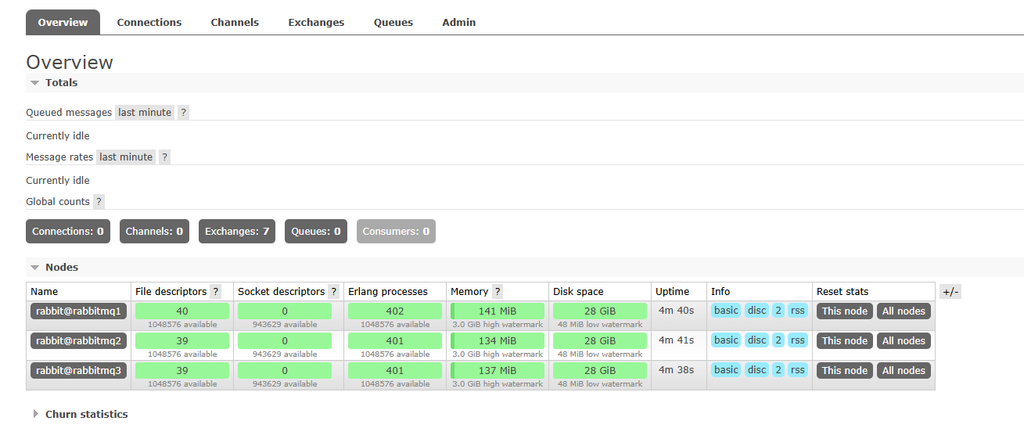
One hangs up, the other will top it.
Detailed Parameters
Parameters for queue
func (ch *Channel) QueueDeclare(name string, durable, autoDelete, exclusive, noWait bool, args Table) (Queue, error)
When it comes to queuing, there are a lot of parameters.
- "name": queue name (name)
- That's the name of the queue you're going to declare.
- RabbitMQ automatically generates a random name if it is an empty string
- durable: durable
trueindicates that the queue is persistent and that the queue remains after the broker restartfalseindicates that the queue is non-persistent, and the broker restart queue is deleted- Note: This guarantees only the Queue itself, not the Queue.
- AutoDelete: Automatically delete (autoDelete)
truemeans that when the last consumer is disconnected, the queue is automatically deletedfalseindicates that the queue will not be automatically deleted, even if there is no consumer connection
- Exclusive: exclusive
trueindicates that the queue is exclusive and can only be used by the current connection, which will be deleted after closingfalseindicates that queues can be shared by multiple connections
- NoWait: nowait
trueindicates that no confirmation is required from the server and will return immediatelyfalseindicates that it will wait for confirmation from the server before returning
- Args: extra parameters (args)
- Additional properties to specify queues, e. g. message TTL, maximum length, etc.
nilfor default settings
When Queue is declared, the queue with the same name, if repeated, must ensure that all configurations are the same
Set Queue Message Length
args := amqp.Table{
    "x-max-length": 100,        // 最大消息数100
    "x-overflow":   "reject-publish", // drop-head丢弃旧消息,reject-publish超过限制时拒绝新消息
},
Message Parameters
ch.Publish(
  "",    // exchange 交换器的名称
  "xxx", // key 路由键,如果exchange="" 则路由键=队列名
  true,  // mandatory 如果消息无法被路由到任何队列(没有匹配的绑定规则),RabbitMQ 会将消息返回给生产者。
  false, // immediate 已废弃 历史作用:如果消息路由到的队列没有消费者,消息会被返回给生产者。
  amqp.Publishing{
    Body: []byte("你好"),
  })
If mandatory=true is configured, you can get no match for route in the NotifyReturn queue.
returnChan := make(chan amqp.Return, 10)
  ch.NotifyReturn(returnChan)
  for returnMsg := range returnChan {
    log.Printf("消息被退回:")
    log.Printf("  回复码: %d", returnMsg.ReplyCode)
    log.Printf("  回复文本: %s", returnMsg.ReplyText)
    log.Printf("  交换机: %s", returnMsg.Exchange)
    log.Printf("  路由键: %s", returnMsg.RoutingKey)
    log.Printf("  消息体: %s", string(returnMsg.Body))
  }
Publishing Field Details
type Publishing struct {
  // 应用程序或交换机特定的字段,headers类型交换机会检查此字段
  // 用于存储自定义键值对元数据,可用于headers交换机的路由规则匹配
  Headers Table

  // 消息属性
  ContentType     string    // MIME内容类型(如"text/plain"、"application/json")
  ContentEncoding string    // MIME内容编码(如"gzip"、"base64",无编码则为空)
  DeliveryMode    uint8     // 投递模式:0或1为非持久化,2为持久化(需配合持久化队列)
  Priority        uint8     // 消息优先级(0-9,需队列支持x-max-priority参数)
  CorrelationId   string    // 关联标识符,用于匹配请求与响应(尤其在RPC场景)
  ReplyTo         string    // 回复地址,指定接收响应的回调队列(常用于RPC)
  Expiration      string    // 消息过期时间(毫秒字符串,如"60000"表示60秒)
  MessageId       string    // 消息唯一标识符(业务层面,用于追踪或去重)
  Timestamp       time.Time // 消息创建的时间戳
  Type            string    // 消息类型名称(自定义,用于区分消息分类,如"order_created")
  UserId          string    // 发送消息的用户ID(需RabbitMQ已存在的用户)
  AppId           string    // 发送消息的应用程序ID(标识消息来源应用)

  // 消息的实际业务数据负载
  Body []byte
}
Consumer parameters
func (ch *Channel) Consume(queue, consumer string, autoAck, exclusive, noLocal, noWait bool, args Table) (<-chan Delivery, error) {}
- queue: String type, specify the queue name to consume.
- Consumer: String type, consumer identifier. Custom name can be used to identify different consumers in the RabbitMQ management interface.
- autoAck: Boolean type, whether to automatically confirm messages.
true: Messages are automatically confirmed (removed from queue) when they are received by the consumer, regardless of whether the business is successfully processed.false: A manual callDelivery.Ack()is required to confirm the message and ensure that the message is removed after the transaction has been processed.
- Exclusive: Boolean type, set for exclusive consumers.
true: The consumer is the only consumer in the queue, and other consumers cannot consume it.false: Allow multiple consumers to consume the queue at the same time (information will be circulated to different consumers).
- noLocal: Boolean type, prohibition of receiving information published by this connection, needing direct exchange
true: Consumers will not receive information from the current connection.false: The current connection is available (usuallyfalse).
- noWait: Boolean type, non-stop waiting for server response.
true: The method returns immediately and does not wait for confirmation from the server (potential error may occur).false: Wait for server confirmation before returning (recommended).
- args:
TableType (similar dictionary), additional parameter configuration. Usually used to transmit RabbitMQ extensions (e.g., message priority, expiry time, etc.) and generallynil.
msg.Ack (false) indicates that this message was received and will be deleted from the queue
If you don't execute the Jack and you don't execute the reject, next time you run the consumer, the information will be sent to the consumer.
msg.Reject (tru), which says no and re-enters the message
msg.Reject (false), which rejects the message, will be deleted from the queue
If there is a risk of failure on the part of the consumer to receive the message, it is recommended that the message be confirmed manually