01 redis Introduction
Redis is a popular memory key database widely used to build high performance caches and message queue applications
If you have access to the website in Carden, then access to the redis cache hotspot data will allow you to experience a qualitative leap.
Retis's system is huge, so this is a simple one. Door.
Retis installation
- The redis from the phpstudi.
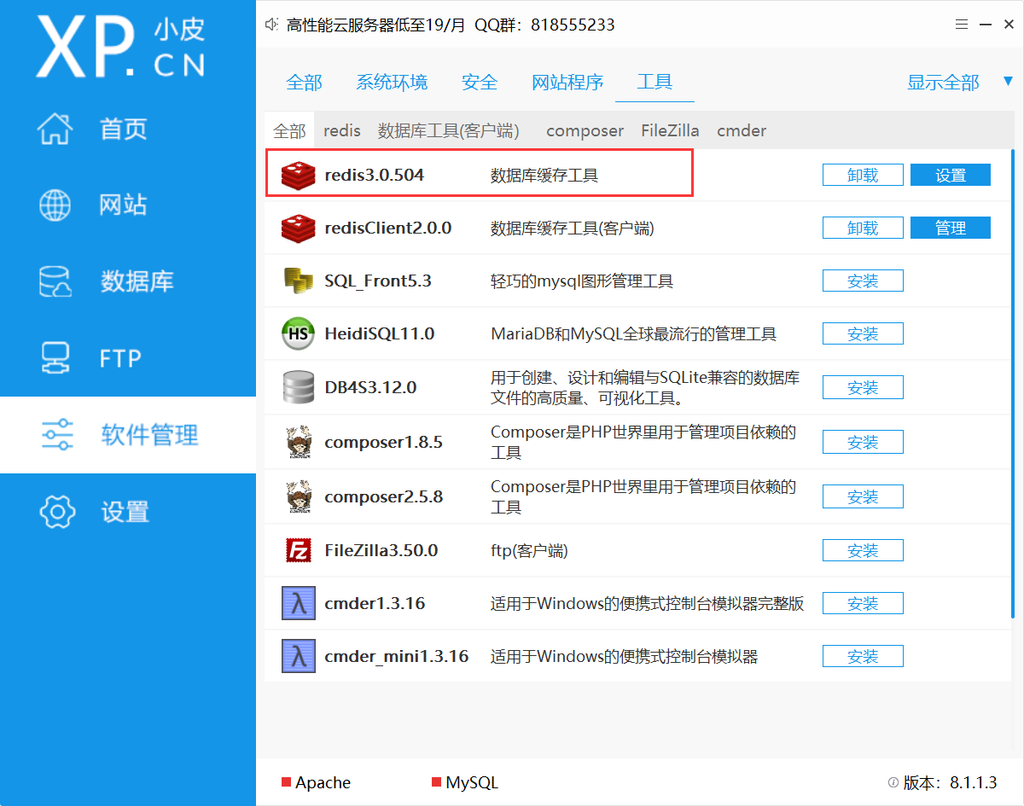
Retis and Mysql are a client, a service.
I find a lot of these software clients and service providers unclear.
That's the service.
It's got a client, you don't have to. You can have another client.
Of course, you can also connect with the code, and then your code serves as a client. End
- docker
docker pull redis:5.0.5

docker run -itd --name redis --restart=always -p 6379:6379 redis:5.0.5 --requirepass "redis"
If you only use the docker for the redis, you can only use the redis service on the host.
You can't use driss-cli's orders in the command line.
Connect Retis
- Command Line Connection
# 完整命令
redis-cli -h 127.0.0.1 -p 6379 -a password
# 简写
redis-cli
# 认证 进入redis之后
auth password
- Code Connection
package main

import (
  "fmt"
  "github.com/go-redis/redis"
)

var DB *redis.Client

func Connect() {
  redisDB := redis.NewClient(&redis.Options{
    Addr:     "127.0.0.1:6379", // 不写默认就是这个
    Password: "redis",          // 密码
    DB:       1,                // 默认是0
  })
  _, err := redisDB.Ping().Result()
  if err != nil {
    panic(err)
  }
  DB = redisDB
}
Retis Five Data Types
The mandatory interview.
- string
- List
- Set
- Hash (Hashi)
- Zset
Note that the data in the redis is in the memory, and when the redis service is restarted, the data will be emptied.
Let's start with the order line. Down
1. String
String String is the easiest data structure for Redis to store string, integer or floating point numbers. The most common application scenario is the object cache
redis-cli
127.0.0.1:6379> auth redis  # 登录
OK
127.0.0.1:6379> set name fengfeng   # 设置
OK
127.0.0.1:6379> get name  # 获取
"fengfeng"
127.0.0.1:6379> exists name  # 判断这个key是否存在
(integer) 1
127.0.0.1:6379> exists name1
(integer) 0
127.0.0.1:6379> del name  # 删除这个key
(integer) 1
127.0.0.1:6379> get name
(nil)
127.0.0.1:6379> GETSET name1 lisi # 如果不存在值,则返回 nil,set是会执行的
(nil)
127.0.0.1:6379> GETSET name1 lisi #  如果存在值,获取原来的值,并设置新的值
"lisi"
Batch Operations
127.0.0.1:6379> mset n1 zhangsan n2 lisi
OK
127.0.0.1:6379> get n1
"zhangsan"
127.0.0.1:6379> get n2
"lisi"
Count
Self-addition 1 less 1
127.0.0.1:6379> get n
(nil)
127.0.0.1:6379> incr n  # 自增1
(integer) 1  # 当前这个n的值
127.0.0.1:6379> get n
"1"
127.0.0.1:6379> incr n
(integer) 2
127.0.0.1:6379> get n
"2"
127.0.0.1:6379> decr n  # 自减1
(integer) 1
127.0.0.1:6379> get n
"1"
127.0.0.1:6379> decr n
(integer) 0
127.0.0.1:6379> get n
"0"
127.0.0.1:6379> decr n
(integer) -1
127.0.0.1:6379> get n
"-1"
Self-increasen, self-reductionn
127.0.0.1:6379> get n
(nil)
127.0.0.1:6379>
127.0.0.1:6379> INCRBY n 10
(integer) 10
127.0.0.1:6379> INCRBY n 11
(integer) 21
127.0.0.1:6379> get n
"21"
127.0.0.1:6379> DECRBY n 5
(integer) 16
127.0.0.1:6379> get n
"16"
Expiry Operation
setex in seconds
127.0.0.1:6379> setex name 20 fengfeng
OK
127.0.0.1:6379> get name
"fengfeng"
127.0.0.1:6379> ttl name  # 查看还有多久过期
(integer) 12
127.0.0.1:6379> ttl name  # -2表示已过期
(integer) -2
127.0.0.1:6379> get name
(nil)
expire
Set the expiry time of a key
如果不设置过期时间,ttl显示的结果是-1表示永不过期
127.0.0.1:6379> set name fengfeng
OK
127.0.0.1:6379> ttl name  # 现在是永不过期
(integer) -1
127.0.0.1:6379> expire name 10
(integer) 1
127.0.0.1:6379> ttl name
(integer) 6
127.0.0.1:6379> ttl name  # 现在是过期了
(integer) -2
Use scene
- Login
- Limited flow
- Count
Chinese Spelling Problem
But it's still a bad code.
redis-cli --raw
127.0.0.1:6379> set name ᄋ ̄ᄋ ̄
OK
127.0.0.1:6379> get name
枫枫
2. List
The list of redis corresponds to the slices in the go.
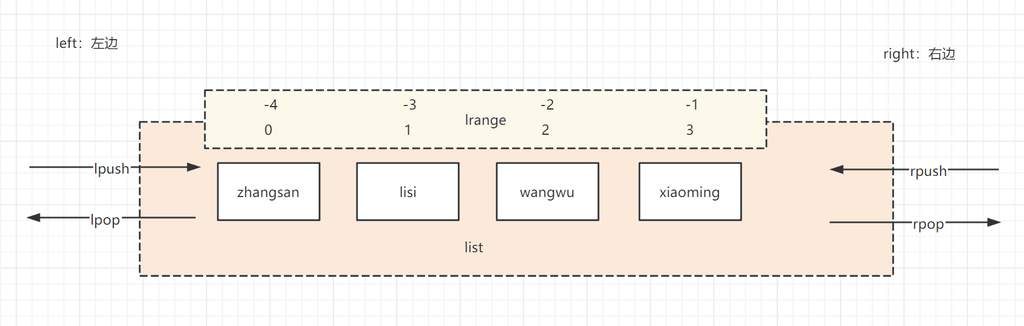
rpush list zhangsan lisi wangwu  xiaoming  # 从右边向左边推入四个元素
4 # 返回列表的长度
127.0.0.1:6379> llen list # 查列表的长度
4
127.0.0.1:6379> lrange list 0 -1  # 查看列表的全部元素
zhangsan
lisi
wangwu
xiaoming
127.0.0.1:6379> rpop list  # 从右边推一个元素出来
rpop list
xiaoming
127.0.0.1:6379> lrange list 0 -1
zhangsan
lisi
wangwu
127.0.0.1:6379> lpop list  # 从左边推一个元素出来
zhangsan
127.0.0.1:6379> lrange list 0 -1
lisi
wangwu
Use scene
- Task Queue
- Highlight
- Page Break Query
3. Hash
It's like a dictionary in a map, python in a go.
127.0.0.1:6379> hset dict name fengfeng  # 设置一个hash key,并且给hash里面设置一组filed value
0
127.0.0.1:6379> hget dict name  # 获取hash里面对应filed的值
fengfeng
127.0.0.1:6379> hgetall dict # 数据量大时,谨慎使用!获取在哈希表中指定 key 的所有字段和值
name
fengfeng
127.0.0.1:6379> hkeys dict # 获取在哈希表中指定 key 的所有filed
name
127.0.0.1:6379> hmset info name fengfeng age 23  # 批量设置
OK
127.0.0.1:6379> hkeys info
name
age
127.0.0.1:6379> HEXISTS info name  # 判断某个key是否存在
1
127.0.0.1:6379> HEXISTS info name1
0
127.0.0.1:6379> HDEL info name  # 删除hash中的一个filed
1
127.0.0.1:6379> hkeys info
age
127.0.0.1:6379> hlen info  # 返回hash中filed的个数
1
Note that the set-up expires only with the rash's key-to-key, and the key-to-be cannot be set to expire separately.
Use scene
- Record the number of views on an article on the website
- Storage Configuration Information
4. Set
There is no order of elements in the collection
HashSet is implemented on top of HashMap. It represents an unordered collection whose elements cannot be repeated.
127.0.0.1:6379> sadd set a b c d # 添加元素
4
127.0.0.1:6379> sadd set a b c e  # 实际只有一个元素添加进去了
1
127.0.0.1:6379> scard set  # 获取集合的长度
5
127.0.0.1:6379> sismember set a # 判断某个元素是不是在集合里面
1
127.0.0.1:6379> sismember set f
0
127.0.0.1:6379> smembers set # 获取集合中的数据 无序的
e
d
b
a
c
127.0.0.1:6379> srem set a # 删除集合中的某个元素 可传多个
1
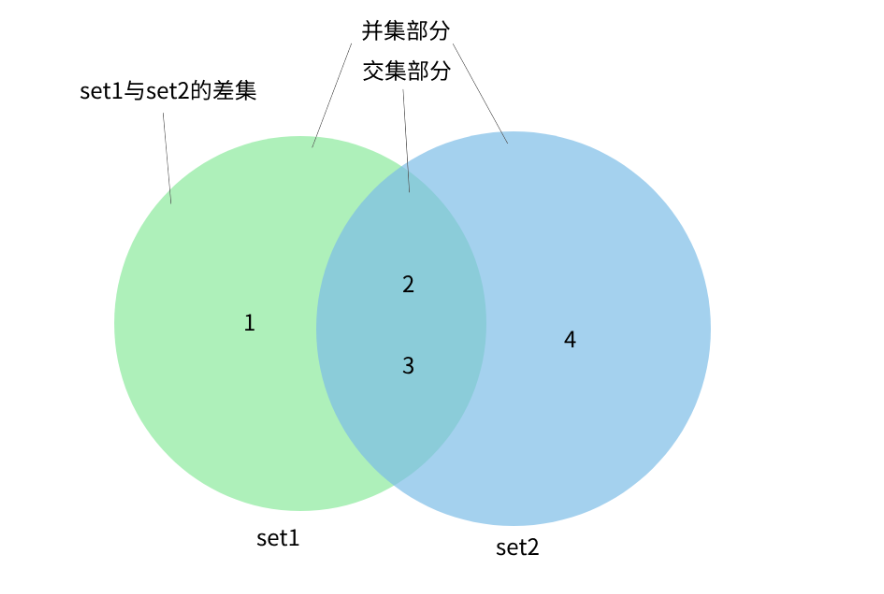
Interlock, Combination and Difference
sdiff Gap
sinter Intersection
sunion Sideset
127.0.0.1:6379> sadd set1 1 2 3
3
127.0.0.1:6379> sadd set2 2 3 4
3
127.0.0.1:6379> sdiff set1 set2   # 差集
1
127.0.0.1:6379> sdiff set2 set1
4
127.0.0.1:6379> sinter set1 set2 # 交集
2
3
127.0.0.1:6379> sunion set1 set2  # 并集
1
2
3
4
Random Award
Use pop command to remove one or more random elements of the specified key in the set and then return the removed elements
127.0.0.1:6379> sadd order 1 2 3 4 5 6 7 8
8
127.0.0.1:6379> spop order # 随机移除一个
5 # 随机的
127.0.0.1:6379> spop order
7
127.0.0.1:6379> spop order 3 # 随机移除3个  3.2版本才有效 redis-server -v 查看版本 或者
7
View Version
Two ways.
C:\Users\枫枫>redis-server -v

127.0.0.1:6379> info server
Use scene
- Together.
- Independent ip for statistical websites
- Label
5. sorted set
Orderly assemble.
sorted set added a weight parameter score to enable the elements in the group to be organized in score
I can't repeat it.
127.0.0.1:6379> zadd class 88 fengfeng 46 zhangsan 76 wangwu 36 lisi  # 向有序集合添加一个或多个成员
(integer) 4
127.0.0.1:6379> zrange class 0 -1  # 通过索引,按照分数从低到高返回
1) "lisi"
2) "zhangsan"
3) "wangwu"
4) "fengfeng"
127.0.0.1:6379> zrevrange class 0 -1  # 通过索引,按照分数从高到低返回
1) "fengfeng"
2) "wangwu"
3) "zhangsan"
4) "lisi"
127.0.0.1:6379> zcard class  # 获取有序集合的成员数
(integer) 4
127.0.0.1:6379> ZSCORE class zhangsan # 查看某个成员的分数
"46"
127.0.0.1:6379> ZRANK class wangwu # 查看成员的排名 从小到大排序
(integer) 2
127.0.0.1:6379> ZREVRANK class wangwu # 查看成员的排名 从大到小排序
(integer) 1
127.0.0.1:6379> zcount class 40 70 # 计算在有序集合中指定区间分数的成员数
(integer) 1
127.0.0.1:6379> zrangebyscore class 40 70  # 通过分数返回有序集合指定区间内的成员
1) "zhangsan"
127.0.0.1:6379> zrevrangebyscore class 100 0 # 返回有序集中指定分数区间内的成员,分数从高到低排序
1) "fengfeng"
2) "wangwu"
3) "zhangsan"
4) "lisi"
127.0.0.1:6379> zrange class 0 -1 withscores  # 把成员和分数一起显示出来
1) "lisi"
2) "36"
3) "zhangsan"
4) "46"
5) "wangwu"
6) "76"
7) "fengfeng"
8) "88"
127.0.0.1:6379> zrem class fengfeng  # 移除一个成员
(integer) 1
127.0.0.1:6379> zrange class 0 -1
1) "lisi"
2) "zhangsan"
3) "wangwu"
127.0.0.1:6379> ZREMRANGEBYRANK class 0 0  # 移除有序集合中给定的排名区间的所有成员(第一名是0)(低到高排序) 现在是把lisi移除了
(integer) 1
127.0.0.1:6379> zrange class 0 -1
1) "zhangsan"
2) "wangwu"
127.0.0.1:6379> ZREMRANGEBYSCORE class 40 50 # 移除有序集合中给定的分数区间的所有成员
(integer) 1
127.0.0.1:6379> zrange class 0 -1
1) "wangwu"
127.0.0.1:6379> ZSCORE class wangwu
"76"
127.0.0.1:6379> ZINCRBY class 2 wangwu  # 给王五+2
"78"
127.0.0.1:6379> ZINCRBY class -2 wangwu # 给王五-2
"76"
127.0.0.1:6379> ZSCORE class wangwu
"76"
Use scene
- Highlight
- Orders are paid out of time (inserted in the order, members are ordered, score is stamped on the order, and write a timed assignment to carry out zrange at intervals)
Operate five data types by go
After the order, use the goo to operate the redis.
You'll find the same way you used the order.
String
var DB *redis.Client
func RedisString() {
  DB.Set("name", "枫枫", 0) // 0 就是永不过期
  stringCmd := DB.Get("name")
  fmt.Println(stringCmd.Val())          // 枫枫
  fmt.Println(stringCmd.Result())       // 枫枫 nil
  fmt.Println(DB.Exists("name").Val())  // 1
  fmt.Println(DB.Exists("name1").Val()) // 0
  DB.Set("age", 12, 0)
  DB.Incr("age")                     // 自增1
  DB.IncrBy("age", 10)               // 自增10
  fmt.Println(DB.Get("age").Int64()) // 23
  fmt.Println(DB.TTL("name").Val())  // -1s
  DB.Expire("name", 2*time.Second) // 设置2秒的过期时间
  fmt.Println(DB.TTL("name").Val()) // 2s
  time.Sleep(2 * time.Second)
  fmt.Println(DB.TTL("name").Val()) // -2s
}
List
func RedisList() {
  DB.RPush("list", "zhangsan", "lisi", "wangwu", "xiaoming")
  fmt.Println(DB.LLen("list").Val())          // 4
  fmt.Println(DB.LRange("list", 0, -1).Val()) // [zhangsan lisi wangwu xiaoming]
}
Hash
func RedisHash() {
  DB.HSet("info", "文章1", 23)
  fmt.Println(DB.HGet("info", "文章1").Int64())  // 23
  fmt.Println(DB.HGetAll("info").Val())        // map[文章1:23]
  fmt.Println(DB.HKeys("info").Val())          // [文章1]
  fmt.Println(DB.HExists("info", "文章1").Val()) // true
  fmt.Println(DB.HExists("info", "文章2").Val()) // false
  fmt.Println(DB.HLen("info").Val())           // 1
}
Set
func RedisSet() {
  DB.SAdd("set", "a", "b", "c", "d")
  fmt.Println(DB.SIsMember("set", "a").Val()) // true
  fmt.Println(DB.SMembers("set").Val())       //[b d c a] 无序的

  DB.SAdd("set1", 1, 2, 3)
  DB.SAdd("set2", 2, 3, 4)
  fmt.Println(DB.SDiff("set1", "set2").Val())  // 差集
  fmt.Println(DB.SInter("set1", "set2").Val()) // 交集
  fmt.Println(DB.SUnion("set1", "set2").Val()) // 并集
}
Zset
func RedisZset() {
  DB.ZAdd("class", redis.Z{Score: 80, Member: "张三"}, redis.Z{Score: 46, Member: "李四"})
  fmt.Println(DB.ZRange("class", 0, -1).Val())                                          // [李四 张三]
  fmt.Println(DB.ZRevRange("class", 0, -1).Val())                                       // [张三 李四]
  fmt.Println(DB.ZRangeByScore("class", redis.ZRangeBy{Min: "0", Max: "100"}).Val())    // [李四 张三]
  fmt.Println(DB.ZRevRangeByScore("class", redis.ZRangeBy{Min: "0", Max: "100"}).Val()) //  [张三 李四]
  fmt.Println(DB.ZRangeWithScores("class", 0, -1).Val())                                // [{46 李四} {80 张三}]
  fmt.Println(DB.ZScore("class", "李四").Val())                                           // 46
}
Retis' usual commands
These are very common orders.
127.0.0.1:6379> select 2 # 切数据库
OK
127.0.0.1:6379[2]> select 0
OK
127.0.0.1:6379> keys *  # 查看所有的key
1) "zset"
2) "order"
127.0.0.1:6379> keys s* # 查看s开头的key
1) "set"
2) "set2"
3) "set1"
127.0.0.1:6379> ping # 查看服务是否运行
PONG
127.0.0.1:6379> move name 1 # 将当前数据库的key移动到数据库1当中
(integer) 1
127.0.0.1:6379[1]> PERSIST name # 移除key的过期时间,key永不过期
(integer) 1
127.0.0.1:6379[1]> type name # 查看key的数据类型
string
127.0.0.1:6379[1]> type info
hash
127.0.0.1:6379[1]> type class
zset
127.0.0.1:6379[1]> type set
set
127.0.0.1:6379[1]> type list
list
127.0.0.1:6379[1]> CLIENT LIST  # 获取连接到服务器的客户端连接列表
id=3 addr=127.0.0.1:52216 fd=8 name= age=386 idle=0 flags=N db=1 sub=0 psub=0 multi=-1 qbuf=0 qbuf-free=32768 obl=0 oll=0 omem=0 events=r cmd=client
id=4 addr=127.0.0.1:52377 fd=7 name= age=5 idle=3 flags=N db=0 sub=0 psub=0 multi=-1 qbuf=0 qbuf-free=0 obl=0 oll=0 omem=0 events=r cmd=client
127.0.0.1:6379[1]> dbsize # 获取当前数据库key的数量
(integer) 5
127.0.0.1:6379[1]> FLUSHDB # 删除当前数据库的所有key
OK
127.0.0.1:6379[1]> FLUSHALL  # 删除全部数据库的所有key
OK
Service
Redis matters are essentially a collection of orders. The service supports the execution of multiple orders at a time, and in one case all orders are sequenced. The order requests submitted by other clients will not be inserted into the service execution order sequence.
Because our program is simultaneous, you set a value in a program, and then you take a value.
But if it's co-existed, then it will be.
On the basis of the above questions, I put all the instructions in one line at a time when I'm working on a client.
127.0.0.1:6379> multi # 开启事务
OK
127.0.0.1:6379> set name ff
QUEUED
127.0.0.1:6379> get name
QUEUED
127.0.0.1:6379> exec # 执行事务
1) OK
2) "ff"
Cancel Service
127.0.0.1:6379> MULTI
OK
127.0.0.1:6379>
127.0.0.1:6379> set age 12
QUEUED
127.0.0.1:6379> discard  # 取消事务
OK
127.0.0.1:6379> get age  # 数据未改动
(nil)
If there is an order error in the course of the business, all orders will not be executed when exec is executed.
127.0.0.1:6379> MULTI
OK
127.0.0.1:6379> set age 12
QUEUED
127.0.0.1:6379> x
(error) ERR unknown command 'x'
127.0.0.1:6379> get age
QUEUED
127.0.0.1:6379> exec
(error) EXECABORT Transaction discarded because of previous errors.
Go and handle the redis.
It's a little different from the command operation.
func PipeLine() {
  tx := DB.TxPipeline()
  tx.Set("name", "枫枫", 0)
  val := tx.Get("name")
  fmt.Println(val.Val()) // 这里是获取不到结果的
  _, err := tx.Exec()
  if err != nil {
    fmt.Println("提交事务失败", err)
    return
  }
  fmt.Println(DB.Get("name").Val()) // 获取事务结果
  fmt.Println(val.Val())            // 获取事务结果
}
Lock
Multiple clients are likely to operate the same data set at the same time, and the data, once modified, will not be suitable for continuing operations
Lock data for operation before operation, terminate current operation if change
127.0.0.1:6379[1]> set price 100
OK
127.0.0.1:6379[1]> WATCH price // 检测这个key,如果key在事务期间发生了变化,则事务不成功
OK
127.0.0.1:6379[1]> MULTI
OK
127.0.0.1:6379[1]> set price 101
QUEUED
127.0.0.1:6379[1]> get price
QUEUED
127.0.0.1:6379[1]> exec // 在exec之前,再用一个客户端去修改这个price的值
(nil)
127.0.0.1:6379[1]> get price
"1"
Go and process the redis lock.
func RedisWatch() {
  key := "price"
  err := DB.Watch(func(tx *redis.Tx) error {
    n, err := tx.Get(key).Int()
    // 判断是不是存在错误
    if err != nil && err != redis.Nil {
      return err
    }
    _, err = tx.Pipelined(func(pipe redis.Pipeliner) error {
      // price + 1
      // 再这个期间去修改price的值
      time.Sleep(10 * time.Second)
      pipe.Set(key, n+1, 0)
      return nil
    })
    return err
  }, key)
  fmt.Println(err)
}
Enduring
Redis is a memory database. Data is stored in memory, but we all know that memory data changes fast and can be lost.
Redis also provides us with a durable mechanism, namely RDB (Redis DataBase) and AOF (Append Only File).
RDB, in short, produces snapshots of the data stored in redis at different time points and is stored on media such as disks;
AOF is a new angle for permanence, i.e., to record all written instructions that Retis has executed, and to re-activate them once again and again, the data can be restored.
Process of redis data disk:
- Client sends writing operations (data in the client ' s memory) to the service.
- The database server receives the requested data (data in the service-end memory).
- The service calls the write system and writes data on disk (data in the buffer zone stored in the system).
- The operating system transfers data from the buffer zone to the disk controller (data is in disk cache).
- The disk controller writes the data into the physical medium of the disk (the data actually falls on the disk).
RDB Sustainability
Default is open. Default storage file is dump.rdb
You can change the name of this file
dbfilename dump.rdb
dir ./
Trigger rdb backup
- Configure Autoback
By default, 10,000 times in a minute, 10 times in five minutes, 1 time in 30 minutes.
save 3600 1
save 300 100
save 60 10000
- Manual Command Backup
save: Save only, otherwise, block, manually save, not recommended.
bgsave: Retis will do a snapshot operation at a backstage step, which will also respond to the client situation.
Time when lastsave command can be used to obtain the last successful snapshot (time stamp)
AOF Enduring
The AOF default is closed and needs to be opened manually. Open with: modify the redis.conf profile to open AOF
If it's phpstudy, change the conf file from the ricis directory, and change the configuration file in the software every time it is restarted.
This is my directory.
Once restarted, there is an application. aof file under this directory
appendonly yes
appendfilename "appendonly.aof"
appendfsync always
dir ./
appendfsync alwayss: Synchronization every writing
appendfsync everysec: Sync every second
appendfsync no: no active synchronization
Reference Documents
go-redis: https://github.com/redis/go-redis
Retis Service: https://blog.csdn.net/weixin_45080272/article/details/129715920
Common command: https://baijiahao.baidu.com/s?id=1678695492251756487&wfr=spider&for=pc
Go connect retis: https://zhuanlan.zhihu.com/p/645669818
zset: https://blog.csdn.net/weixin_46377355/article/details/116407373
Five data types: http://www.taodudu.cc/news/show-6290486.html?action=onClick
Go handle retis: https://www.php.cn/faq/585769.html
Go process the redis lock: https://blog.csdn.net/weixin_44706011/article/details/106910913
Retis Endurance: https://baijiahao.baidu.com/s?id=1708708550003841683&wfr=spider&for=pc
Retis Endurance: https://blog.csdn.net/JAVAMysql111/article/details/123171055
Retis opens the AOF permanence: https://baijiahao.baidu.com/s?id=1763858330943737708&wfr=spider&for=pc
Retis opens the AOF permanence: https://blog.csdn.net/lili40342/article/details/127938233
Redis RDB persistence: https://blog.csdn.net/weixin_43888891/article/details/131031003