01 mysql installation nanny level
phpstudy install mysql
It is recommended that you use phpstudy to quickly build a mysql environment
This way you can use the mysql command on the command line
https://www.xp.cn/download.html
After installation, enter the interface and start the mysql service.
If you have installed mysql before, you need to uninstall it.
Then configure the environment variables
docker install mysql service
docker pull mysql:5.7

mkdir -p ./mysql/conf ./mysql/datadir

# 直接运行
docker run -itd --name mysql -p 3307:3306 -e  MYSQL_ROOT_PASSWORD=root  mysql:5.7

# 映射目录
docker run -itd --name mysql --restart=always -p 3307:3306 -v /opt/db/mysql/conf:/etc/mysql/conf.d -v /opt/db/mysql/datadir:/var/lib/mysql -e  MYSQL_ROOT_PASSWORD=root -e MYSQL_DATABASE=db mysql:5.7

# windows下的映射目录
Create a database named db, the root password is root, and the port mapping is 3307 of the local machine to 3306 of the container.
-v is the mapping directory, which is mainly the configuration and data of mysql. If you restart the container, the data will still be maintained.
If you already have a mysql service, just change the port.
The advantage of using docker is that the version can be changed at will
02 Mysql basic operations
Basic command operations
connect
// 连接本机的3306端口上的mysql服务
mysql -uroot -proot

// 连接本机的其他端口
mysql -uroot -proot -P 3307

// 连接其他主机的其他端口
mysql -uroot -proot -P 3307 -h 192.168.100.113
Library operations
Create library
create database mydb;

// 设置编码与字符集
create database mydb default character set utf8 collate utf8_general_ci;
create database mydb   代表的是创建数据库 mydb

default character  set utf8   代表的是将该库的默认编码格式设置为utf8

collate  utf8_general_ci     代表的是数据库校对规则,utf8_bin将字符串中的每一个字符用二进制数据存储,区分大小写。utf8_genera_ci不区分大小写,ci为case insensitive的缩写,即大小写不敏感。utf8_general_cs区分大小写,cs为case sensitive的缩写,即大小写敏感
// 查看库
show databases;
// 进入库
use mydb;
// 查看库里面的表
show tables;
// 查看库的编码,有的编码写中文会报错,这个要注意
show create database mydb;
// 删除数据库
drop database mydb;
// 修改库的编码
alter database mydb character set utf8;
Table operations
The prerequisite must be to enter a certain library
Create table
create table user
(
    id         int(11) primary key auto_increment not null comment '序号',                        # 主键,自动增长
    username   varchar(50) unique                 not null comment '姓名',                        # 不能为空,不能重复
    sex        boolean   default true comment '性别 1 男 0 女',                                   # tinyint(1) 一位 默认值是1
    age        int(8)    default 18 comment '年龄,默认18',                                        # tinyint(1) 一位 默认值是1
    created_at timestamp default CURRENT_TIMESTAMP on update  CURRENT_TIMESTAMP comment '创建时间' # 创建时间,时间自动创建
);
Field constraints
Common field constraints
primary Key  # 记录的唯一标识,能够通过该标识确定唯一一条记录  一般用于记录id
default # 默认值
unique # 唯一约束
not null # 空值约束,不可以为空,不写就是可以为空
auto_increment # 自动增长
// 查看表结构
desc user;
// 删除表
drop table user;
// 删除表中全部数据
delete from user where true;
// 重置自增计数器
alter table user auto_increment = 1;
// 更改表名
rename table old_user to new_user;
// 新增字段
alter table user add column nick varchar(50) null;
// 删除字段
alter table user drop column nick;
# 新增索引
alter table user add index index_name (username);
# 查看索引   默认是有一个主键索引的
show index from user;
# 删除索引
alter table user drop index index_name;
Data operations
Insert data
# 完整的插入语句
insert into user(id, username, sex, created_at) value (
    2, 'zhangsan', 0, '2023-10-17 08:15:03'
    );

# 因为有些字段设置了默认值和可以为null或自增长
insert into user(username) value ('wangwu'); # 简单插入语句

# 批量插入
insert into user(username) values ('wangwu1'),
       ('lisi'),
       ('fengfeng');
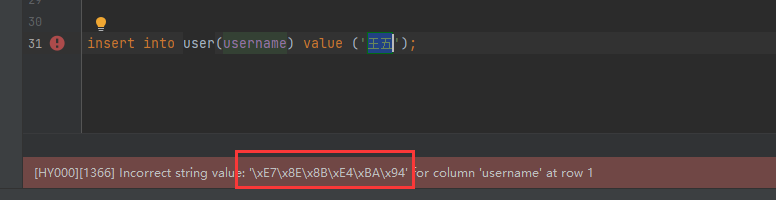
Sometimes the default encoding will cause an error when inserting Chinese.
Query
Query will be discussed specifically later. Here we first master three query statements.
# 查这张表的全部数据,字段全部显示
select * from user;
# 查这张表的全部数据,字段部分显示
select id,username from user;
# 条件查询,查询id为2的数据
select id,username from user where id = 2;
Modify
The prerequisite for modification is to find the data
# 找到id为2的将 username修改为lisi123
update user set username = 'lisi123' where id = 2;

# 也可以修改多个字段
update user set username = 'lisi123', sex = 0 where id = 2;

# 也可以批量修改
update user set sex = 0 where id > 0;
# 将某个字段的值赋给其他字段
update user set username = user.nick where id = 1;
update user set  age = user.age + 1 where id=3;
Delete
# 删除id为1的数据
delete from user where id = 1;
// 删除表中全部数据
delete from user where true;
// 重置自增计数器
alter table user auto_increment = 1;
03 mysql single table query
MySQL queries can be discussed separately because there are too many knowledge points.
select
MySQL's SELECT statement is used to retrieve data from a database table. Powerful functions, complex and diverse statement structures. But the basic statement format is as follows.
Not limited to querying data tables, for example, you can directly output
select '枫枫知道', now() as date;
A complete SELECT statement contains optional clauses. The SELECT statement is defined as follows
SELECT clause
[FROM clause]
[WHERE clause]
[GROUP BY clause]
[HAVING clause]
[ORDER BY clause]
[LIMIT clause]
Execution order of different clauses
开始 > FROM子句 > WHERE子句 > GROUP BY子句 > HAVING子句 > SELECT子句 > ORDER BY子句 > LIMIT子句 > 最终结果
WHERE clause
| Operator | Description |
|---|---|
| = | equals |
| != or <> | not equal to |
| > | greater than |
| < | less than |
| >= | Greater than or equal to |
| <= | Less than or equal to |
| BETWEEN AND | Within a certain range (closed interval) |
| LIKE | Search for a pattern |
| AND | Multiple conditions AND |
| OR | Multiple conditions or |
Create some data for easy querying
delete from user
where true;

alter table user
    auto_increment = 1;

insert into user(username, age, sex)
values ('wangwu', 19, 0),
       ('lisi', 20, 1),
       ('zhangsan', 18, 0),
       ('fengfeng', 23, 1),
       ('fangfang', 18, 0),
       ('fengfengzhidao', 25, 1),
       ('feifei12138', 28, 0);
# 查询是女的
# 查询年龄范围在18-23之间的
# 查询是女的,年龄在18-23的
# 查询名称是feng开头的
# 查询年龄不是18的
# 查询年龄是18,或者名称是feng开头的
# 查询是女的
select * from user where sex = 0;
# 查询年龄范围在18-23之间的
select * from user where age >= 18 and age <= 23;
select * from user where age between 18 and 23;
select * from user where age in (18,19,20,21,22,23);
# 查询是女的,年龄在18-23的
select * from user where sex = 0 and (age between 18 and 23);
# 查询名称是feng开头的
select * from user where username like 'feng%';
# 查询年龄不是18的
select * from user where not age = 18;
select * from user where age <> 18;
select * from user where age != 18;
# 查询年龄是18,或者名称是feng开头的
select * from user where  age = 18 or username like 'feng%';
GROUP BY clause
Except for the grouping field, other fields must be included in the aggregate function
Group query
# 分别统计男女生人数
select sex, count(id) from user group by sex;
# 统计各个年龄的个数,并且把用户名显示出来
select age, count(id), group_concat(username) from user group by age;
HAVING clause
HAVING, like the WHERE clause, is used to specify selection conditions. However, there are obvious differences in the usage of HAVING and WHERE clauses.
WHERE works on tables and views, HAVING works on groups.
WHERE selects input rows before grouping and aggregation calculations (therefore, it controls which rows enter the aggregation calculation), while HAVING selects grouping after grouping and aggregation
# 分别统计男女生人数,只显示人数大于3的数据
# select sex, count(id) as cnt from user where cnt > 18 group by sex;  # 无法做到
select sex, count(id) as cnt from user  group by sex having cnt > 3;
ORDER BY clause
The ORDER BY clause is used to sort the result set based on specified columns.
The default is primary key ascending order ASC (ascend)
# 按照id降序
select * from user order by id desc;
# 先按照年龄升序,再按照id降序
select * from user order by age,id desc;
LIMIT clause
The LIMIT clause can be used to force a SELECT statement to return a specified number of records.
Generally used with offset to record the offset
# 查全部
select * from user;
# 查前两个
select * from user limit 2;
select * from user limit 0, 2;
# 查两个,偏移两个
select * from user limit 2,2;
select * from user limit 2 offset 2;
Page query
一页显示条数 size = 2
页数    offset         limit
1         0            size
2         2            size
3         4            size
n      (n-1) * size    size
DISTINCT clause
Remove duplicates
# 显示不重复的年龄段
select distinct age from user;

# 按照年龄分组,并且统计,不重名的个数
select age, count(distinct username) from user group by age;
UNION clause
The function of UNION is to vertically combine the results of two or more queries.
You can feel it intuitively
select 1, 2 union select 3, 4
Note that the number of fields must match
04 Mysql common functions
Math functions
# 进制转换
SELECT CONV('a',16,2);          -- 1010
SELECT CONV('6E',18,8);          -- 172
SELECT CONV(-17,10,-18);        -- -H
SELECT CONV(10+'10'+'10'+X'0a',10,10);  -- 40
# 绝对值
select ABS(-1);
select ABS(123);
# 向上取整
select ceil(1.1);
# 向下去整
select floor(1.9);
# 四舍五入
select round(1.3);
select round(1.6);
String functions
# 拼接字符串
select concat('枫枫', '知道');
# 拼接字符串,指定拼接符号
select concat_ws('-', '枫枫', '知道');
# 提取字符串
select substr('fengfeng', 1, 4); # feng
select substr('fengfeng', -4, 4); # feng 从后往前
# 按分隔符截取字符串前 N 个或者后 N 个子串
select substring_index('fengfengzhidao.com', '.', 1); # fengfengzhidao
select substring_index('fengfengzhidao.com', '.', -1); # com
select substring_index('fengfengzhidao.com', '.', 2); # fengfengzhidao.com
Date function
# 返回当前时间
select now();
# 返回年月日的格式
select CURDATE();
# 返回时间格式
select CURTIME();
# 时间戳转日期
SELECT FROM_UNIXTIME(1697537006);
# 日期转时间戳
SELECT UNIX_TIMESTAMP('2023-10-17 10:03:26');
SET @dt = '2019-04-16 15:05:12.123456';
# 时间选取
select date(@dt) as 日期,
       TIME(@dt) as 时间,
       YEAR(@dt)  as 年,
       MONTH(@dt)  as 月,
       MONTHNAME(@dt)  as 全名月,
       DAY(@dt)  as 月份中的天,
       DAYNAME(@dt)  as 星期名字,
       DAYOFYEAR(@dt)  as 一年的天数,
       HOUR(@dt)  as 时,
       MINUTE(@dt)  as 分,
       SECOND(@dt)  as 秒,
       QUARTER(@dt)  as 季度,
       WEEK(@dt)  as 周数;
Comparison function
select 1 in (1, 2);
select 1 in (2, 4);
select isnull(null);
select isnull(1);
# 算最小值
select least(1,2,3,4);
# 返回最大值
select greatest(1,2,3,4)
05 mysql one-to-many relationship
The relationship between tables is also the relationship between entities
For example, how to record the relationship between students and classes?
You can have one table for the class and one table for the students.
How to reflect students’ belonging relationship?
The following designs can be used
class schedule
| id | class name |
|---|---|
| 1 | Class every three years |
| 2 | Class 2, Grade 3 |
Student table
| id | name | class_id |
|---|---|---|
| 1 | fengfeng | 1 |
| 2 | lisi | 1 |
| 3 | wangwu | 2 |
Table structure
create table class
(
    id   int(11)     NOT NULL AUTO_INCREMENT PRIMARY KEY,
    name varchar(16) not null
);
create table student
(
    id       int(11)     NOT NULL AUTO_INCREMENT PRIMARY KEY,
    name     varchar(16) not null,
    class_id int(11),
    FOREIGN KEY (class_id) REFERENCES class (id) # 设置外键约束
)
Insert data
insert into class(name)
values ('三年一班'),
       ('三年二班');
insert into student(name, class_id)
values ('wangwu', 1),
       ('lisi', 1),
       ('fengfeng', 2);
One-to-many query
# 查询三年一班的学生列表
# 先找到三年一班的id,再通过id去查学生
select *
from student
where class_id = (select id from class where class.name = '三年一班');
# 通过连表查询,把这两张表合到一起
select *
from student
         left join class on class.id = student.class_id where class.name = '三年一班';
There are two query modes here, one is subquery mode and the other is join table query
About FOREIGN KEY
Foreign keys are not required
For example, the following table creation statement is also possible
create table class
(
    id   int(11)     NOT NULL AUTO_INCREMENT PRIMARY KEY,
    name varchar(16) not null
);
create table student
(
    id       int(11)     NOT NULL AUTO_INCREMENT PRIMARY KEY,
    name     varchar(16) not null,
    class_id int(11)
)
So, what are the benefits of using foreign keys?
-
Foreign keys are used by the database itself to ensure data consistency
What does it mean? For example, if user 1 is associated with class 1, then class 1 cannot be deleted.
-
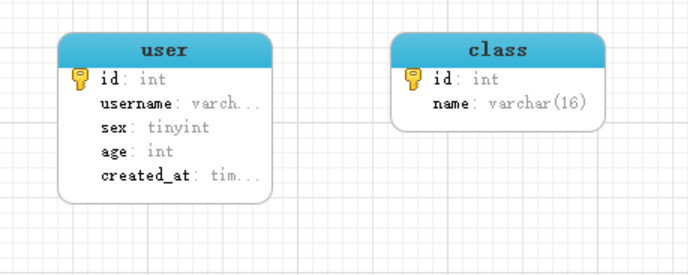
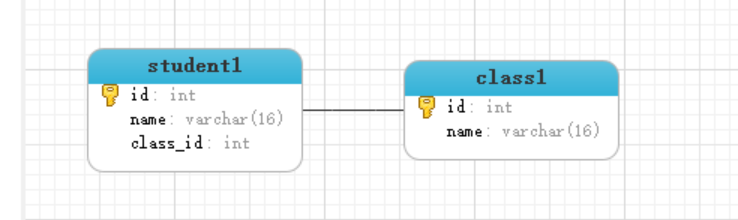
Database design with primary and foreign keys can increase the readability of the ER diagram, which is very important in database design.
no foreign keys
There are foreign keys
Association deletion rules
When defining foreign keys, we can set association deletion rules. Common association deletion rules include the following:
CASCADE: Cascade deletion, when a record in the main table is deleted, the records associated with it in the slave table will also be deleted.SET NULL: Set to NULL, when a record in the main table is deleted, the foreign key column in the record associated with it in the slave table will be set to NULL- NO ACTION: No action is performed. When a record in the main table is deleted, an error will be generated. Records in the slave table will not be affected.
- RESTRICT: Restrict deletion. When a record in the main table is deleted, if there is a record associated with it in the slave table, the deletion operation will be rejected.
- SET DEFAULT: Set the default value. When a record in the main table is deleted, the foreign key column in the record associated with it in the slave table will be set to the default value.
create table class1
(
    id   int(11)     NOT NULL AUTO_INCREMENT PRIMARY KEY,
    name varchar(16) not null
);
create table student1
(
    id       int(11)     NOT NULL AUTO_INCREMENT PRIMARY KEY,
    name     varchar(16) not null,
    class_id int(11),
    FOREIGN KEY (class_id) REFERENCES class1 (id) on delete cascade # 设置外键约束
);
If a foreign key is set, when building a table, you must first create a table without a foreign key relationship, and then create a table with a foreign key relationship.
Deletion is reversed, first delete tables with foreign key relationships, and then delete tables without foreign key relationships.
Add foreign key association afterwards
# 创建关联
alter table student add foreign key (class_id) references class(id) on delete set null ;
# 删除关联
alter table student drop foreign key student_ibfk_1;
06 mysql one-to-one relationship
Case: Relationship between users and user details
One-to-one use is usually
There is a table with commonly used fields and a table with less commonly used fields, for example
User table
| id | username | age |
| 1 | Fengfeng | 23 |
| 2 | zhangsan | 18 |
User details table
| user_id | Address | Hobbies | Mobile phone number | |
| 1 | Changsha, Hunan | singing and dancing rap | 12542244 | 123@qq.com |
To achieve this, check the user details through the user, and check the user through the user details.
How to express this?
Table structure definition
Similar to defining a one-to-many relationship
But a one-to-many foreign key can only be on the table with many
For example, students and classes, there are many students, the class is 1, the foreign key can only be on the student table
But one-to-one foreign keys can be in different locations
Foreign key in user table
create table user
(
    id           int(11)     NOT NULL AUTO_INCREMENT PRIMARY KEY,
    name         varchar(16) not null,
    age          int(16) default 18,
    user_info_id int(11)     null unique , # 要设置不能重复
    FOREIGN KEY (user_info_id) REFERENCES userinfo (user_id) on delete set null # 设置外键约束
);
create table userinfo
(
    user_id int(11)     NOT NULL PRIMARY KEY,
    `like`  varchar(16) null,
    `addr`  varchar(32),
    `tel`   varchar(11),
    `email` varchar(32)
);
Foreign key in user information table
create table user
(
    id     int(11)     NOT NULL AUTO_INCREMENT PRIMARY KEY,
    name   varchar(16) not null,
    age    int(16) default 18
);
create table userinfo
(
    user_id int(11)     NOT NULL PRIMARY KEY,
    `like`  varchar(16) null,
    `addr`  varchar(32),
    `tel`   varchar(11),
    `email` varchar(32),
    FOREIGN KEY (user_id) REFERENCES user (id) on delete cascade # 设置外键约束
);
Note that the foreign key deletion logic used in the two cases is different.
The first situation
The foreign key is in the user table. If you delete user information, you definitely cannot delete the user. You can only set the user's data about this foreign key to null.
Second case
The foreign key is in the user information table. If you delete the user table, the user information will be useless and can be deleted in cascade.
Generally speaking, one-to-one foreign keys are in common tables
Data writing
Use the first case
# 先把用户详情数据加入
insert into userinfo(user_id, `like`, addr, tel, email)value (1, '唱跳rap', '湖南长沙', '126545', '12324@qq.com');
# 用户关联用户详情
insert into user(`name`, age, user_info_id) value ('枫枫', 18, 1);
Data query
# 查枫枫的爱好
select `like`from userinfo where user_id = (select id from user where name = '枫枫');

select name, `like` from user join userinfo  on user.id = userinfo.user_id  where name = '枫枫';
07 mysql many-to-many relationship
Many-to-many is a two-way one-to-many, that is, one row of data in table A corresponds to multiple rows of data in table B, and the same row of data in table B also corresponds to multiple rows of data in table A.
For example, articles and tag tables
An article has multiple tags, and one tag can be associated with multiple articles.
So how do we record such a relationship?
Article table
| id | title |
| 1 | Getting started with python development from scratch |
| 2 | Getting started with golang development from scratch |
tag table
| id | title |
| 1 | python |
| 2 | golang |
Assume that the tags of article 1 have 1 and 2, how do we represent them?
We can easily think of recording the relationship between them through the third table
join table
| article id | tag id |
| 1 | 1 |
| 1 | 2 |
create table article
(
    id    int(11) primary key auto_increment,
    title varchar(16)
);
create table tag
(
    id    int(11) primary key auto_increment,
    title varchar(16)
);
create table article_tag
(
    article_id int(11),
    tag_id     int(11),
    PRIMARY KEY (article_id, tag_id),
    foreign key (article_id) references article (id),
    foreign key (tag_id) references tag (id)
)
Query
insert into article(title)value ('入门golang开发');
insert into tag(title)values('前端'),('后端');
insert into article_tag values (1, 1),(1,2);


# 查询入门golang开发的标签有哪些
select article.title, t.title from article left join article_tag a on article.id = a.article_id left join tag t on a.tag_id = t.id where article.title = '入门golang开发';

select title from tag where id in (select article_tag.tag_id from article_tag where article_id in (select article.id from article where article.title = '入门golang开发'));
08 mysql join table query
Let’s focus on explaining the join table query. This is also the focus of the interview.
Direct connection, error demonstration
select * from student,class;
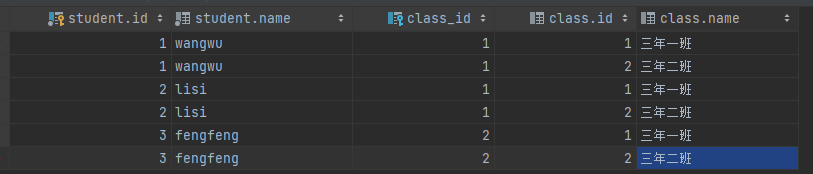
This kind of connection is also called Descartes., which means two-way intersection.
Conditions must be added later to prove that the two tables have the same fields.
select * from student,class where student.class_id = class.id;

There are three connection modes
- inner join
- left join
- right join
If the data can all be matched one-to-one, then there will be no difference in the output results of the three of them.
However, if the data does not match, then there will be differences between the three of them.
For example
class schedule
| id | class name |
|---|---|
| 1 | Class every three years |
| 2 | Class 2, Grade 3 |
| 3 | Class Three, Three Years |
Student table
| id | name | class_id |
|---|---|---|
| 1 | wangwu | 1 |
| 2 | lisi | null |
| 3 | fengfeng | 2 |
| 4 | fang | 2 |
select * from student inner join class  on student.class_id = class.id;
select * from class inner join student  on student.class_id = class.id;

select * from student left join class  on student.class_id = class.id;
select * from class left join student on student.class_id = class.id;

select * from student right join class  on student.class_id = class.id;
select * from class right join student  on student.class_id = class.id;
In the first case, inner connection, through students and classes, there are only 1 3 4 student and class records.
The second case, inner connection, connects students through classes, which is the same as the first case.
In the third case, left connection connects classes through students. The student information is completely displayed, and the class information corresponding to student 2 is all null.
The fourth case, left connection, connects students through classes. The class information is completely displayed, but the student information corresponding to class 3 is null.
The fifth case, right connection, connects classes through students, using the class table as the base table, the class information is completely displayed, but the student information corresponding to class 3 is null
The sixth case, right join, connects students through classes, using the student table as the base table, the student information is completely displayed, but the class information corresponding to student 2 is null
Different connection relationships
Their differences are:
-
Return different
inner join will return the same rows in both tables
left join will return all records from the left table, even if it does not match the right table
-
Different quantities
inner join is less than or equal to the number of records in the left and right tables
left join: The number of left joins is the same as the number of records in the left table.
-
Record attributes are different
Record attributes that are insufficient for inner join will be discarded directly.
Record attributes insufficient for left join are filled with NULL
Left and right have different base tables and different operations.
09 mysql subquery
Subquery is a SELECT statement within another statement.
Subquery is also called inner query (Inner Query) and must be located in parentheses. A query that contains subqueries is called an outer query. Subqueries support multiple levels of nesting, that is, subqueries can contain other subqueries.
Test your skills
# 查询是男生的数据
select * from user where sex = 1;
select * from user where id in (select id from user where sex = 1);
Although writing this is like taking off your pants and farting, the meaning is this
First find the data in the subquery, and then bring it to the upper layer for query
Need to consider whether the result set of the subquery is single or multiple
- The subquery is in where
- Subquery in form
- The subquery is in select
create table users
(
    id   int(11) primary key auto_increment,
    name varchar(8) not null,
    age  int(4),
    sex bool default 0
);

# 查询超过男生平均年龄的男生
# 查询超过男生平均年龄的男生,并且把平均年龄显示出来
# 查询用户的年龄,平均年龄
# 查询用户的年龄,性别,对应性别的平均年龄
# 查询超过男生平均年龄的男生
select * from users where sex = 1 and age > (select avg(age) from users where sex = 1 group by sex);

# 查询超过男生平均年龄的男生,并且把平均年龄显示出来
select name, age, u1.ag from (select avg(age) as ag from users where sex = 1 group by sex) u1, users where users.age > u1.ag;

# 查询用户的年龄,平均年龄
select name, age, (select avg(age) from users)  as ag from users;

# 查询用户的年龄,性别,对应性别的平均年龄
select name, age, sex, (select avg(age) from users u2 where u1.sex = u2.sex)  as sex_ag from users u1;
10 mysql index
In general application systems, the read-write ratio is about 10:1, and insertion operations and general update operations rarely cause performance problems. In a production environment, what we encounter most and are most likely to cause problems are some complex query operations, so optimizing query statements is obviously a top priority. Speaking of accelerating queries, we have to mention indexes.
Index principle
The purpose of indexing is to improve query efficiency, which is the same as the table of contents we use to check books: first locate the chapter, then locate a section under the chapter, and then find the page number. Similar examples include: looking up in a dictionary, looking up train numbers, airplane flights, etc.
The essence is: filter out the final desired results by continuously narrowing the scope of the data you want to obtain, and at the same time turn random events into sequential events. In other words, with this indexing mechanism, we can always use the same search method to lock the data.
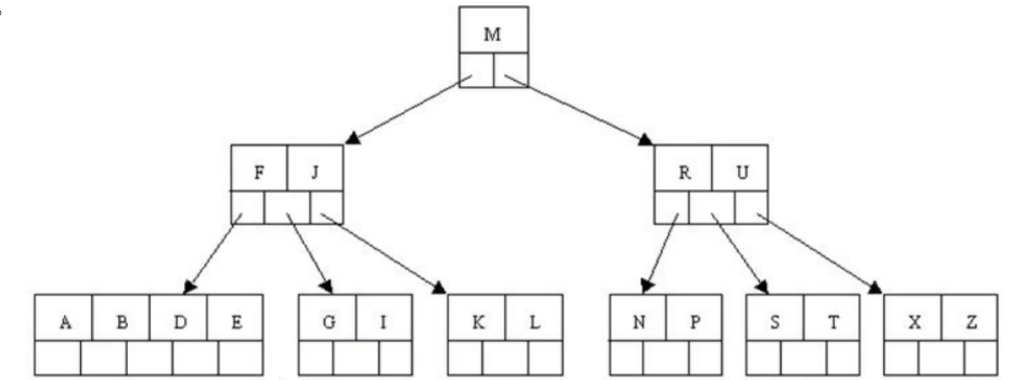
Disadvantages: Affects the speed of additions, deletions and modifications
Which ones are suitable for indexing?
- Fields with strong uniqueness need to be indexed, such as mobile phone number and user name.
- Do not add indexes to duplicate lists, such as gender
The primary key increases the index by default
Test your skills
Here, 10 million data are inserted into the table through the program, and the difference between index fields and ordinary fields is compared.
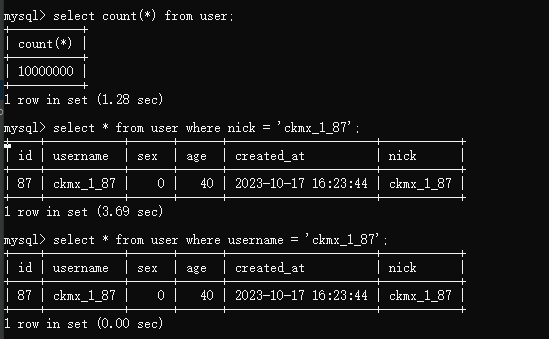
It can be seen that the difference between using index and not using index is still very big.
How to check if index hit
explain select * from users where id = 1;
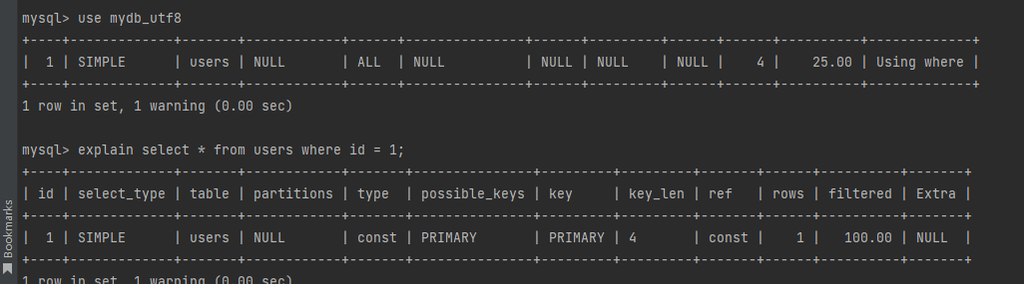
system > const > eq_ref > ref > fulltext > ref_or_null > index_merge > unique_subquery > index_subquery > range > index>all
type=const: only matches one row of data and is found through the index once. const is used to compare primary key or unique index.
eq_ref: unique index scan, for each index key, only one record in the table matches it. Common in primary key or unique index scans
type=ref: non-unique index scan, returns all rows that match a single value. It is essentially an index access, which returns all rows that match a single value. However, it may find multiple qualified rows, so it should be a mixture of search and scan.
type=range: Retrieve only a given range of rows, using an index to select rows. The key column shows which index is used. Generally, queries such as between, <、>, in, etc. appear in your where statement. This range scan index scan is better than a full table scan because it only needs to start from a certain point in the index and end at another point, without scanning the entire index.
type=index: Index appears when SQL uses an index but does not filter through the index. Generally, a covering index is used or the index is used for sorting and grouping.
type=all: Traverse the entire table to find matching rows
Index classification
- Ordinary index index
- Primary key index, a table has only one primary key index
- Unique index
- Foreign key index
- Union index
# 添加索引
alter table users add index index_users_name(name);
alter table users add index  index_users_nameAgeSex(name,age,sex);


# 删除索引
drop index index_users_nameAgeSex on users ;
Index failure
- Query without using index columns
- Data type mismatch
- Improper use of prefix index, for example, fuzzy matching starts with %
- Use functions or expressions to query
- The joint index violates the leftmost prefix principle
ALTER TABLE users ADD INDEX index_users_nameAgeSex(name,age,sex);

name                      √
name age                   √
name age pos           √
name pos              √
Just match the leftmost one
11 mysql view
- A view is a virtual table whose content is defined by a query.
- Like a real table, a view contains a series of named column and row data.
- Row and column data come from the table referenced by the custom view's query and are dynamically generated when the view is referenced.
- Simply put, a view is a table composed of select results.
Simply put, a view encapsulates a specific query statement
Advantages:
- Customize user data and focus on specific data
- Simplify data operations
- Improve data security
- Share required data
- Change data format
- Reuse SQL statements
View operations
# 创建一个视图
create view v_article as select title from article;

# 使用视图
select * from v_article;

# 修改视图
alter view v_article as select id, title from article;

# 删除视图
drop view if exists v_article;
Some commonly used view queries
You can write some connected tables or complex SQL statements into the view, such as when we talk about subqueries
# 查询超过男生平均年龄的男生
select * from users where sex = 1 and age > (select avg(age) from users where sex = 1 group by sex);

# 查询超过男生平均年龄的男生,并且把平均年龄显示出来
select name, age, u1.ag from (select avg(age) as ag from users where sex = 1 group by sex) u1, users where users.age > u1.ag;
create view v_avg_age as  select avg(age) as ag from users where sex = 1 group by sex;

# 查询超过男生平均年龄的男生
select * from users where sex = 1 and age > (select ag from v_avg_age);

# 查询超过男生平均年龄的男生,并且把平均年龄显示出来
select name, age, u1.ag from (select ag from v_avg_age) u1, users where users.age > u1.ag;