01 mysql安装保姆级
phpstudy安装mysql
推荐大家使用phpstudy快速搭建mysql环境
这样就可以在命令行里面使用mysql命令了
https://www.xp.cn/download.html
安装,进去界面之后开启mysql服务,即可
如果之前安装有mysql的,要把之前安装的卸载干净
然后就是配置环境变量
docker安装mysql服务
docker pull mysql:5.7

mkdir -p ./mysql/conf ./mysql/datadir

# 直接运行
docker run -itd --name mysql -p 3307:3306 -e  MYSQL_ROOT_PASSWORD=root  mysql:5.7

# 映射目录
docker run -itd --name mysql --restart=always -p 3307:3306 -v /opt/db/mysql/conf:/etc/mysql/conf.d -v /opt/db/mysql/datadir:/var/lib/mysql -e  MYSQL_ROOT_PASSWORD=root -e MYSQL_DATABASE=db mysql:5.7

# windows下的映射目录
创建一个名为db 的数据库,root密码是root,端口映射为本机的3307映射到容器的3306
-v是映射目录,主要是mysql的配置和数据,这样重启容器,数据还会保持
如果你已经有mysql服务了,那你换一个端口就行了
用docker的好处就是,版本可以随便换
02 mysql基本操作
基本命令操作
连接
// 连接本机的3306端口上的mysql服务
mysql -uroot -proot

// 连接本机的其他端口
mysql -uroot -proot -P 3307

// 连接其他主机的其他端口
mysql -uroot -proot -P 3307 -h 192.168.100.113
库操作
创建库
create database mydb;

// 设置编码与字符集
create database mydb default character set utf8 collate utf8_general_ci;
create database mydb   代表的是创建数据库 mydb

default character  set utf8   代表的是将该库的默认编码格式设置为utf8

collate  utf8_general_ci     代表的是数据库校对规则,utf8_bin将字符串中的每一个字符用二进制数据存储,区分大小写。utf8_genera_ci不区分大小写,ci为case insensitive的缩写,即大小写不敏感。utf8_general_cs区分大小写,cs为case sensitive的缩写,即大小写敏感
// 查看库
show databases;
// 进入库
use mydb;
// 查看库里面的表
show tables;
// 查看库的编码,有的编码写中文会报错,这个要注意
show create database mydb;
// 删除数据库
drop database mydb;
// 修改库的编码
alter database mydb character set utf8;
表操作
前提必须是进入到某个库里面
建表
create table user
(
    id         int(11) primary key auto_increment not null comment '序号',                        # 主键,自动增长
    username   varchar(50) unique                 not null comment '姓名',                        # 不能为空,不能重复
    sex        boolean   default true comment '性别 1 男 0 女',                                   # tinyint(1) 一位 默认值是1
    age        int(8)    default 18 comment '年龄,默认18',                                        # tinyint(1) 一位 默认值是1
    created_at timestamp default CURRENT_TIMESTAMP on update  CURRENT_TIMESTAMP comment '创建时间' # 创建时间,时间自动创建
);
字段约束
常见的字段约束
primary Key  # 记录的唯一标识,能够通过该标识确定唯一一条记录  一般用于记录id
default # 默认值
unique # 唯一约束
not null # 空值约束,不可以为空,不写就是可以为空
auto_increment # 自动增长
// 查看表结构
desc user;
// 删除表
drop table user;
// 删除表中全部数据
delete from user where true;
// 重置自增计数器
alter table user auto_increment = 1;
// 更改表名
rename table old_user to new_user;
// 新增字段
alter table user add column nick varchar(50) null;
// 删除字段
alter table user drop column nick;
# 新增索引
alter table user add index index_name (username);
# 查看索引   默认是有一个主键索引的
show index from user;
# 删除索引
alter table user drop index index_name;
数据操作
插入数据
# 完整的插入语句
insert into user(id, username, sex, created_at) value (
    2, 'zhangsan', 0, '2023-10-17 08:15:03'
    );

# 因为有些字段设置了默认值和可以为null或自增长
insert into user(username) value ('wangwu'); # 简单插入语句

# 批量插入
insert into user(username) values ('wangwu1'),
       ('lisi'),
       ('fengfeng');
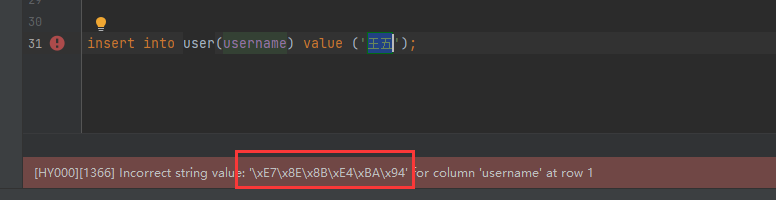
有的时候默认编码,插入中文会报错
查询
查询要后面专门讲查询,这里先掌握三个查询语句
# 查这张表的全部数据,字段全部显示
select * from user;
# 查这张表的全部数据,字段部分显示
select id,username from user;
# 条件查询,查询id为2的数据
select id,username from user where id = 2;
修改
修改的前提就是要找到数据
# 找到id为2的将 username修改为lisi123
update user set username = 'lisi123' where id = 2;

# 也可以修改多个字段
update user set username = 'lisi123', sex = 0 where id = 2;

# 也可以批量修改
update user set sex = 0 where id > 0;
# 将某个字段的值赋给其他字段
update user set username = user.nick where id = 1;
update user set  age = user.age + 1 where id=3;
删除
# 删除id为1的数据
delete from user where id = 1;
// 删除表中全部数据
delete from user where true;
// 重置自增计数器
alter table user auto_increment = 1;
03 mysql单表查询
mysql的查询可以单独拿出来讲,因为知识点太多太多了
select
MySQL 的 SELECT 语句用于从数据库表中检索数据。功能强大,语句结构复杂多样。不过基本的语句格式像下面这个样子。
不局限于查询数据表,例如可以直接输出
select '枫枫知道', now() as date;
一个完整的 SELECT 语句包含一些可选的子句。SELECT 语句定义如下
SELECT clause
[FROM clause]
[WHERE clause]
[GROUP BY clause]
[HAVING clause]
[ORDER BY clause]
[LIMIT clause]
不同子句的执行顺序
开始 > FROM子句 > WHERE子句 > GROUP BY子句 > HAVING子句 > SELECT子句 > ORDER BY子句 > LIMIT子句 > 最终结果
WHERE 子句
| 运算符 | 描述 |
|---|---|
| = | 等于 |
| != 或 <> | 不等于 |
| > | 大于 |
| < | 小于 |
| >= | 大于等于 |
| <= | 小于等于 |
| BETWEEN AND | 在某个范围内(闭区间) |
| LIKE | 搜索某种模式 |
| AND | 多个条件与 |
| OR | 多个条件或 |
造些数据,方便做查询用
delete from user
where true;

alter table user
    auto_increment = 1;

insert into user(username, age, sex)
values ('wangwu', 19, 0),
       ('lisi', 20, 1),
       ('zhangsan', 18, 0),
       ('fengfeng', 23, 1),
       ('fangfang', 18, 0),
       ('fengfengzhidao', 25, 1),
       ('feifei12138', 28, 0);
# 查询是女的
# 查询年龄范围在18-23之间的
# 查询是女的,年龄在18-23的
# 查询名称是feng开头的
# 查询年龄不是18的
# 查询年龄是18,或者名称是feng开头的
# 查询是女的
select * from user where sex = 0;
# 查询年龄范围在18-23之间的
select * from user where age >= 18 and age <= 23;
select * from user where age between 18 and 23;
select * from user where age in (18,19,20,21,22,23);
# 查询是女的,年龄在18-23的
select * from user where sex = 0 and (age between 18 and 23);
# 查询名称是feng开头的
select * from user where username like 'feng%';
# 查询年龄不是18的
select * from user where not age = 18;
select * from user where age <> 18;
select * from user where age != 18;
# 查询年龄是18,或者名称是feng开头的
select * from user where  age = 18 or username like 'feng%';
GROUP BY 子句
除分组字段,其他字段要被套在聚合函数里面
分组查询
# 分别统计男女生人数
select sex, count(id) from user group by sex;
# 统计各个年龄的个数,并且把用户名显示出来
select age, count(id), group_concat(username) from user group by age;
HAVING 子句
HAVING 和 WHERE 子句一样,用于指定选择条件。但 HAVING 和 WHERE 子句的用法上却有明显的区别。
WHERE 作用于表和视图,HAVING 作用于组。
WHERE 在分组和聚集计算之前选取输入行(因此,它控制哪些行进入聚集计算),而 HAVING 在分组和聚集之后选取分组
# 分别统计男女生人数,只显示人数大于3的数据
# select sex, count(id) as cnt from user where cnt > 18 group by sex;  # 无法做到
select sex, count(id) as cnt from user  group by sex having cnt > 3;
ORDER BY 子句
ORDER BY 子句用于根据指定的列对结果集进行排序。
默认是主键升序 ASC(ascend)
# 按照id降序
select * from user order by id desc;
# 先按照年龄升序,再按照id降序
select * from user order by age,id desc;
LIMIT 子句
LIMIT 子句可以被用于强制 SELECT 语句返回指定的记录数。
一般搭配offset,记录偏移
# 查全部
select * from user;
# 查前两个
select * from user limit 2;
select * from user limit 0, 2;
# 查两个,偏移两个
select * from user limit 2,2;
select * from user limit 2 offset 2;
分页查询
一页显示条数 size = 2
页数    offset         limit
1         0            size
2         2            size
3         4            size
n      (n-1) * size    size
DISTINCT 子句
去重
# 显示不重复的年龄段
select distinct age from user;

# 按照年龄分组,并且统计,不重名的个数
select age, count(distinct username) from user group by age;
UNION 子句
UNION 的作用是将两次或多次查询结果纵向合并起来。
可以直观感受一下
select 1, 2 union select 3, 4
注意,字段的个数要匹配
04 mysql常用函数
数学函数
# 进制转换
SELECT CONV('a',16,2);          -- 1010
SELECT CONV('6E',18,8);          -- 172
SELECT CONV(-17,10,-18);        -- -H
SELECT CONV(10+'10'+'10'+X'0a',10,10);  -- 40
# 绝对值
select ABS(-1);
select ABS(123);
# 向上取整
select ceil(1.1);
# 向下去整
select floor(1.9);
# 四舍五入
select round(1.3);
select round(1.6);
字符串函数
# 拼接字符串
select concat('枫枫', '知道');
# 拼接字符串,指定拼接符号
select concat_ws('-', '枫枫', '知道');
# 提取字符串
select substr('fengfeng', 1, 4); # feng
select substr('fengfeng', -4, 4); # feng 从后往前
# 按分隔符截取字符串前 N 个或者后 N 个子串
select substring_index('fengfengzhidao.com', '.', 1); # fengfengzhidao
select substring_index('fengfengzhidao.com', '.', -1); # com
select substring_index('fengfengzhidao.com', '.', 2); # fengfengzhidao.com
日期函数
# 返回当前时间
select now();
# 返回年月日的格式
select CURDATE();
# 返回时间格式
select CURTIME();
# 时间戳转日期
SELECT FROM_UNIXTIME(1697537006);
# 日期转时间戳
SELECT UNIX_TIMESTAMP('2023-10-17 10:03:26');
SET @dt = '2019-04-16 15:05:12.123456';
# 时间选取
select date(@dt) as 日期,
       TIME(@dt) as 时间,
       YEAR(@dt)  as 年,
       MONTH(@dt)  as 月,
       MONTHNAME(@dt)  as 全名月,
       DAY(@dt)  as 月份中的天,
       DAYNAME(@dt)  as 星期名字,
       DAYOFYEAR(@dt)  as 一年的天数,
       HOUR(@dt)  as 时,
       MINUTE(@dt)  as 分,
       SECOND(@dt)  as 秒,
       QUARTER(@dt)  as 季度,
       WEEK(@dt)  as 周数;
比较函数
select 1 in (1, 2);
select 1 in (2, 4);
select isnull(null);
select isnull(1);
# 算最小值
select least(1,2,3,4);
# 返回最大值
select greatest(1,2,3,4)
05 mysql一对多关系
表与表的关系,也是实体与实体之间的关系
例如如何记录学生和班级的关系呢
可以班级一张表,学生一张表
如何体现学生的归属关系呢
可以使用如下设计
班级表
| id | 班级名称 |
|---|---|
| 1 | 三年一班 |
| 2 | 三年二班 |
学生表
| id | name | class_id |
|---|---|---|
| 1 | fengfeng | 1 |
| 2 | lisi | 1 |
| 3 | wangwu | 2 |
表结构
create table class
(
    id   int(11)     NOT NULL AUTO_INCREMENT PRIMARY KEY,
    name varchar(16) not null
);
create table student
(
    id       int(11)     NOT NULL AUTO_INCREMENT PRIMARY KEY,
    name     varchar(16) not null,
    class_id int(11),
    FOREIGN KEY (class_id) REFERENCES class (id) # 设置外键约束
)
插入数据
insert into class(name)
values ('三年一班'),
       ('三年二班');
insert into student(name, class_id)
values ('wangwu', 1),
       ('lisi', 1),
       ('fengfeng', 2);
一对多查询
# 查询三年一班的学生列表
# 先找到三年一班的id,再通过id去查学生
select *
from student
where class_id = (select id from class where class.name = '三年一班');
# 通过连表查询,把这两张表合到一起
select *
from student
         left join class on class.id = student.class_id where class.name = '三年一班';
这里有两种查询模式,一种是子查询模式,一种是连表查询
关于FOREIGN KEY
外键不是必须的
例如下面的建表语句也是可以的
create table class
(
    id   int(11)     NOT NULL AUTO_INCREMENT PRIMARY KEY,
    name varchar(16) not null
);
create table student
(
    id       int(11)     NOT NULL AUTO_INCREMENT PRIMARY KEY,
    name     varchar(16) not null,
    class_id int(11)
)
那么,用外键有什么好处呢?
-
外键是数据库自身为了保证数据一致性
什么意思呢,比如用户1关联了班级1,那么就不能把班级1删除
-
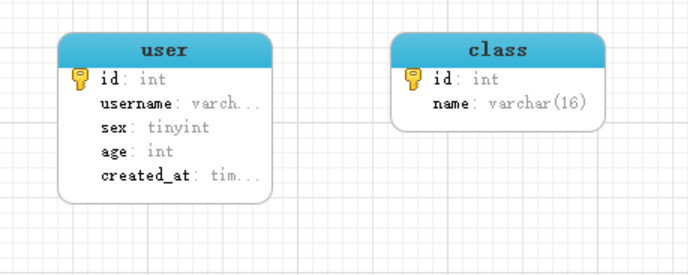
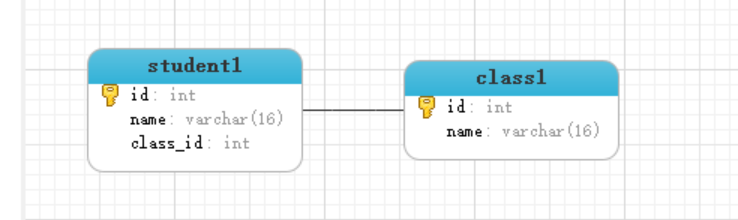
有主外键的数据库设计可以增加ER图的可读性,这点在数据库设计时非常重要
没有外键
有外键
关联删除规则
在定义外键时,我们可以设置关联删除规则。常见的关联删除规则有以下几种:
CASCADE:级联删除,当主表中的记录被删除时,从表中与之相关联的记录也会被删除SET NULL:设置为空,当主表中的记录被删除时,从表中与之相关联的记录中的外键列会被设置为 NULL- NO ACTION:不执行任何操作,当主表中的记录被删除时,会产生一个错误,从表中的记录不会受到影响
- RESTRICT:限制删除,当主表中的记录被删除时,如果从表中存在与之相关联的记录,删除操作会被拒绝
- SET DEFAULT:设置默认值,当主表中的记录被删除时,从表中与之相关联的记录中的外键列会被设置为默认值
create table class1
(
    id   int(11)     NOT NULL AUTO_INCREMENT PRIMARY KEY,
    name varchar(16) not null
);
create table student1
(
    id       int(11)     NOT NULL AUTO_INCREMENT PRIMARY KEY,
    name     varchar(16) not null,
    class_id int(11),
    FOREIGN KEY (class_id) REFERENCES class1 (id) on delete cascade # 设置外键约束
);
设置了外键的话,建表要先建没有外键关系的表,再建有外键关系的表
删除是反过来的,先删有外键关系的表,再删没有外键关系的表
事后添加外键关联
# 创建关联
alter table student add foreign key (class_id) references class(id) on delete set null ;
# 删除关联
alter table student drop foreign key student_ibfk_1;
06 mysql一对一关系
案例:用户与用户详情的关系
一对一的使用常见一般是
有一张常用字段的表,还有一张不怎么常用字段的表,例如
用户表
| id | 用户名 | 年龄 |
| 1 | 枫枫 | 23 |
| 2 | zhangsan | 18 |
用户详情表
| user_id | 地址 | 爱好 | 手机号 | 邮箱 |
| 1 | 湖南长沙 | 唱跳rap | 12542244 | 123@qq.com |
要实现,通过用户查用户详情,通过用户详情查用户
这样如何表示呢?
表结构定义
和定义一对多关系类似
但是一对多的外键只能在多的那张表上
比如学生和班级,学生是多的,班级是1,外键只能在学生表上
但是一对一的外键可以在不同位置
外键在用户表
create table user
(
    id           int(11)     NOT NULL AUTO_INCREMENT PRIMARY KEY,
    name         varchar(16) not null,
    age          int(16) default 18,
    user_info_id int(11)     null unique , # 要设置不能重复
    FOREIGN KEY (user_info_id) REFERENCES userinfo (user_id) on delete set null # 设置外键约束
);
create table userinfo
(
    user_id int(11)     NOT NULL PRIMARY KEY,
    `like`  varchar(16) null,
    `addr`  varchar(32),
    `tel`   varchar(11),
    `email` varchar(32)
);
外键在用户信息表
create table user
(
    id     int(11)     NOT NULL AUTO_INCREMENT PRIMARY KEY,
    name   varchar(16) not null,
    age    int(16) default 18
);
create table userinfo
(
    user_id int(11)     NOT NULL PRIMARY KEY,
    `like`  varchar(16) null,
    `addr`  varchar(32),
    `tel`   varchar(11),
    `email` varchar(32),
    FOREIGN KEY (user_id) REFERENCES user (id) on delete cascade # 设置外键约束
);
注意,两种情况下用的外键删除逻辑是不一样的
第一种情况
外键在用户表,删除用户信息,肯定不能把用户删掉,只能把用户关于这个外键的数据设置为null
第二种情况
外键在用户信息表,删除用户表,这个用户信息就没用了,可以级联删除
一般来说,一对一的外键是在常用表里面
数据写入
使用第一种情况
# 先把用户详情数据加入
insert into userinfo(user_id, `like`, addr, tel, email)value (1, '唱跳rap', '湖南长沙', '126545', '12324@qq.com');
# 用户关联用户详情
insert into user(`name`, age, user_info_id) value ('枫枫', 18, 1);
数据查询
# 查枫枫的爱好
select `like`from userinfo where user_id = (select id from user where name = '枫枫');

select name, `like` from user join userinfo  on user.id = userinfo.user_id  where name = '枫枫';
07 mysql多对多关系
多对多就是双向的一对多,即A表中的一行数据对应B表中的多行数据,相同的B表中的一行数据也对应A表中的多行数据。
例如文章和标签表
一篇文章有多个标签,一个标签可以关联多个文章
那么我们怎么记录这样的关系呢
文章表
| id | title |
| 1 | 零基础入门python开发 |
| 2 | 零基础入门golang开发 |
标签表
| id | title |
| 1 | python |
| 2 | golang |
假设,文章1的标签有1和2,我们如何表示呢?
我们很容易就能想到,通过第三张表去记录他们之间的关系
连接表
| 文章id | 标签id |
| 1 | 1 |
| 1 | 2 |
create table article
(
    id    int(11) primary key auto_increment,
    title varchar(16)
);
create table tag
(
    id    int(11) primary key auto_increment,
    title varchar(16)
);
create table article_tag
(
    article_id int(11),
    tag_id     int(11),
    PRIMARY KEY (article_id, tag_id),
    foreign key (article_id) references article (id),
    foreign key (tag_id) references tag (id)
)
查询
insert into article(title)value ('入门golang开发');
insert into tag(title)values('前端'),('后端');
insert into article_tag values (1, 1),(1,2);


# 查询入门golang开发的标签有哪些
select article.title, t.title from article left join article_tag a on article.id = a.article_id left join tag t on a.tag_id = t.id where article.title = '入门golang开发';

select title from tag where id in (select article_tag.tag_id from article_tag where article_id in (select article.id from article where article.title = '入门golang开发'));
08 mysql连表查询
重点讲解一下连表查询,这个也是面试重点
直接连,错误示范
select * from student,class;
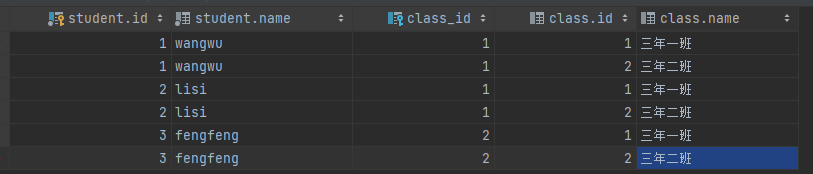
这种连接又被称为笛卡儿积,就是两两向交
后面要加上条件证明两表有相同的字段
select * from student,class where student.class_id = class.id;

有三种连接模式
- inner join
- left join
- right join
如果数据都能一一对应上的话,那么他们三个的输出结果没有任何区别
但是,数据有对不上的情况,那么他们三个就有区别了
例如
班级表
| id | 班级名称 |
|---|---|
| 1 | 三年一班 |
| 2 | 三年二班 |
| 3 | 三年三班 |
学生表
| id | name | class_id |
|---|---|---|
| 1 | wangwu | 1 |
| 2 | lisi | null |
| 3 | fengfeng | 2 |
| 4 | fang | 2 |
select * from student inner join class  on student.class_id = class.id;
select * from class inner join student  on student.class_id = class.id;

select * from student left join class  on student.class_id = class.id;
select * from class left join student on student.class_id = class.id;

select * from student right join class  on student.class_id = class.id;
select * from class right join student  on student.class_id = class.id;
第一种情况,内连接,通过学生连班级,就只有1 3 4的学生和班级记录
第二种情况,内连接,通过班级连学生,和第一种情况是一样的
第三种情况,左连接,通过学生连班级,学生信息是完整显示出来了,学生2对应的班级信息全是null
第四种情况,左连接,通过班级连学生,班级信息完整显示出来了,但是班级3对应的学生信息是null
第五种情况,右连接,通过学生连班级,以班级表为基表,班级信息是完整显示出来了,但是班级3对应的学生信息是null
第六种情况,右连接,通过班级连学生,以学生表为基表,学生信息完整显示出来了,但是学生2对应的班级信息是null
不同的连接关系
他们的区别是:
-
返回不同
inner join会返回两表中一样的行
left join会返回左表的所有记录,哪怕它没有匹配到右表
-
数量不同
inner join小于等于左表和右表的记录数量
left join:left join的数量以左表中的记录数量相同。
-
记录属性不同
inner join不足的记录属性会被直接舍弃
left join不足的记录属性用NULL填充
left和right就是基表不同,操作不同
09 mysql子查询
子查询是另一个语句中的 SELECT 语句。
子查询也称为内查询(Inner Query),必须位于括号之中。包含子查询的查询称为外查询(Outer Query)。子查询支持多层嵌套,也就是子查询可以包含其他子查询。
小试牛刀
# 查询是男生的数据
select * from user where sex = 1;
select * from user where id in (select id from user where sex = 1);
虽然这样写是脱裤子放屁,但是意思就是这么个意思
先在子查询里面查出数据,再带入上层进行查询
需要考虑子查询的结果集是单个还是多个
- 子查询在where里面
- 子查询在form
- 子查询在select里面
create table users
(
    id   int(11) primary key auto_increment,
    name varchar(8) not null,
    age  int(4),
    sex bool default 0
);

# 查询超过男生平均年龄的男生
# 查询超过男生平均年龄的男生,并且把平均年龄显示出来
# 查询用户的年龄,平均年龄
# 查询用户的年龄,性别,对应性别的平均年龄
# 查询超过男生平均年龄的男生
select * from users where sex = 1 and age > (select avg(age) from users where sex = 1 group by sex);

# 查询超过男生平均年龄的男生,并且把平均年龄显示出来
select name, age, u1.ag from (select avg(age) as ag from users where sex = 1 group by sex) u1, users where users.age > u1.ag;

# 查询用户的年龄,平均年龄
select name, age, (select avg(age) from users)  as ag from users;

# 查询用户的年龄,性别,对应性别的平均年龄
select name, age, sex, (select avg(age) from users u2 where u1.sex = u2.sex)  as sex_ag from users u1;
10 mysql索引
一般的应用系统,读写比例在10:1左右,而且插入操作和一般的更新操作很少出现性能问题,在生产环境中,我们遇到最多的,也是最容易出问题的,还是一些复杂的查询操作,因此对查询语句的优化显然是重中之重。说起加速查询,就不得不提到索引了。
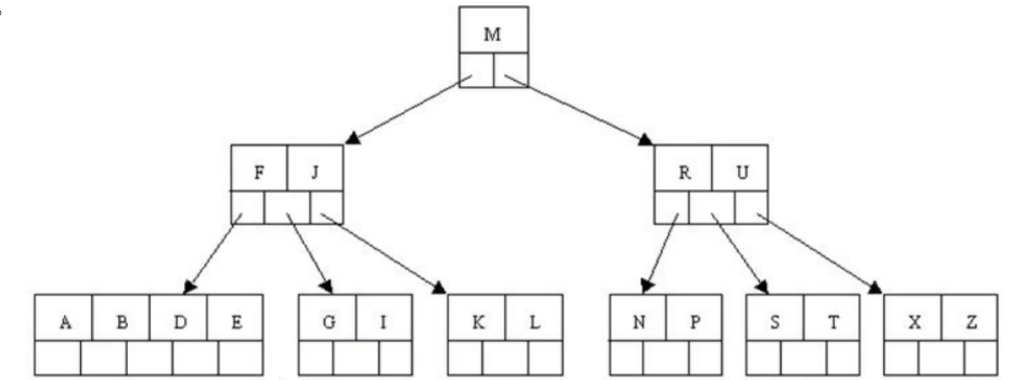
索引原理
索引的目的在于提高查询效率,与我们查阅图书所用的目录是一个道理:先定位到章,然后定位到该章下的一个小节,然后找到页数。相似的例子还有:查字典,查火车车次,飞机航班等
本质都是:通过不断地缩小想要获取数据的范围来筛选出最终想要的结果,同时把随机的事件变成顺序的事件,也就是说,有了这种索引机制,我们可以总是用同一种查找方式来锁定数据。
缺点:影响增删改的速度
哪些适合建索引
- 唯一性强的字段需要建立索引,例如手机号,用户名
- 不要对重复列表添加索引,例如性别
主键默认增加索引
小试牛刀
这里通过程序给表插入了一千万的数据,对比查索引字段和普通字段的区别
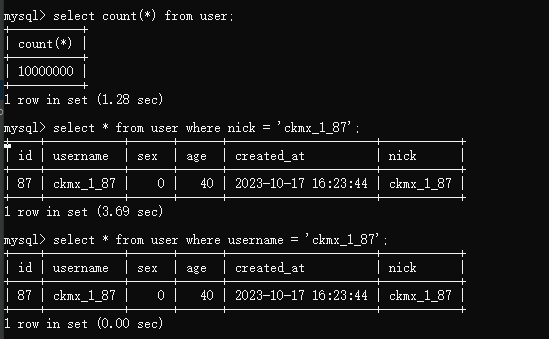
可以看到,用了索引和没用索引的差别还是很大的
如何查看是否命中了索引
explain select * from users where id = 1;
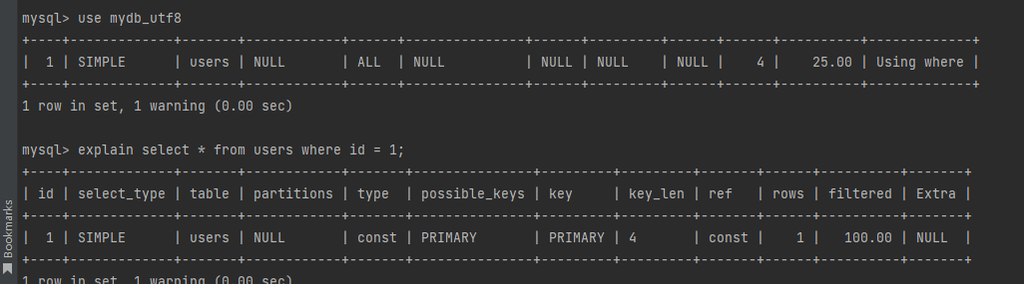
system > const > eq_ref > ref > fulltext > ref_or_null > index_merge > unique_subquery > index_subquery > range > index>all
type=const:只匹配一行数据,通过索引一次就找到了,const 用于比较 primary key 或者 unique 索引。
eq_ref:唯一性索引扫描,对于每个索引键,表中只有一条记录与之匹配。常见于主键或唯一索引扫描
type=ref:非唯一性索引扫描,返回匹配某个单独值的所有行.本质上也是一种索引访问,它返回所有匹配某个单独值的行, 然而,它可能会找到多个符合条件的行,所以他应该属于查找和扫描的混合体。
type=range:只检索给定范围的行,使用一个索引来选择行。key 列显示使用了哪个索引一般就是在你的 where 语句中出现 了 between、<、>、in 等的查询这种范围扫描索引扫描比全表扫描要好,因为它只需要开始于索引的某一点,而 结束语另一点,不用扫描全部索引
type=index:出现index是sql使用了索引但是没用通过索引进行过滤,一般是使用了覆盖索引或者是利用索引进行了排序分组。
type=all:遍历全表以找到匹配的行
索引分类
- 普通索引 index
- 主键索引,一张表只有一个主键索引
- 唯一索引
- 外键索引
- 联合索引
# 添加索引
alter table users add index index_users_name(name);
alter table users add index  index_users_nameAgeSex(name,age,sex);


# 删除索引
drop index index_users_nameAgeSex on users ;
索引失效
- 不使用索引列进行查询
- 数据类型不匹配
- 前缀索引的使用不当,例如模糊匹配以%开头
- 使用函数或表达式进行查询
- 联合索引违反了最左前缀原则
ALTER TABLE users ADD INDEX index_users_nameAgeSex(name,age,sex);

name                      √
name age                   √
name age pos           √
name pos              √
最左边匹配上就行
11 mysql视图
- 视图是一个虚拟表,其内容由查询定义。
- 同真实的表一样,视图包含系列带有名称的列和行数据。
- 行和列数据来自定义视图的查询所引用的表,并且在引用视图时动态生成。
- 简单的来说视图是由select结果组成的表。
简单的说,视图就是封装了特定的查询语句
优点:
- 定制用户数据,聚焦特定的数据
- 简化数据操作
- 提高数据的安全性
- 共享所需数据
- 更改数据格式
- 重用SQL语句
视图操作
# 创建一个视图
create view v_article as select title from article;

# 使用视图
select * from v_article;

# 修改视图
alter view v_article as select id, title from article;

# 删除视图
drop view if exists v_article;
一些常用的视图查询
可以将一些连表的或者复杂的sql语句,写到视图里面,例如我们讲子查询的时候
# 查询超过男生平均年龄的男生
select * from users where sex = 1 and age > (select avg(age) from users where sex = 1 group by sex);

# 查询超过男生平均年龄的男生,并且把平均年龄显示出来
select name, age, u1.ag from (select avg(age) as ag from users where sex = 1 group by sex) u1, users where users.age > u1.ag;
create view v_avg_age as  select avg(age) as ag from users where sex = 1 group by sex;

# 查询超过男生平均年龄的男生
select * from users where sex = 1 and age > (select ag from v_avg_age);

# 查询超过男生平均年龄的男生,并且把平均年龄显示出来
select name, age, u1.ag from (select ag from v_avg_age) u1, users where users.age > u1.ag;